

A well-designed AWS multi-account strategy is the single most effective architectural decision you can make before your cloud environment gets complicated enough to fight back. The core idea is straightforward: use separate AWS accounts as hard isolation boundaries for identity, resources, billing, and security, rather than trying to manage everything inside one account with increasingly complex IAM policies. AWS itself describes this as a foundational architectural pattern that replaces the compounding risks of a single-account setup as workloads scale.
The practical benefits are concrete. Multiple accounts distribute API request-rate limits and service quotas across environments, align billing boundaries with specific business units or product lifecycles, and create security perimeters that IAM alone cannot replicate. Three AWS services sit at the center of any serious implementation:
- AWS Organizations manages the account hierarchy and applies governance policies across the entire environment.
- AWS Control Tower automates account provisioning and enforces preventative and detective guardrails.
- Service Control Policies (SCPs) define the maximum permissions available to accounts and organizational units (OUs).
Key reasons to adopt a multi-account approach:
- Security boundaries that are enforced at the account level, not just by policy
- Billing separation that maps costs directly to teams, products, or environments
- Operational isolation that limits the blast radius of misconfigurations
- Independent service quota pools per account, preventing one workload from starving another
- Cleaner compliance scoping, since regulated workloads live in dedicated accounts
How to design your AWS multi-account environment
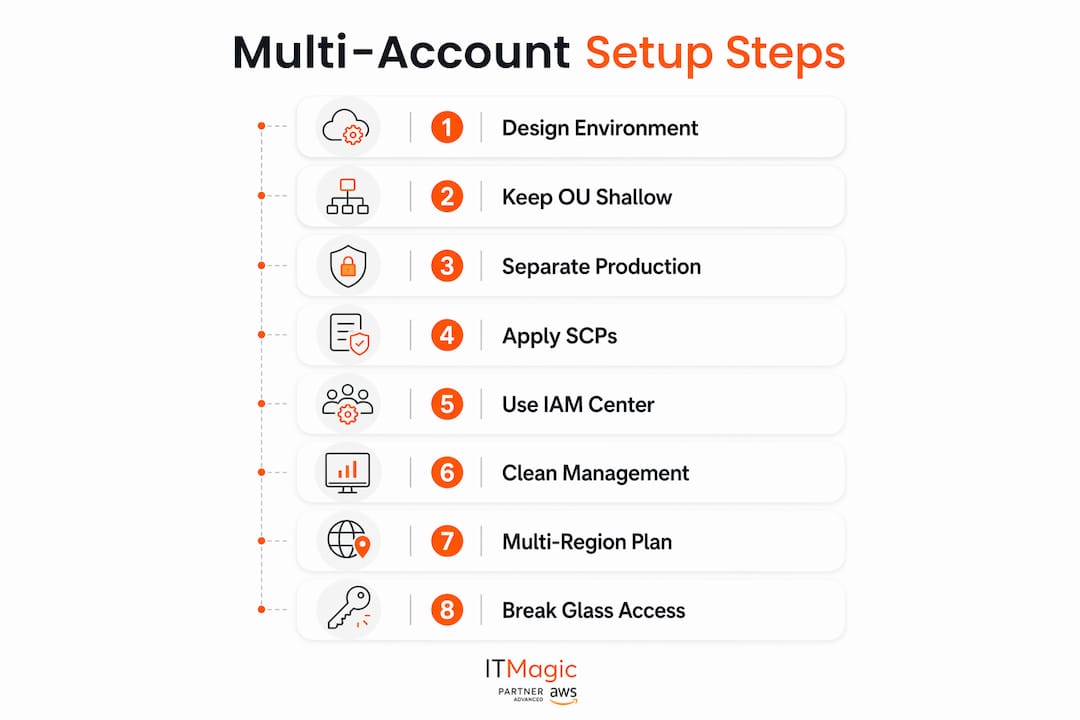
The most common mistake architects make is organizing accounts to mirror the company org chart. Finance gets a finance account, engineering gets an engineering account, and six months later you have a governance mess that breaks every time someone changes teams. AWS recommends organizing accounts and OUs based on function, compliance requirements, or a common set of controls, not reporting structure. That distinction matters in practice because controls need to survive reorgs.
Keep your OU hierarchy shallow
AWS Organizations supports up to five levels of OU nesting, but deep hierarchies create configuration drift and make it hard to reason about which SCPs apply where. The practical ceiling is three levels. A typical structure looks like: Root → Security OU → Workloads OU → Prod OU / NonProd OU. That covers most enterprise needs without becoming a maze.
Separate production from everything else
Production and non-production workloads belong in different accounts, full stop. When they share an account, a misconfigured IAM policy in a dev environment can touch production data. Separate accounts make that impossible by default, since no access exists between accounts unless you explicitly allow it.
Apply SCPs at the OU level, not the account level
Applying SCPs to OUs rather than individual accounts is how you scale governance without scaling headcount. When a new account joins an OU, it inherits the controls automatically. Managing SCPs per account is the kind of manual work that breaks down the moment you have more than a dozen accounts.
Use federated access through AWS IAM Identity Center
AWS IAM Identity Center lets your engineers use their existing corporate credentials to access authorized accounts, without creating individual IAM users in each account. That keeps personally identifiable information out of IAM and eliminates the credential sprawl that plagues single-account environments.
Keep the management account clean
SCPs do not apply to the management account. That means any workload running there operates outside your normal guardrails. Reserve the management account for billing and orchestration only, and use delegated administration to push security service management into a dedicated security tooling account.
Plan for multiple regions from the start
If your workloads span AWS regions, design your logging and identity federation strategy before you deploy. A log archive bucket in one region with cross-region logging from other accounts is a workable pattern. AWS KMS keys are region-bound, so factor in latency if your encryption strategy crosses regional lines.
Build break glass access into your design
Break glass access gives authorized personnel emergency entry to accounts they do not normally access. The management account handles this through IAM users with tightly scoped trust policies. Keep at least two such users to avoid lockout, document the process, and audit its use through AWS CloudTrail.
Best practices for running a multi-account AWS environment
Running this on your own AWS setup? IT-Magic is an AWS Advanced Tier Partner — we audit, fix, or fully manage it for you.
Get a free consultationDesigning the structure is one thing. Operating it at scale is where most teams run into friction.
Automate account provisioning with AWS Control Tower
AWS Control Tower automates account setup and applies guardrails consistently across your organization. Without automation, every new account is a manual checklist that someone will eventually skip. Control Tower creates a landing zone with shared accounts for logging, auditing, and management, and it provisions new accounts against your baseline configuration automatically.
Pro Tip: Use a consistent email naming convention for root user addresses when provisioning accounts. A predictable pattern like [email protected] makes root account recovery manageable and prevents the chaos of lost root credentials on accounts nobody remembers creating.
Centralize logging and monitoring
AWS CloudTrail, AWS Config, and AWS Security Hub all support organization-wide integration through AWS Organizations. Configure a central log archive account as the aggregation point for audit logs from every member account. Prevent member accounts from disabling logging by applying an SCP that denies the relevant CloudTrail actions.

Enforce MFA everywhere
MFA applies to root users and all IAM users regardless of privilege level. In a multi-account environment, this means enforcing MFA through SCPs that deny API calls when MFA is not present. Hardware MFA tokens for root accounts add another layer that software-based authenticators cannot match.
Manage costs at the account level
Account-level cost separation is one of the clearest wins from a multi-account setup. AWS Cost Explorer and cost and usage reports surface spending by account, which maps directly to teams or products when your account structure is clean. Tag everything consistently, since tags on resources, OUs, and accounts give you granular cost attribution without requiring separate accounts for every cost center.
Share resources carefully
Cross-account resource sharing through AWS Resource Access Manager requires explicit permission grants. That explicitness is a feature. When a resource is shared, you know exactly which accounts can access it and under what conditions. Never assume a resource is isolated unless you have verified that no sharing policies exist.
Handle security incidents across accounts centrally
Amazon GuardDuty, AWS Security Hub, and Amazon Macie all support delegated administration, meaning you manage them from a single security tooling account rather than logging into each member account separately. When an incident occurs, your response team works from one console with visibility across the entire organization. For cloud security best practices that apply across account boundaries, the delegated model is the only one that scales.
Stages of adopting a multi-account AWS environment
The transition from a single account to a multi-account architecture typically follows three recognizable stages. Knowing which stage you are in shapes which decisions to prioritize.
- Experimentation stage: One or a few accounts, used to learn AWS services and run initial workloads. Security controls are minimal, costs are low, and the priority is speed of learning. You do not need a full multi-account structure here, but you should avoid building dependencies that will be painful to untangle later.
- Foundation stage: This is where the real work happens. You establish AWS Organizations, deploy a Control Tower landing zone, define your OU structure, and set up centralized logging and identity federation. Core compliance checks, MFA enforcement, and baseline SCPs go in at this stage. The goal is a repeatable, automated account provisioning process before workload volume makes manual management untenable.
- Expansion stage: Accounts multiply as new teams, products, and compliance requirements arrive. Automation from the foundation stage pays off here. New accounts provision against your baseline in minutes rather than days. Cost management becomes more granular, and you start delegating security service administration to specialized teams.
The transition from experimentation to foundation is the most disruptive. Waiting until a single account hits its limits before making the move tends to cause downtime and rushed decisions. The better trigger is product-market fit and the first dedicated infrastructure or security hire, not a quota alarm.
Expert insights from IT-Magic, an AWS Advanced Tier Services Partner
IT-Magic has been designing and operating AWS environments since 2010, with more than 700 projects delivered across 300+ clients in fintech, retail, and enterprise sectors. As an AWS Advanced Tier Services Partner, the team works exclusively on infrastructure, automation, compliance, and operations, which means multi-account architecture is not a side capability. It is the core of what they do.
The most common pitfall IT-Magic sees in client environments is SCPs applied at the account level rather than the OU level. It works fine at five accounts. At fifty, it becomes unmanageable, and the inconsistencies create compliance gaps that auditors find immediately.
Pro Tip: When designing your Control Tower landing zone, delegate administration of GuardDuty, Security Hub, and AWS Config to a dedicated security tooling account from day one. Retrofitting delegated administration into an existing environment is significantly more complex than building it in at the start.
IT-Magic’s work with enterprise clients demonstrates the cost impact of clean account structures. When billing boundaries align with product teams, engineering leads can see their own AWS spend in real time, which changes spending behavior faster than any cost optimization campaign.
| Area | Common problem | IT-Magic approach |
|---|---|---|
| Account provisioning | Manual, inconsistent baselines | Control Tower automation with custom guardrails |
| SCP management | Applied per account, hard to audit | Applied at OU level, version-controlled |
| Security visibility | Fragmented across accounts | Centralized via delegated Security Hub |
| Cost attribution | Shared accounts obscure spend | Account-per-workload with consistent tagging |
| Compliance | Reactive, per-audit effort | Continuous AWS Config rules across all accounts |
For organizations navigating PCI DSS, SOC 2, or HIPAA requirements, IT-Magic’s certified experts use AWS Config rules and SCPs to maintain continuous compliance posture across every account in the organization. The AWS compliance checklist IT-Magic publishes covers the specific controls that map to each framework, which is a useful starting point before engaging a partner.
How IT-Magic helps you build a production-ready multi-account environment
Running 700+ AWS projects since 2010 gives IT-Magic a pattern library that most internal teams build over years of painful trial and error. For cloud architects and DevOps teams who need a multi-account environment that is secure, auditable, and ready for enterprise-scale compliance, IT-Magic delivers the full stack: account structure design, Control Tower deployment, SCP authoring, centralized logging, and ongoing governance.

The difference between a well-run multi-account environment and a sprawling one usually comes down to whether governance was designed in or bolted on. IT-Magic builds it in from the first account. Clients in fintech and retail have used this approach to reduce their AWS security audit preparation time and gain real-time cost visibility by product line, as demonstrated in the INTERTOP cost reduction case study. If your organization is at the foundation stage or preparing for enterprise-wide expansion, reach out to IT-Magic for an architecture review and a clear path forward.
FAQ
What is an AWS multi-account strategy?
An AWS multi-account strategy uses separate AWS accounts as isolation boundaries for identity, resources, billing, and security. It replaces the risks of managing all workloads in a single account as environments grow.
Why should you use multiple AWS accounts instead of one?
Multiple accounts provide hard security boundaries that IAM policies alone cannot enforce, distribute service quotas across workloads, and align billing directly with teams or products. A single account with complex IAM configurations is both harder to audit and easier to misconfigure.
How do you manage multiple AWS accounts efficiently?
AWS Organizations combined with AWS Control Tower handles hierarchy, governance, and automated account provisioning. Centralize logging in a dedicated log archive account and use AWS IAM Identity Center for federated access across all accounts.
When should you transition from a single account to multiple accounts?
The right time is before you hit service quota limits, not after. For startups, the trigger is typically the first dedicated infrastructure or security hire and the beginning of distinct production workloads, not a capacity alarm.
How does IT-Magic support multi-account AWS environments?
IT-Magic designs and deploys full multi-account environments as an AWS Advanced Tier Services Partner, covering Control Tower setup, SCP authoring, centralized security, and compliance automation for PCI DSS, SOC 2, and HIPAA requirements.
Key takeaways
A well-structured AWS multi-account environment uses account-level isolation, OU-based governance, and automated provisioning to maintain security and cost control as workloads scale.
| Point | Details |
|---|---|
| Account isolation is a hard boundary | Separate accounts enforce security and billing limits that IAM policies inside a single account cannot replicate. |
| Keep OU hierarchies shallow | AWS Organizations supports five OU levels, but staying at three or fewer prevents configuration drift and governance gaps. |
| Apply SCPs at the OU level | Attaching SCPs to OUs rather than individual accounts scales governance automatically as new accounts join. |
| Automate provisioning from day one | AWS Control Tower with consistent email naming conventions and baseline guardrails prevents manual errors at scale. |
| IT-Magic builds governance in from the start | Building on AWS since 2010 as an AWS Advanced Tier Services Partner, IT-Magic designs multi-account environments with compliance, cost visibility, and security built into the foundation. |
Alexander founded IT-Magic, an AWS Advanced Tier Services Partner delivering DevOps, cloud architecture, and managed services since 2010. He holds:
- AWS Certified Solutions Architect – Professional
- AWS Certified DevOps Engineer – Professional
- AWS Certified Security – Specialty
- AWS Certified Advanced Networking – Specialty
Talk to a certified AWS team trusted by INTERTOP, Foxtrot, Pandora, and J.Hilburn.
Get a free consultation


