

TL;DR:
- Cloud provides the infrastructure for AI workloads, which rely on compute, storage, and networking. Inference costs often constitute 80 to 90 percent of an AI project’s total lifecycle expenses as usage scales.
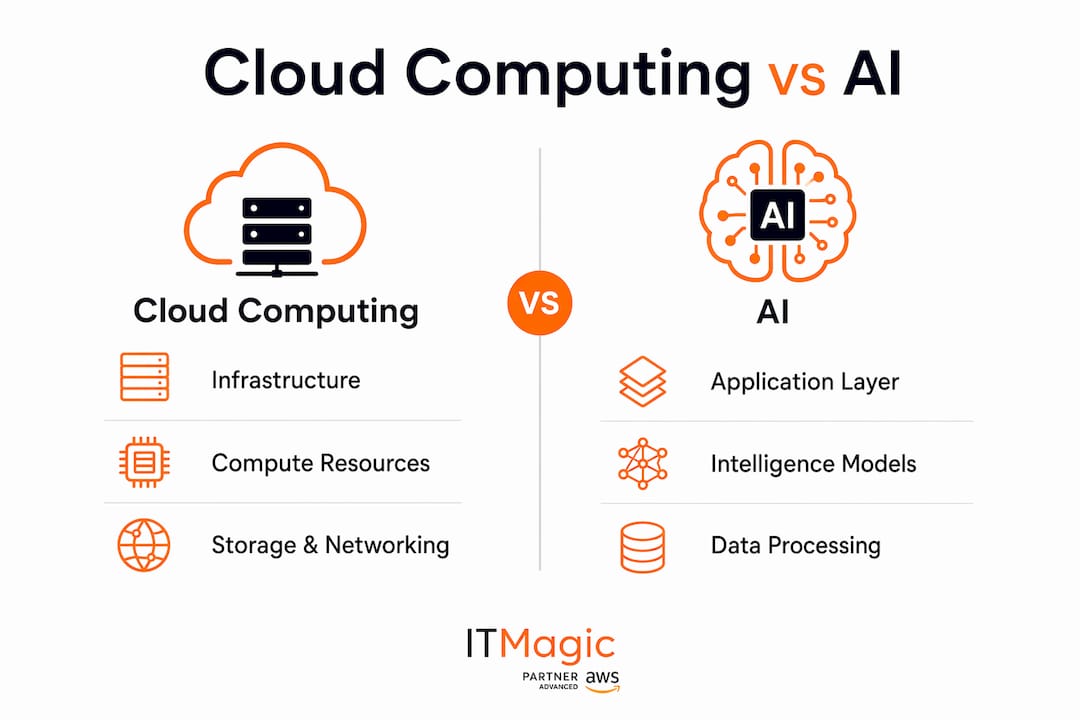
Cloud computing and AI are complementary, not competing. Cloud is the infrastructure layer — servers, storage, networking, and managed platform services. AI is the intelligence layer that runs on top of it. You cannot train a large model or serve inference at scale without the compute, elasticity, and data pipelines that cloud provides. AWS, with services like Amazon SageMaker, EC2 GPU instances, and AWS Trainium, is where most U.S. enterprises build that foundation today.
Oracle’s research confirms cloud providers now use AI internally to automate provisioning and failure detection, while Akamai’s 2025 analysis shows Edge AI is maturing fast, pushing inference closer to users. The practical question for your team is not “cloud or AI” but “how do we run AI workloads responsibly and cost-efficiently on cloud?” Start with an infrastructure readiness assessment from an AWS partner before you commit to architecture or spend.
Table of Contents
- What do cloud computing and AI actually mean for your stack?
- Why cloud and AI are complementary, not competing
- How do training, inference, and batch analytics differ as workloads?
- What infrastructure components does AI on cloud actually require?
- How does running AI change your DevOps and team structure?
- Where do AI costs concentrate, and how do you control them?
- What security and compliance controls does AI on cloud require?
- Cloud-only, edge, or hybrid: how do you choose?
- What to prepare before engaging an AWS infrastructure partner
- Key Takeaways
- The case for infrastructure-first AI
- IT-Magic: AWS infrastructure for production AI workloads
- FAQ
- Useful sources
What do cloud computing and AI actually mean for your stack?
Running this on your own AWS setup? IT-Magic is an AWS Advanced Tier Partner — we audit, fix, or fully manage it for you.
Get a free consultationCloud computing delivers on-demand servers, storage, networking, and managed platform services over the internet. AI delivers models, data pipelines, training runs, and inference endpoints that rely on those resources to function at scale. The foundational relationship is straightforward: cloud is the substrate; AI is the workload.
On AWS, that maps to concrete services:
- Compute: EC2 P4 and G5 GPU instance families for training and inference; AWS Trainium for cost-efficient training; AWS Inferentia for high-throughput, low-cost inference
- Managed ML platform: Amazon SageMaker for end-to-end model lifecycle (training jobs, model registry, endpoints)
- Orchestration: Amazon EKS (Kubernetes) for containerized model serving and batch workloads
- Competing clouds: Azure AI and Google Cloud AI offer comparable managed ML platforms, though AWS leads in breadth of accelerator options and managed service depth for enterprise workloads
Ownership splits cleanly: cloud and DevOps engineers manage infrastructure and platform; ML engineers own model lifecycle, feature stores, and data pipelines.
Why cloud and AI are complementary, not competing
Cloud enables AI at scale by providing managed models and APIs that teams can call without building from scratch. NLP, computer vision, and recommendation engines are all accessible via SDK today. That lowers the barrier to entry but does not eliminate the need for solid infrastructure underneath.
“AI increases, rather than decreases, demand for cloud engineering skills — because production AI systems need robust platform engineering, identity controls, and network and security architectures to operate reliably.” — Neal Davis, April 2026
Think of the stack in two layers. The cloud layer handles infrastructure and services: compute, storage, networking, identity, and managed platforms. The AI layer sits on top: data ingestion, feature engineering, training, and inference. Where responsibility changes is at the API boundary between platform and ML teams. Cloud engineers keep the platform healthy; ML engineers keep the models healthy. Both jobs are growing.
How do training, inference, and batch analytics differ as workloads?

Treat them as separate workload classes. Each has a distinct compute, storage, and cost profile.
| Workload | Primary use case | Compute profile | Storage needs | Latency sensitivity | Cost profile | Operational complexity |
|---|---|---|---|---|---|---|
| Training | Model development | High GPU burst (P4/G5, Trainium) | Large datasets, S3 + EFS | Low | High but episodic | Medium (SageMaker training jobs) |
| Inference | Real-time prediction | Steady GPU or Inferentia | Model artifacts, low volume | High (<100 ms) | Continuous, scales with QPS | High (SageMaker endpoints, EKS) |
| Batch analytics | Offline scoring, reporting | CPU or moderate GPU | Data lakes, S3 | None | Low, predictable | Low (managed batch, S3 + Glue) |
Training costs are large but episodic. Inference is continuous and grows with usage, which is why it tends to dominate lifecycle costs. Batch analytics is the most forgiving workload and the easiest to right-size.
What infrastructure components does AI on cloud actually require?
Planning AI infrastructure means scoping seven component categories, each with real operational consequences:
- GPU/accelerator selection: P4 and G5 instances for general training and inference; Trainium for cost-optimized training at scale; Inferentia for high-volume, latency-sensitive inference. On-premises GPU racks require specialized power, cooling, and procurement lead times measured in months.
- Instance types and autoscaling: Use Auto Scaling groups or Karpenter on EKS to match capacity to demand. Over-provisioning GPUs is the fastest way to blow a budget.
- Storage strategy: S3 for training datasets and model artifacts with lifecycle policies to move cold data to Glacier; EBS or EFS for hot working storage during training runs.
- High-throughput networking: Enhanced networking (ENA) and placement groups reduce inter-node latency for distributed training. Data egress costs are a hidden line item — architect to minimize cross-region transfers.
- Data pipelines: ETL with AWS Glue or streaming with Kinesis feeds training and inference. Garbage-in-garbage-out applies at every layer.
- Container orchestration: Amazon EKS manages containerized model serving, canary deployments, and horizontal pod autoscaling for inference fleets.
- Model registry: SageMaker Model Registry tracks versions, approval status, and deployment history. Without it, reproducing a production model becomes a fire drill.
Pro Tip: Use spot instances for training jobs — they can cut GPU compute costs by 60–70% for fault-tolerant workloads. For inference, mixed-precision (FP16/BF16) and model quantization reduce memory footprint and let you serve more requests per accelerator.
Generative AI is also accelerating cloud migrations, with early efforts showing meaningful reductions in remediation time and investment. Factor that into your migration timeline estimates.
How does running AI change your DevOps and team structure?
Running AI in production adds MLOps on top of DevOps. The additional operational surface includes model versioning, reproducible training pipelines, data validation, drift detection, and model rollback. AI cloud services lower the entry barrier, but organizations still need cloud and data engineering skills to implement them safely.
Concretely, your team needs CI/CD pipelines for models (not just code), feature stores to prevent training-serving skew, observability that covers both infrastructure metrics and model explainability, and incident response playbooks for model failures. FinOps for AI is its own discipline: GPU spend can spike 10x overnight if autoscaling policies are misconfigured.
IT-Magic’s infrastructure automation and 24/7 managed support covers the platform layer, keeping production inference endpoints healthy so your ML engineers can focus on models rather than on-call rotations.
Where do AI costs concentrate, and how do you control them?
GPU compute and inference dominate. Inference can consume the majority of a project’s total lifecycle cost because training is episodic while inference runs continuously at scale.
Inference often accounts for 80–90% of an AI project’s total lifecycle cost — not training. Budget accordingly before you commit to an architecture.
Practical levers to pull:
- Spot/interruptible instances for training: significant savings for fault-tolerant jobs
- Batching and response caching for inference: reduces per-request GPU time
- Model quantization and distillation: smaller models, lower memory, faster throughput
- Autoscaling policies: scale inference fleets to zero during off-peak hours
- Multi-tier storage lifecycle: move training data to Glacier after use
- Inferentia/Trainium: purpose-built accelerators cost less per inference token than general GPU instances
Pro Tip: For low-traffic inference endpoints, serverless containers (AWS Lambda with container images or SageMaker Serverless Inference) eliminate idle GPU costs entirely. Right-size before you scale.
For AI-driven ecommerce workloads, chatbot inference patterns and recommendation engines are among the highest-volume, cost-sensitive use cases — worth modeling separately in your budget.
What security and compliance controls does AI on cloud require?
AI workloads inherit all cloud security responsibilities and add data governance and model governance on top. Treat training data, model weights, and inference endpoints as sensitive assets.
Controls checklist for U.S. enterprise environments (PCI DSS, SOC2, HIPAA):
- Strong IAM with least-privilege roles for training jobs, endpoints, and data pipelines
- VPC segmentation isolating training and inference environments
- Encryption at rest (S3 SSE-KMS, EBS encryption) and in transit (TLS 1.2+)
- AWS KMS or CloudHSM for key management
- Model access controls and endpoint authentication
- CloudTrail logging for all API calls; GuardDuty for threat detection
- Monitoring for data drift and model integrity degradation
- Privacy-preserving techniques (tokenization, differential privacy) where PHI or PCI data is involved
IT-Magic has delivered compliance-ready AWS environments across PCI DSS, SOC2, and HIPAA for 300+ clients. Compliance architecture is scoped at the start of an engagement, not retrofitted.
Cloud-only, edge, or hybrid: how do you choose?
Choose topology by your dominant constraint.
Cloud-only (SageMaker + S3 + EKS): Best for large-scale training, model management, and workloads where latency above 100 ms is acceptable. Lowest operational complexity.
Edge AI (edge inference nodes + CDN + async cloud sync): Choose this when you need sub-50 ms latency, on-device data processing, or want to minimize data transmission to centralized data centers. Edge AI reduces inference latency and can improve security by keeping sensitive data on-device. Relevant for retail, manufacturing, and IoT use cases. See AI in retail deployments for concrete edge/hybrid examples.
Hybrid (on-prem GPU inference + cloud-trained models + centralized model registry): Best when strict data residency requirements, specialized hardware, or regulatory constraints prevent full cloud migration. Cloud trains and manages models; on-prem serves inference against local data.
AI in supply chain is a common hybrid use case: IoT sensor data stays on-prem for latency and compliance, while models are trained and updated in the cloud.
What to prepare before engaging an AWS infrastructure partner
Use this checklist in your RFP or discovery call to get realistic scoping and pricing.
- Data volume and growth rate — current GB/TB and projected 12-month growth
- Expected QPS for inference — peak and average queries per second
- Acceptable latency — p50/p99 targets for inference endpoints
- Compliance requirements — PCI DSS, SOC2, HIPAA, or other applicable frameworks
- Preferred accelerators — GPU families (P4/G5), Trainium, Inferentia, or no preference
- Disaster recovery RTO/RPO — acceptable downtime and data loss windows
- Monitoring and SLOs — existing observability stack and target uptime
- Budget constraints — monthly compute ceiling and FinOps maturity
Items that most affect pricing and timelines: GPU count and instance family, data egress volume, and migration complexity from legacy systems. Come with numbers on these three and your scoping call will be twice as productive.
Suggested next step: schedule a 2–4 hour infrastructure readiness assessment with an AWS infrastructure partner before committing to architecture or procurement.
Key Takeaways
Cloud and AI are complementary: cloud is the infrastructure layer and AI is the intelligence layer that runs on it, with inference typically consuming 80–90% of total lifecycle cost as usage scales.
| Point | Details |
|---|---|
| Cloud enables AI, not competes with it | Cloud provides the compute, storage, and networking AI models need to train and serve at scale. |
| Inference dominates lifecycle cost | Inference can consume 80–90% of a project’s total lifecycle cost as usage grows; budget and architect accordingly from day one. |
| MLOps extends DevOps significantly | Production AI adds model versioning, drift detection, and rollback on top of standard DevOps practices. |
| Topology choice follows your constraint | Latency drives edge; scale and cost drive cloud; data residency drives hybrid. |
| IT-Magic for AWS AI infrastructure | IT-Magic delivers infrastructure readiness assessments, GPU provisioning, EKS, FinOps, and compliance for AI workloads on AWS. |
The case for infrastructure-first AI
The most common mistake U.S. engineering teams make is treating AI as a software problem and cloud as a commodity backdrop. The infrastructure decisions made in the first 30 days of an AI initiative, including instance family selection, storage architecture, and IAM design, determine cost and reliability for the next two years.
Production AI systems need robust platform engineering, identity controls, and network and security architectures to operate reliably. That is not a nice-to-have; it is the reason AI projects fail in production even when the models themselves are excellent. The teams that ship AI reliably are the ones that treat infrastructure as a first-class concern, not an afterthought.
IT-Magic: AWS infrastructure for production AI workloads
IT-Magic is an AWS Advanced Tier Services Partner that has delivered 700+ projects for 300+ clients since 2010, focusing entirely on infrastructure, automation, and compliance. For engineering teams running AI workloads on AWS, that means a partner who handles GPU provisioning, EKS-based inference fleets, FinOps for AI spend, and compliance architecture (PCI DSS, SOC2, HIPAA) so your ML engineers can focus on models.

Services relevant to AI workloads: infrastructure readiness assessments, accelerator selection and provisioning, containerized inference on EKS, cost optimization and autoscaling, 24/7 managed support for production endpoints, and compliance-ready architecture. No software development, no scope creep. Pure infrastructure.
Book an infrastructure readiness assessment to scope your AI workload architecture before you commit to spend.
FAQ
Is cloud computing the same as AI?
No. Cloud computing is the infrastructure layer (servers, storage, networking); AI is the application layer that runs on top of it. They are complementary, not interchangeable.
Why does inference cost more than training over time?
Training is episodic; inference runs continuously at scale. Inference can consume 80–90% of a project’s total lifecycle cost as usage grows, making it the primary cost optimization target.
When should you use edge AI instead of cloud AI?
Choose Edge AI when you need sub-50 ms latency, on-device data processing, or need to minimize data sent to centralized data centers. Cloud remains the right choice for large-scale training and model management.
Does AI reduce the need for cloud engineers?
The opposite. AI increases demand for cloud engineers because production AI systems require robust platform engineering, identity management, and security architecture to operate reliably.
What compliance frameworks apply to AI workloads on AWS in the U.S.?
Depending on your industry: HIPAA for healthcare data, PCI DSS for payment data, and SOC2 for enterprise trust. IT-Magic has compliance experience across all three for AWS-hosted AI environments.
Useful sources
- Oracle: AI and cloud computing — evidence that cloud providers use AI internally to automate provisioning, scaling, and failure detection
- Akamai: AI and cloud computing, evolving landscape — 2025 analysis of Edge AI maturity and inference latency tradeoffs
- Neal Davis: AI vs cloud skills, 2026 — expert commentary on why AI increases demand for cloud engineering
- Practitioner analysis: inference lifecycle cost — inference cost concentration (80–90% of lifecycle spend)
- McKinsey: What is cloud computing? — gen AI impact on cloud migration timelines and costs
- Coursera: What are AI cloud services? — talent gap analysis: managed services lower barriers but engineering skills remain required
- Salesforce: What is cloud AI? — overview of managed AI APIs and on-demand model access
- AWS documentation: Amazon SageMaker, Amazon EKS, AWS Trainium and Inferentia — primary technical references for AWS AI infrastructure services
Recommended
- Best AI Cloud Platforms: A Comprehensive Guide | IT-Magic
- Azure AI vs AWS AI: A Comprehensive Comparison for AI Solutions | IT-Magic
- Edge Computing vs Cloud Computing: Key Differences, Benefits & Use Cases | IT-Magic
- AWS AI Infrastructure: A 2026 Guide for IT Teams
Alexander founded IT-Magic, an AWS Advanced Tier Services Partner delivering DevOps, cloud architecture, and managed services since 2010. He holds:
- AWS Certified Solutions Architect – Professional
- AWS Certified DevOps Engineer – Professional
- AWS Certified Security – Specialty
- AWS Certified Advanced Networking – Specialty
Talk to a certified AWS team trusted by INTERTOP, Foxtrot, Pandora, and J.Hilburn.
Get a free consultation


