

TL;DR:
- Kubernetes autoscaling on AWS involves automatic node and pod scaling to match workload demands. Karpenter is now recommended for node autoscaling because it provisions nodes faster and supports Spot interruptions, while HPA and KEDA handle pod scaling based on metrics and external events. Proper configuration of both layers prevents over-provisioning and scheduling failures, optimizing costs and performance.
Kubernetes autoscaling on AWS is defined as the automatic adjustment of compute nodes and pod replicas in response to real-time workload demand. On Amazon EKS, this involves two distinct layers: node-level scaling handled by Karpenter or Cluster Autoscaler, and pod-level scaling handled by the Horizontal Pod Autoscaler (HPA), Vertical Pod Autoscaler (VPA), or KEDA. Getting both layers right is what separates clusters that waste money at 3 AM from clusters that cost exactly what they should. This guide covers how each tool works, how to configure them, and how to avoid the mistakes that silently break autoscaling in production.
What are the core Kubernetes autoscaling components on AWS?
Kubernetes autoscaling operates at two independent layers. Each layer solves a different problem, and confusing them is the most common setup mistake.

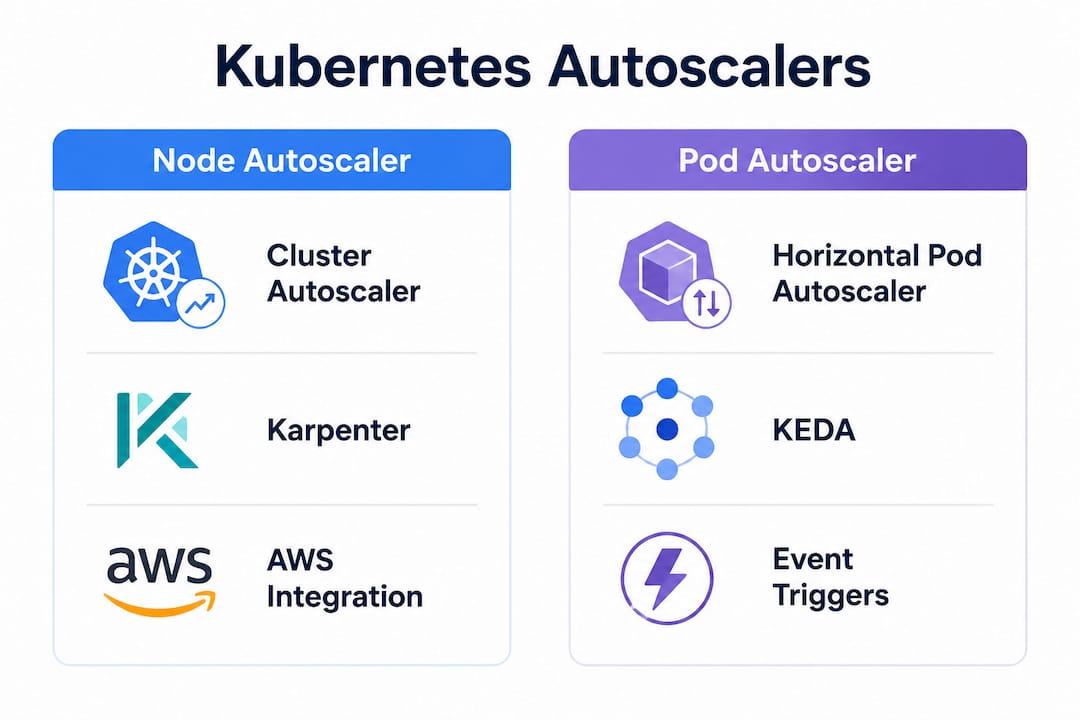
Node-level autoscaling adds or removes EC2 instances from your cluster. Two tools handle this on AWS EKS.
Cluster Autoscaler (CA) works by monitoring pending pods and triggering Auto Scaling Group (ASG) changes when no existing node can schedule them. It evaluates scale-down by checking node utilization, pod rescheduling feasibility, and cooldown periods. CA is mature and widely understood, but it is tightly coupled to ASG configurations, which slows provisioning.
Karpenter takes a different approach. It provisions nodes directly via the EC2 Fleet API, completing node provisioning in 30–60 seconds compared to 2–5 minutes for Cluster Autoscaler. That speed difference matters when traffic spikes hit fast. AWS now recommends Karpenter as the default node autoscaler for new EKS clusters because of its superior bin-packing, Spot diversification, and automated node consolidation.
Pod-level autoscaling adjusts the number of running pod replicas or their resource requests without touching nodes.
- HPA scales replicas based on CPU, memory, or custom metrics from the Kubernetes Metrics Server or Prometheus Adapter.
- VPA adjusts CPU and memory requests on existing pods, useful for rightsizing rather than scaling out.
- KEDA (Kubernetes Event-Driven Autoscaling) extends HPA with over 65 event sources including AWS SQS and Kafka, and adds scale-to-zero capability that native HPA cannot provide.
| Autoscaler | Scope | Scaling trigger | AWS integration |
|---|---|---|---|
| Cluster Autoscaler | Nodes | Pending pods, ASG limits | ASG tags, IAM policies |
| Karpenter | Nodes | Pending pods, EC2 Fleet API | NodePool CRDs, EC2NodeClass |
| HPA | Pod replicas | CPU, memory, custom metrics | Metrics Server, CloudWatch |
| KEDA | Pod replicas | Event sources, queues | SQS, Kinesis, DynamoDB |
| VPA | Pod resources | Historical usage | Works alongside HPA |
Node and pod autoscalers must work together. When HPA scales pods up, pending pods trigger node autoscaling. When pods scale down, nodes with low utilization become candidates for removal. Misaligning these two layers produces either over-provisioned clusters or scheduling failures.
How to set up Karpenter for node autoscaling on EKS
Running this on your own AWS setup? IT-Magic is an AWS Advanced Tier Partner — we audit, fix, or fully manage it for you.
Get a free consultationKarpenter installation on EKS requires Helm, an IAM role with EC2 and SQS permissions, and a correctly tagged VPC and subnets. The AWS documentation provides a reference CloudFormation stack for the IAM role, but the configuration you write afterward determines whether Karpenter actually saves money.
The two core Custom Resource Definitions (CRDs) are NodePool and EC2NodeClass. EC2NodeClass defines the AWS-specific properties: AMI family, subnet selectors, security group selectors, and instance profile. NodePool defines the scheduling constraints: instance families, capacity types (On-Demand or Spot), availability zones, and consolidation policy.
A minimal but production-ready NodePool looks like this:
- Set
spec.template.spec.requirementsto allow multiple instance families (for example,m5,m6i,m6a,c5,c6i). - Include both
on-demandandspotincapacity-typerequirements. - Set
consolidationPolicy: WhenUnderutilizedunderspec.disruptionto enable automatic node removal. - Define
expireAfterto recycle nodes on a schedule, which keeps AMIs current. - Tag all Karpenter-managed nodes with your cost allocation tags via
EC2NodeClass.spec.tags.
Karpenter handles Spot interruptions gracefully by draining nodes when it receives an EC2 interruption notice via an SQS queue. This requires creating an SQS queue and an EventBridge rule during setup. Skip this step and your Spot nodes will terminate without warning.
Pro Tip: Allowing broad instance families in your NodePool is one of the highest-leverage configuration choices you can make. Restricting to a single instance type, such as only m5.large, eliminates most Spot capacity pools and forces Karpenter into On-Demand fallback far more often than necessary.
For teams migrating to Kubernetes on AWS from self-managed clusters, Karpenter also removes the need to pre-define node groups for every workload shape, which alone reduces operational overhead significantly.
How do you implement HPA and KEDA for pod autoscaling?
HPA is the default pod autoscaler in Kubernetes and requires no additional installation beyond the Metrics Server. Configuring it correctly means setting minReplicas, maxReplicas, and a targetAverageUtilization that reflects your actual traffic patterns, not a default of 80% CPU copied from a tutorial.
A practical HPA setup for a web service on EKS:
- Deploy the Kubernetes Metrics Server via Helm to expose CPU and memory metrics.
- Create an
HorizontalPodAutoscalerresource targeting your deployment. - Set
targetCPUUtilizationPercentagebased on load testing results, not guesswork. - Add
behavior.scaleDown.stabilizationWindowSeconds(typically 300 seconds) to prevent rapid scale-down after brief traffic drops. - For custom metrics, deploy the Prometheus Adapter or the AWS CloudWatch Metrics Adapter and reference them in
spec.metrics.
KEDA extends this model for event-driven workloads. A background worker consuming from an SQS queue is the canonical use case. KEDA reads the queue depth and scales replicas from zero to your maximum when messages arrive, then back to zero when the queue empties. That scale-to-zero capability is not available in native HPA and can eliminate idle compute costs for batch workloads entirely.
Key practices for combining autoscalers:
- Never apply HPA and VPA to the same metric on the same deployment. Conflicting resource signals between HPA and VPA can create infinite scaling loops.
- Use VPA in recommendation mode first to gather data before enabling automatic updates.
- Use KEDA as the primary scaler for queue-driven workloads and HPA for request-driven services.
Pro Tip: KEDA installs its own HPA object under the hood. If you already have an HPA on the same deployment, delete it before deploying a KEDA ScaledObject to avoid two controllers fighting over replica counts.
For a broader view of how Kubernetes workload patterns map to autoscaling choices, the use cases vary significantly between stateless APIs, batch processors, and GPU inference workloads.
What are the most common Kubernetes autoscaling problems on AWS?
Most autoscaling failures fall into a small number of categories. Knowing them in advance saves hours of debugging.
Pods stuck in Pending state. The node autoscaler sees pending pods and should trigger scale-up. If it does not, check whether the pod’s resource requests exceed the largest instance type in your NodePool or ASG. A pod requesting 32 GB of memory will never schedule on a cluster limited to m5.large nodes.
Scale-down never happens. This is the most expensive silent failure in Kubernetes operations. Common blockers include:
- PodDisruptionBudgets (PDBs) with
minAvailable: 1on single-replica deployments. A strict PDB configuration blocks node drain indefinitely because the autoscaler cannot evict the last pod safely. - The
cluster-autoscaler.kubernetes.io/safe-to-evict: "false"annotation on pods, which explicitly prevents eviction. emptyDirorhostPathvolumes on pods. By default, nodes with local storage are skipped during scale-down unless you set the--skip-nodes-with-local-storage=falseflag.
Cluster Autoscaler not scaling up. Verify that your ASGs carry the required discovery tags: k8s.io/cluster-autoscaler/enabled: "true" and k8s.io/cluster-autoscaler/<cluster-name>: "owned". Missing or misspelled ASG tags cause CA to ignore node groups entirely.
Migrating from Cluster Autoscaler to Karpenter is not a drop-in replacement. It requires running both tools in parallel, manually scaling down legacy ASGs, and updating pod annotations that reference CA-specific behavior. Treat it as an infrastructure migration, not a Helm chart swap.
Pro Tip: Set Karpenter’s --log-level=debug temporarily when diagnosing provisioning failures. The logs show exactly which NodePool constraints rejected a pending pod, which is far faster than reading through events.
How do you choose the right autoscaling strategy for your workloads?
The choice between Cluster Autoscaler and Karpenter comes down to cluster age, team familiarity, and workload diversity. For new EKS clusters, Karpenter is the correct default. For existing clusters with stable ASG configurations and no immediate pain points, migration may not be worth the disruption.
Factors that favor Karpenter:
- Workloads with variable shapes (GPU jobs, ARM builds, memory-intensive analytics) that need different instance types per job.
- Teams running significant Spot instance usage who need automatic rebalancing and interruption handling.
- Clusters where provisioning latency affects user experience.
Factors that favor keeping Cluster Autoscaler:
- Clusters with strict compliance requirements tied to specific, audited ASG configurations.
- Teams without bandwidth to manage the IAM and CRD changes Karpenter requires.
For pod autoscaling, the right combination is VPA for resource rightsizing, HPA for request-driven scaling, and KEDA for event-driven or batch workloads. Running all three simultaneously requires clear ownership: each autoscaler should target a different metric or a different deployment.
Architectural considerations for cost efficiency:
- Use Spot instances for stateless, fault-tolerant workloads and On-Demand for stateful or latency-sensitive services.
- Enable Karpenter’s consolidation policy to bin-pack workloads onto fewer nodes during off-peak hours.
- Set pod
topologySpreadConstraintsto distribute replicas across availability zones, which prevents a single AZ from blocking scale-down.
For teams thinking about cloud scalability at the architecture level, autoscaling decisions connect directly to how you design for availability and cost across regions.
Key Takeaways
Effective Kubernetes autoscaling on AWS requires combining node-level tools like Karpenter with pod-level autoscalers like HPA and KEDA, each configured to avoid conflicts and tuned to your actual workload patterns.
| Point | Details |
|---|---|
| Use Karpenter for new EKS clusters | Karpenter provisions nodes in 30–60 seconds and handles Spot interruptions automatically. |
| Separate node and pod autoscaling concerns | Node autoscalers respond to pending pods; pod autoscalers respond to metrics or events. |
| Avoid PDB misconfigurations | A single-replica deployment with minAvailable: 1 will block all node scale-down indefinitely. |
| Allow broad instance families in NodePools | Restricting to one instance type reduces Spot availability and increases cost. |
| Never combine HPA and VPA on the same metric | Conflicting signals between the two autoscalers create unstable scaling loops. |
What I’ve learned from real Karpenter deployments
The shift from Cluster Autoscaler to Karpenter is not just a tooling change. It is a different mental model for how nodes get created. With CA, you define node groups upfront and the autoscaler picks from them. With Karpenter, you describe constraints and Karpenter decides what to provision. That inversion catches teams off guard because it requires trusting the tool more and pre-configuring less.
The most expensive mistake I see in production is misconfigured PodDisruptionBudgets. Teams set them up correctly for high availability, then forget them entirely when scaling down. A PDB with minAvailable: 1 on a single-replica deployment is a permanent scale-down blocker. The autoscaler will never touch that node, and the cluster quietly accumulates idle nodes that cost real money every hour.
The second most common mistake is a narrow instance type list in Karpenter NodePools. Engineers pick two or three familiar instance types and call it done. Then Spot capacity for those types dries up, Karpenter falls back to On-Demand, and the cost savings disappear. Allowing eight to twelve instance families costs nothing and dramatically improves Spot availability.
My recommendation: start with Karpenter on a non-production cluster, run it for two weeks, and watch the consolidation logs. You will see exactly how it thinks about bin-packing and Spot selection. That hands-on familiarity is worth more than any documentation before you migrate production workloads.
— Oleksandr
AWS Kubernetes autoscaling expertise from IT-Magic
IT-Magic is an AWS Advanced Tier Services Partner with over 700 projects delivered since 2010. The team specializes in EKS architecture, Karpenter and Cluster Autoscaler configuration, and pod autoscaling design for startups, fintech, and enterprise clients.

If your EKS cluster is over-provisioned, scaling too slowly, or accumulating idle nodes you cannot explain, the issue is almost always a configuration problem, not a capacity problem. IT-Magic’s AWS cost optimization services include a full autoscaling audit, NodePool and HPA configuration review, and a migration path from Cluster Autoscaler to Karpenter where it makes sense. The team also covers IAM hardening, Spot instance strategy, and PDB review as part of every engagement.
FAQ
What is the difference between Karpenter and Cluster Autoscaler?
Karpenter provisions EC2 nodes directly via the Fleet API in 30–60 seconds, while Cluster Autoscaler works through Auto Scaling Groups and takes 2–5 minutes. Karpenter also supports dynamic instance selection and automated consolidation without pre-defined node groups.
Can HPA and KEDA run on the same deployment?
No. KEDA creates its own HPA object internally, so running a separate HPA on the same deployment causes two controllers to conflict over replica counts. Remove any existing HPA before deploying a KEDA ScaledObject.
Why is my EKS cluster not scaling down?
The most common causes are PodDisruptionBudgets blocking eviction, the safe-to-evict: "false" annotation on pods, and emptyDir volumes that prevent node drain. Check each of these before adjusting autoscaler timing parameters.
When should I use KEDA instead of HPA?
Use KEDA when your scaling trigger is an external event source such as an SQS queue depth, a Kafka consumer lag, or a DynamoDB stream. KEDA also supports scale-to-zero, which HPA cannot do natively.
Does Karpenter work with AWS Spot instances?
Yes. Karpenter integrates with an SQS interruption queue to receive Spot termination notices and drain affected nodes gracefully before the instance is reclaimed. This requires setting up the SQS queue and an EventBridge rule during Karpenter installation.
Recommended
- Migrating to Kubernetes on AWS: A Practical 2026 Guide
- AWS EKS explained: streamline Kubernetes for scalable success
- ECS on AWS: Scale containers reliably in 2026
- AWS cloud operations tutorial: optimize and scale smart
Alexander founded IT-Magic, an AWS Advanced Tier Services Partner delivering DevOps, cloud architecture, and managed services since 2010. He holds:
- AWS Certified Solutions Architect – Professional
- AWS Certified DevOps Engineer – Professional
- AWS Certified Security – Specialty
- AWS Certified Advanced Networking – Specialty
Talk to a certified AWS team trusted by INTERTOP, Foxtrot, Pandora, and J.Hilburn.
Get a free consultation


