


TL;DR:
- ECS offers production-grade container orchestration with less operational overhead than EKS.
- Proper task placement, networking, and IAM practices are critical for ECS stability at scale.
- Choose ECS for simplicity and AWS-native features unless specific Kubernetes capabilities are required.
Many engineering leaders default to Kubernetes without stopping to ask whether it’s the right tool for their AWS workloads. Amazon ECS (Elastic Container Service) handles production-grade container orchestration with far less operational overhead than EKS, and it integrates tightly with IAM, VPC, CloudWatch, and ALB out of the box. Yet it remains underutilized, partly because Kubernetes has louder marketing. This guide breaks down ECS architecture, placement strategies, networking modes, and operational best practices so you can make smarter infrastructure decisions, whether you’re migrating a legacy monolith, scaling a fintech platform, or building cloud-native from scratch.
Key Takeaways
| Point | Details |
|---|---|
| ECS architecture basics | Understanding core ECS components like task definitions and clusters is key to AWS container management. |
| Task placement matters | Placement strategies and constraints can greatly impact cost, performance, and HA in production. |
| Networking impacts scaling | awsvpc mode boosts isolation but demands careful subnet and ENI planning to avoid task failures. |
| Best practices save time | Following proven ECS practices helps prevent service outages and accelerates reliable scaling. |
| ECS offers simplicity | For AWS-native workloads, ECS offers reliable scaling with much less complexity than Kubernetes. |
ECS architecture explained: Core components and concepts
Running this on your own AWS setup? IT-Magic is an AWS Advanced Tier Partner — we audit, fix, or fully manage it for you.
Get a free consultationECS is built around four core primitives that work together to schedule, run, and manage containers across your AWS infrastructure. Understanding how they interact is essential before you tune anything.
Core components include task definitions, services, clusters, and capacity providers. Here’s what each one actually does:
| Component | Purpose | Interacts with |
|---|---|---|
| Task definition | Blueprint for your container (image, CPU, memory, ports, env vars) | Services, ECS agent |
| Service | Maintains desired task count, handles restarts and load balancing | ALB, Auto Scaling, task definition |
| Cluster | Logical grouping of compute resources (EC2 or Fargate) | Capacity providers, services |
| Capacity provider | Controls how compute is provisioned and scaled | EC2 Auto Scaling Groups, Fargate |
Services are where high availability lives. When a task crashes, the ECS service scheduler detects the failure and launches a replacement automatically. Combine this with Application Load Balancer health checks and you get zero-downtime recovery without writing a single line of custom logic.
IAM plays a critical role in ECS security. Every task has two separate IAM roles: the task execution role (used by the ECS agent to pull images, write logs, and access Secrets Manager) and the task role (used by your application code to call AWS APIs). Conflating these two is a common mistake that either breaks deployments or over-provisions permissions.
Key architectural differences vs. EKS:
- ECS uses AWS-native APIs; EKS uses Kubernetes APIs (more portable but more complex)
- ECS has no control plane management overhead; EKS requires managing etcd, kube-apiserver, and node groups
- ECS autoscaling integrates directly with AWS Application Auto Scaling; EKS requires Cluster Autoscaler or Karpenter setup
- ECS IAM is per-task; EKS uses IRSA (IAM Roles for Service Accounts), which is more granular but harder to configure
For a deeper ECS vs EKS comparison, the differences become especially visible when you factor in team expertise, compliance requirements, and total cost of ownership.
Pro Tip: Always create separate IAM roles for task execution and task-level permissions. This follows least-privilege principles and makes security audits far cleaner, especially if you’re operating in regulated environments like fintech or healthcare.
For teams running infrastructure support for e-commerce, ECS’s native ALB integration and auto-scaling make it particularly well-suited for traffic spikes without complex Kubernetes operator configuration.
Task placement strategies: Balancing cost, performance, and resilience
Once your ECS cluster is running, you need to control where tasks land. ECS gives you three main placement strategies, each with different cost and availability trade-offs.
Task placement uses strategies like spread, binpack, and random, along with constraints such as distinctInstance or memberOf.
| Strategy | Best for | Cost impact | Availability impact |
|---|---|---|---|
| Spread | High availability, fault tolerance | Higher (more instances needed) | Excellent: distributes across AZs or instances |
| Binpack | Cost optimization | Lower (fewer instances) | Lower: tasks concentrated on fewer hosts |
| Random | Dev/test environments | Neutral | Unpredictable |
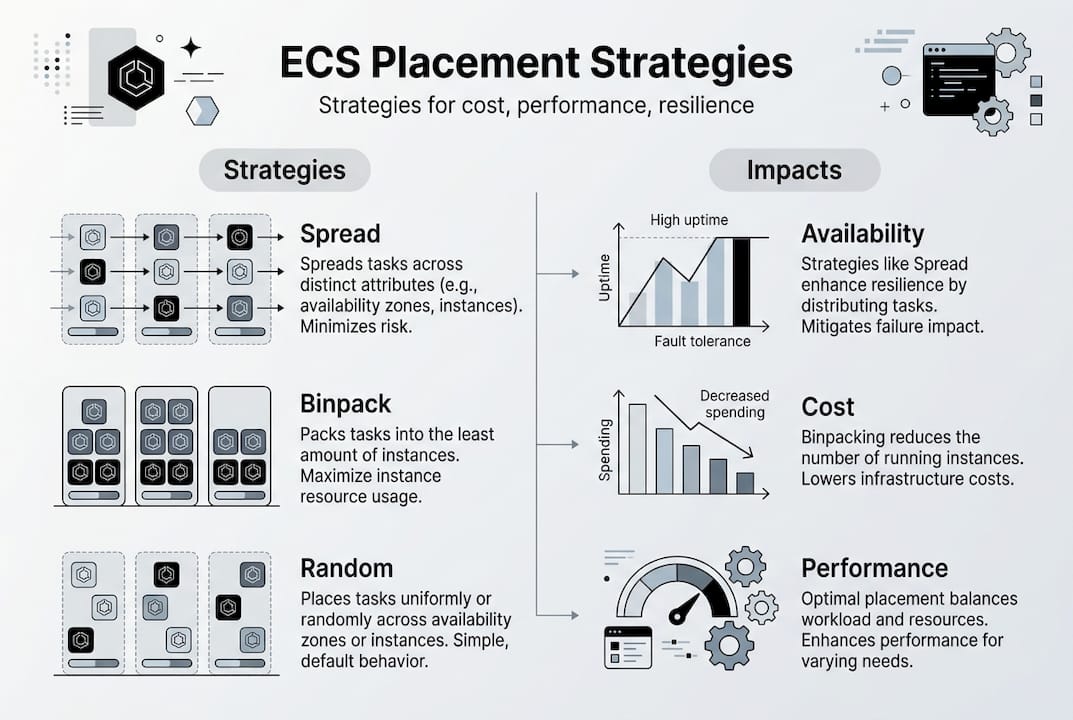
The mistake most teams make is treating these strategies as mutually exclusive. You can chain them. For example, spread across availability zones first, then binpack on memory within each AZ. This gives you fault tolerance at the zone level and cost efficiency at the instance level.
Placement constraints let you add rules like “only run on instances with a specific attribute” or “never run two copies of this task on the same instance.” The danger is over-constraining. If your constraints are too tight and your cluster doesn’t have qualifying instances, tasks stay in PENDING state indefinitely.
Troubleshooting placement failures (step by step):
- Check the ECS service events tab in the AWS console for specific failure messages
- Verify that cluster capacity is available and no Auto Scaling limits are blocking new instances
- Review your placement constraints for conflicts with existing instance attributes
- Confirm task CPU and memory requirements are not exceeding available instance capacity
- Use the ECS placement simulator (available in the console) to test constraint logic before deploying
For teams exploring AI-driven scaling strategies, pairing ECS with predictive Auto Scaling policies can preemptively adjust capacity before demand spikes hit, cutting both latency and cost.
Pro Tip: Chain placement strategies by specifying them in priority order in your service configuration. Set spread by availabilityZone as the first strategy and binpack by memory as the second. This is one of the most cost-effective production patterns available in ECS.
Networking modes in ECS: Security, isolation, and limits
Network configuration in ECS is not just a deployment detail. It directly determines your task density, security posture, and how many containers you can actually run per instance.
ECS supports four networking modes:
- awsvpc: Each task gets its own elastic network interface (ENI) with a private IP. This is the recommended mode for production. It provides full network isolation, supports security groups at the task level, and works with both EC2 and Fargate.
- bridge: Uses Docker’s default bridge networking. Tasks share the host’s network namespace but are isolated from each other via port mapping. Works well for legacy workloads but lacks per-task security group support.
- host: The task shares the EC2 instance’s network namespace directly. Zero NAT overhead, but no isolation. Only use this when you need raw network performance and fully trust your workload.
- none: No external network access. Useful only for batch jobs that write to local storage or shared volumes.
Networking modes in ECS include awsvpc, bridge, host, and none, with awsvpc recommended for isolation but subject to ENI-based limits.
The critical limitation with awsvpc mode is ENI density. Each EC2 instance supports a finite number of ENIs based on its instance type. A c5.xlarge, for instance, supports a maximum of 15 ENIs, which caps your task density regardless of available CPU or memory. ENI exhaustion is one of the most common causes of silent deployment failures in production ECS clusters.
Best practices for network mode selection:
- Use awsvpc for all production workloads where security group isolation matters
- Use EC2 instance types with higher ENI limits (like c5n or r5) when running dense task workloads
- Enable ENI Trunking (VPC Trunking) to increase per-instance ENI limits significantly
- Monitor ENI utilization through CloudWatch and set alarms well before you hit your instance’s quota
For teams scaling with AWS solutions under high traffic, ENI planning is as important as instance sizing when you’re running awsvpc at scale.

Best practices and troubleshooting for ECS at scale
Operational discipline is what separates stable ECS deployments from clusters that generate 2am pages. Here are the practices that matter most in production.
Essential ECS production best practices:
- Use separate IAM execution and task roles for every task family
- Enable CloudWatch Container Insights for CPU, memory, network, and disk metrics per task
- Use small, immutable container images (tag with git SHA, never use “latest” in production)
- Log to stdout/stderr and forward via FireLens or the awslogs driver to CloudWatch Logs
- Define explicit CPU and memory reservations for every task to prevent noisy-neighbor problems
- Set up ECS Service Auto Scaling with target tracking policies tied to ALB request count or CPU utilization
For alerting, configure CloudWatch alarms on the following signals: task placement failures (track FailedTaskPlacements metric), service task count below desired, and ENI utilization approaching instance limits.
“The most frequent ECS failure causes in production are ENI exhaustion, task placement constraint conflicts, ECS agent disconnects, and ephemeral storage limits being hit on Fargate tasks.”
Edge cases like ENI exhaustion, placement failures, agent disconnects, and ephemeral storage limits are the most common sources of ECS production incidents.
Troubleshooting checklist for common ECS edge cases:
- ENI exhaustion: Check instance ENI limits, enable VPC trunking, or scale up to larger instance types
- Agent disconnects: Verify ECS agent version is current, check VPC endpoint or internet gateway connectivity, and review instance IAM role permissions
- Ephemeral storage limits (Fargate): Increase ephemeral storage in the task definition (up to 200 GB in 2026)
- Stalled deployments: Check service events for error messages and verify the task definition changes are syntactically valid
For retail ECS best practices where uptime directly impacts revenue, pairing these operational practices with a reliable deployment pipeline (blue/green via CodeDeploy) makes ECS significantly more resilient.
Pro Tip: Separate task families by business domain rather than just by service. Grouping all payment tasks into one family and all notification tasks into another makes upgrades, rollbacks, and IAM scoping dramatically simpler.
Working with top AWS partners can help you accelerate these practices without reinventing every operational pattern from scratch.
Why ECS is the pragmatic choice for AWS-native scaling
Here’s the uncomfortable truth we’ve seen repeatedly across 700+ projects: most teams choose Kubernetes on AWS because it sounds right, not because their requirements actually demand it. ECS is not a “simpler but lesser” tool. It is a purpose-built orchestrator that handles the vast majority of real-world container use cases with a fraction of the operational burden.
The teams that struggle with ECS are usually fighting problems they created themselves: over-constrained task placement, misconfigured IAM roles, or ENI limits they never planned for. The teams that thrive with ECS treat it as a first-class platform, invest in observability, and automate their deployment pipelines properly.
Choose EKS when you genuinely need Kubernetes portability, advanced custom resource definitions, or a multi-cloud control plane. Don’t choose it because a conference talk made it sound exciting. For a detailed ECS vs EKS perspective grounded in real workload patterns, the answer usually comes down to team expertise and operational simplicity over feature lists.
ECS gives you AWS-native resilience, tight IAM integration, and predictable scaling without a dedicated platform team. That’s a real competitive advantage for startups and enterprises alike.
Optimize your AWS containers with expert support
Understanding ECS architecture and best practices is a strong start, but executing it consistently across growing infrastructure is where most teams hit friction.

At IT-Magic, we’ve helped 300+ clients design, migrate, and optimize containerized workloads on AWS, delivering measurable improvements in reliability, cost efficiency, and deployment speed. Our AWS infrastructure support covers everything from cluster design to scaling automation. If your team is containerizing services or optimizing existing ECS deployments, our AWS DevOps services give you certified expertise without the overhead of building an in-house platform team. We also offer Kubernetes support options for teams that genuinely need EKS alongside ECS.
Frequently asked questions
What is the main role of ECS in AWS?
ECS orchestrates, schedules, and manages containerized workloads securely and at scale across AWS infrastructure. Its core components include task definitions, services, clusters, and capacity providers working together.
How do ECS placement strategies affect my AWS costs?
Using binpack concentrates tasks on fewer instances for lower compute costs, while spread distributes tasks for higher availability at the expense of potentially more instances running.
How is ECS different from Kubernetes on AWS (EKS)?
ECS is AWS-native and simpler to operate, while EKS provides full Kubernetes APIs for teams needing advanced customization, multi-cloud portability, or deep ecosystem tooling.
What common issues should I monitor for with ECS?
The highest-priority issues are ENI exhaustion and placement failures, along with ECS agent disconnects and ephemeral storage limits on Fargate, all of which have clear remediation paths.
Alexander founded IT-Magic, an AWS Advanced Tier Services Partner delivering DevOps, cloud architecture, and managed services since 2010. He holds:
- AWS Certified Solutions Architect – Professional
- AWS Certified DevOps Engineer – Professional
- AWS Certified Security – Specialty
- AWS Certified Advanced Networking – Specialty
Talk to a certified AWS team trusted by INTERTOP, Foxtrot, Pandora, and J.Hilburn.
Get a free consultation


