

TL;DR:
- Most organizations over-provision servers to handle infrequent peak loads, leading to wasted costs during normal operations. Cloud scaling dynamically adjusts infrastructure in real time, aligning capacity with workload demands and enabling cost-efficient, flexible business performance. Kubernetes autoscaling tools like HPA and Karpenter enhance responsiveness, but require careful resource request tuning and ongoing monitoring to maximize benefits and prevent waste.
Most organizations still over-provision servers to handle peak loads they see maybe a dozen times a year. That’s money sitting idle 90% of the time. Understanding why choose cloud scaling matters now more than ever: it replaces that fixed-cost thinking with a model where your infrastructure breathes with your workload. Whether you’re running a fintech platform with unpredictable transaction spikes or an e-commerce service bracing for seasonal surges, cloud scaling gives you the capacity you need, exactly when you need it, without paying for what you don’t.
Table of Contents
- Key takeaways
- Why choose cloud scaling: the core case
- Real business benefits of cloud scaling
- Kubernetes autoscaling in practice
- Common challenges and how to handle them
- My perspective on cloud scaling’s real value
- How IT-Magic helps you scale with confidence
- FAQ
Key takeaways
Running this on your own AWS setup? IT-Magic is an AWS Advanced Tier Partner — we audit, fix, or fully manage it for you.
Get a free consultation| Point | Details |
|---|---|
| Fixed infrastructure wastes money | Over-provisioned hardware sits idle during low demand, while cloud scaling matches costs to actual usage. |
| Three scaling types serve different needs | Vertical, horizontal, and diagonal scaling each address distinct workload patterns and budget constraints. |
| Kubernetes autoscaling is production-ready | HPA and Karpenter reduce provisioning latency from minutes to seconds, directly lowering infrastructure costs. |
| Accurate resource requests are non-negotiable | Misconfigured pod requests cause wasteful node provisioning and undermine the cost case for cloud scaling. |
| Scaling is an ongoing practice | Continuous monitoring and tuning, not a one-time setup, determine whether your scaling strategy pays off. |
Why choose cloud scaling: the core case
Cloud scalability is the ability to increase or decrease compute, storage, and network resources dynamically to match real demand. That definition sounds simple, but its operational implications are profound for any team managing infrastructure at scale.
Traditional hardware procurement forces you to guess your peak load 18 to 36 months in advance. You buy for the ceiling, pay for the ceiling, and watch that investment sit underutilized during every normal business day. Cloud infrastructure scaling breaks that model entirely.
There are three primary scaling mechanisms you need to understand:
- Vertical scaling adds more CPU or RAM to an existing instance. It’s fast to implement but hits hard limits quickly and typically requires downtime during resizing.
- Horizontal scaling spins up additional instances to distribute load. It’s the workhorse of modern cloud architecture and supports nearly unlimited capacity growth.
- Diagonal scaling combines both approaches, scaling out with more instances while simultaneously scaling up their specs. This hybrid approach handles complex workload patterns that neither strategy alone can address efficiently.
Underlying all three is elasticity: the system’s ability to adjust in real time rather than on a scheduled maintenance window. Add load balancing to the picture and you get traffic distributed automatically across instances as they appear, so users never see the seams.
| Scaling type | Best for | Key limitation |
|---|---|---|
| Vertical | Stateful apps, databases | Instance size ceiling, potential downtime |
| Horizontal | Stateless services, microservices | Requires app-level support for distribution |
| Diagonal | Complex, mixed workloads | Higher configuration complexity |
Real business benefits of cloud scaling
The business case for cloud scaling goes well beyond “it’s cheaper.” The pay-for-use model eliminates the financial friction of owning idle hardware, but that’s just the starting point.
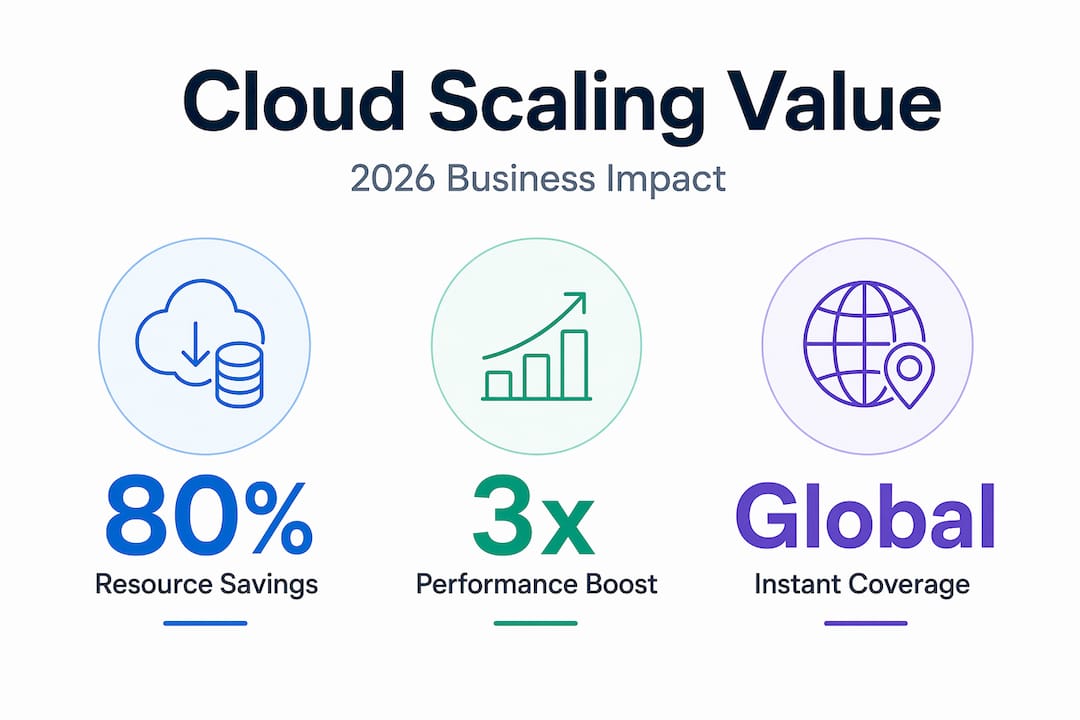
Performance during demand spikes is where cloud scaling proves its value in real time. A flash sale that triples your transaction volume, a news story that sends a million users to your site in an hour. Without elastic infrastructure, that’s an outage. With it, your platform scales out before users notice any slowdown.

Faster innovation cycles are a less-discussed cloud scalability benefit that matters enormously to engineering teams. When you don’t need a procurement cycle to test a new service at scale, rapid workload response becomes your competitive advantage. Teams ship, test, and iterate in days instead of quarters.
Consider what this looks like in practice:
- A fintech startup can onboard a new payment processing region without ordering new racks. They provision in minutes and pay only while running the validation workload.
- A media company can absorb a viral traffic event without pre-purchasing a server fleet that will sit idle after the story cycle ends.
- A SaaS business can enter a new geographic market by spinning up infrastructure in a new AWS region, testing product-market fit, and scaling down if the traction doesn’t materialize.
Global scalability and disaster recovery round out the picture. Cloud infrastructure scaling across multiple regions means your architecture can absorb a zone failure without user impact, because traffic shifts to healthy regions automatically. For organizations with SLA commitments, that resilience is not optional.
Pro Tip: If you’re evaluating cloud scaling advantages for a CFO presentation, frame the cost argument around avoided capacity versus reduced spend. The number that moves budget decisions is usually the infrastructure you didn’t have to buy, not the bill you already paid.
Kubernetes autoscaling in practice
Kubernetes is where cloud scaling principles become concrete engineering decisions. Understanding Kubernetes autoscaling use cases clarifies why it has become the dominant runtime for scaling workloads on AWS EKS and ECS.
Here’s how the major autoscaling layers work together:
-
Horizontal Pod Autoscaler (HPA) runs as a periodic control loop that monitors CPU, memory, or custom application metrics. When a metric crosses a configured threshold, HPA adjusts the number of pod replicas to bring it back to target. The critical detail: stabilization windows prevent rapid oscillation when metrics fluctuate.
-
Node Autoscaling operates at the cluster level. When pods can’t be scheduled because no node has sufficient capacity, the node autoscaler adds nodes automatically. When nodes run underutilized below a configurable threshold, it consolidates workloads and removes the excess, trimming cost without manual intervention.
-
Karpenter replaces the traditional Cluster Autoscaler for teams that need faster, smarter provisioning. Where the classic autoscaler works through Auto Scaling Group loops, Karpenter provisions nodes directly based on pending pod requirements. The result is provisioning latency measured in seconds rather than minutes.
Salesforce demonstrated what that difference looks like at scale. Migrating from Cluster Autoscaler to Karpenter across their fleet of 1,000 EKS clusters reduced scaling latency dramatically and contributed to projected 5% FY2026 cost savings. At Salesforce’s infrastructure scale, that figure represents tens of millions of dollars.
| Tool | Provisioning speed | Bin packing | Configuration complexity |
|---|---|---|---|
| Cluster Autoscaler | Minutes | Moderate | Lower |
| Karpenter | Seconds | Optimized | Higher initially |
One factor that affects every layer of this stack deserves specific attention. Pod resource request accuracy determines whether your node autoscaler provisions the right size nodes. Overstated requests trigger the autoscaler to provision larger or additional nodes than your workload actually needs, inflating costs without delivering any performance benefit.
Pro Tip: Run VPA (Vertical Pod Autoscaler) in recommendation mode for two to four weeks before setting production resource requests. It surfaces actual usage patterns and gives you defensible numbers for your request and limit values.
Common challenges and how to handle them
Adopting cloud scaling is not a configuration you deploy once and forget. The organizations that see the strongest returns treat it as an ongoing practice, not a project milestone.
Misconfigured resource requests are the most common source of unexpected cost growth. When teams set CPU and memory requests conservatively to avoid OOM kills, the autoscaler treats that padded number as real demand. Nodes fill less efficiently, and you provision more than you need. The fix is a deliberate tuning cycle using monitoring data, not intuition.
Scaling latency creates a window where your application is under-resourced while new capacity comes online. For HPA, this window is typically the time between a metric threshold being crossed and new pods reaching a ready state. Strategies to narrow that window include maintaining a small warm-pool of pre-scaled replicas, using predictive scaling based on traffic patterns, and ensuring container images are optimized for fast startup.
Thrashing describes the condition where HPA scaling parameters cause the replica count to oscillate up and down rapidly in response to metric noise. This wastes resources and creates instability. Stabilization windows and conservative scale-down thresholds solve the problem, but require workload-specific tuning.
Best practices that consistently deliver results:
- Combine HPA and node autoscaling so both layers respond together rather than one waiting on the other.
- Set separate scale-up and scale-down thresholds. Aggressive scale-up with conservative scale-down protects availability without over-spending.
- Monitor actual resource utilization weekly and revisit request settings every quarter or after significant application changes.
- Use cloud cost optimization practices in parallel with autoscaling to catch waste from over-provisioned base capacity.
Pro Tip: Do not tune autoscaling parameters in production under load. Build a load testing environment that mirrors your production metrics pipeline and run scaling experiments there. The data you collect will be far more useful than any default configuration.
My perspective on cloud scaling’s real value
I’ve spent years working with Kubernetes autoscaling across AWS environments, and the pattern I keep seeing is this: teams get the technology right faster than they get the process right.
HPA works. Karpenter works. But I’ve watched organizations deploy sophisticated autoscaling configurations and still end up with surprise bills at the end of the month, because nobody owned the practice of reviewing utilization data and adjusting resource requests. The tooling scales your infrastructure. Your team has to scale the discipline around it.
The other thing I’d push back on is the framing of cloud scaling as a cost-cutting initiative. It is that, but framing it that way causes decision-makers to optimize for the wrong outcome. The more valuable question is what you can build, ship, or attempt when infrastructure capacity is no longer a constraint on your timeline. That’s where the real return lives. Cloud infrastructure agility is not just a technical feature. It’s a business capability that compounds over time.
I also want to be honest about organizational readiness. If your deployment process takes two weeks, autoscaling won’t help you respond to demand spikes. The infrastructure has to be matched by the processes around it, or you’ve built a fast car with a slow driver.
— Oleksandr
How IT-Magic helps you scale with confidence

At IT-Magic, we’ve designed and operated cloud scaling architectures for 300+ clients across fintech, SaaS, and enterprise environments since 2010. If you’re running workloads on AWS and want autoscaling that actually reduces your bill rather than adding complexity, our team of certified AWS engineers can help. Our Kubernetes support services cover everything from initial HPA and Karpenter configuration to ongoing tuning and monitoring. For teams focused on the cost side, our AWS cost optimization services identify the specific resource request mismatches and idle capacity that autoscaling alone won’t catch. We don’t just deploy configurations. We stay involved until the numbers reflect the investment.
FAQ
What is the main reason to choose cloud scaling?
Cloud scaling lets you match infrastructure capacity to actual demand in real time, eliminating the cost of over-provisioned hardware while protecting application performance during traffic spikes.
How does cloud scaling work in Kubernetes?
Kubernetes uses Horizontal Pod Autoscaler to adjust pod replicas based on CPU, memory, or custom metrics, and node autoscalers like Karpenter to provision or remove nodes based on pending workload requirements.
What is the difference between horizontal and vertical scaling?
Horizontal scaling adds more instances to distribute load and supports nearly unlimited growth. Vertical scaling increases resources on an existing instance but hits physical limits and may require downtime.
Why do resource requests matter for cloud scaling costs?
Overstated pod resource requests cause the node autoscaler to provision larger or additional nodes than the workload actually needs, inflating infrastructure costs without any performance benefit.
How quickly can Karpenter provision new nodes?
Karpenter provisions nodes in seconds by acting directly on pending pod requirements, compared to minutes for the traditional Cluster Autoscaler. Salesforce documented this improvement across 1,000 EKS clusters with measurable cost savings.
Recommended
- AWS scalability explained: Optimize your cloud for growth
- Cloud Infrastructure Explained: Scale, Secure, Optimize AWS
- Why choose AWS for startups: scale, save, and succeed fast
- Cloud Computing for Small Business: Benefits and Uses | IT-Magic
Alexander founded IT-Magic, an AWS Advanced Tier Services Partner delivering DevOps, cloud architecture, and managed services since 2010. He holds:
- AWS Certified Solutions Architect – Professional
- AWS Certified DevOps Engineer – Professional
- AWS Certified Security – Specialty
- AWS Certified Advanced Networking – Specialty
Talk to a certified AWS team trusted by INTERTOP, Foxtrot, Pandora, and J.Hilburn.
Get a free consultation


