

TL;DR:
- Most organizations mistakenly believe migrating to AWS automatically ensures scalability, but true scalability depends on deliberate architectural design. Understanding the differences between vertical and horizontal scaling, along with leveraging core AWS services like Auto Scaling, Lambda, and S3, is essential for responding to fluctuating demand efficiently. Regular review and iteration of scaling policies, combined with operational preparedness, are crucial for maximizing AWS’s cost savings, reliability, and growth potential.
Migrating to AWS does not automatically make your systems scalable. That’s a costly assumption many engineering leaders discover too late, often after a surprise invoice or a service outage during peak traffic. Real AWS scalability is about designing systems that dynamically match resources to actual business demand, not just flipping a switch. This article breaks down what AWS scalability genuinely means, which services power it, why it matters operationally, and where most teams quietly go wrong. If you’re responsible for cloud infrastructure, the details ahead will change how you think about every architecture decision.
Key Takeaways
| Point | Details |
|---|---|
| Scalability is dynamic | AWS scalability adapts resources in real time for changing business demands. |
| Cost efficiency | Dynamic scaling prevents overprovisioning and helps control cloud expenses. |
| Right tools matter | Key AWS services like EC2, Lambda, and EKS underpin scalable solutions. |
| Proactive review needed | Scaling strategies require regular adjustment to align with actual usage patterns. |
Demystifying scalability in AWS: What it really means
Running this on your own AWS setup? IT-Magic is an AWS Advanced Tier Partner — we audit, fix, or fully manage it for you.
Get a free consultationScalability in AWS refers to the system’s ability to automatically increase or decrease cloud resources as workload demands change. On paper, that sounds simple. In practice, it requires deliberate architectural choices, not just an AWS account.
The two foundational models are vertical scaling and horizontal scaling. Vertical scaling means upgrading the capacity of a single instance, switching from a "t3.mediumto ac6i.4xlarge`, for example, to handle more CPU or memory load. Horizontal scaling means adding or removing instances based on demand, distributing traffic across many smaller nodes rather than one giant machine. AWS natively supports both, but they serve very different architectural purposes.
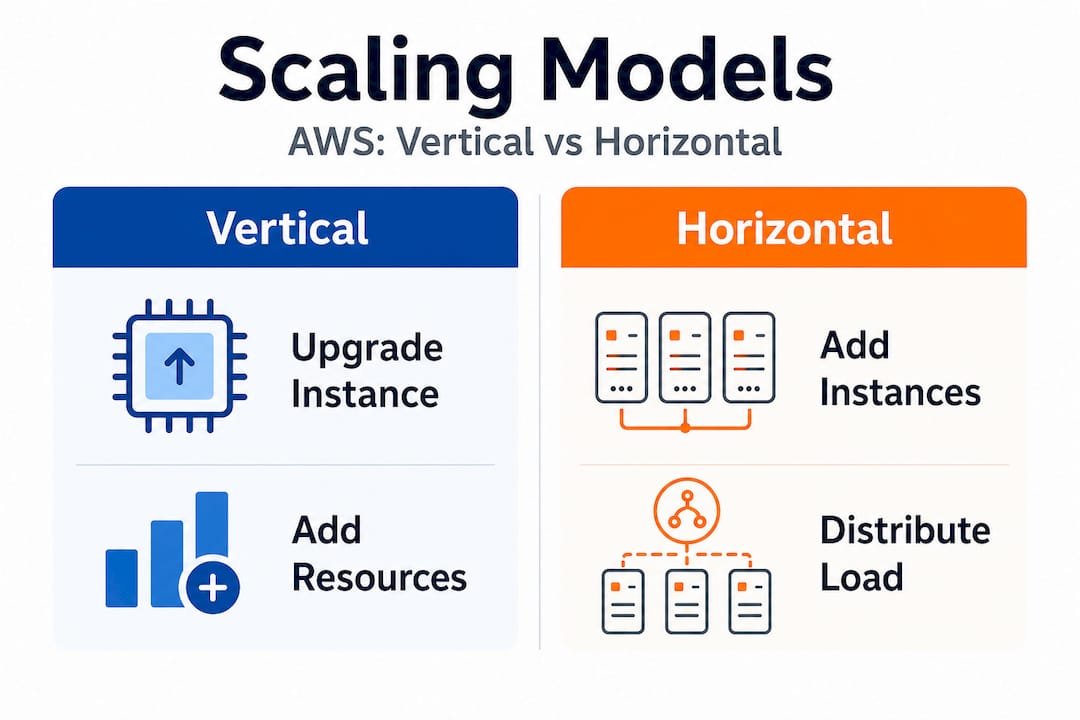
| Dimension | Vertical scaling | Horizontal scaling |
|---|---|---|
| How it works | Upgrade a single instance size | Add or remove multiple instances |
| Downtime risk | Often requires restart | Typically zero downtime |
| Cost model | Higher per-unit cost, simpler billing | Pay-per-instance, granular cost control |
| Ceiling | Limited by instance type maximums | Theoretically unlimited |
| Best for | Databases, legacy monoliths | Stateless apps, microservices, web tiers |
| AWS tools | EC2 instance resizing | Auto Scaling Groups, ECS, EKS |
The myth of “infinite AWS scalability” is worth addressing directly. AWS lets organizations scale dynamically, adapting cloud resources to fluctuating demands, but that capability has real boundaries. Service quotas, regional capacity limits, architectural bottlenecks like a single relational database, and budget constraints all shape what’s actually achievable. Misunderstanding this leads to over-confidence in planning and under-investment in architecture.
True scalability delivers three things that matter to you as an engineering leader:
- Cost alignment: You pay for actual usage, not theoretical peaks.
- Responsiveness: Your systems react to demand spikes automatically, not hours after someone notices.
- Experimentation: You can run staging environments at scale and shut them down immediately, accelerating development cycles.
“The organizations that win with cloud aren’t those who simply move to AWS—they’re those who continuously align their architecture with how their users actually behave.” This Solaya AWS AI partnership insight reflects what AWS-native companies have learned: scalability is a continuous business practice, not a migration milestone.
It’s also worth noting that even retail companies using AWS for retail face unique scaling challenges tied to seasonal patterns, flash sales, and global expansion. Understanding how peers in different verticals have approached scaling is useful context when you’re designing your own systems. If you want to benchmark AWS against competing platforms, the analysis of AWS competitors for retail AI is a strong reference for understanding where AWS genuinely leads.
The core AWS services powering scalable architectures
With a clear understanding of scalability’s meaning, let’s dive into the AWS services that make it possible. The ecosystem is broad, but a relatively small group of services forms the backbone of most scalable architectures.
| AWS service | Primary use case | Scaling dimension addressed |
|---|---|---|
| EC2 | General compute workloads | Vertical and horizontal compute |
| Auto Scaling Groups | Automatic instance management | Horizontal compute elasticity |
| AWS Lambda | Event-driven serverless functions | Automatic concurrency scaling |
| S3 | Object and static asset storage | Virtually unlimited storage scaling |
| ECS | Containerized workloads | Horizontal container scaling |
| EKS | Kubernetes-based container orchestration | Multi-cluster horizontal scaling |
| SQS | Decoupled message queuing | Buffered workload distribution |
| RDS/Aurora | Managed relational databases | Read replica horizontal scaling |
Dynamic scaling with core AWS services is vital for enterprises dealing with unpredictable user demands and cost efficiency. Here’s how those services interact during a real event. Imagine a web application expecting a product launch surge:
- Traffic begins increasing. An Application Load Balancer distributes incoming requests across your EC2 fleet.
- CloudWatch detects CPU utilization crossing a threshold (say, 70% for two consecutive minutes).
- Auto Scaling Group launches new instances using a pre-baked AMI, registering them behind the load balancer within 90 to 120 seconds.
- Lambda functions handle asynchronous tasks (email confirmations, order processing events) without touching your web tier capacity.
- S3 serves all static assets (images, CSS, JavaScript) via CloudFront, keeping your compute layer free for dynamic requests only.
- SQS queues incoming order events, decoupling spikes in submission volume from downstream processing capacity.
- Traffic subsides. Auto Scaling removes excess instances, and your cost curve drops accordingly.
This sequence is why event-driven architectures are so powerful. For AWS for ecommerce use cases specifically, decoupling the order pipeline from the storefront using Lambda, SQS, and S3 allows each component to scale independently. The storefront never bottlenecks because of a slow inventory check.
Pro Tip: If you’re still using synchronous API calls between your internal services during high-load events, replace them with SQS or EventBridge. A single slow downstream service can cascade failures through your entire stack. Async event-driven communication between services is one of the highest-leverage architectural changes you can make for scalability, and it often costs less than the compute you’d otherwise need to handle synchronous retry storms. The AWS DevOps support for ecommerce context matters here: having DevOps expertise specifically aligned to ecommerce load patterns accelerates how quickly you can safely implement these patterns.
Why AWS scalability is critical for operational efficiency and growth
Having explored the major AWS scalability tools, let’s clarify why such scalability directly affects your organization’s bottom line and agility.
Static infrastructure is expensive in a specific way that’s easy to overlook. You pay for peak capacity 24 hours a day, seven days a week, even when 80% of that capacity sits idle. Elastic scaling flips this model. Retailers using AWS have been able to expand operations quickly to meet market demand and avoid overprovisioning costs. The savings from right-sizing and auto-scaling aren’t marginal. Teams that move from static to elastic architectures routinely cut compute costs by 30% to 50%, sometimes more when serverless is introduced for bursty workloads.
The business advantages of AWS scalability extend well beyond cost:
- Cost efficiency: Pay only for what you actually use. No idle capacity wasting budget.
- Service reliability: Automatic scaling prevents resource exhaustion during unexpected demand spikes, protecting uptime and user experience.
- Speed to market: Elastic dev and staging environments let engineering teams spin up full-stack environments for testing, then shut them down within hours. This shortens release cycles measurably.
- Handling unpredictable spikes: Flash sales, viral product moments, news events, partner integrations that drive unexpected traffic. Scalable architecture handles all of these without a war room response.
- Geographic expansion: Multi-region architectures allow you to scale into new markets without rebuilding infrastructure from scratch.
Consider an e-commerce operator preparing for a major sales event. Without elastic scaling, the team must either overprovision massively (expensive) or risk being unable to serve demand (catastrophic). A well-designed AWS architecture handles a 10x traffic spike automatically, then scales back down by the next morning. The guide on scaling online stores with AWS covers this pattern in detail, including specific Auto Scaling configurations proven to work under real holiday traffic conditions.
There’s also an operational efficiency angle tied to inventory and demand forecasting. AI-driven inventory management increasingly integrates with AWS infrastructure, allowing teams to pre-warm capacity based on predicted demand signals rather than reactive scaling alone. Combining proactive scaling with elastic reactive scaling creates a genuinely robust posture.

Pro Tip: Always set both minimum and maximum instance counts on your Auto Scaling Groups. Teams that skip the maximum limit have received five-figure surprise invoices because a runaway process triggered infinite scaling. Set conservative maximums initially, validate your workload behavior, then adjust upward with confidence.
Pitfalls and best practices for scalable AWS architectures
While AWS scalability offers huge benefits, it’s easy to unintentionally create complexity or cost surprises if best practices aren’t followed. The most experienced infrastructure teams we work with still encounter these pitfalls, often when moving fast or inheriting architectures without documentation.
The most frequent mistakes engineering teams make:
- Ignoring scaling policies until something breaks. Many teams launch with default or no scaling policies and only revisit them after an outage or a budget alarm fires. By that point, the damage is already done.
- Treating all workloads the same. A batch processing job and a customer-facing API have completely different scaling requirements. Applying the same scaling policy to both wastes resources or causes reliability issues.
- Failing to monitor scaling events. CloudWatch alarms trigger scaling, but without dedicated dashboards tracking scaling activity, teams are flying blind. You need visibility into how often your infrastructure is scaling and how fast it responds.
- Poor cost forecasting for elastic architectures. Elastic scaling means your bill is variable. Without tagging, cost allocation, and budget alerts, you won’t know which services are driving cost until the monthly invoice arrives.
- Tightly coupled architectures that can’t scale horizontally. If your application stores session state in memory on a single server, you can’t add more servers without losing user sessions. Shared-nothing architectures are a prerequisite for real horizontal scaling.
- Skipping load testing. Many teams assume their scaling configuration will work and never test it under realistic load. AWS best practices are clear on this: regularly validating scaling behavior under simulated load is non-negotiable.
The best practices that consistently work across the organizations we’ve partnered with:
- Use managed services wherever possible. RDS, Aurora Serverless, ElastiCache, and DynamoDB handle much of the scaling complexity for data tiers without requiring you to manage cluster topology manually.
- Automate everything. Infrastructure as code (Terraform, CloudFormation, CDK) ensures your scaling configuration is version-controlled, reviewable, and reproducible. Manual changes are a source of drift and a safety risk.
- Monitor leading indicators, not just lagging ones. CPU utilization is a lagging signal. Request queue depth, application latency percentiles (p95, p99), and connection pool saturation are better signals for predictive scaling.
- Test scaling during real events. Run deliberate load tests against your production environment (with appropriate safeguards) before major traffic events, not after.
“Effective AWS architecture demands regular review and iterative improvements to scaling policies for optimal results.” Treating your scaling configuration as a living document reviewed quarterly against actual usage data is the mark of a mature engineering organization.
Our perspective: What most AWS scalability advice gets wrong
Most AWS scalability guides give you a clean, linear narrative. Pick the right service. Set a threshold. Watch it scale. What they undervalue is the organizational and iterative reality of running scalable systems at production scale over years.
Standard AWS documentation is accurate but written for idealized conditions. It assumes you have clean, stateless workloads, complete observability, and teams who have time to iterate. In practice, most organizations have a mix of legacy services, undocumented architectural decisions, and teams splitting their attention between feature delivery and infrastructure stability. The documentation doesn’t account for this, and advice that ignores it will disappoint you.
True scalability isn’t “set and forget.” The infrastructure patterns that served you well at 10,000 daily active users will create problems at 500,000. The scaling configuration right for predictable B2B traffic patterns is wrong for consumer-facing flash sales. This is why we consistently advocate for periodic architecture reviews tied to actual usage patterns, not theoretical capacity models. If your scaling policies haven’t been revisited in six months, they’re almost certainly misconfigured for your current traffic reality.
There’s also a human factor that rarely gets mentioned. The best AWS scaling configuration in the world fails if your on-call engineer doesn’t understand why the Auto Scaling Group isn’t launching fast enough during a spike. Investing in documentation, runbooks, and team training around your specific scaling architecture is as important as the architecture itself.
Pro Tip: Build a scaling exercise into your incident management practice. Once a quarter, deliberately simulate a major load event and walk your team through the response. You’ll find gaps in tooling, knowledge, and configuration that no architecture review document would surface.
The guide on handling high loads on AWS captures much of this operational wisdom. What scales successfully in production combines technical configuration with business context, team readiness, and a genuine willingness to iterate after every significant traffic event.
Next steps: Unlock real AWS scalability with expert partners
Scaling with AWS is a journey that requires both the right technology choices and the operational expertise to run them reliably under pressure. Understanding the theory is step one, but applying it to your specific architecture, team size, and business growth stage is where most teams need support.

If your organization is running containerized workloads or planning to, Kubernetes support for AWS scaling is one of the highest-leverage investments you can make for long-term scalability. For a concrete example of what optimized AWS infrastructure delivers, the real-world AWS cost reduction case shows measurable outcomes from better scaling design. IT-Magic has helped 300+ clients across fintech, ecommerce, and enterprise since 2010, working as a dedicated cloud infrastructure partner focused entirely on making AWS environments perform and scale the way your business actually needs.
Frequently asked questions
What is the difference between vertical and horizontal scaling in AWS?
Vertical scaling means upgrading the resources of a single instance (CPU, memory, storage), while horizontal scaling adds or removes multiple instances to distribute load across your infrastructure.
Can AWS scalability help control cloud costs?
Yes, avoiding overprovisioning costs is one of the most direct financial benefits of AWS scalability, allowing you to pay only for the compute and storage your workloads actually consume.
Which AWS services are most commonly used for scalability?
EC2, Auto Scaling Groups, Lambda, S3, and ECS/EKS are the primary services. Dynamic scaling with core AWS services covers unpredictable demand and cost efficiency for most production architectures.
How often should scaling policies and architectures be reviewed?
At minimum, review them quarterly or immediately after any significant business change, such as a major product launch or rapid user growth. Iterative improvements to scaling policies are what separate resilient architectures from costly ones.
Alexander founded IT-Magic, an AWS Advanced Tier Services Partner delivering DevOps, cloud architecture, and managed services since 2010. He holds:
- AWS Certified Solutions Architect – Professional
- AWS Certified DevOps Engineer – Professional
- AWS Certified Security – Specialty
- AWS Certified Advanced Networking – Specialty
Talk to a certified AWS team trusted by INTERTOP, Foxtrot, Pandora, and J.Hilburn.
Get a free consultation


