

TL;DR:
- Cloud networking involves creating and managing virtual infrastructure like VPCs, subnets, routing, firewall policies, and hybrid connections for secure, scalable cloud communication. Proper IP planning, architecture design, hybrid connectivity setup, and validation are essential to prevent technical debt, with recommended practices including CIDR allocation, segmentation, and thorough testing. Using hub-and-spoke models with NVA enhances security and auditability, while systematic validation and documentation ensure reliable, efficient cloud networks.
Cloud networking is defined as the practice of creating and managing virtual network infrastructure, including VPCs, subnets, routing tables, firewall policies, and hybrid connectivity, to enable secure and scalable communication between cloud resources and on-premises systems. Knowing how to set up cloud networking correctly from the start determines whether your architecture scales cleanly or accumulates technical debt. This guide covers the full process: IP planning with CIDR notation, VPC design, hybrid connectivity via Dedicated Interconnect or Cloud VPN, routing and firewall configuration, and connectivity validation. Every step follows Google Cloud’s security blueprint principles, which apply equally to AWS VPCs and Azure VNets.
How do you design the foundation of a cloud network?
Cloud network design starts with a structured IP address plan. Without one, you will hit overlapping ranges when connecting environments, and fixing that later requires re-addressing entire subnets. Use CIDR notation to carve your address space deliberately before you create a single resource.
Follow these steps to build your network foundation:
-
Define your IP address space. Assign a non-overlapping RFC 1918 range to each environment (production, staging, development). A common pattern is 10.0.0.0/8 for the entire organization, subdivided by environment and region. CIDR-based subnetting by availability zone is the standard approach for high availability, since each subnet maps to a single AZ.
-
Create a custom VPC. In Google Cloud, always create a custom-mode VPC rather than auto-mode. Auto-mode VPCs generate subnets in every region automatically, which creates uncontrolled address space you cannot easily reclaim. In AWS, the equivalent is a custom VPC with no default subnet creation.
-
Subnet by function and availability zone. Create separate subnets for web tiers, application tiers, and data tiers. Distribute each tier across at least two availability zones. This gives you fault isolation without requiring separate VPCs for each workload.
-
Define initial firewall policies. Apply a default-deny posture from day one. Create explicit allow rules only for required traffic paths. Google Cloud’s security networking blueprint treats firewall policies as structural essentials, not afterthoughts.
-
Configure Cloud NAT for private instances. Instances without external IP addresses still need outbound internet access for package updates and external API calls. Cloud NAT with Cloud Router automates this without exposing instances directly to the internet.
Pro Tip: Reserve at least 20% of each subnet’s address space for future growth. Expanding a subnet after workloads are deployed is painful in most cloud providers and impossible without downtime in some configurations.
What are the steps to configure hybrid cloud connectivity?
Running this on your own AWS setup? IT-Magic is an AWS Advanced Tier Partner — we audit, fix, or fully manage it for you.
Get a free consultation
Hybrid connectivity is where most cloud networking setups introduce risk. The cloud side is well-documented. The on-premises side, including router reconfiguration, firewall rule updates, and DNS forwarding, is where projects stall. Understanding hybrid cloud architecture before you start saves significant rework.
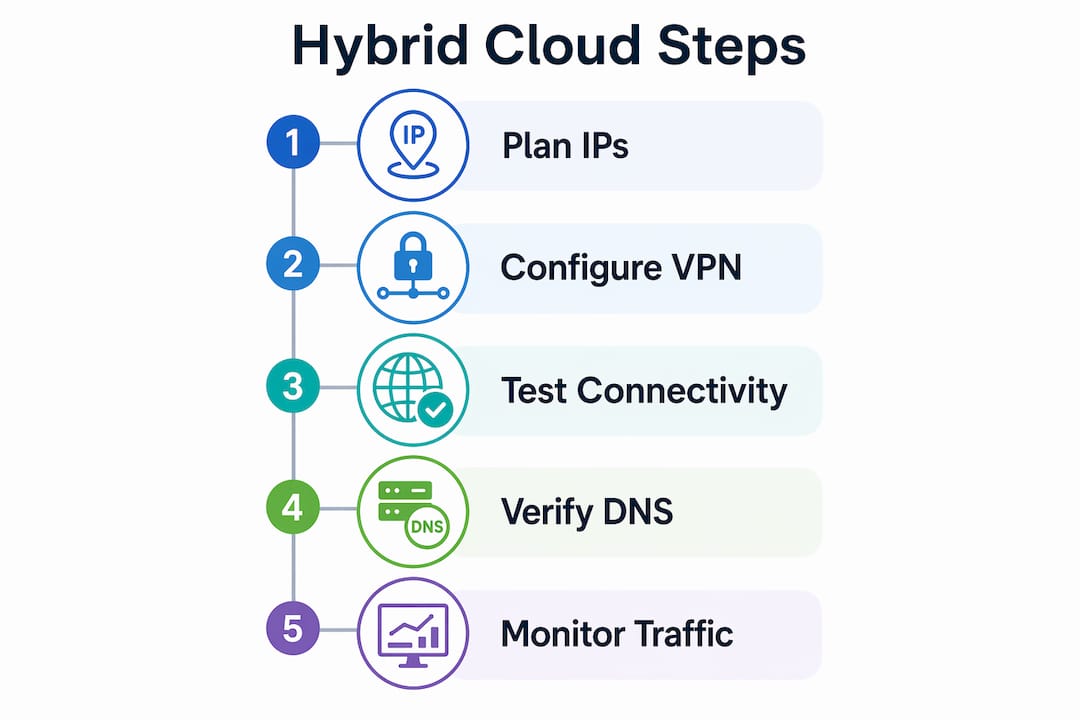
Google Cloud offers Cloud VPN, Dedicated Interconnect, and Network Connectivity Center as the primary hybrid connectivity tools. Cloud VPN works for lower-bandwidth or lower-criticality connections. Dedicated Interconnect is the right choice when you need consistent throughput, low latency, and stronger security guarantees. SD-WAN overlays sit on top of either option to add traffic management and visibility.
Here is the step-by-step process for Dedicated Interconnect:
-
Order the Interconnect circuit. Submit the request through your cloud provider’s portal and coordinate with your colocation provider to complete the physical cross-connect.
-
Configure VLAN attachments. Create VLAN attachments in your cloud project that map to the physical circuit. Each attachment gets a BGP session configuration.
-
Configure the on-premises router. Set up BGP peering on your on-prem router using the ASN and peer IP addresses from the cloud-side VLAN attachment. This step requires direct access to your physical network gear.
-
Update on-premises firewall rules. Open the required ports between your on-prem network and the cloud subnets. DNS forwarding zones and firewall scopes are as critical as the interconnect links themselves. Missing this step breaks name resolution even when the link is up.
-
Configure DNS forwarding. Set up Cloud DNS forwarding zones to resolve on-prem hostnames from the cloud, and configure your on-prem DNS resolver to forward cloud-domain queries to Cloud DNS. Validate both directions before cutover.
Pro Tip: Test DNS resolution independently from connectivity testing. A working ping does not mean DNS is correctly forwarded. Run nslookup or dig against both resolvers before declaring hybrid connectivity operational.
How do routing and firewall rules shape cloud network traffic?
Routing and firewall rules are not independent decisions. They must be designed together, especially in architectures that use a Network Virtual Appliance to gate traffic between network segments.
Understanding VPC route tables
VPC route tables use longest-prefix-match to determine the next hop for any given packet. A more specific route (for example, 10.1.2.0/24) always wins over a less specific one (10.0.0.0/8). This matters when you are advertising on-premises routes via BGP alongside static cloud routes. Overlapping prefixes with different specificity produce unpredictable routing behavior that is difficult to debug under load.
Hub-and-spoke vs. flat VPC architecture
The hub-and-spoke model uses a central hub VPC to connect multiple spoke environments, with a Network Virtual Appliance gating all spoke-to-spoke traffic. This makes segmentation enforceable and auditable. A flat VPC architecture, where all workloads share one network, is simpler but offers no enforceable boundary between workloads.
| Architecture | Segmentation | Auditability | Complexity |
|---|---|---|---|
| Flat VPC | Low | Low | Low |
| Hub-and-Spoke with NVA | High | High | Medium |
| Multi-VPC peering mesh | Medium | Medium | High |
Common routing and firewall pitfalls
Firewall rules and routing must be designed together early, especially in NVA-based models. East-west traffic (between spokes) and north-south traffic (between cloud and internet or on-premises) need separate policy paths. Treating them identically leads to either over-permissive rules or broken traffic flows.
Watch for these specific issues:
- Asymmetric routing. If the return path for a packet takes a different route than the forward path, stateful firewalls drop the connection. Always verify that both directions of a flow traverse the same NVA instance.
- Route propagation conflicts. BGP-learned routes from on-premises can override static routes if not filtered correctly. Use route policies to control what gets propagated into your cloud VPC.
- Overly broad firewall rules. Rules that allow entire RFC 1918 ranges defeat the purpose of subnetting. Scope every rule to the minimum required source and destination.
Pro Tip: Model your east-west and north-south traffic flows on paper before writing a single firewall rule. A simple diagram of who talks to whom prevents 80% of the policy conflicts you would otherwise debug in production.
How can you validate and troubleshoot your cloud network setup?
Validation is not optional. A network that looks correct in the console can still have broken connectivity due to a missing route, a misconfigured firewall rule, or a DNS forwarding gap. Google’s hands-on lab sequence demonstrates the correct validation order: create the network, apply firewall rules, deploy test VMs, then measure latency between them.
Follow this validation sequence:
-
Deploy test VMs in each subnet. Place one VM in each subnet you want to validate. Use minimal instances (e.g., e2-micro in Google Cloud or t3.nano in AWS) to keep costs low during testing.
-
Test intra-VPC connectivity. Ping between VMs in the same VPC across different subnets. A failed ping here points to a firewall rule gap, not a routing issue.
-
Test hybrid endpoint connectivity. From a cloud VM, attempt to reach a known on-premises host by IP address, then by hostname. Separate failures tell you whether the issue is routing or DNS.
-
Measure latency baselines. Use tools like iperf3 or ping with packet counts to establish latency baselines between key endpoints. Document these numbers. They become your reference when diagnosing future performance complaints.
For ongoing reliability, enable VPC Flow Logs and Cloud Logging from day one. Flow logs capture source, destination, protocol, and bytes for every accepted and rejected connection. They are the fastest way to confirm whether a firewall rule is matching traffic or being bypassed entirely.
Additional troubleshooting checks to run before closing out a setup:
- Verify that route tables in each subnet point to the correct next hop for all required destinations.
- Confirm that security groups and firewall rules allow return traffic, not just outbound.
- Check that Cloud NAT or equivalent is correctly associated with the subnets that need outbound internet access.
- Review network security strategies to confirm your firewall posture aligns with current best practices.
Key takeaways
A well-executed cloud network setup requires coordinated IP planning, firewall design, hybrid connectivity configuration, and systematic validation before any production workload goes live.
| Point | Details |
|---|---|
| Start with IP planning | Define non-overlapping CIDR ranges for every environment before creating any cloud resource. |
| Design firewall rules early | Apply default-deny policies from day one and scope every rule to the minimum required traffic path. |
| Treat DNS as first-class | Validate DNS forwarding in both directions before declaring hybrid connectivity operational. |
| Use hub-and-spoke for segmentation | NVA-gated hub-and-spoke architecture makes traffic policy enforceable and auditable at scale. |
| Validate before production | Deploy test VMs, measure latency baselines, and confirm flow logs are active before onboarding workloads. |
What i have learned from 700+ cloud network deployments
After working through hundreds of cloud infrastructure projects at IT-Magic, the pattern I see most often is this: teams rush the IP planning phase because it feels like paperwork, then spend weeks untangling address conflicts when they try to connect environments. The IP plan is not administrative overhead. It is the constraint that everything else inherits.
The second thing I would push back on is the assumption that hybrid connectivity is mostly a cloud-side task. The cloud provider’s documentation covers their side thoroughly. What it does not cover is the on-premises work: reconfiguring your physical router, updating firewall ACLs on gear that may be years old, and adjusting DNS resolvers that were never designed with cloud forwarding in mind. I have seen Dedicated Interconnect circuits come up cleanly while the project stalled for two weeks because nobody owned the on-prem DNS change.
The hub-and-spoke model with NVA gating is worth the added complexity in any environment with more than two workload types. Flat VPCs feel simpler until you need to demonstrate to an auditor that workload A cannot reach workload B. With NVA gating, you show them the policy. Without it, you show them a spreadsheet of firewall rules and hope they believe you.
Finally, document as you build. Not after. A network diagram created three months after deployment is a guess. The one created during deployment is a record. Automated tools like Terraform and Pulumi help here because the infrastructure-as-code file is the documentation.
— Oleksandr
IT-Magic helps you build and operate cloud networks at scale

IT-Magic has delivered 700+ cloud infrastructure projects since 2010, including complex multi-environment network architectures on AWS and Google Cloud. If your team is working through a cloud networking setup and needs certified expertise in VPC design, hybrid connectivity, or security compliance, IT-Magic’s Kubernetes support services cover containerized workload networking end to end. For teams concerned about the cost of running cloud network infrastructure at scale, IT-Magic’s AWS cost optimization services identify and eliminate networking spend that does not deliver value. Reach out to discuss your architecture requirements with a certified AWS expert.
FAQ
What is the first step in cloud network setup?
The first step is defining your IP address space using CIDR notation before creating any cloud resources. Overlapping address ranges between environments are the most common and most expensive mistake to fix after deployment.
How does a VPC differ from a traditional network?
A VPC is a logically isolated virtual network within a cloud provider’s infrastructure, controlled entirely through software-defined policies rather than physical hardware. You configure routing, firewall rules, and subnets through APIs or a console instead of managing physical switches.
When should you use dedicated interconnect vs. cloud VPN?
Use Dedicated Interconnect when you need consistent throughput, low latency, and stronger security for production workloads. Cloud VPN is appropriate for lower-bandwidth connections or non-critical environments where a shared internet path is acceptable.
What is the hub-and-spoke model in cloud networking?
The hub-and-spoke model connects multiple spoke VPCs through a central hub VPC, with a Network Virtual Appliance gating all inter-spoke traffic. This architecture makes network segmentation enforceable and auditable rather than incidental.
How do you test a cloud network after setup?
Deploy test VMs in each subnet, verify intra-VPC connectivity with ping, test hybrid endpoints by IP and hostname separately, and measure latency baselines with iperf3. Enable VPC Flow Logs from the start to capture traffic evidence for troubleshooting.
Recommended
- What Is Cloud Networking? A Guide for IT Pros
- Network Security Strategies for Cloud Environments in 2026
- Cloud Computing for Small Business: Benefits and Uses | IT-Magic
- What Is Cloud Provisioning? A Guide for IT Teams
Alexander founded IT-Magic, an AWS Advanced Tier Services Partner delivering DevOps, cloud architecture, and managed services since 2010. He holds:
- AWS Certified Solutions Architect – Professional
- AWS Certified DevOps Engineer – Professional
- AWS Certified Security – Specialty
- AWS Certified Advanced Networking – Specialty
Talk to a certified AWS team trusted by INTERTOP, Foxtrot, Pandora, and J.Hilburn.
Get a free consultation


