

TL;DR:
- Cloud backup securely copies data to a remote environment for quick recovery after loss, ransomware, or disasters. It differs from storage and sync by focusing on point-in-time recovery, with features like immutability and geographic redundancy that enhance security and compliance. Effective strategies involve testing restore processes regularly and choosing suitable deployment models such as BaaS, native cloud backup, or hybrid solutions.
Cloud backup is the process of securely copying protected data to a remote cloud environment so it can be restored after deletion, corruption, ransomware, or disaster. This is the cloud backup definition that separates a real data protection strategy from simply storing files online. Unlike cloud storage or sync tools, backup is built specifically for recovery. Providers like Veeam, AWS Backup, and Acronis deliver this through encrypted transfer, redundant storage, and managed restore workflows. Understanding how cloud backup works, and how it differs from adjacent services, is the foundation of any serious disaster recovery plan.
What is backup in cloud and how does it work?
Cloud backup is the process of copying protected data to an offsite cloud environment so it can be restored after events like deletion, corruption, outages, ransomware, or disasters. The key word is recovery. A backup exists to bring systems and data back to a known good state, not simply to provide another place to access files.
The end-to-end workflow follows a consistent pattern across most platforms:
- Data selection. Admins define what gets protected: specific files, databases, virtual machines, or entire systems.
- Compression and encryption. Data is compressed to reduce transfer size and encrypted before leaving the source environment, protecting it in transit.
- Secure transfer. Encrypted data moves over a network connection to the cloud destination using TLS or similar protocols.
- Redundant cloud storage. The provider stores data across multiple availability zones or regions to prevent single points of failure.
- Incremental updates. After the initial full backup, most platforms capture only changed data blocks. This reduces bandwidth consumption and storage costs significantly.
- Restore point management. Retention policies define how many restore points are kept and for how long, giving admins options to recover from a specific moment in time.
- Restoration. When an incident occurs, admins select the appropriate restore point and recover individual files, databases, or full systems.
The choice between full, incremental, and differential backups directly affects bandwidth use, restore speed, and storage costs. Full backups are complete but expensive. Incremental backups are efficient but require chaining multiple restore points during recovery. Differential backups offer a middle ground, capturing all changes since the last full backup. Many platforms blend these methods based on workload requirements.
Pro Tip: Schedule your initial full backup during off-peak hours, then let incremental jobs run continuously. This keeps your recovery point objective tight without saturating production network links.

Cloud backup vs. cloud storage and sync: what is the difference?
Running this on your own AWS setup? IT-Magic is an AWS Advanced Tier Partner — we audit, fix, or fully manage it for you.
Get a free consultationThese three services are frequently confused, and that confusion creates real operational risk. Each serves a fundamentally different purpose.
Cloud backup is designed for recovery, meaning it creates point-in-time copies that are protected from modification. Cloud storage, such as Amazon S3 or Google Drive, is designed for access and collaboration. Cloud sync tools like Dropbox or OneDrive apply changes across devices in real time.
The critical risk with sync and storage is propagation. If a user accidentally deletes a folder, or ransomware encrypts files on a synced drive, those changes replicate instantly to every connected device and the cloud copy. There is no protected restore point to fall back on.
| Feature | Cloud Backup | Cloud Storage | Cloud Sync |
|---|---|---|---|
| Primary purpose | Point-in-time recovery | File access and sharing | Real-time file synchronization |
| Protects against accidental deletion | Yes | No | No |
| Ransomware protection | Yes (with immutability) | No | No |
| Versioning and restore points | Yes | Limited | Limited |
| Designed for disaster recovery | Yes | No | No |
| Typical use case | DR, compliance, data protection | Collaboration, archiving | Device synchronization |
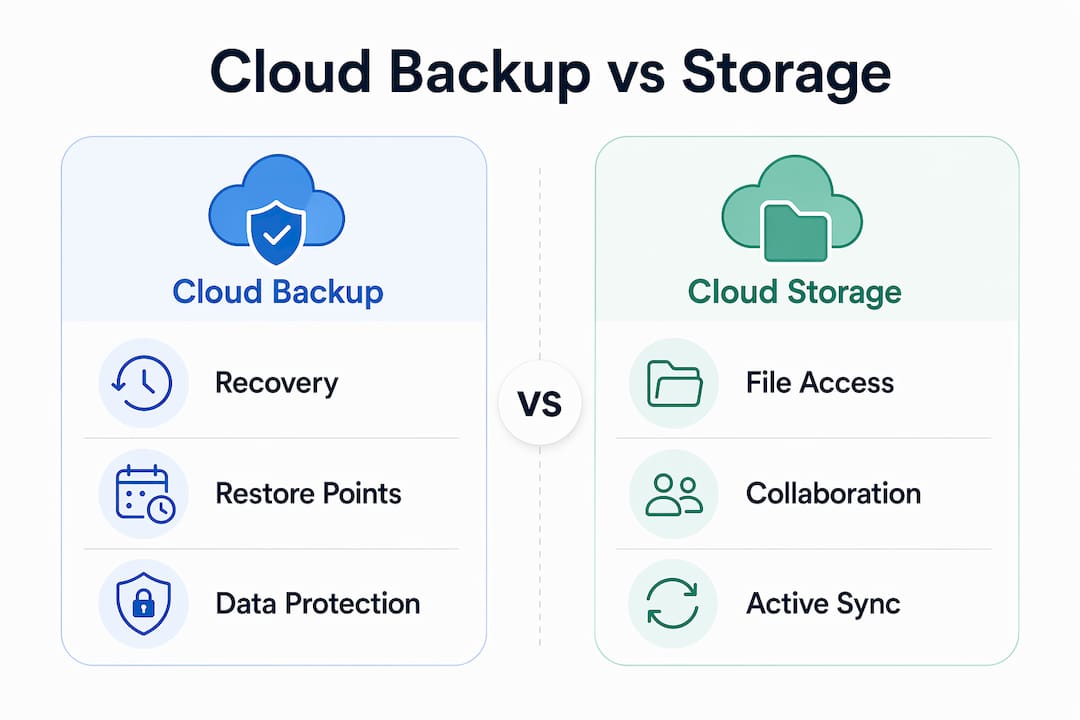
The table makes the operational difference clear. Backup solutions for cloud storage add a recovery layer that neither storage nor sync provides on its own. Organizations that rely solely on cloud storage or sync for data protection are exposed to exactly the scenarios backup is designed to prevent.
What are the key benefits of cloud backup for security and disaster recovery?
Cloud backup delivers advantages that go well beyond simply having a copy of your data somewhere offsite. For IT teams and business leaders, the most important benefits cluster around security, recovery speed, and operational cost.
Ransomware resilience through immutability. Immutable backups are written to WORM storage and cannot be modified, deleted, or encrypted for a defined retention period. This property is enforced at the storage layer, meaning even a compromised backup application cannot alter the protected copy. AWS S3 Object Lock and Azure Immutable Blob Storage both implement this at the object level. Ransomware resilience also depends on securing all access paths and credentials to prevent backup corruption, not just enabling the immutability flag.
Geographic redundancy. Cloud backup architectures replicate data across multiple regions or availability zones. This means a regional outage, a data center fire, or a localized infrastructure failure does not eliminate your last known good restore point.
Alignment with RPO and RTO objectives. Recovery Point Objective (RPO) defines the maximum acceptable data loss, measured in time. Recovery Time Objective (RTO) defines how quickly systems must be restored. An RPO of one hour means you can tolerate losing up to one hour of data. An RTO of 30 minutes means the system must be operational within 30 minutes of a failure. Cloud backup frequency, retention, and restore workflows must be designed to meet these targets. Frequent backups do not automatically mean a low RPO if restore points cannot be verified as recoverable.
Additional operational benefits include:
- Reduced infrastructure costs. No on-premises tape libraries, backup servers, or dedicated storage hardware to maintain.
- Managed services via BaaS. Backup as a Service providers handle scheduling, monitoring, and alerting, reducing the burden on internal IT teams.
- Simplified compliance. Retention policies and audit logs support regulatory requirements under frameworks like HIPAA, PCI DSS, and SOC 2.
- Scalability. Storage capacity scales with data growth without hardware procurement cycles.
Pro Tip: Treat your RPO and RTO as business commitments, not technical settings. Involve finance and operations leadership in setting these targets so IT can build a solution that reflects actual downtime costs.
What types of cloud backup solutions should you consider?
The right cloud backup solution depends on your workload type, recovery objectives, team capacity, and compliance requirements. Three deployment models dominate the market.
Backup as a Service (BaaS). BaaS is a managed approach where a third-party provider handles the entire backup and restoration workflow. Enterprises connect to the backup engine, configure preferences, and the provider’s infrastructure manages file transfer, encryption, storage, and recovery operations. NetApp and Veeam both offer BaaS platforms that reduce the need for internal backup expertise. The key evaluation criterion is whether the provider manages the full backup and restore workflow, not just the storage layer.
Public cloud native backup. AWS Backup, Azure Backup, and Google Cloud Backup and DR are native services that integrate directly with cloud workloads. They offer tight integration with EC2, RDS, EFS, and other services, making them a natural fit for organizations already running on those platforms.
Hybrid cloud backup. This model combines on-premises backup infrastructure with cloud storage for offsite copies. It suits organizations with large data volumes, strict latency requirements for local restores, or regulatory constraints on data residency.
| Solution Type | Best For | Key Advantage | Key Trade-off |
|---|---|---|---|
| BaaS (managed) | Teams with limited backup expertise | Fully managed, reduced operational burden | Less control over infrastructure |
| Public cloud native | AWS, Azure, or GCP workloads | Deep platform integration | Vendor lock-in risk |
| Hybrid cloud | Large on-prem data estates | Fast local restores plus offsite protection | Higher infrastructure complexity |
| Self-managed cloud | Organizations with specific compliance needs | Full control over data and processes | Requires dedicated internal expertise |
When selecting a solution, RPO and RTO targets are the primary technical constraints. A solution that cannot meet your recovery objectives is not a solution. For fintech and healthcare organizations, compliance requirements around data residency and encryption key management add additional selection criteria. Retail operations face their own data protection challenges, particularly around transaction data and customer records, where backup strategy for retail directly affects business continuity.
Key takeaways
Effective cloud backup requires treating recovery as the primary objective, not just data copying.
| Point | Details |
|---|---|
| Backup is for recovery | Cloud backup creates protected restore points, not just accessible file copies. |
| Immutability blocks ransomware | WORM storage and object lock prevent encrypted or deleted backups during an attack. |
| RPO and RTO drive design | Define acceptable data loss and downtime first, then build the technical solution to match. |
| BaaS reduces operational burden | Managed providers handle the full workflow, freeing internal teams from backup administration. |
| Sync and storage are not backup | Neither cloud sync nor cloud storage provides point-in-time recovery protection. |
Why most cloud backup strategies fail before they are tested
After working on cloud infrastructure for over a decade, the pattern I see most often is this: teams configure a backup job, watch it complete successfully for weeks, and assume they are protected. They are not. A backup that cannot be restored within a useful timeframe, or that has never been tested under realistic conditions, does not meet its purpose.
The most dangerous misconception in cloud backup is equating a green status light with resilience. I have seen organizations discover, during an actual incident, that their restore process takes six hours when their RTO is two. The backup was technically running. The recovery strategy was not.
My strongest recommendation is to treat backup and restore as a single integrated process. Schedule restore drills quarterly, not annually. Test file-level recovery, database recovery, and full system recovery separately, because each has different failure modes. For ransomware defense specifically, immutable backups using AWS S3 Object Lock or Azure Immutable Blob Storage are non-negotiable. But immutability alone is not enough. Secure the credentials and access paths that manage your backup environment with the same rigor you apply to production systems.
For organizations choosing between BaaS and self-managed solutions, I consistently recommend managed or hybrid approaches for teams under 10 engineers. The operational complexity of maintaining a reliable backup pipeline is underestimated. A managed provider that owns the full restore workflow removes a category of risk that most internal teams cannot adequately monitor. Pair this with a documented disaster recovery plan that maps every critical workload to its RPO and RTO, and you have a foundation that actually holds up when something goes wrong.
— Oleksandr
How IT-Magic can strengthen your cloud backup and recovery
IT-Magic has delivered cloud infrastructure for 300+ clients since 2010, including backup and disaster recovery architectures on AWS that meet PCI DSS, SOC 2, and HIPAA requirements. For organizations that need reliable automated backup, tested restore workflows, and RPO/RTO alignment built into their AWS environment, IT-Magic’s team of certified AWS engineers handles the full implementation.

Whether you are designing a new backup architecture or auditing an existing one, IT-Magic’s AWS infrastructure support services cover backup configuration, immutability setup, monitoring, and recovery testing. The goal is a backup strategy that works when it matters, not just when conditions are ideal. Contact IT-Magic to discuss your specific recovery objectives and data protection requirements.
FAQ
What is the cloud backup definition in simple terms?
Cloud backup is the process of copying data to a remote cloud environment so it can be recovered after loss, corruption, or disaster. It is designed specifically for recovery, not file access.
How does cloud backup differ from cloud storage?
Cloud storage is built for file access and collaboration, while cloud backup creates protected point-in-time restore points. Cloud storage does not protect against accidental deletion or ransomware propagation.
Is cloud backup secure enough for sensitive business data?
Yes, when implemented correctly. Modern cloud backup solutions use encryption in transit and at rest, immutable storage with WORM or object lock, and access controls that meet HIPAA, PCI DSS, and SOC 2 requirements.
What are RPO and RTO in cloud backup?
RPO (Recovery Point Objective) is the maximum acceptable data loss measured in time. RTO (Recovery Time Objective) is how quickly systems must be restored after a failure. Both drive backup frequency, retention policy, and restore workflow design.
What is backup as a service (BaaS)?
BaaS is a managed cloud backup model where a third-party provider handles scheduling, encryption, storage, and recovery operations. It reduces the internal expertise required to maintain a reliable backup and restore pipeline.
Alexander founded IT-Magic, an AWS Advanced Tier Services Partner delivering DevOps, cloud architecture, and managed services since 2010. He holds:
- AWS Certified Solutions Architect – Professional
- AWS Certified DevOps Engineer – Professional
- AWS Certified Security – Specialty
- AWS Certified Advanced Networking – Specialty
Talk to a certified AWS team trusted by INTERTOP, Foxtrot, Pandora, and J.Hilburn.
Get a free consultation


