

TL;DR:
- Successful AWS migration requires thorough discovery, phased waves, and strategic modernization to reduce costs and avoid failures. Proper planning of dependencies, security setup, and migration tools enables a smooth transition with minimal downtime. Post-migration optimization focuses on right-sizing and continuous cost management to maximize cloud value.
AWS migration is the structured process of moving workloads, data, and applications from on-premises or other cloud environments into Amazon Web Services using a defined sequence of discovery, planning, execution, and optimization. Done correctly, it reduces infrastructure costs significantly and positions your organization for cloud-native modernization. Done poorly, it causes outages, cost overruns, and months of cleanup. This guide gives IT managers and technical leaders a precise, phased AWS migration guide built around 2026 best practices, covering everything from landing zone setup through post-migration cost control. The core tools you need include AWS Migration Hub, AWS Application Migration Service, AWS Application Discovery Service, and AWS Control Tower.
How to migrate to AWS: prerequisites and tools
The single most important step before any migration work begins is a thorough environment discovery. Without it, you are moving blind. Comprehensive discovery can identify and decommission 10–20% of obsolete workloads immediately, and right-sizing alone can cut infrastructure costs by approximately 50%. Those numbers explain why organizations that skip discovery almost always overspend in the first year on AWS.

AWS Application Discovery Service collects server configuration, performance, and dependency data from your on-premises environment. It feeds directly into AWS Migration Hub, which becomes your single pane of glass for tracking migration status across every workload. Before you run a single replication job, you need this inventory complete and validated.
Your AWS Landing Zone is the second non-negotiable prerequisite. AWS Control Tower automates the setup of a multi-account environment with guardrails for governance, identity, and logging baked in from day one. Building the landing zone before mass migration prevents security gaps and compliance failures that are extremely expensive to fix retroactively.
Network connectivity is the third pillar. You need either AWS Direct Connect for dedicated, low-latency links or an IPsec VPN as a minimum baseline. Manual migrations cause configuration drift, which is why infrastructure as code tools like AWS CloudFormation and Terraform belong in your toolkit from the start. They give you consistent, repeatable environments and a reliable rollback path.
Core prerequisites checklist:
- Complete server and dependency inventory via AWS Application Discovery Service
- AWS Landing Zone deployed with AWS Control Tower
- Network connectivity validated (Direct Connect or VPN)
- IAM structure and account hierarchy defined
- Compliance requirements mapped (PCI DSS, SOC 2, HIPAA where applicable)
- Team roles assigned: cloud architect, security lead, migration engineer
Pro Tip: Run AWS Application Discovery Service for a minimum of two weeks before planning your first wave. One week of data misses weekly batch jobs and scheduled tasks that become critical dependencies mid-migration.
| Tool | Primary function | When to deploy |
|---|---|---|
| AWS Application Discovery Service | Inventory and dependency mapping | Pre-migration discovery phase |
| AWS Migration Hub | Centralized migration tracking | Throughout all migration waves |
| AWS Control Tower | Landing zone and governance setup | Before any workload migration |
| AWS Application Migration Service | Server replication and cutover | Execution phase per wave |
| AWS Database Migration Service | Database replication and conversion | Execution phase, database workloads |
| AWS CloudFormation / Terraform | Infrastructure as code and consistency | Prerequisites through post-migration |
How to plan migration waves for maximum success
Running this on your own AWS setup? IT-Magic is an AWS Advanced Tier Partner — we audit, fix, or fully manage it for you.
Get a free consultationWave-based migration is the most reliable structure for moving a large workload portfolio to AWS. Phased wave migration groups 5–10 applications per wave, enabling iterative learning and reducing systemic downtime risk. That constraint is deliberate. Smaller waves mean faster feedback loops, tighter blast radius if something fails, and a team that gets measurably better with each cycle.
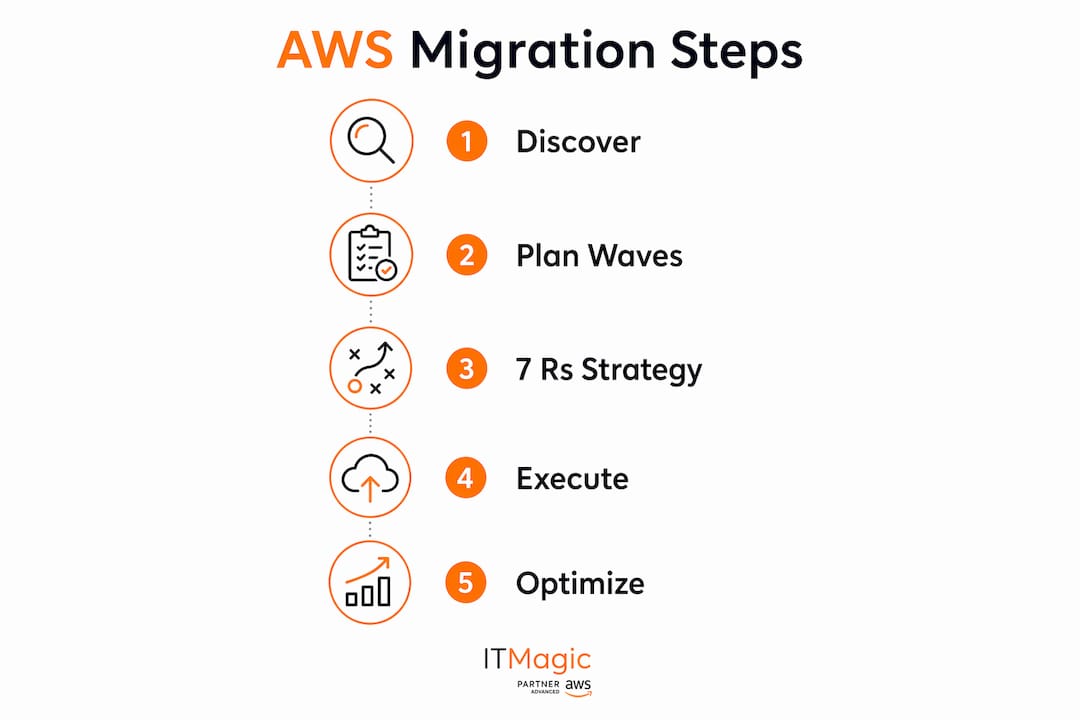
Wave selection is not arbitrary. You prioritize based on three criteria: risk level, technical complexity, and dependency mapping. Wave 1 should contain low-risk, low-dependency workloads. Development and test environments are ideal candidates. They let your team practice the full migration runbook without threatening production. Wave 2 moves to medium-complexity workloads. Production-critical systems come last, after your team has refined the process.
Dependency mapping deserves special attention. 70% of audited environments have at least 2–3 undocumented critical service dependencies. That statistic means the average enterprise has hidden connections that will break a migration if not found first. Dependency mapping is not optional; it is the difference between a clean cutover and an emergency rollback at 2 AM.
Wave planning best practices:
- Group applications by dependency cluster, not by business unit or team
- Document rollback criteria before each wave begins, not during
- Run a dry-run cutover in a staging environment for every wave
- Capture lessons learned after each wave and update the runbook before the next
- Avoid scheduling cutovers on Fridays or before major business events
Pro Tip: Build a migration factory model by automating wave setup with reusable CloudFormation templates. Each wave that uses the same automation baseline improves consistency and cuts setup time significantly.
What are the 7 Rs AWS migration strategies?
The 7 Rs framework is the standard decision model for choosing how to move each workload. Every application in your portfolio maps to one of these strategies, and the choice drives cost, timeline, and long-term cloud value.
Rehost (lift and shift) moves a workload to AWS with no changes. AWS Application Migration Service automates this. Use it for legacy systems with no near-term modernization plan. Replatform makes targeted optimizations without changing core architecture. Moving a MySQL database to Amazon RDS is a classic example. Refactor (re-architect) rebuilds the application to use cloud-native services. It delivers the highest long-term value but requires the most effort. Repurchase replaces the application with a SaaS product. Retire decommissions workloads that discovery reveals as unused. Retain keeps certain workloads on-premises temporarily due to compliance or latency constraints. Relocate moves VMware workloads to VMware Cloud on AWS with minimal change.
| Strategy | Best for | Key benefit | Main risk |
|---|---|---|---|
| Rehost | Legacy apps, fast migration | Speed, low effort | No cloud optimization |
| Replatform | Apps needing minor improvements | Managed service benefits | Requires testing |
| Refactor | High-value, cloud-native candidates | Maximum efficiency | High cost and time |
| Repurchase | Commodity software | Eliminates maintenance | Vendor lock-in |
| Retire | Unused or redundant workloads | Immediate cost savings | Stakeholder resistance |
| Retain | Compliance-constrained workloads | Risk reduction | Deferred migration |
| Relocate | VMware environments | Minimal disruption | Limited modernization |
Modernizing on the fly by moving databases to managed services like Amazon Aurora or containerizing applications to Amazon EKS captures full cloud value during migration rather than deferring it. Most organizations that plan to modernize “later” never do. Build modernization decisions into your wave planning from the start.
Pro Tip: Apply Retire aggressively. Discovery almost always surfaces servers running at under 5% CPU utilization for months. Decommissioning them before migration reduces your AWS bill from day one and simplifies the workload portfolio.
How to execute the migration phase safely
Safe execution follows a defined sequence: replicate, validate, test launch, cutover, and confirm. Skipping any step increases the probability of a failed cutover significantly.
- Install the AWS Application Migration Service agent on each source server. The agent begins continuous block-level replication to a staging area in your target AWS region.
- Validate replication lag. Replication lag should reach near-zero before you schedule a cutover window. If lag stalls, check network egress controls first. Replication failures most often stem from network proxies and egress policies dropping AWS MGN traffic, not from compute issues.
- Run a test launch. AWS Application Migration Service spins up a non-disruptive test instance in AWS. Run end-to-end application validation, performance benchmarks, and integration tests against this instance.
- Execute cutover. Schedule a maintenance window. Quiesce the source server, allow final replication sync, then launch the cutover instance in AWS.
- Validate post-cutover. Confirm application health, database connectivity, and dependent service communication before decommissioning the source.
For zero-downtime cutovers, weighted DNS shifts and blue-green deployments let you route a small percentage of traffic to the new AWS environment first. If metrics look healthy, you increase the weight progressively. If something fails, rollback is a single DNS change.
Cutover readiness checklist:
- Replication lag at near-zero for minimum 24 hours
- Test launch passed all validation checks
- Rollback trigger criteria defined and communicated to the team
- DNS TTL reduced to 60 seconds at least 48 hours before cutover
- Database backups confirmed current
Pro Tip: Validate SSL/TLS inspection policies on your firewall before starting replication. Deep packet inspection on outbound traffic is the most common cause of AWS MGN replication stalls that teams misdiagnose as agent or compute problems.
What post-migration steps optimize performance and cost?
Post-migration optimization is where the financial case for AWS migration actually materializes. The first 90 days after cutover are the highest-leverage window for cost and performance improvements.
Right-sizing is the top priority. AWS Compute Optimizer analyzes actual utilization data and recommends instance type changes. Post-migration right-sizing combined with FinOps practices drives ongoing cost savings that compound over time. Pair Compute Optimizer recommendations with AWS Savings Plans or Reserved Instances for predictable workloads to lock in further discounts.
Security hardening follows immediately. Review IAM policies and apply least-privilege principles across all roles. Enable Amazon GuardDuty for threat detection and AWS Security Hub for a unified compliance view. For organizations under HIPAA, PCI DSS, or SOC 2 requirements, these controls are not optional. They are audit requirements.
Key day-two operations activities:
- Run Compute Optimizer and implement right-sizing recommendations within 30 days
- Enable AWS Cost Explorer and set budget alerts by team or project tag
- Activate GuardDuty, Security Hub, and AWS Config across all accounts
- Set up Amazon CloudWatch dashboards for application performance baselines
- Containerize eligible workloads to Amazon EKS for density and portability gains
- Upgrade eligible databases to Amazon Aurora or other managed services
- Establish a FinOps review cadence (monthly minimum) to track spend against targets
For teams managing AWS cost reduction post-migration, tagging discipline is the foundation. Without consistent resource tagging, cost allocation becomes guesswork and optimization stalls.
Key Takeaways
A successful AWS migration requires structured discovery, phased wave execution, and deliberate post-migration optimization to deliver cost savings and modernization benefits.
| Point | Details |
|---|---|
| Discovery before everything | Use AWS Application Discovery Service to map dependencies and eliminate 10–20% of redundant workloads before migration begins. |
| Wave-based execution | Group 5–10 applications per wave to limit blast radius, enable rollback, and build team expertise iteratively. |
| Apply the 7 Rs deliberately | Match each workload to the right strategy; default to modernization during migration rather than deferring it. |
| Zero-downtime cutover techniques | Use weighted DNS or blue-green deployments to reduce cutover risk and preserve rollback options. |
| Post-migration optimization | Right-size with AWS Compute Optimizer and implement FinOps practices within the first 90 days to realize cost savings. |
The mistake I see most often in AWS migrations
Most AWS migrations I have worked on fail at the same point: teams treat migration as a server relocation project instead of a transformation program. The mindset difference is not subtle. A relocation mindset focuses on getting servers running in AWS. A transformation mindset asks what the workload should look like in AWS, and then plans the migration accordingly.
The discovery phase is where this plays out most visibly. Teams that rush discovery to hit a migration start date almost always hit a wall in wave 3 or 4 when an undocumented dependency surfaces and breaks a production cutover. The 70% figure on hidden dependencies is not an edge case. It is the norm. Two weeks of discovery data is the minimum. Four weeks is better for complex environments.
The second pattern I see consistently is the “modernize later” trap. Organizations plan a lift-and-shift migration with a promise to refactor afterward. That refactoring rarely happens. Once the migration is declared complete, the team moves to the next project and the technical debt stays in AWS indefinitely. The organizations that get the most value from AWS build modernization decisions into wave planning from the start, even if it means migrating fewer applications per quarter.
Automation is the third lever that separates fast, consistent migrations from slow, error-prone ones. Infrastructure as code is not a nice-to-have. It is the mechanism that makes your migration factory repeatable. Every manual step in a migration runbook is a future incident waiting to happen.
— Oleksandr
IT-Magic’s AWS migration support for technical teams
IT-Magic is an AWS Advanced Tier Services Partner with over 700 completed projects since 2010. The team specializes in the exact phases covered in this guide: landing zone architecture, phased migration execution, security hardening, and post-migration cost control.

For IT managers who need a certified partner to reduce migration risk, IT-Magic’s AWS infrastructure support services cover the full migration lifecycle. That includes landing zone setup with AWS Control Tower, migration factory execution, compliance readiness for HIPAA and PCI DSS, and ongoing FinOps optimization. Teams migrating containerized workloads can also access dedicated Kubernetes support for EKS deployment and operations. Contact IT-Magic to build a migration plan tailored to your environment, timeline, and compliance requirements.
FAQ
What is the first step to migrate to AWS?
The first step is a comprehensive discovery phase using AWS Application Discovery Service to inventory all workloads, map dependencies, and identify redundant systems before any migration work begins.
How long does an AWS migration typically take?
Timeline depends on portfolio size and complexity. Small environments with 20–50 servers can complete migration in 8–12 weeks. Large enterprise portfolios with hundreds of workloads typically require 6–18 months using a phased wave approach.
What are the 7 Rs of AWS migration?
The 7 Rs are Rehost, Replatform, Refactor, Repurchase, Retire, Retain, and Relocate. Each strategy matches a specific workload profile and business requirement, from simple lift-and-shift to full cloud-native re-architecture.
How do you avoid downtime during AWS migration cutover?
Weighted DNS shifts and blue-green deployments allow gradual traffic routing to the new AWS environment, so teams can validate performance before committing fully and roll back with a single configuration change if needed.
What causes AWS migration replication failures?
Replication stalls most commonly result from network egress controls and SSL/TLS inspection policies blocking AWS Application Migration Service traffic, not from agent or compute problems. Validate egress paths before starting replication.
Recommended
- Workload Migration for IT Teams: A 2026 Strategy Guide
- Articles About Site and Server Support | IT-Magic
- Cloud Migration Strategies: Everything You Need to Know | IT-Magic
- On-Premise to AWS Cloud Migration Step by Step | IT-Magic
Alexander founded IT-Magic, an AWS Advanced Tier Services Partner delivering DevOps, cloud architecture, and managed services since 2010. He holds:
- AWS Certified Solutions Architect – Professional
- AWS Certified DevOps Engineer – Professional
- AWS Certified Security – Specialty
- AWS Certified Advanced Networking – Specialty
Talk to a certified AWS team trusted by INTERTOP, Foxtrot, Pandora, and J.Hilburn.
Get a free consultation


