

TL;DR:
- Scaling ecommerce on AWS involves selecting appropriate cloud services to ensure store reliability under high traffic at a reasonable cost. Using services like DynamoDB, ElastiCache, and SQS helps build a scalable architecture, with microservices and automation improving cost efficiency and resilience. Proper security measures, load testing, and ongoing optimization are essential for successful growth and security.
Scaling ecommerce on AWS means matching the right cloud services to your workload so your store performs reliably under any traffic load, at a cost that makes sense. AWS cloud solutions for ecommerce give you the building blocks: DynamoDB for product catalogs, ElastiCache for session caching, SQS for order queuing, CloudFront for global content delivery, and Terraform for repeatable infrastructure. The difference between a store that crashes on Black Friday and one that handles 10x normal traffic comes down to architecture decisions made months before the sale begins.
Which AWS services are essential for scaling ecommerce effectively?
The right AWS service for each workload is the foundation of any ecommerce scale strategy. Choosing the wrong service creates bottlenecks that no amount of compute can fix.
DynamoDB, ElastiCache Redis, and SQS form the core data layer for most ecommerce platforms. DynamoDB handles predictable CRUD operations like product lookups and order writes. Redis caches session data so users stay logged in without hitting your database on every click. SQS decouples checkout flows so a surge in orders does not block your payment service.
Beyond the data layer, three more services carry significant weight:
- Amazon CloudFront delivers static assets like product images and category pages from edge locations close to your customers. CloudFront caching cuts backend load and reduces global latency without any application changes.
- Amazon ECS Fargate runs containerized microservices without requiring you to manage the underlying servers. Each service scales independently, so your search service can grow without touching your checkout service.
- Terraform manages all of this as code. Infrastructure as Code with Terraform prevents configuration drift and lets you spin up identical staging environments before any major traffic event.
Pro Tip: Build your Terraform modules around workload types, not team boundaries. A “checkout” module that owns its own DynamoDB table, SQS queue, and ECS service is far easier to scale and debug than a shared monolithic infrastructure stack.
How to architect a scalable ecommerce platform on AWS
Running this on your own AWS setup? IT-Magic is an AWS Advanced Tier Partner — we audit, fix, or fully manage it for you.
Get a free consultationA monolithic architecture puts your product catalog, checkout, search, and user accounts into one deployable unit. That works at launch. It breaks under scale because one slow component blocks every other component.

Microservices solve this by splitting each business function into its own service with its own data store. The checkout service owns its database. The product service owns its catalog. Neither can take down the other. Migrating from a monolith to microservices on AWS reduced infrastructure costs by 40% for one platform while supporting over 2 million monthly active users. That cost drop comes from right-sizing each service independently rather than over-provisioning a single large instance.
A production-ready ecommerce architecture on AWS follows this sequence:
- API Gateway sits at the front, routing traffic to the correct microservice and handling authentication, rate limiting, and SSL termination.
- Application Load Balancer distributes traffic across ECS Fargate tasks within each service, with health checks that pull unhealthy tasks out of rotation automatically.
- Multi-AZ deployment places your RDS databases and ElastiCache clusters across at least two Availability Zones. A single AZ failure does not take your store offline.
- Multi-region replication for DynamoDB Global Tables keeps product and user data close to customers in different geographies, cutting read latency for international traffic.
- Terraform modules codify every resource so you can reproduce your production environment exactly in staging. This matters most before high-traffic events when you need to test at scale without risking production.
| Architecture pattern | Best for | Key trade-off |
|---|---|---|
| Monolithic on EC2 | Early-stage stores under 50K monthly users | Simple to deploy, hard to scale independently |
| Microservices on ECS Fargate | Growth-stage stores with distinct service bottlenecks | Higher operational complexity, lower cost at scale |
| Serverless with Lambda | Bursty, event-driven workloads like email triggers | Near-zero idle cost, cold start latency on first request |
| Hybrid (microservices + Lambda) | Mature platforms with mixed workload types | Maximum flexibility, requires strong IaC discipline |
The Fanatics Commerce migration to AWS demonstrates what this looks like at enterprise scale. That migration achieved up to 48% infrastructure cost savings while improving global performance. The savings came from eliminating over-provisioned on-premises hardware and replacing it with services sized to actual demand.
What are the best practices for AWS auto-scaling for ecommerce?
AWS Auto Scaling is the mechanism that adds or removes compute capacity in response to traffic. Configuring it correctly is the difference between a store that stays up during a flash sale and one that returns 503 errors to paying customers.
Three scaling modes work together for ecommerce:
- Scheduled scaling pre-warms capacity before known events. If your sale starts at 9:00 AM, you schedule a scaling action at 8:30 AM. Your instances are ready before the first customer arrives.
- Predictive scaling uses 14 months of historical traffic data to forecast demand and provision capacity ahead of time. This handles recurring patterns like weekend spikes without manual intervention.
- Reactive scaling responds to real-time metrics like CPU utilization or request count. The critical detail here is instance startup time. Default AMIs with dependencies installed at boot can take 7–8 minutes to become ready. Pre-baked AMIs with all dependencies already installed reduce that window to 45 seconds. That difference determines whether your scaling response catches a traffic spike or misses it entirely.
Well-configured auto-scaling architectures handle traffic spikes up to 12x baseline with response times under 2 minutes. That is the benchmark to target for any ecommerce platform expecting seasonal peaks.
Two additional settings matter more than most teams realize. Cooldown periods prevent your scaling policy from adding instances every 30 seconds during a sustained spike, which wastes money without improving performance. Target tracking policies tied to request count per target are more accurate for ecommerce than CPU-based policies, because a product page can be CPU-light but connection-heavy.
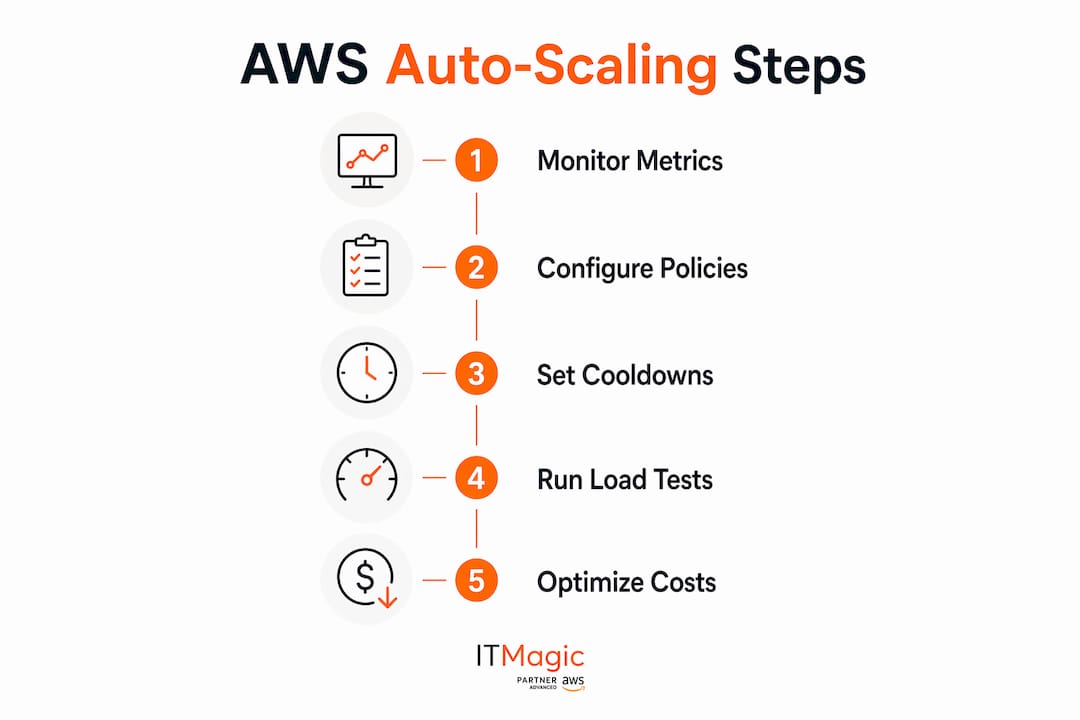
Pro Tip: Run a load test against your staging environment at 150% of your expected peak before every major sale. Use AWS CloudWatch alarms to verify that scaling triggers fire at the thresholds you configured, not the ones you assumed.
For stores that also invest in driving traffic to those scaled pages, technical SEO for ecommerce compounds the value of a reliable AWS infrastructure by ensuring search engines can crawl and index your catalog at scale.
How can ecommerce businesses reduce AWS costs while scaling?
Cost control on AWS is not about spending less. It is about spending on the right things. Stores that over-provision to feel safe end up paying for idle capacity every month.
The highest-impact cost moves for ecommerce platforms are:
- Migrate from monolith to microservices. Each service scales to its actual demand. You stop paying for a large instance that runs at 20% utilization because one component occasionally spikes.
- Right-size your instances. AWS Compute Optimizer analyzes your actual usage and recommends instance types. Most teams discover they are running instances one or two sizes too large.
- Mix On-Demand and Reserved capacity. Reserve capacity for your baseline load at a significant discount. Use On-Demand for the variable portion that scales up during peaks.
- Use AWS Lambda for event-driven tasks. Order confirmation emails, inventory updates, and webhook processing cost almost nothing on Lambda because you pay only for execution time, not idle time.
- Monitor with AWS Cost Explorer. Set budget alerts before costs exceed thresholds, not after. Surprises on your AWS bill are always avoidable with proper alerting.
The IT-Magic team has seen this pattern repeatedly: stores that move their ecommerce workloads to AWS with a proper architecture review cut infrastructure spend significantly compared to lift-and-shift migrations that simply move existing over-provisioned servers to the cloud.
How to ensure security and resilience when scaling ecommerce on AWS
Security cannot be an afterthought when you are handling payment data and customer accounts at scale. AWS provides the tools. The responsibility for configuring them correctly sits with your team.
The non-negotiable security controls for any ecommerce platform on AWS are:
- IAM least-privilege policies so each service can only access the resources it needs. A compromised checkout service should not have read access to your user database.
- AWS Secrets Manager for storing database credentials, API keys, and payment processor tokens. Hardcoded credentials in environment variables are a common source of breaches.
- AWS WAF in front of CloudFront and your Application Load Balancer to block SQL injection, cross-site scripting, and bot traffic before it reaches your application.
- Encryption at rest and in transit for all data stores. DynamoDB, RDS, and S3 all support encryption at rest with AWS KMS. All traffic between services should use TLS.
- PCI DSS compliance for any store processing card payments. AWS provides a shared responsibility model where the infrastructure layer is certified, but your application configuration must meet the remaining controls.
Resilience comes from treating failure as expected, not exceptional. Multi-AZ deployments, automated RDS snapshots, and tested disaster recovery runbooks are the baseline. A store that has never practiced restoring from backup is not resilient. It just has not failed yet.
Pro Tip: Enable AWS Config rules to continuously audit your infrastructure against your security baseline. Any drift from your approved configuration triggers an alert before it becomes a vulnerability.
Key Takeaways
Scaling ecommerce on AWS requires matching each workload to the right AWS service, automating infrastructure with Terraform, and configuring auto-scaling before traffic peaks arrive.
| Point | Details |
|---|---|
| Match services to workloads | Use DynamoDB for CRUD, ElastiCache Redis for sessions, and SQS for order queuing. |
| Automate infrastructure with Terraform | IaC prevents configuration drift and enables safe, repeatable deployments before high-traffic events. |
| Pre-bake AMIs for fast scaling | Reduce instance startup from 8 minutes to 45 seconds to catch traffic spikes before they cause errors. |
| Migrate to microservices for cost control | Splitting services independently can cut infrastructure costs by 40% or more at scale. |
| Secure by default, not by exception | Apply IAM least-privilege, AWS WAF, Secrets Manager, and PCI DSS controls before you scale, not after. |
What I have learned from scaling ecommerce platforms on AWS
The teams that struggle most with AWS scaling share one pattern: they treat infrastructure as something to fix after a problem appears. They add capacity after the crash. They add security after the breach. They add cost controls after the bill shock.
The stores that scale well do the opposite. They run load tests in staging before every major sale. They set CloudWatch alarms before they need them. They review AWS Cost Explorer weekly, not quarterly. The technical work is not especially complex. The discipline to do it consistently is where most teams fall short.
One thing I push back on regularly is the assumption that microservices are always the right answer. For a store doing under 50,000 monthly active users, a well-structured monolith on ECS is easier to operate and cheaper to run than a distributed microservices system. The migration to microservices pays off when you have clear service boundaries and distinct scaling needs per component. Migrating before you hit that point adds complexity without adding value.
The other lesson that took time to internalize: AWS migration for high-load stores is not a one-time event. It is an ongoing process of right-sizing, refactoring, and re-evaluating which services fit your current workload. The stores that treat it as a project with an end date end up back in the same position two years later.
— Oleksandr
AWS expertise that scales with your ecommerce business
IT-Magic has delivered over 700 infrastructure projects since 2010, with a specific focus on ecommerce and retail workloads on AWS. The work covers architecture design, migration from monolithic systems, auto-scaling configuration, cost optimization, and PCI DSS compliance.

For ecommerce businesses that need a reliable AWS infrastructure before their next peak season, IT-Magic’s AWS consulting services cover the full scope: from initial architecture review through production deployment and ongoing support. The team holds AWS Advanced Tier Services Partner status and includes certified specialists in DevOps, security, and networking. If your store is growing faster than your current infrastructure can handle, that is the right starting point.
FAQ
What AWS services are best for ecommerce scaling?
DynamoDB, ElastiCache Redis, SQS, CloudFront, and ECS Fargate cover the core needs of most ecommerce platforms. Each service addresses a specific workload type, from data storage to content delivery to asynchronous order processing.
How much can AWS reduce ecommerce infrastructure costs?
Migrating to a microservices architecture on AWS has reduced infrastructure costs by 40% for platforms supporting over 2 million monthly active users. Large-scale migrations have achieved savings of up to 48%.
What is the fastest way to configure AWS auto-scaling for ecommerce?
Use scheduled scaling for known events, predictive scaling for recurring traffic patterns, and pre-baked AMIs for reactive scaling. Pre-baked AMIs reduce instance startup time from 7–8 minutes to 45 seconds, which is the critical factor during sudden traffic spikes.
How does Terraform help with ecommerce scaling on AWS?
Terraform manages AWS infrastructure as code, preventing configuration drift and enabling identical staging environments. This lets teams test at scale before high-traffic events without risking production systems.
What security controls are required for ecommerce platforms on AWS?
IAM least-privilege policies, AWS WAF, Secrets Manager, encryption at rest and in transit, and PCI DSS compliance controls are the baseline requirements for any ecommerce platform handling payment data on AWS.
Alexander founded IT-Magic, an AWS Advanced Tier Services Partner delivering DevOps, cloud architecture, and managed services since 2010. He holds:
- AWS Certified Solutions Architect – Professional
- AWS Certified DevOps Engineer – Professional
- AWS Certified Security – Specialty
- AWS Certified Advanced Networking – Specialty
Talk to a certified AWS team trusted by INTERTOP, Foxtrot, Pandora, and J.Hilburn.
Get a free consultation


