

Use IRSA when you need portability across identity providers, you’re running mixed EKS and non-EKS Kubernetes clusters, or your compliance team wants explicit, auditable IAM trust policies tied to a sub claim. Choose EKS Pod Identity instead when you’re fully committed to EKS, want to cut IAM trust-policy edits, and are starting fresh without years of existing IRSA annotations to unwind.
The technical reason comes down to trust mechanics. IRSA registers your cluster’s OIDC issuer as an IAM identity provider, then lets Pods call sts:AssumeRoleWithWebIdentity using a projected ServiceAccount token. Pod Identity skips the OIDC dance entirely, routing credential requests through a Pod Identity Agent and the EKS Auth API instead.
If you’re starting today, your next move depends on where you are. New cluster, no legacy baggage? Install the Pod Identity Agent add-on and move on. Existing IRSA setup with dozens of annotated ServiceAccounts? Don’t rip it out. Run both side by side and migrate on your own schedule.
- Scope: IRSA works with any OIDC-compatible identity provider; Pod Identity only works inside EKS.
- Operational overhead: IRSA needs trust-policy edits per role; Pod Identity centralizes credential issuance through EKS APIs.
- Auditability: Both log to CloudTrail, but IRSA’s explicit
subconditions make manual policy review more granular.
The real decision isn’t “which is better” — it’s “which trust model matches the compliance and portability constraints you already have.” Teams with strict audit requirements often keep IRSA specifically because its trust policies spell out exactly which namespace and ServiceAccount can assume a role, in plain JSON anyone can read.
Table of Contents
- IRSA vs EKS Pod Identity: A Technical Comparison
- How Do You Set Up IRSA Step by Step?
- Why Is My Pod Not Getting IRSA Credentials?
- Can You Run IRSA and Pod Identity Together?
- Security Best Practices for IRSA at Scale
- When Should You Avoid IRSA?
- How IT-Magic Handles IRSA Setup and Identity Migrations
- TL;DR Technical Takeaways
- Sources
- FAQ
IRSA vs EKS Pod Identity: A Technical Comparison
Running this on your own AWS setup? IT-Magic is an AWS Advanced Tier Partner — we audit, fix, or fully manage it for you.
Get a free consultationThe two approaches solve the same problem, credential delivery to Pods, through fundamentally different plumbing. Understanding where they diverge saves you from a migration you’ll regret in six months.
Trust model. IRSA establishes a federated OIDC trust between your cluster’s issuer URL and IAM, then Pods present a projected, signed JWT to STS and call AssumeRoleWithWebIdentity. Pod Identity cuts out the OIDC layer completely: the Pod Identity Agent running as a DaemonSet exchanges the ServiceAccount token directly with the EKS Auth API, which then vends temporary credentials.

Scope and portability. This is the dimension that decides most real-world choices. IRSA’s OIDC foundation means the same pattern works on self-managed Kubernetes, EKS Anywhere, or any cluster where you can register an OIDC provider with IAM. Pod Identity is EKS-only, full stop. If your organization runs even one non-EKS cluster that needs the same IAM role pattern, Pod Identity can’t help you there.
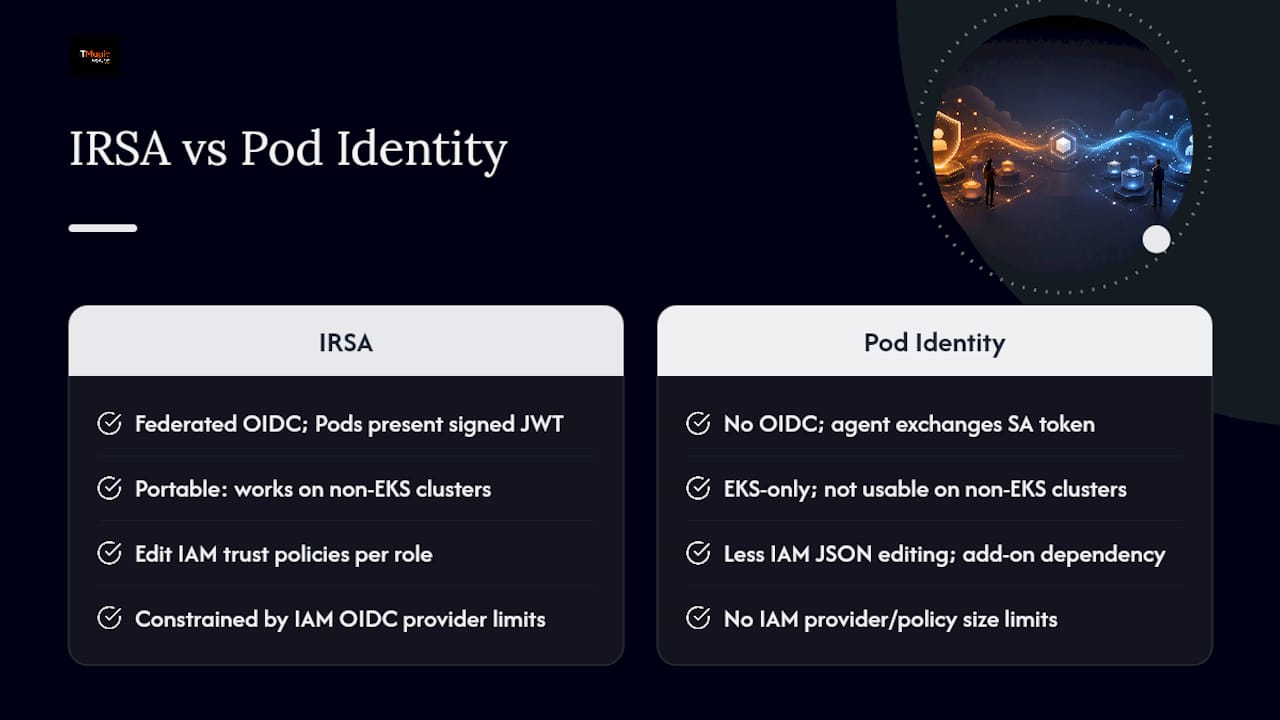
Operational overhead. IRSA requires you to touch IAM trust policies every time you add a role, and each policy needs an exact sub condition referencing namespace and ServiceAccount name. Pod Identity moves that mapping into the EKS API via aws eks create-pod-identity-association, which means less JSON editing but a new dependency on the agent add-on staying healthy on every node.
Scalability and limits. AWS caps IAM OIDC providers per account, and trust policies have a size ceiling that matters once you’re mapping dozens of ServiceAccounts to a single role with conditional logic. Pod Identity sidesteps both constraints since role associations live in the EKS control plane, not embedded in IAM trust policy text.
Security and auditability. Both mechanisms log to CloudTrail. IRSA calls show up as AssumeRoleWithWebIdentity events; Pod Identity calls appear as AssumeRoleForPodIdentity. IRSA’s explicit trust conditions tend to be easier for compliance reviewers to eyeball directly in the IAM console, since the namespace and ServiceAccount binding is visible in the policy document itself rather than in a separate EKS API resource.
Tooling. For IRSA you’re working with eksctl utils associate-iam-oidc-provider, eksctl create iamserviceaccount, or raw AWS CLI trust-policy JSON. For Pod Identity, it’s eksctl create addon --name eks-pod-identity-agent followed by aws eks create-pod-identity-association.
Quick decision checklist
- Need portability beyond EKS? Pick IRSA.
- Running a brand-new EKS cluster with no legacy IAM patterns? Pod Identity gets you running faster.
- Heavy multi-account or multi-cluster role reuse? Compare OIDC provider limits against Pod Identity’s simpler cross-cluster role association before committing either way.
- Compliance team wants human-readable trust conditions in IAM directly? Stick with IRSA.
How Do You Set Up IRSA Step by Step?
Before touching any commands, confirm three things: your EKS cluster is on a supported version, your AWS SDK version in the application supports AssumeRoleWithWebIdentity credential chaining, and you have eksctl installed alongside IAM permissions to create OIDC providers and roles.
-
Associate the OIDC provider with your cluster (skip if already associated):
eksctl utils associate-iam-oidc-provider --cluster my-cluster --approve -
Create the IAM role with a trust policy scoped to your namespace and ServiceAccount. The trust policy’s
subcondition must read exactlysystem:serviceaccount:<namespace>:<service-account-name>, andaudmust equalsts.amazonaws.com. -
Attach minimum-privilege policies. For an app that only reads from S3, attach a scoped
AmazonS3ReadOnlyAccess-style custom policy rather than the AWS-managed version, which grants access to every bucket in the account. For Managed Service for Prometheus, AWS documents an IRSA-specific role withaps:RemoteWritepermissions scoped to a single workspace ARN. -
Create or annotate the ServiceAccount. The fastest path is letting
eksctldo steps 2 through 4 in one command:eksctl create iamserviceaccount --name my-app-sa --namespace default --cluster my-cluster --attach-policy-arn arn:aws:iam::123456789012:policy/MyS3ReadPolicy --approveThe AWS CLI equivalent means manually running
aws iam create-role,aws iam attach-role-policy, and then adding theeks.amazonaws.com/role-arnannotation to your ServiceAccount YAML by hand. -
Verify from inside a test Pod. Exec into a Pod using the annotated ServiceAccount and check:
echo $AWS_ROLE_ARNreturns the expected role.ls /var/run/secrets/eks.amazonaws.com/serviceaccount/shows the projectedtokenfile.aws sts get-caller-identityreturns the assumed role’s ARN, not the node’s instance role.
| Command | Tool | Verification |
|---|---|---|
eksctl utils associate-iam-oidc-provider |
eksctl | aws iam list-open-id-connect-providers shows the new provider |
eksctl create iamserviceaccount |
eksctl | kubectl get sa <name> -o yaml shows the role-arn annotation |
aws sts get-caller-identity |
AWS CLI (inside Pod) | Returns assumed-role ARN matching the IAM role, not the node role |
kubectl describe pod <pod> |
kubectl | Shows injected AWS_ROLE_ARN and AWS_WEB_IDENTITY_TOKEN_FILE env vars |
Why Is My Pod Not Getting IRSA Credentials?
Most IRSA failures fall into four buckets, and the fix depends on which one you’re hitting.
AccessDenied from the AWS SDK. This usually means the role assumed correctly, but the attached IAM policy doesn’t grant the action you’re calling. Run aws iam get-role --role-name <role> and cross-check the attached policies against the exact API call failing in your app logs.
Missing AWS_ROLE_ARN or AWS_WEB_IDENTITY_TOKEN_FILE env vars. If these aren’t present in the Pod, the pod-identity-webhook never injected them. That mutating admission webhook is what wires up both the environment variables and the projected token volume; if it’s misbehaving, check kubectl logs for the webhook Pod in kube-system and confirm the webhook’s MutatingWebhookConfiguration still matches your Pod’s namespace selector.
Trust policy mistakes. The sub claim comparison is exact-match and case-sensitive. A trailing space, wrong namespace, or a wildcard where AWS expects an exact ServiceAccount name will cause immediate rejection at AssumeRoleWithWebIdentity. Double-check aud equals sts.amazonaws.com too, since some hand-written trust policies default to the wrong audience string.
SDK version mismatches. Older AWS SDK versions may not support the web identity credential provider in the same credential chain order as current releases, which can cause the SDK to silently fall back to instance metadata credentials instead of the IRSA role. Update to a current SDK release before assuming the trust policy is broken.
One more edge case worth knowing: if a Pod runs with hostNetwork: true, it can sometimes reach the EC2 Instance Metadata Service directly, which changes which credentials the SDK picks up first in its chain. That’s rarely what you want when IRSA is supposed to be the source of truth.
Pro Tip: Run a three-step validation sequence when debugging: first confirm the token file exists in the Pod (rules out webhook failure), then confirm the env vars are injected (rules out annotation drift), then run aws sts get-caller-identity (isolates whether it’s a trust-policy or SDK-side issue). Whichever step fails tells you exactly where to look next.
Can You Run IRSA and Pod Identity Together?
Yes, and for most production clusters, running both during a transition period is the safer path than a hard cutover. AWS designed Pod Identity to coexist with IRSA rather than force an all-or-nothing switch.
To enable coexistence, update your IAM role’s trust policy to include both the existing OIDC federated principal and the pods.eks.amazonaws.com service principal used by Pod Identity. The role itself doesn’t need duplicating; you’re just widening who can assume it.
- Inventory every ServiceAccount currently using IRSA annotations and map which IAM role each one assumes.
- Update trust policies on those roles to add the Pod Identity principal alongside the existing OIDC trust, without removing the OIDC trust.
- Deploy the Pod Identity Agent as an EKS add-on, scoped first to a canary namespace rather than cluster-wide.
- Create Pod Identity associations for a small, low-risk workload in that canary namespace using
aws eks create-pod-identity-association. - Run smoke tests against the canary Pod, confirming it can still call the same AWS APIs it did under IRSA.
- Roll forward namespace by namespace, watching CloudTrail for
AssumeRoleForPodIdentityevents to confirm which mechanism each workload is actually using.
- If a canary Pod fails, roll back by removing its Pod Identity association. The IRSA annotation and OIDC trust remain untouched, so the Pod falls straight back to its original credential path.
- Keep both trust principals active until every workload has been validated under Pod Identity. Don’t remove OIDC trust prematurely.
- Use CloudTrail’s
eventNamefilter to distinguishAssumeRoleWithWebIdentity(IRSA) fromAssumeRoleForPodIdentity(Pod Identity) traffic during the transition, so you know exactly which workloads have actually cut over versus which are still calling the old path.
Security Best Practices for IRSA at Scale
Treat IRSA roles the same way you’d treat any other production IAM surface: least privilege by default, no exceptions for “it’s just internal.”
- Design one narrow IAM policy per ServiceAccount rather than sharing a broad role across multiple applications. A single
Resource: "*"statement defeats the entire point of scoping credentials to a workload. - Set the trust policy’s
subcondition to the exact namespace and ServiceAccount name, never a wildcard pattern, and confirmaudequalssts.amazonaws.comevery time. - Automate OIDC provider and role creation through Terraform or
eksctlrather than clicking through the console. The terraform-aws-modules IAM submodule handles OIDC thumbprint registration automatically, which avoids the subtle TLS mismatches that silently break trust validation when done by hand. - Enable CloudTrail logging for
AssumeRoleWithWebIdentityevents and pair it with IAM Access Analyzer to flag roles with unused permissions. - For multi-account or multi-cluster setups, be deliberate about OIDC provider limits per account. A centralized role pattern that lets multiple clusters assume the same role through a shared trust condition can work, but test it against your account’s provider limits first.
- Rely on Kubernetes’ built-in projected token rotation and the AWS SDK’s automatic credential refresh. Never bake static credentials into container images or Kubernetes secrets as a workaround for IRSA setup friction, a mistake worth avoiding entirely, and worth pairing with a broader look at secrets management hygiene across the cluster.
Pro Tip: Create ServiceAccounts with their role association fully defined in your infrastructure-as-code, rather than annotating existing ServiceAccounts manually. Manual annotation drift, where someone edits a ServiceAccount directly in a cluster and forgets to update the Terraform state, is one of the most common causes of “it worked yesterday” IRSA incidents.
Pro Tip: Include the ServiceAccount name and namespace as a comment directly in the IAM policy document, not just the trust policy. When an auditor pulls a list of IAM policies six months from now, that context saves everyone a support ticket.
When Should You Avoid IRSA?
IRSA isn’t the right tool in every scenario, and forcing it where it doesn’t fit creates maintenance debt.
- If you’re fully committed to EKS with no plans to run other Kubernetes distributions, and your priority is minimizing IAM trust-policy edits, Pod Identity’s simpler operational model may serve you better from day one.
- Very large multi-cluster or multi-namespace deployments can bump into OIDC provider limits per account or trust-policy size ceilings when a single role needs to serve dozens of ServiceAccount conditions.
- Workloads needing extremely dynamic, per-pod credential assignment that changes faster than IAM trust policies can reasonably track may be better served by a node-local agent pattern or a different runtime identity model entirely.
- If part of your fleet runs on non-EKS Kubernetes distributions that can’t register the same cluster OIDC provider with IAM in a compatible way, IRSA’s portability advantage disappears for that subset, and you’ll need a separate identity strategy anyway.
How I decide between IRSA and Pod Identity on real projects
Most enterprise clients land on a version of the same rule: if the ServiceAccount-to-role mapping already exists and works, leave it on IRSA until there’s a concrete reason to move it. Migrating for its own sake burns engineering time that rarely shows up as a line item anyone budgeted for.
The factors that actually tip the decision are rarely technical. Compliance and audit posture matter more than almost anything else. Teams under SOC 2 or PCI DSS scrutiny tend to keep IRSA specifically because the trust policy is a document an auditor can read without needing access to the EKS control plane. Multi-account sprawl matters too. Once you have OIDC providers registered in a dozen accounts, ripping that out for Pod Identity is a bigger project than it looks on paper, and the payoff (fewer trust-policy edits) rarely justifies the audit and testing overhead.
Where infrastructure-as-code maturity is high and the team already treats Terraform as the source of truth for IAM, the “operational overhead” argument for Pod Identity mostly evaporates. Terraform makes IRSA trust-policy edits close to zero-touch anyway, since a role change is a pull request, not a manual console click. In that world, the real deciding factor becomes portability. A fintech client running one production EKS cluster and no plans to diversify made sense to migrate wholesale to Pod Identity. A platform team supporting both EKS and a self-managed cluster for regulatory reasons kept IRSA everywhere, because introducing a second identity model for one cluster type wasn’t worth the operational split.
How IT-Magic Handles IRSA Setup and Identity Migrations
IT-Magic is the alternative to guessing your way through trust-policy JSON and OIDC thumbprint mismatches: as an AWS Advanced Tier Services Partner, we set up IRSA, automate it with Terraform, and plan Pod Identity migrations without the production outages that come from doing it live and unsupervised.

Our team builds IAM role and OIDC provider automation directly into your existing infrastructure-as-code, audits current IRSA usage for over-permissioned roles, and runs phased Pod Identity migrations with canary testing built in, rather than a risky cluster-wide cutover. We’ve applied this kind of infrastructure work on projects like our AWS cost optimization engagement with INTERTOP, where scalable, well-architected identity and infrastructure patterns directly reduced operational cost and complexity.
If you’re auditing existing IRSA roles, planning a Pod Identity migration, or troubleshooting a production credential issue right now, reach out to IT-Magic to scope the work and get a concrete plan for your cluster.
TL;DR Technical Takeaways
IRSA fits multi-cluster, non-EKS, or compliance-heavy environments, while EKS Pod Identity suits EKS-only clusters that want less IAM trust-policy maintenance.
- Use IRSA when you need portability beyond EKS or explicit, auditable IAM trust conditions.
- Enable IRSA fast with
eksctl create iamserviceaccount, then verify withaws sts get-caller-identityfrom inside the Pod. - Debug failures in this order: token file present, env vars injected, then trust-policy or SDK issue.
- Coexistence works: widen the trust policy to include both OIDC and
pods.eks.amazonaws.comprincipals during migration. - Monitor CloudTrail for
AssumeRoleWithWebIdentityversusAssumeRoleForPodIdentityevents to confirm which mechanism each workload actually uses.
| Point | Details |
|---|---|
| Pick by portability | Use IRSA for multi-cluster or non-EKS environments; Pod Identity for EKS-only setups. |
| Verify with STS | Run aws sts get-caller-identity inside a Pod to confirm the assumed role is correct. |
| Trust policy precision | Match sub exactly to system:serviceaccount:<namespace>:<sa-name> and aud to sts.amazonaws.com. |
| Migrate in phases | Widen trust policies to accept both principals, then canary-test before full cutover. |
| Get expert setup | IT-Magic automates IRSA and Pod Identity migrations with Terraform and phased testing. |
Sources
- Amazon EKS Pod Identity — AWS Containers Blog
- Dev
- Set up IRSA for Amazon Managed Service for Prometheus — AWS docs
FAQ
What Is IRSA in EKS?
IRSA (IAM Roles for Service Accounts) is a mechanism that lets you associate an IAM role with a Kubernetes ServiceAccount, so Pods get short-lived, scoped AWS credentials instead of using the node’s IAM role.
Is EKS Pod Identity Replacing IRSA?
No. AWS designed Pod Identity to coexist with IRSA as an EKS-native alternative, not a forced replacement, and both mechanisms can run on the same cluster during a migration.
How Do I Enable IRSA on an Existing Cluster?
Run eksctl utils associate-iam-oidc-provider to register the OIDC provider, then use eksctl create iamserviceaccount to create the IAM role, attach policies, and annotate the ServiceAccount in one step.
Why Does My Pod Get AccessDenied With IRSA?
Usually either the trust policy’s sub condition doesn’t exactly match system:serviceaccount:<namespace>:<service-account>, or the IAM role’s attached policy lacks the permission your application is calling.
Should I Migrate Existing IRSA Roles to Pod Identity?
Only if you’re fully on EKS and want to reduce trust-policy maintenance. If you need portability across non-EKS clusters or rely on explicit trust policies for compliance audits, keeping IRSA is usually the safer call. IT-Magic can audit your current setup and help you decide.
Recommended
- ECS vs EKS: Which is Better for Container Orchestration?
- How to Reduce EKS Costs: A 2026 Engineer’s Guide
- AWS EKS explained: streamline Kubernetes for scalable success
- EKS Best Practices for Platform Engineers: 2026 Guide
Alexander founded IT-Magic, an AWS Advanced Tier Services Partner delivering DevOps, cloud architecture, and managed services since 2010. He holds:
- AWS Certified Solutions Architect – Professional
- AWS Certified DevOps Engineer – Professional
- AWS Certified Security – Specialty
- AWS Certified Advanced Networking – Specialty
Talk to a certified AWS team trusted by INTERTOP, Foxtrot, Pandora, and J.Hilburn.
Get a free consultation


