

TL;DR:
- GPU instances on AWS are some of the most expensive compute resources, with costs driven by instance family, GPU hardware, workload utilization, and pricing models. Continuous telemetry, proper instance selection, and workload-specific strategies can reduce GPU spending by 40–70% without sacrificing performance. Spot instances combined with checkpointing and rightsizing practices significantly improve cost efficiency, especially for training workloads.
GPU instances on AWS are the most expensive compute resources in the EC2 catalog, with on-demand pricing ranging from $0.526/hr to over $98/hr depending on instance family and GPU generation. A single p5.48xlarge running continuously can exceed $71,000 per month. GPU instances AWS cost optimization is not a one-time task. It requires continuous telemetry, the right pricing model, and workload-specific strategies. This guide covers the exact methods cloud architects and engineers use to cut GPU spend by 40–70% without sacrificing performance.
What factors drive the high costs of GPU instances on AWS?
AWS GPU pricing is determined by four variables: instance family, GPU hardware generation, pricing model, and workload utilization patterns. Getting any one of these wrong can multiply your bill unnecessarily.
AWS GPU instance types fall into several families, each targeting a different workload profile:
- p5 / p4 instances use NVIDIA H100 and A100 GPUs, designed for large-scale model training
- g5 / g4dn instances use A10G and T4 GPUs, suited for inference and graphics workloads
- inf2 instances use AWS Inferentia2 chips, purpose-built for inference at lower cost
- trn1 instances use AWS Trainium chips, optimized for training transformer models
Selecting the wrong GPU family can increase costs by 10–40x compared to a purpose-fit instance. A team running inference on a p4d instance when an inf2 would suffice is paying for hardware it does not need.
Utilization is the second major cost driver. GPU instances bill by the hour regardless of whether the GPU is at 5% or 95% utilization. Idle or underutilized instances are the most common source of waste in GPU budgets. Spot instance pricing adds another layer of variability. Spot capacity for high-demand GPU families like p4 and p5 can be scarce, which forces teams onto on-demand pricing at the worst possible time.

| Instance | GPU | On-demand price | Best use case |
|---|---|---|---|
| g4dn.xlarge | NVIDIA T4 | ~$0.53/hr | Inference, light training |
| g5.xlarge | NVIDIA A10G | ~$1.01/hr | Inference, ML serving |
| p4d.24xlarge | NVIDIA A100 x8 | ~$32.77/hr | Large model training |
| inf2.xlarge | AWS Inferentia2 | ~$0.76/hr | Inference, NLP models |
| p5.48xlarge | NVIDIA H100 x8 | ~$98.32/hr | Frontier model training |
How can Spot instances and checkpointing cut GPU training costs?
Running this on your own AWS setup? IT-Magic is an AWS Advanced Tier Partner — we audit, fix, or fully manage it for you.
Get a free consultationSpot instances offer 60–70% savings over on-demand pricing for GPU compute. That discount is real and repeatable for the right workload type. Training jobs are the ideal candidate because they are interruptible by design.
The catch is that AWS can reclaim Spot capacity with a two-minute warning. Without a recovery plan, an interruption means losing hours of training progress. Checkpointing solves this. By saving model state to Amazon S3 every 15–30 minutes, a training job can resume from the last checkpoint rather than restarting from scratch.
AWS SageMaker Managed Spot Training automates this process. It handles Spot interruptions, resumes from the latest checkpoint, and tracks the time saved versus on-demand pricing. For teams running training outside SageMaker, the same pattern applies using EC2 Spot with a custom checkpoint loop writing to S3.
- Enable Spot instance requests for your training job configuration
- Write checkpoint files to S3 at regular intervals (every 15–30 minutes)
- On job startup, check S3 for an existing checkpoint and resume from it
- Set a maximum Spot wait time to fall back to on-demand if capacity is unavailable
- Monitor Spot interruption rates by instance family and region to pick the most stable options
Pro Tip: g4dn and g5 Spot capacity is generally more available than p4 or p5. If your training job fits on a g5.12xlarge, you will get more consistent Spot availability than chasing p4d capacity. Match the instance to the minimum GPU requirement, not the maximum available.
For teams running batch training at scale, pairing Spot instances with EC2 Spot savings strategies can push total GPU spend down dramatically over a billing cycle.
What methods optimize inference workloads for cost efficiency on AWS?
Inference optimization requires a different approach than training. Inference jobs run continuously, serve real-time traffic, and have strict latency requirements. The cost levers are different too.
AWS Inferentia2 instances deliver 50–70% cost savings over comparable NVIDIA GPU instances for supported models. The inf2.xlarge costs approximately $0.76/hr versus $1.01/hr for a g5.xlarge. That gap compounds fast at scale. Inferentia2 works well for transformer-based models including BERT, GPT variants, and Stable Diffusion when compiled with AWS Neuron SDK.
- SageMaker Multi-Model Endpoints consolidate multiple small models onto a single GPU instance, reducing the number of instances needed to serve a diverse model portfolio
- Autoscaling inference endpoints match GPU capacity to real-time traffic, eliminating idle GPU hours during off-peak periods
- Target tracking policies on Application Auto Scaling let you set a GPU utilization target and let AWS scale the fleet automatically
- GPU utilization thresholds for inference should stay above 50%; anything below that signals an oversized instance or a candidate for multi-model consolidation
Pro Tip: Before migrating an inference workload to Inferentia2, run the AWS Neuron model compilation step in a test environment. Not all model architectures compile cleanly. Identify compatibility issues before committing to an inf2 fleet in production.
Retail and e-commerce teams running recommendation models at high request volumes have found that business intelligence-driven traffic analysis helps predict peak inference demand, which directly informs autoscaling policy configuration.
How does rightsizing and utilization monitoring improve GPU cost management?
Rightsizing is the practice of matching the GPU instance type and size to the actual resource consumption of the workload. Most teams overprovision from the start and never revisit the decision. That is where the waste accumulates.
The standard monitoring stack for GPU workloads combines CloudWatch Agent with NVIDIA DCGM metrics to capture GPU utilization, GPU memory utilization, and power consumption per instance. The recommended utilization targets are above 80% for training workloads and above 50% for inference. Falling below these thresholds consistently means the instance is oversized.
GPU utilization metrics alone are misleading. GPU power consumption as a percentage of TDP gives a more accurate picture of actual hardware load. A GPU can show 80% kernel execution time while sitting at 30% power draw, which means the workload is not actually stressing the hardware. Power metrics close that gap.
Automated demand-driven resizing through EC2 APIs removes the manual analysis cycle. Instead of reviewing dashboards monthly, teams configure telemetry thresholds that trigger instance type changes automatically. This approach keeps GPU resources aligned with real workload demand without requiring constant human intervention.
| Workload type | Target GPU utilization | Target GPU memory | Monitoring tool |
|---|---|---|---|
| Model training | >80% | >70% | CloudWatch + DCGM |
| Real-time inference | >50% | >40% | CloudWatch + DCGM |
| Batch inference | >60% | >50% | Prometheus + DCGM Exporter |
| Development / testing | N/A | N/A | Cost Explorer tags |
Pro Tip: Static Kubernetes resource limits for AI and ML workloads cause consistent over-provisioning. Replace fixed GPU limits with dynamic analysis of utilization trends. Review actual consumption weekly for the first month after deployment, then adjust requests and limits to match observed peaks.
What are practical steps to implement GPU cost optimization on AWS?
Implementation requires combining the right AWS tools with disciplined operational practices. The following steps give cloud architects a concrete starting point.
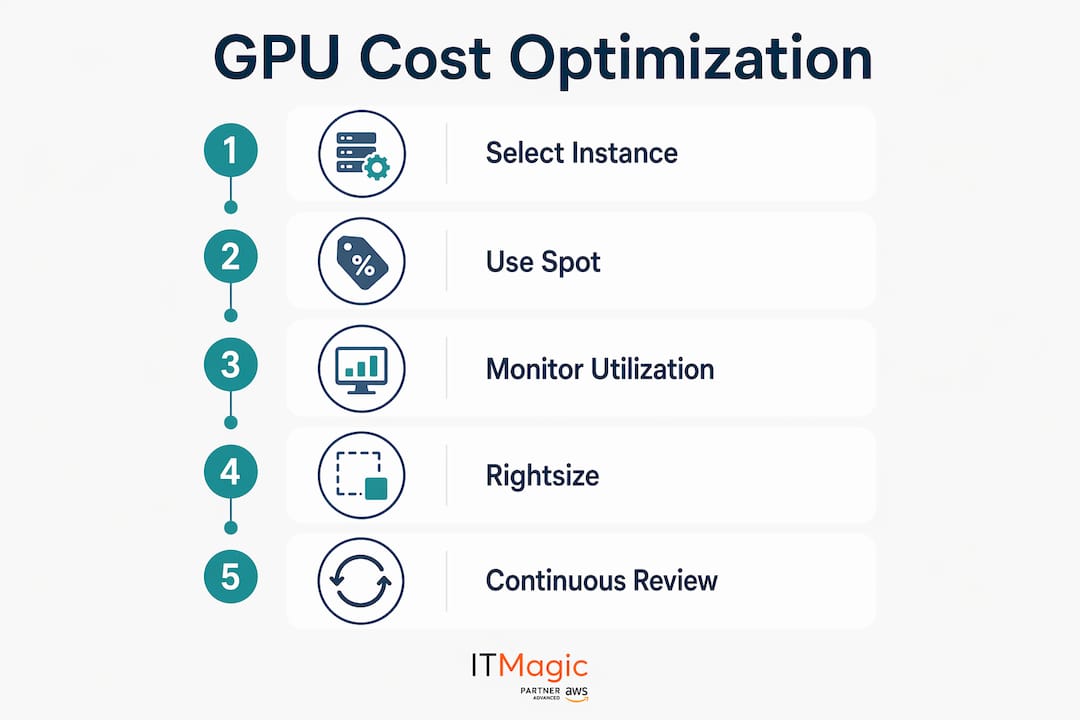
- Enable AWS Compute Optimizer with GPU metrics. Compute Optimizer analyzes CloudWatch data and recommends right-sized instance types. Customize recommendation preferences to include GPU utilization data for more accurate suggestions.
- Implement instance scheduling. Stop GPU instances during off-hours using AWS Instance Scheduler or Lambda-based automation. A development GPU instance running 8 hours a day instead of 24 cuts that line item by 67%.
- Use Compute Savings Plans instead of Reserved Instances. Compute Savings Plans apply savings across any EC2 instance family, region, and OS. Reserved Instances lock you into a specific GPU family, which becomes a liability when AWS releases a new generation.
- Tag every GPU instance for cost attribution. Apply tags for team, project, environment, and workload type. Without tagging, AWS Cost Explorer cannot separate training spend from inference spend or production from development.
- Set AWS Budgets alerts. Configure alerts at 80% and 100% of monthly GPU budget thresholds. Surprises in GPU billing are almost always the result of a forgotten instance or a runaway training job.
For cost attribution in Kubernetes environments, DCGM Exporter and OpenTelemetry provide per-pod GPU metrics that map directly to team and workload spend. This level of granularity is what separates teams that control their GPU budgets from those that react to them. Pairing this with proven AWS cost reduction steps gives architects a complete framework from instance selection through financial reporting.
Key Takeaways
Effective GPU cost management on AWS requires combining the right pricing model, workload-matched instance types, and continuous telemetry to eliminate idle and oversized resources.
| Point | Details |
|---|---|
| Match instance to workload | Use Inferentia2 for inference and p-family only for large-scale training to avoid 10–40x cost overruns. |
| Use Spot for training | Spot instances cut training costs by 60–70%; pair with S3 checkpointing every 15–30 minutes to handle interruptions. |
| Monitor power, not just utilization | GPU power consumption as a percentage of TDP is a more accurate load indicator than kernel execution time alone. |
| Prefer Compute Savings Plans | Compute Savings Plans apply across instance families, avoiding the obsolescence risk of GPU-specific Reserved Instances. |
| Tag and attribute costs | Apply cost allocation tags and use DCGM Exporter with OpenTelemetry to separate production spend from waste in Kubernetes. |
What I’ve learned from years of GPU cost work on AWS
The most common mistake I see is treating GPU cost optimization as a one-time rightsizing exercise. Teams run Compute Optimizer, resize a few instances, and consider the job done. Six months later, the bill is back where it started because the workload changed and nobody updated the instance configuration.
Continuous telemetry is the only approach that actually holds. GPU hardware evolves fast on AWS. The H100-based p5 family replaced p4 in a short window. Teams that locked into three-year Reserved Instances on p4d instances are now paying for hardware that is two generations behind while newer, more cost-efficient options sit unused. Compute Savings Plans avoid that trap entirely.
The collaboration gap between cloud architects and data scientists is also underestimated. Data scientists often have the clearest picture of which training runs are exploratory versus production-grade. That distinction determines whether a job belongs on Spot or on-demand. When architects and data scientists share utilization dashboards and review them together, the optimization decisions get much sharper. Without that conversation, architects are guessing at workload patterns from the outside.
One more thing: power-based GPU metrics are still rare in most monitoring setups. Most teams track GPU utilization percentage and stop there. Adding TDP percentage to your CloudWatch dashboards takes an afternoon to configure and gives you a fundamentally better signal for rightsizing decisions. That single change has changed the cost trajectory on more than one engagement I have worked on.
— Oleksandr
IT-Magic GPU and Kubernetes optimization for AWS
Managing GPU workloads on AWS at scale requires more than good tooling. It requires infrastructure expertise that spans instance selection, Kubernetes scheduling, autoscaling configuration, and financial reporting.

IT-Magic is an AWS Advanced Tier Services Partner with over 700 projects delivered since 2010. The team specializes in Kubernetes support for GPU workloads, including EKS cluster configuration, GPU node group management, DCGM-based monitoring, and cost attribution pipelines. For cloud architects who need a dedicated partner to implement and maintain GPU cost controls, IT-Magic brings the certified AWS expertise to get it done right. Learn more about AWS cost optimization best practices or reach out directly to discuss your GPU infrastructure.
FAQ
What is the cheapest AWS GPU instance for inference?
The inf2.xlarge at approximately $0.76/hr is the most cost-efficient option for inference on supported models, delivering 50–70% savings over comparable NVIDIA GPU instances like the g5.xlarge.
How much can Spot instances save on GPU training costs?
Spot instances reduce GPU training costs by 60–70% compared to on-demand pricing. Pair Spot usage with S3 checkpointing every 15–30 minutes to recover from interruptions without losing training progress.
Why should I avoid Reserved Instances for GPU workloads?
AWS releases new GPU generations frequently, making long-term Reserved Instance commitments a risk. Compute Savings Plans offer comparable discounts with the flexibility to apply across any EC2 instance family as hardware evolves.
What GPU utilization threshold signals an oversized instance?
GPU utilization below 80% for training workloads and below 50% for inference workloads consistently indicates an oversized instance. Use CloudWatch Agent with NVIDIA DCGM metrics to track both utilization and power consumption for accurate rightsizing.
How do I attribute GPU costs by team in Kubernetes?
Deploy DCGM Exporter with OpenTelemetry to capture per-pod GPU metrics, then route data to Amazon Managed Prometheus and Grafana. Apply Kubernetes labels that map to cost allocation tags in AWS Cost Explorer for team-level spend visibility.
Recommended
- Cloud cost optimization strategies for CIOs: a practical guide
- AWS Cost Optimization: Best Practices, Principles, and Tools
- AWS cost reduction strategies: proven steps for cloud savings
- Cut AWS Costs by 90% Using EC2 Spot Instances
Alexander founded IT-Magic, an AWS Advanced Tier Services Partner delivering DevOps, cloud architecture, and managed services since 2010. He holds:
- AWS Certified Solutions Architect – Professional
- AWS Certified DevOps Engineer – Professional
- AWS Certified Security – Specialty
- AWS Certified Advanced Networking – Specialty
Talk to a certified AWS team trusted by INTERTOP, Foxtrot, Pandora, and J.Hilburn.
Get a free consultation


