

TL;DR:
- AWS AI infrastructure combines GPU-accelerated compute, managed machine learning platforms, and dedicated accelerators for scalable training and deployment. The latest offerings include G7e instances with NVIDIA RTX PRO 6000 Blackwell GPUs and purpose-built chips like Trainium and Inferentia for cost-efficient training and inference. Implementing co-located, layered security and leveraging managed services like SageMaker and ECS reduces operational complexity and enhances performance.
AWS AI infrastructure is a purpose-built cloud environment that combines GPU-accelerated compute, managed machine learning platforms, and dedicated AI accelerators to power training, inference, and deployment at scale. The standard industry term for this category is AI cloud infrastructure, though AWS AI infrastructure has become the working shorthand for the specific combination of services AWS provides. For IT professionals and decision-makers, the core stack includes Amazon SageMaker AI, EC2 GPU instances, and AWS-designed chips like Trainium and Inferentia. Together, these components cover the full AI lifecycle from raw data processing through production model serving, with integrated security and cost controls built in.
What are the latest AWS GPU and accelerator offerings for AI workloads?
The hardware layer of any cloud AI solution determines what workloads you can run and at what cost. AWS has made significant moves in 2026 on both fronts.

The G7e instance family is the most notable recent addition. Powered by NVIDIA RTX PRO 6000 Blackwell GPUs, G7e instances deliver up to 2.3x higher inference performance compared to the previous G6e generation. That gain comes from doubled GPU memory and 1.85x higher memory bandwidth. A single G7e instance provides 768 GB of aggregate GPU memory, which means workloads that previously required multi-node setups can now run on a single node. That consolidation directly reduces networking complexity and cost.
AWS Trainium and Inferentia chips take a different approach. They are purpose-built for cost-efficient AI training and inference rather than general GPU compute. The key operational update is that Amazon ECS Managed Instances now support both Trainium and Inferentia accelerators, enabling automatic optimal resource allocation without manual driver configuration per task.
Key capabilities of the current AWS accelerator lineup:
- G7e instances handle large generative AI inference jobs on a single node, reducing inter-node communication overhead.
- AWS Trainium targets training workloads where cost per training step matters more than raw peak throughput.
- AWS Inferentia targets high-volume, low-latency inference at a lower cost per request than GPU alternatives.
- ECS Managed Instances with Neuron use the
NEURON_CORE=alltask definition setting to enforce single-task-per-instance placement, guaranteeing dedicated accelerator access.
Pro Tip: When evaluating G7e versus Inferentia for inference, benchmark your specific model size first. G7e wins on raw performance for large models; Inferentia wins on cost per request for smaller, high-volume models.
How does Amazon SageMaker AI optimize and manage AI model training and inference?
Running this on your own AWS setup? IT-Magic is an AWS Advanced Tier Partner — we audit, fix, or fully manage it for you.
Get a free consultation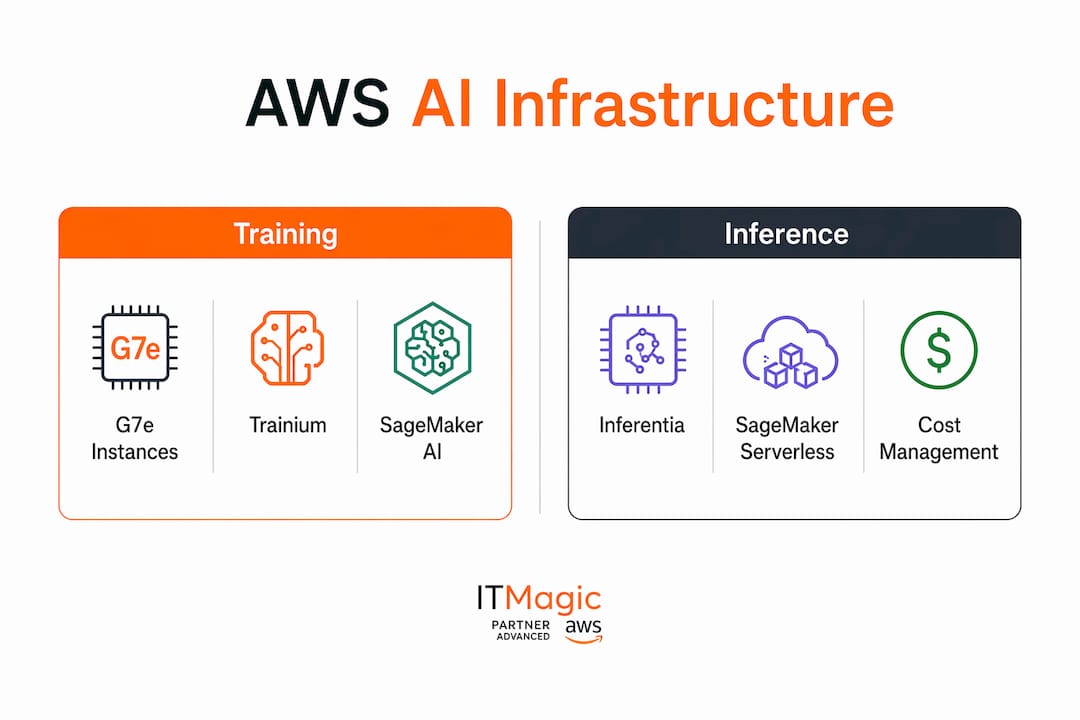
Amazon SageMaker AI is the managed platform that covers the full ML lifecycle on AWS. It handles data preparation, training, hyperparameter tuning, deployment, and monitoring under one service umbrella. The managed nature of SageMaker removes the need to provision and patch underlying infrastructure manually, which is the primary reason production teams choose it over self-managed EC2 clusters for most workloads.
The most operationally significant recent addition is the inference recommendations feature. SageMaker AI benchmarks multiple instance types automatically against your defined goals, whether that is latency, throughput, or cost. The output is a validated, deployment-ready configuration rather than a set of raw numbers you have to interpret yourself. This removes the manual benchmarking cycle that typically consumes days of engineering time before a model reaches production.
The workflow for using inference recommendations follows a clear sequence:
- Define your performance goals. Set target latency, minimum throughput, or maximum cost per inference request before running the benchmark.
- Submit your model artifact. SageMaker AI pulls the model from S3 and runs it against candidate instance types automatically.
- Review the ranked output. The service returns latency, throughput, and cost projections for each instance type tested.
- Select and deploy. Choose the configuration that matches your production requirements and deploy directly from the recommendations output.
The feature is available in seven AWS regions, including US East (N. Virginia) and Europe (Frankfurt). That regional coverage matters for teams with data residency requirements. For teams choosing between managed services, Amazon Bedrock versus SageMaker is a common architectural decision: Bedrock suits API-based foundation model consumption with serverless, token-billed pricing, while SageMaker suits custom training and fine-tuning scenarios where you need full control over the training environment.
What are best practices for architecting scalable, secure AI workloads on AWS?
Architecture for AI on AWS requires three independent placement decisions for distributed workloads: where the agent runtime lives, where model hosting runs, and where tools and data reside. Getting these wrong creates latency spikes, compliance gaps, or unnecessary cost. Distributed agentic AI workloads benefit from separating these concerns explicitly, using GPU-accelerated G-series instances for model hosting and general-purpose CPU instances for agent runtime to balance cost and performance.
Co-location within EC2 UltraClusters
Foundation model training has a hard physical constraint: compute, network interconnect, and storage must be co-located. Treating these as tightly integrated blocks within EC2 UltraClusters maximizes distributed training throughput. Failing to co-locate causes measurable latency and throughput degradation, not theoretical risk. This is the most common architectural mistake teams make when moving from single-node experiments to multi-node training runs.
Hybrid cloud and edge deployments add another layer of complexity. They are the right choice when latency requirements or data residency rules prevent full cloud deployment. The architectural pattern that works is separating agent, model hosting, and data workflows so each component can be placed where compliance and performance requirements dictate.
Key architectural principles for production AI workloads:
- Place model hosting on accelerated compute (G7e, Trainium, or Inferentia) and agent runtime on CPU instances to avoid paying GPU rates for orchestration logic.
- Use high-bandwidth Elastic Fabric Adapter networking between training nodes to prevent the network from becoming the bottleneck.
- Store training datasets in Amazon S3 with direct mount or high-throughput transfer to minimize I/O wait during training.
- Apply AWS AI Security Framework controls across infrastructure, identity and data, and application layers as a defense-in-depth stack.
“Security architecture should maintain consistent governance across AI infrastructure shifts, applying AWS AI Security Framework controls uniformly whether using self-hosted or managed services. Relying on isolated security controls risks breaches during model version upgrades or infrastructure changes.”
AI introduces threat vectors that traditional security controls do not cover. Prompt injection is the clearest example. The AWS AI Security Framework addresses this by integrating Amazon Bedrock Guardrails with existing identity management, creating application-level defenses that sit above the infrastructure layer. Teams that apply enterprise AI security controls only at the network perimeter leave the model interaction layer unprotected.
Pro Tip: Map your compliance requirements (PCI DSS, HIPAA, SOC 2) to specific AWS AI Security Framework layers before you write a single line of infrastructure code. Retrofitting security controls into a running AI system costs significantly more than building them in from the start.
How can IT teams optimize AWS AI infrastructure operations and cost management?
Operational efficiency on AWS AI infrastructure comes down to removing manual work from the critical path and preventing the resource misconfigurations that silently degrade performance. Two tools address the bulk of this problem: ECS Managed Instances for Trainium and Inferentia workloads, and Kubernetes Dynamic Resource Allocation for teams running containerized training jobs.
Kubernetes Dynamic Resource Allocation is now the best practice for managing specialized resources like Elastic Fabric Adapter and Trainium within Kubernetes clusters. It divides infrastructure and ML practitioner responsibilities cleanly without losing topology awareness. Misconfigured drivers or saturated EFA network links can bottleneck AI training as much as a poor parallelism strategy. The Dynamic Resource Allocation approach surfaces these issues at the scheduling layer rather than at runtime.
| Optimization method | Best use case | Primary benefit |
|---|---|---|
| ECS Managed Instances with Neuron | Trainium and Inferentia workloads on ECS | Automatic resource allocation, no manual driver config |
| Kubernetes Dynamic Resource Allocation | Large-scale training on EKS with EFA | Clean separation of infra and ML responsibilities |
| SageMaker serverless inference | Intermittent or unpredictable inference traffic | Pay only for actual compute used, no idle instance cost |
| SageMaker managed spot training | Non-time-critical training jobs | Significant cost reduction versus on-demand instances |
SageMaker serverless inference removes idle instance cost for workloads with unpredictable traffic patterns. Managed spot training cuts costs on non-urgent training runs. Neither option requires custom infrastructure code, which is the point. The goal is to push infrastructure decisions into managed services wherever the workload allows, and reserve manual configuration for the cases where managed services cannot meet your performance or compliance requirements.
Pro Tip: Run a cost attribution report by workload type before choosing between on-demand, spot, and serverless options. Teams that skip this step routinely over-provision on-demand capacity for workloads that would run fine on spot instances at a fraction of the cost.
Key takeaways
Effective AWS AI infrastructure requires co-located accelerated compute, managed ML services like SageMaker AI, and layered security controls applied consistently across every infrastructure change.
| Point | Details |
|---|---|
| Hardware selection drives cost | Match G7e for large inference, Trainium for training, and Inferentia for high-volume low-cost inference. |
| SageMaker AI removes benchmarking work | Use inference recommendations to get validated instance configurations instead of manual testing. |
| Co-location is non-negotiable | Place compute, EFA networking, and storage together in EC2 UltraClusters to avoid training bottlenecks. |
| Security must span all layers | Apply AWS AI Security Framework controls at infrastructure, identity, and application layers from day one. |
| Managed services cut operational load | ECS Managed Instances and Kubernetes Dynamic Resource Allocation reduce driver misconfigurations and idle cost. |
What I’ve learned from watching teams get AWS AI infrastructure wrong
The pattern I see most often is teams that treat AWS AI infrastructure as a standard cloud deployment with a GPU attached. They provision instances, install drivers manually, and wire up networking the same way they would for a web application. Then they wonder why their training jobs are 40% slower than benchmarks suggest they should be.
The real issue is that AI workloads have physical constraints that web workloads do not. Network bandwidth between training nodes is not a nice-to-have. It is as load-bearing as the compute itself. Teams that skip EC2 UltraCluster co-location or undersize their EFA configuration pay for it in wall-clock training time, which translates directly into engineering hours and compute cost.
The second mistake is treating security as an infrastructure-only concern. AI systems face prompt injection and model extraction attacks that have no equivalent in traditional application security. The AWS AI Security Framework exists specifically because the old controls do not map cleanly onto AI threat models. I have seen teams with excellent network security and IAM hygiene get caught flat-footed because they had no application-layer guardrails on their model endpoints.
The third thing I would tell any decision-maker planning an AI infrastructure investment: the gap between infrastructure teams and data science teams is your biggest operational risk. Infrastructure engineers know how to provision and secure the environment. Data scientists know what the model needs. When those two groups do not share a common vocabulary around resource requirements, you get either over-provisioned clusters that burn budget or under-provisioned ones that stall training runs. Getting those teams into the same planning conversation early is worth more than any single tool choice.
— Oleksandr
IT-Magic’s approach to AWS AI infrastructure deployments
IT-Magic has been designing and operating AWS environments since 2010, with more than 700 projects delivered for clients in fintech, enterprise, and high-growth startups. AI workloads require a different operational model than standard cloud deployments, and that is where having a dedicated infrastructure partner matters.

IT-Magic’s AWS infrastructure support covers the full stack for AI workloads: instance selection and configuration, EFA networking, storage architecture, and security controls aligned with PCI DSS, SOC 2, and HIPAA requirements. For teams running containerized AI environments, IT-Magic’s Kubernetes support services handle EKS cluster design, Dynamic Resource Allocation configuration, and ongoing operational management. The result is a production-ready AI environment without the months of trial and error that typically precede it. Explore IT-Magic’s AWS generative AI services to see how these capabilities apply to your specific workload.
FAQ
What is AWS AI infrastructure?
AWS AI infrastructure is the combination of GPU instances, purpose-built accelerators (Trainium, Inferentia), managed platforms like SageMaker AI, and integrated networking and storage services that AWS provides for training and deploying AI models at scale.
How do G7e instances differ from G6e for AI workloads?
G7e instances with NVIDIA RTX PRO 6000 Blackwell GPUs deliver up to 2.3x higher inference performance than G6e, with doubled GPU memory and 1.85x higher memory bandwidth, enabling large models to run on a single node instead of multiple nodes.
What does SageMaker AI inference recommendations do?
SageMaker AI automatically benchmarks your model across multiple instance types and returns validated latency, throughput, and cost projections, so you can deploy an optimized configuration without manual testing cycles.
How does AWS handle AI-specific security threats?
The AWS AI Security Framework recommends a defense-in-depth approach covering infrastructure isolation, identity and data controls, and application-layer guardrails like Amazon Bedrock Guardrails to address threats such as prompt injection that traditional security tools do not cover.
When should I use Amazon Bedrock instead of SageMaker AI?
Use Amazon Bedrock for API-based access to foundation models where serverless, token-billed pricing fits your usage pattern. Use SageMaker AI when you need custom training, fine-tuning, or full control over the ML lifecycle and deployment environment.
Recommended
- AWS Security Trends: What CIOs Need to Know for 2026
- Top Cloud DevOps Trends Shaping AWS Success in 2026
- Best AI Cloud Platforms: A Comprehensive Guide | IT-Magic
- AWS Optimization Checklist for Cloud Teams in 2026
Alexander founded IT-Magic, an AWS Advanced Tier Services Partner delivering DevOps, cloud architecture, and managed services since 2010. He holds:
- AWS Certified Solutions Architect – Professional
- AWS Certified DevOps Engineer – Professional
- AWS Certified Security – Specialty
- AWS Certified Advanced Networking – Specialty
Talk to a certified AWS team trusted by INTERTOP, Foxtrot, Pandora, and J.Hilburn.
Get a free consultation


