


TL;DR:
- Elite DevOps teams focus on pipeline design, discipline, and continuous improvement, not just tooling.
- CI/CD automates testing, deployment, and rollback processes to improve speed, reliability, and business outcomes.
- Common pitfalls include bypassing approval gates, leaking secrets, flaky tests, and environment drift, which hinder performance.
Most engineering leaders assume DevOps transformation is a tool problem. Buy the right platform, integrate it, and watch deployment velocity soar. But the data tells a different story. Elite DevOps teams achieve 127x faster lead time and 182x more deploys than low performers, and the gap isn’t explained by tooling alone. It comes down to how those teams design, discipline, and continuously improve their CI/CD pipelines. This article walks you from foundational CI/CD concepts through advanced practices like DevSecOps and GitOps, covering the pitfalls that derail even experienced teams and the metrics that separate elite performers from everyone else.
Key Takeaways
| Point | Details |
|---|---|
| CI/CD powers elite DevOps | Automated pipelines drive faster, safer, and more reliable software releases. |
| Metrics drive improvement | Tracking deployment frequency, lead time, and MTTR highlights areas to optimize. |
| Avoid common pitfalls | Production approval gates and proper test handling are essential for trust and stability. |
| Evolve with security and GitOps | Integrating security and considering GitOps can future-proof your delivery pipelines. |
What is CI/CD and why is it core to DevOps?
Running this on your own AWS setup? IT-Magic is an AWS Advanced Tier Partner — we audit, fix, or fully manage it for you.
Get a free consultationCI/CD stands for Continuous Integration and Continuous Delivery (or Deployment). These aren’t buzzwords. They’re two distinct engineering disciplines that, when combined, replace manual, error-prone release processes with automated, auditable workflows.
Continuous Integration means every developer merges code into a shared branch frequently, often multiple times per day. Each merge triggers an automated build and test sequence. Think of it like a quality checkpoint on a factory floor: every part gets inspected before it moves to the next station, not at the end of the line when fixing defects is expensive.
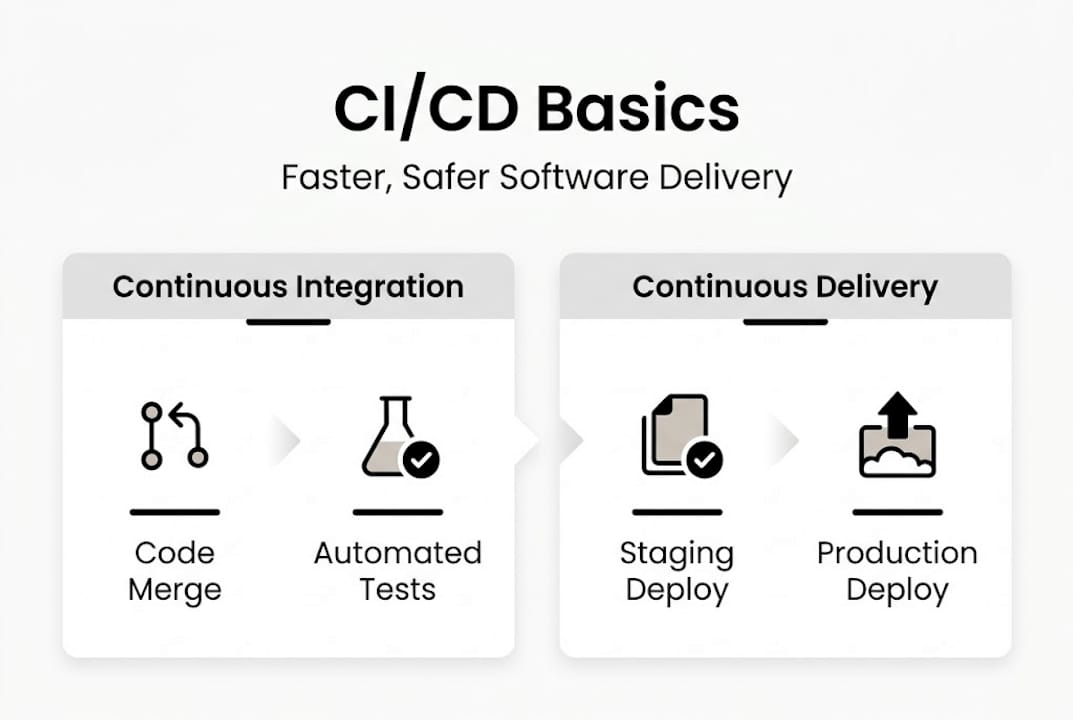
Continuous Delivery extends that by automatically preparing every passing build for release. Continuous Deployment goes one step further and pushes those builds to production without manual intervention, assuming all quality gates pass.
Here’s why this matters structurally:
- Speed: Automated pipelines eliminate the hours or days teams spend coordinating manual deployments
- Repeatability: Every release follows the exact same process, reducing configuration errors
- Auditability: Every change, test result, and deployment is logged, which is critical for compliance-heavy industries like fintech
- Quality gates: Automated tests, security scans, and approval steps catch issues before they reach customers
CI/CD sits at the backbone of modern DevOps because it directly links a code commit to a production release through a structured, automated chain. Without it, DevOps is just a philosophy with no operational teeth.
| Stage | Manual approach | CI/CD approach |
|---|---|---|
| Code integration | Weekly merges, conflict-heavy | Daily or hourly, automated |
| Testing | Manual QA cycles | Automated on every commit |
| Deployment | Scripted by hand | Pipeline-triggered, repeatable |
| Rollback | Hours of coordination | Automated, sub-minute |
Elite teams use trunk-based development, modern CI tools, and Infrastructure as Code as the technical foundation for high performance. If your team is still using long-lived feature branches and deploying manually, you’re building against the current.
For a practical look at how automation workflows connect these stages, the DevOps automation workflow guide breaks down the architecture in detail. You can also explore CI/CD strategies tailored to different team sizes and compliance requirements.
Pro Tip: Start with the simplest possible pipeline: build, test, deploy to staging. Add complexity only when a specific pain point demands it. Tool sprawl kills more CI/CD initiatives than missing features ever will.
How CI/CD drives speed, reliability, and business outcomes
Now that we’ve defined CI/CD, let’s see how top teams leverage it for real-world results.
The DORA research program (DevOps Research and Assessment) tracks four key metrics that predict software delivery performance:
- Deployment frequency: How often you ship to production
- Lead time for changes: Time from code commit to production
- Change failure rate: Percentage of deployments that cause incidents
- Mean time to recovery (MTTR): How fast you recover from failures
Elite performers achieve on-demand deployment, sub-hour MTTR, and 0 to 15% change failure rates. Compare that to low performers who deploy monthly or less and take days to recover from incidents.
“The difference between elite and low performers isn’t talent. It’s process discipline, automated feedback loops, and a culture that treats deployment as a routine event, not a crisis.”
Here’s what that looks like in practice:
| Team type | Deploy frequency | Lead time | MTTR | Change failure rate |
|---|---|---|---|---|
| Elite (CI/CD mature) | On-demand | Under 1 hour | Under 1 hour | 0 to 15% |
| High performer | Daily to weekly | 1 day to 1 week | Under 1 day | 0 to 15% |
| Low performer | Monthly or less | 1 to 6 months | 1 week+ | 46 to 60% |
The business impact is direct. Faster feature delivery means shorter feedback cycles with customers. Lower change failure rates mean fewer incidents eroding user trust. Sub-hour MTTR means outages become minor blips instead of front-page problems.

For teams running ecommerce platforms, the stakes are even higher. A single failed deployment during peak traffic can cost thousands per minute. Infrastructure support for ecommerce requires CI/CD pipelines that handle rollbacks automatically and enforce approval gates before production pushes.
If you want to benchmark your team’s current performance, start by measuring MTTR and deployment frequency. Those two numbers alone reveal more about your pipeline maturity than any tool audit. Explore DevOps with CI/CD to see how different architectures affect these metrics.
Common CI/CD pitfalls and how to avoid them
Delivering fast, reliable software takes more than tools. Here’s where teams trip up, and how to outperform.
Even well-resourced teams with strong engineering cultures run into the same recurring failures. Real-world CI/CD pipeline disasters include auto-deploying to production without approvals, leaking secrets in logs, relying on flaky tests, and allowing configuration drift between environments. Each one is preventable.
-
Deploying to production without approval gates. Fully automated deployment sounds efficient until a bad commit ships to 10,000 users at 2 AM. Production deployments should require explicit human approval or at minimum a time-gated release window. Automation handles the how; humans decide the when.
-
Secrets leaked in logs or configs. API keys, database credentials, and tokens have no place in pipeline logs or version-controlled config files. Use a secrets manager like AWS Secrets Manager or HashiCorp Vault. Rotate credentials automatically. Audit your pipeline logs regularly for accidental exposure.
-
Flaky or unreliable automation tests. A test suite that fails randomly is worse than no test suite. It trains engineers to ignore failures, which means real bugs get ignored too. Flaky tests destroy confidence in the pipeline and slow down every deployment.
-
Configuration drift between environments. When your staging environment doesn’t match production, test results become meaningless. Infrastructure as Code (IaC) with tools like Terraform or AWS CloudFormation eliminates drift by defining environments declaratively.
Pro Tip: Quarantine flaky tests into a separate suite and track their failure rate over time. Mandate a production approval gate even in fully automated pipelines. These two practices alone eliminate the majority of CI/CD-related incidents we see in the field.
Building robust automation workflows means designing for failure from the start, not patching gaps after an incident teaches you the hard way.
CI/CD evolution: Security, GitOps, and next-gen practices
Once the basics are secured, advanced practices and trends offer even more impact.
The most significant shift in CI/CD over the past few years is the integration of security directly into the pipeline. DevSecOps means security isn’t a gate at the end of the release cycle. It’s a continuous process embedded at every stage.
Key security tools now standard in mature pipelines:
- SAST (Static Application Security Testing): Scans source code for vulnerabilities before it runs
- DAST (Dynamic Application Security Testing): Tests running applications for exploitable weaknesses
- SCA (Software Composition Analysis): Audits open-source dependencies for known CVEs
- Policy as code: Enforces compliance rules automatically, critical for PCI DSS and SOC 2 environments
DevSecOps adoption reaches 68% in SMEs, with GitOps excelling in security, auditability, and drift control. These aren’t optional extras for regulated industries. They’re baseline expectations.
GitOps represents a different architectural model. Instead of the pipeline pushing changes to infrastructure (traditional CI/CD), GitOps uses a pull-based model where an agent inside the cluster continuously reconciles the live state with the desired state defined in Git.
| Dimension | Traditional CI/CD (push) | GitOps (pull) |
|---|---|---|
| Deployment trigger | Pipeline pushes to cluster | Agent pulls from Git repo |
| State management | Pipeline-defined | Git is single source of truth |
| Drift detection | Manual or periodic | Continuous, automatic |
| Audit trail | Pipeline logs | Git commit history |
GitOps vs. traditional CI/CD shows that GitOps excels in Kubernetes-heavy environments where drift detection and auditability are priorities. Traditional CI/CD remains simpler for smaller teams or non-containerized workloads.
For tooling, the choice depends on scale and compliance needs. Startups typically do well with GitHub Actions for its simplicity and native GitHub integration. Enterprises with complex approval workflows and compliance requirements often favor Azure DevOps or GitLab’s enterprise tier.
Exploring advanced automation patterns helps teams decide which model fits their architecture before committing to a platform migration.
Why high-performing DevOps teams rethink CI/CD fundamentals
Here’s an uncomfortable observation from working with engineering teams across startups and enterprises: the organizations with the most sophisticated tooling stacks are often the ones with the worst deployment reliability.
They’ve automated everything except the discipline. They’ve adopted GitOps, DevSecOps, and policy as code, but they haven’t defined what a successful deployment actually looks like. MTTR is unmeasured. Rollback rates are unknown. Approval gates exist on paper but get bypassed under deadline pressure.
The teams that consistently outperform aren’t running the most advanced platforms. They’re running simple, well-understood pipelines with clear ownership, enforced quality gates, and a weekly ritual of reviewing DORA metrics. They treat CI/CD case studies as learning inputs, not benchmarks to copy.
The real leverage in CI/CD isn’t the tool. It’s the feedback loop. When every engineer can see deployment frequency, lead time, and MTTR in real time, behavior changes. Teams start optimizing for recovery speed instead of avoiding deployments. That mindset shift is what separates elite performers from everyone else.
Simplicity, measurement, and discipline beat complexity every time.
Need expert help implementing CI/CD in your DevOps?
Building a CI/CD pipeline that actually delivers on its promise requires more than following a tutorial. It requires architectural decisions that align with your team’s scale, compliance requirements, and growth trajectory.

IT-Magic has delivered AWS DevOps consulting for 300+ clients since 2010, covering GitHub Actions, GitLab, Azure DevOps, Kubernetes, and Infrastructure as Code. Whether you’re a startup setting up your first automated pipeline or an enterprise rearchitecting for GitOps and DevSecOps compliance, our certified AWS engineers bring hands-on experience to every engagement. Our infrastructure support experts handle the operational complexity so your team can focus on shipping. Let’s build something that actually works.
Frequently asked questions
How does CI/CD improve deployment reliability?
CI/CD automates testing and deployment, reducing human error and making releases more predictable. Elite teams achieve under 0.3% rollback rates and 0 to 15% change failure rates using mature CI/CD practices.
What metrics matter most for CI/CD effectiveness?
The four DORA metrics: deployment frequency, lead time for changes, change failure rate, and MTTR. DORA identifies these four as the definitive benchmarks for measuring elite DevOps performance.
Is CI/CD only for large enterprises or can startups benefit too?
Startups gain speed and agility from CI/CD using lightweight tools like GitHub Actions, while enterprises benefit at scale with compliance-focused platforms. GitHub Actions for startups and Azure DevOps or GitLab for enterprise scale and compliance are the most common patterns.
What are common CI/CD pipeline pitfalls?
The most damaging mistakes include skipping production approval gates, leaking secrets in logs, tolerating flaky tests, and allowing configuration drift between environments. Real-world pipeline disasters show these four issues account for the majority of CI/CD-related incidents.
Alexander founded IT-Magic, an AWS Advanced Tier Services Partner delivering DevOps, cloud architecture, and managed services since 2010. He holds:
- AWS Certified Solutions Architect – Professional
- AWS Certified DevOps Engineer – Professional
- AWS Certified Security – Specialty
- AWS Certified Advanced Networking – Specialty
Talk to a certified AWS team trusted by INTERTOP, Foxtrot, Pandora, and J.Hilburn.
Get a free consultation


