

TL;DR:
- External Secrets Operator automates synchronization of secrets from external providers into Kubernetes Secrets, enabling centralized secret management. It relies on cluster controls like etcd encryption and strict RBAC to ensure security, while supporting multiple cloud and enterprise providers. Proper coordination and security practices are essential for safe and effective ESO deployment at scale.
The External Secrets Operator (ESO) synchronizes values from external secret managers like AWS Secrets Manager, HashiCorp Vault, and Google Secret Manager into native Kubernetes Secret objects, keeping them continuously in sync through a controller-driven reconciliation loop. Use it to centralize secret sources across providers while you harden cluster storage and RBAC, because ESO writes standard Kubernetes Secrets that land in etcd.
TL;DR:
- ESO solves the problem of manually managing secrets across multiple providers by automating sync into Kubernetes-native objects your workloads already know how to consume.
- ESO does not replace cluster-level security controls. Secrets written to etcd are stored unencrypted by default, so etcd encryption at rest and strict RBAC remain required.
- Top operational action: enable etcd encryption, scope SecretStore credentials to the narrowest possible path or key set, and plan a pod-restart strategy for secret rotation before you go to production.
Table of Contents
- What is External Secrets Operator and why does it matter?
- How does External Secrets Operator fetch and sync secrets?
- What do the core CRDs actually control?
- Which external providers does ESO support?
- How do you install ESO and verify it’s working?
- Configuring ESO on AWS EKS with IRSA
- What security controls does ESO require you to implement?
- How does ESO compare to the Secrets Store CSI Driver?
- Best practices and troubleshooting for ESO in production
- Key Takeaways
- The part most teams get wrong about ESO rollouts
- IT-Magic accelerates your ESO adoption on AWS EKS
- Useful sources
- FAQ
What is External Secrets Operator and why does it matter?
Running this on your own AWS setup? IT-Magic is an AWS Advanced Tier Partner — we audit, fix, or fully manage it for you.
Get a free consultationESO extends Kubernetes with custom resource definitions (CRDs) that describe where secrets live and how to pull them into Kind=Secret objects. Without it, teams typically hard-code secrets into manifests, manage provider-specific SDKs in init containers, or write bespoke sync scripts that break on provider API changes. ESO replaces all of that with a declarative, community-backed operator that handles authentication, fetching, templating, and lifecycle management.
Three personas interact with ESO in practice. Cluster operators install and maintain the controller, configure ClusterSecretStores, and set RBAC boundaries. Application developers declare ExternalSecret resources in their namespaces, specifying which remote keys map to which local Secret fields. Security engineers scope provider credentials, audit access, and enforce admission policies. The clean separation of those roles is one of ESO’s strongest operational arguments.
Typical use cases include centralizing secrets from multiple cloud providers into a single Kubernetes-native workflow, templating secrets into application-specific config formats, and enforcing a single source of truth for secrets across staging and production clusters. ESO supports providers including AWS, HashiCorp, Google, Azure, IBM, Akeyless, CyberArk, and Pulumi ESC, which covers most enterprise environments.
One important boundary: ESO is a synchronization layer. It does not change how Kubernetes stores Secrets internally, and it does not add encryption on top of etcd. That distinction matters when you’re making compliance arguments.
How does External Secrets Operator fetch and sync secrets?
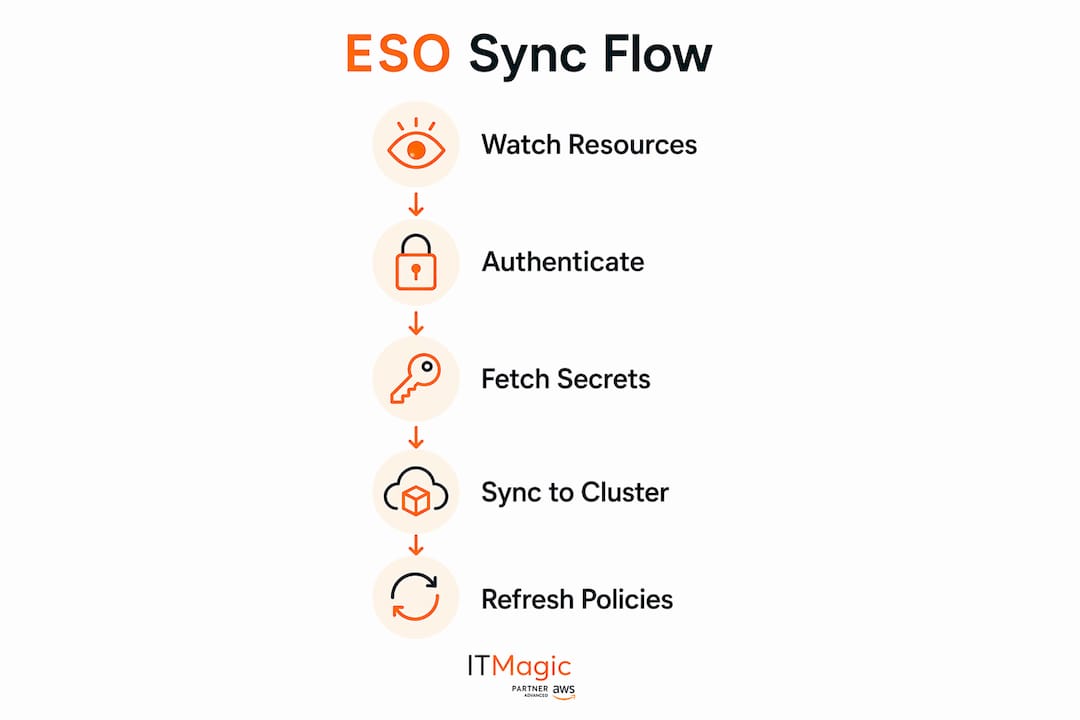
The controller watches ExternalSecret resources across namespaces. When it finds one, it reads spec.secretStoreRef to locate the corresponding SecretStore or ClusterSecretStore, instantiates the appropriate provider client, and authenticates using the credentials defined in that store.

From there, the reconciliation loop follows a predictable sequence: authenticate to the provider, fetch the remote secret values, decode and apply any templating defined in target.template, then create or update the target Kind=Secret. The controller records a status.conditions entry and updates refreshTime on each successful cycle. If anything fails, the condition reflects the error and the controller retries.
Refresh behavior is controlled by refreshPolicy and refreshInterval. The three policy options are Periodic (re-fetch on a timer), OnChange (re-fetch only when the remote secret version changes), and CreatedOnce (fetch once at creation and never again). The ExternalSecret API also supports syncWindows, which lets you restrict periodic refreshes to specific time windows — useful for rate-limit-sensitive providers or change-freeze periods.
One operational implication worth internalizing: a secret update at the provider propagates to the cluster only after the next reconciliation cycle. If your refreshInterval is 1 hour and a credential rotates at the provider, your cluster sees the new value up to an hour later. Design rotation windows accordingly.
What do the core CRDs actually control?
The three primary CRDs divide responsibilities cleanly, and getting their scope right is the difference between a tightly governed setup and one where a single misconfigured store exposes secrets across the entire cluster.
SecretStore vs. ClusterSecretStore
SecretStoreis namespace-scoped. Use it when a team owns their own provider credentials and you want strict tenancy boundaries. The controller only resolves ExternalSecrets in the same namespace.ClusterSecretStoreis cluster-wide. Use it when a platform team manages a shared credential (e.g., a single Vault AppRole for all teams) and wants to expose it across namespaces. Scope it carefully — a misconfigured ClusterSecretStore is a broad blast radius.- Credentials for either store live in a Kubernetes Secret in the controller’s namespace (or the store’s namespace for namespace-scoped stores). Protect those credential Secrets with the same RBAC rigor you’d apply to any privileged resource.
ExternalSecret fields that matter
spec.datamaps individual remote keys to local Secret keys.spec.dataFrombulk-fetches all properties from a remote secret — convenient but potentially over-fetching.target.templatelets you reshape fetched values using Go templating functions before they land in the Secret. Use it to build connection strings or config files from multiple remote keys.creationPolicycontrols whether ESO creates the target Secret (Owner), merges into an existing one (Merge), or only creates if absent (None).deletionPolicycontrols what happens to the target Secret when the ExternalSecret is deleted.- Watch out for
target.nameimmutability after creation. Changing it requires deleting and recreating the ExternalSecret. Also, whencreationPolicyisOwner, ESO sets an ownerReference on the target Secret, which means deleting the ExternalSecret cascades to the Secret.
RBAC and controller scoping
ESO supports controller selectors that let you run multiple controller instances, each responsible for a subset of SecretStores. This is the right pattern for multi-tenant clusters where you don’t want a single controller with cluster-wide Secret access. Partition by team or environment, and assign each controller instance only the RBAC it needs.

Which external providers does ESO support?
ESO ships with provider support for every major secret backend. The table below covers the most commonly deployed options and their typical auth patterns.
| Provider | Common auth method | Key operational notes |
|---|---|---|
| AWS Secrets Manager | IRSA (EKS), IAM user | Prefer IRSA; avoid long-lived IAM keys. Rate limits apply per region. |
| HashiCorp Vault | AppRole, Kubernetes auth | Kubernetes auth is preferred in-cluster; AppRole suits CI/CD pipelines. |
| Google Secret Manager | Workload Identity, service account key | Workload Identity is the GKE-native equivalent of IRSA. |
| Azure Key Vault | Workload Identity, client secret | Azure Workload Identity replaces pod identity; migrate if still on the old model. |
| IBM Secrets Manager | IAM API key | Useful in IBM Cloud or hybrid environments. |
| Akeyless | API key, JWT auth | CSA STAR-registered; suited for compliance-heavy environments. |
| CyberArk Conjur | JWT, API key | Common in enterprise environments with existing CyberArk deployments. |
| Pulumi ESC | OIDC, access tokens | Useful when Pulumi manages your infrastructure and secrets together. |
Provider selection usually comes down to what your organization already uses. If you’re on AWS, AWS Secrets Manager with IRSA is the path of least resistance. Multi-cloud teams often run a ClusterSecretStore per provider and let each team’s ExternalSecrets reference whichever store holds their credentials.
Multi-provider setups are straightforward: create one SecretStore or ClusterSecretStore per provider, and reference the appropriate store in each ExternalSecret. ESO doesn’t natively chain providers as fallbacks in a single ExternalSecret, but you can implement fallback logic at the application layer or by deploying multiple ExternalSecrets that write to different target Secrets.
How do you install ESO and verify it’s working?
The fastest path is Helm. ESO’s chart installs the controller, RBAC, and CRDs in one command. One important flag: by default, Helm manages CRDs for you. If your cluster policy requires CRDs to be managed separately (common in GitOps pipelines), set --set installCRDs=false and apply the CRD manifests manually via server-side apply.
That server-side apply requirement matters. ESO’s CRDs can approach the 256KB limit, which exceeds what kubectl apply handles with client-side apply. Always use kubectl apply --server-side for CRD installation in production.
Minimal install sequence:
- Create a dedicated namespace:
kubectl create namespace external-secrets - Install via Helm:
helm install external-secrets external-secrets/external-secrets -n external-secrets - Verify the controller pod is running:
kubectl get pods -n external-secrets - Create a SecretStore or ClusterSecretStore pointing to your provider.
- Apply a basic ExternalSecret referencing that store.
- Confirm the target Secret was created:
kubectl get secret <target-name>
Verification commands:
kubectl get externalsecret -n <namespace>shows sync status andREADYcolumn.kubectl describe externalsecret <name>showsstatus.conditionswith detailed error messages when sync fails.- Controller logs (
kubectl logs -n external-secrets -l app.kubernetes.io/name=external-secrets) surface authentication errors and provider API failures before they show up in ExternalSecret status.
Configuring ESO on AWS EKS with IRSA
IRSA (IAM Roles for Service Accounts) is the right auth pattern for ESO on EKS. It eliminates long-lived IAM credentials from your cluster entirely, binding IAM permissions to a Kubernetes ServiceAccount via the cluster’s OIDC provider. Here’s the ordered checklist for a production-safe setup.
- Enable the OIDC provider on your EKS cluster. If you created the cluster with
eksctl, this is a flag at creation time. For existing clusters, add it via the AWS console or CLI. - Create a narrowly scoped IAM policy. Grant only
secretsmanager:GetSecretValueandsecretsmanager:DescribeSecreton specific secret ARNs or tag-based conditions. Avoid*in the resource field. For AWS Secrets Manager best practices, tag secrets by environment and team, then scope the IAM policy to those tags usingConditionblocks. - Create the IRSA IAM role. Set the trust policy to allow the EKS OIDC provider to assume the role, scoped to the ESO controller’s ServiceAccount name and namespace.
- Annotate the ESO ServiceAccount. Add
eks.amazonaws.com/role-arn: <role-arn>to the ServiceAccount ESO uses. If you’re using the Helm chart, pass this as a value at install time. - Create a ClusterSecretStore referencing the IRSA-annotated ServiceAccount. Set
spec.provider.aws.auth.jwt.serviceAccountRefto point to that ServiceAccount. - Apply a test ExternalSecret that fetches a single known secret. Check
status.conditionsforReady: Trueand confirmrefreshTimeupdates. - Validate least privilege. Attempt to read a secret the IAM policy does not cover using the same role. The request should fail with an access-denied error. If it succeeds, your policy is too broad.
Pro Tip: Scope IAM policies to specific secret ARNs whenever possible. Tag-based conditions are a good fallback when secret names are dynamic, but they require consistent tagging discipline across your team. Never use arn:aws:secretsmanager:*:*:secret:* in production — that grants access to every secret in the account.
What security controls does ESO require you to implement?
ESO’s core security trade-off is straightforward: you gain centralized, auditable secret management at the provider level, but you introduce a controller that writes Kubernetes Secrets into etcd. That etcd storage is the primary attack surface to harden.
Kubernetes stores Secrets in etcd unencrypted by default. Anyone with etcd access or sufficient RBAC permissions can read them in plaintext. Enabling encryption at rest for etcd is non-negotiable for any cluster running ESO in a production or compliance context. AWS EKS supports envelope encryption via KMS for etcd; enable it at cluster creation or add it afterward through the console.
RBAC deserves the same attention. Separate cluster operators (who manage SecretStores) from application developers (who create ExternalSecrets) from workloads (which only need to read specific Secrets). Use Role and RoleBinding at the namespace level wherever possible, and audit who holds get/list/watch on secrets cluster-wide. That permission is more powerful than most teams realize.
Admission controls add a policy enforcement layer on top of RBAC. OPA/Gatekeeper or Kyverno policies can enforce that ExternalSecrets reference only approved SecretStores, that target Secrets carry required labels, and that dataFrom bulk-fetch is restricted to specific namespaces. For teams in enterprise security environments, admission policies are often the difference between a compliant deployment and a finding.
ESO itself runs with elevated privileges to create and update Secrets across the cluster. Scope SecretStore credentials to the minimum necessary paths or keys, use per-team ClusterSecretStores or controller selectors to partition access, and rotate provider credentials on a schedule. A single compromised SecretStore credential should expose only that team’s secrets, not the entire vault.
How does ESO compare to the Secrets Store CSI Driver?
These two tools solve adjacent problems with fundamentally different architectures. Choosing between them, or deciding to run both, comes down to whether you need Kubernetes Secret objects or ephemeral pod-level mounts.
| Dimension | External Secrets Operator | Secrets Store CSI Driver |
|---|---|---|
| Sync method | Syncs into Kubernetes Kind=Secret |
Mounts secrets directly into pods as volumes |
| Persistence | Secrets persisted in etcd | Ephemeral; no Kubernetes Secret created by default |
| Encryption surface | etcd (requires encryption at rest) | Pod filesystem only; no etcd exposure |
| Provider support | Broad (AWS, Vault, GCP, Azure, and more) | Broad (similar provider coverage via plugins) |
| Auth methods | Per-provider (IRSA, AppRole, Workload Identity) | Per-provider (same patterns, configured in SecretProviderClass) |
| Setup complexity | Moderate; CRD-driven, Helm install | Moderate; DaemonSet-based, requires pod annotation |
| Best for | Native Secret consumers, controllers, existing tooling | Ephemeral credentials, compliance requirements to avoid etcd storage |
| Pod restart on update | Required for env var consumers | Automatic file update in mounted volume (no restart needed) |
The practical decision rule: if your workloads consume secrets as environment variables, or if other controllers in your cluster read Secrets directly (cert-manager, external-dns, operators), ESO is the right fit. If your primary concern is avoiding etcd storage entirely and your workloads can consume mounted files, the CSI Driver is cleaner.
Running both is a legitimate pattern. Use the CSI Driver for runtime-only credentials that should never touch etcd (short-lived tokens, session credentials), and use ESO for long-lived configuration secrets that other cluster components need to read. The added complexity is real, but so is the security benefit for high-assurance environments. For cloud security strategies that require strict data isolation, the combination gives you the most control.
Best practices and troubleshooting for ESO in production
Monitoring and observability
- Watch
status.conditionson ExternalSecret resources. AReady: Falsecondition with a descriptive message is your first signal of a sync failure. - Track
refreshTime— if it stops updating, the controller has stopped reconciling that resource. - Monitor controller logs for provider API errors, rate-limit responses (HTTP 429), and authentication failures. These surface before ExternalSecret status reflects them.
- Set alerts on ExternalSecret
Readycondition changes in your observability stack.
Common failure modes
- Credential misconfiguration in SecretStore: the most frequent issue. The controller log will show an authentication error; validate credentials directly with the provider CLI before debugging ESO.
- Permission denied from provider: the IAM policy or Vault policy is too narrow. Test with the provider’s native CLI using the same credentials.
- CRD installation failures: hitting the 256KB server-side-apply limit during upgrades. Always use
--server-sidefor CRD apply. - Templating errors in
target.template: Go template syntax errors fail silently in some versions. Check controller logs, not just ExternalSecret status.
Troubleshooting sequence
kubectl describe externalsecret <name>— readstatus.conditionsfor the error message.- Check controller logs for the specific ExternalSecret name.
- Validate provider credentials with a direct CLI call (e.g.,
aws secretsmanager get-secret-value). - Force a re-sync by adding or updating an annotation on the ExternalSecret:
force-sync: <timestamp>. - If the target Secret exists but has wrong values, check
target.templatesyntax anddatakey mappings.
Secret rotation and pod updates
ESO does not automatically restart pods when a synchronized Secret updates. Workloads consuming secrets as environment variables won’t see the new value until the pod restarts. Three patterns address this:
- Trigger a rolling restart via a CI/CD pipeline step or a Kubernetes Job that runs
kubectl rollout restartafter ESO confirms the Secret has updated. - Use mounted volumes instead of environment variables. Kubernetes updates mounted Secret files without a pod restart, though the application must support file-watching or periodic config reload.
- Deploy a sidecar that watches the mounted Secret file and sends a reload signal to the main process.
Pro Tip: Set refreshInterval conservatively in production. A 1-minute interval across hundreds of ExternalSecrets generates significant provider API traffic and can trigger rate limits. Start at 1 hour, measure provider API usage, and tighten only where rotation SLAs require it.
Version compatibility and operational constraints
ESO requires a minimum Kubernetes version of 1.16.0. In practice, most teams running ESO are on 1.24 or later, where the CRD API is stable and server-side apply is well-supported. If you’re on an older cluster, upgrade before attempting ESO installation.
The 256KB CRD size limit is the most common installation surprise. It affects CRD upgrades more than initial installs, particularly as ESO adds new provider fields across versions. Coordinate Helm installCRDs behavior with your GitOps pipeline. If Argo CD or Flux manages your Helm releases, decide upfront whether the operator or the GitOps tool owns CRD lifecycle.
At very high secret counts (thousands of ExternalSecrets) or with short refresh intervals, the controller’s reconciliation queue can grow. ESO supports horizontal scaling via leader election, but a single controller instance handles most production workloads comfortably. Watch controller CPU and memory under load before assuming you need multiple replicas.
Key Takeaways
External Secrets Operator centralizes secret management across providers, but its security value depends entirely on the cluster-level controls you build around it: etcd encryption, RBAC scoping, and a deliberate pod-update strategy for rotation.
| Point | Details |
|---|---|
| Enable etcd encryption first | ESO writes Kubernetes Secrets to etcd; without encryption at rest, those secrets are readable by anyone with etcd access. |
| Scope SecretStore credentials tightly | Use least-privilege IAM policies or Vault paths; a single compromised store should expose only that team’s secrets. |
| Plan pod-restart triggers | ESO does not restart pods on Secret updates; implement rolling restarts or file-watching before enabling rotation. |
| Use controller selectors for multi-tenant clusters | Partition ESO controllers by team or environment to avoid a single controller with cluster-wide Secret access. |
| IT-Magic for safe ESO rollout | IT-Magic handles ESO installation, IRSA integration, RBAC design, and compliance hardening for EKS environments. |
The part most teams get wrong about ESO rollouts
ESO gets treated as a DevOps tool when it’s actually a security architecture decision. Teams install the operator, wire up a ClusterSecretStore, and ship to production in a week. Then a security audit finds that etcd isn’t encrypted, the ClusterSecretStore credential has vault-wide read access, and nobody has a plan for what happens when a secret rotates and pods don’t restart.
The operator is the easy part. The hard part is the coordination work: getting the security team to sign off on etcd encryption, getting the platform team to agree on ClusterSecretStore scoping, and getting application teams to update their deployment pipelines to handle secret rotation without downtime. That coordination takes longer than the installation, and skipping it is where most ESO deployments accumulate technical debt.
My recommendation for teams evaluating ESO at scale: treat it as a three-team project from day one. Start in a nonproduction namespace with a single provider and a single ExternalSecret. Validate the IAM policy with a least-privilege audit before expanding. Only after you’ve confirmed etcd encryption is enabled, RBAC is scoped correctly, and your rotation playbook works in staging should you promote to production. For environments under PCI DSS, SOC2, or HIPAA, that validation step isn’t optional — it’s the compliance evidence you’ll need anyway.
The teams that get ESO right are the ones that slow down at the security design phase and move fast at the implementation phase. The ones that rush the design end up rebuilding SecretStore scoping six months later after an incident or audit finding.
IT-Magic accelerates your ESO adoption on AWS EKS
Deploying ESO correctly on EKS requires coordinated work across IAM, Kubernetes RBAC, etcd configuration, and your CI/CD pipeline. IT-Magic’s AWS security consulting team handles the full stack: ESO installation and CRD management, IRSA role design with least-privilege IAM policies, ClusterSecretStore scoping, admission policy design with Kyverno or OPA/Gatekeeper, and monitoring playbooks for ExternalSecret sync failures.

The engagement starts with a discovery session to map your current secret sources and cluster configuration, followed by a pilot in a nonproduction environment where IT-Magic validates IAM policies, tests rotation workflows, and documents the runbook. From there, the team hardens and automates the production rollout, with optional Kubernetes support for ongoing operations. If you’re in a compliance-driven environment (PCI DSS, SOC2, HIPAA), IT-Magic brings the audit evidence trail into the process from the start. Request an ESO audit or pilot through IT-Magic’s AWS consulting services page.
Useful sources
- External Secrets Operator — official documentation and overview
- ESO Getting Started guide (Helm install, CRD notes)
- ESO v2.5.0 Overview (CRDs, reconciliation, provider auth)
- ExternalSecret API reference (refreshPolicy, syncWindows, template)
- Kubernetes Secrets best practices (etcd encryption, RBAC)
- Distribute credentials securely using Secrets — Kubernetes
- Azure Key Vault — provider documentation
- Akeyless — CSA STAR registry entry
- ESO OpenSSF Best Practices badge
FAQ
What is External Secrets Operator in Kubernetes?
External Secrets Operator is a Kubernetes controller that syncs secrets from external providers like AWS Secrets Manager, HashiCorp Vault, and Google Secret Manager into native Kubernetes Secret objects using custom resources (ExternalSecret, SecretStore, ClusterSecretStore).
Is External Secrets Operator safe to use in production?
ESO is safe when paired with the right cluster controls. Because it writes to Kubernetes Secrets stored in etcd, you must enable etcd encryption at rest and enforce strict RBAC — ESO itself does not add encryption on top of Kubernetes’ default storage behavior.
What is the difference between ESO and the Secrets Store CSI Driver?
ESO syncs secrets into Kubernetes Secret objects (persisted in etcd); the Secrets Store CSI Driver mounts secrets directly into pods as ephemeral volumes without creating Kubernetes Secrets. Choose ESO when workloads or controllers need native Secret objects; choose the CSI Driver when you want to avoid etcd storage entirely.
How does ESO keep secrets updated after the provider changes them?
ESO’s controller reconciles ExternalSecrets on a configurable refreshInterval using refreshPolicy options: Periodic (timer-based), OnChange (version-triggered), or CreatedOnce (fetch once only). Note that updated Secrets do not automatically restart pods — you need a separate rollout trigger for workloads consuming secrets as environment variables.
Recommended
- AWS Secrets Management: Best Practices for Engineers
- Kubernetes deployment step by step: IT leader’s guide
- How to Set Up Kubernetes: Step-by-Step Guide for IT Leaders
- Kubernetes orchestration explained: ensure scalability and control
Alexander founded IT-Magic, an AWS Advanced Tier Services Partner delivering DevOps, cloud architecture, and managed services since 2010. He holds:
- AWS Certified Solutions Architect – Professional
- AWS Certified DevOps Engineer – Professional
- AWS Certified Security – Specialty
- AWS Certified Advanced Networking – Specialty
Talk to a certified AWS team trusted by INTERTOP, Foxtrot, Pandora, and J.Hilburn.
Get a free consultation


