

TL;DR:
- Most organizations wrongly assume AWS handles end-to-end security, which increases their risk of breaches. The shared responsibility model clearly delineates duties, with AWS managing infrastructure and customers responsible for applications and data security. Effective security depends on deliberate responsibility mapping, regular auditing, and comprehensive operational controls tailored to each service model.
Most organizations moving workloads to AWS assume the cloud provider handles security end to end. That assumption is wrong, and it creates real risk. What is AWS shared responsibility? It is a contractual and operational framework that divides security duties between AWS and the customer, with each party owning distinct layers of the stack. Understanding this division is not optional for cloud architects and compliance officers. It determines how you build controls, what you can claim in an audit, and where your organization is exposed if something goes wrong.
Table of Contents
- Key takeaways
- What is AWS shared responsibility: the core concept
- What AWS is responsible for
- What your team is responsible for
- How responsibility shifts across service models
- Compliance and risk management implications
- Putting it into practice: steps for your team
- My take on what this model means in practice
- How Itmagic helps you own your side of the model
- FAQ
Key takeaways
Running this on your own AWS setup? IT-Magic is an AWS Advanced Tier Partner — we audit, fix, or fully manage it for you.
Get a free consultation| Point | Details |
|---|---|
| AWS owns the infrastructure layer | AWS secures physical data centers, hypervisors, and managed service platforms. |
| Customers own what runs on top | Data protection, OS patching, IAM policies, and app configs are customer obligations. |
| Service model shifts the boundary | Moving from EC2 to Lambda transfers significant operational security work to AWS. |
| Compliance is always shared | AWS holds infrastructure certifications; customers must verify their own control effectiveness. |
| Configuration drift is your risk | IAM mismanagement and configuration drift are the most common customer-side failure points. |
What is AWS shared responsibility: the core concept
The AWS shared responsibility model draws a clear line between what AWS secures and what you secure. AWS manages components from the host operating system and virtualization layer down to the physical facilities. Everything above that line belongs to the customer.
AWS describes their portion as security of the cloud. Your portion is security in the cloud. The distinction matters because it tells you exactly where your legal exposure starts and where AWS’s ends. A widespread misunderstanding is assuming AWS handles end-to-end security. That belief has caused real breaches, where misconfigured S3 buckets and overly permissive IAM roles exposed sensitive data while the underlying infrastructure remained perfectly secure on AWS’s side.
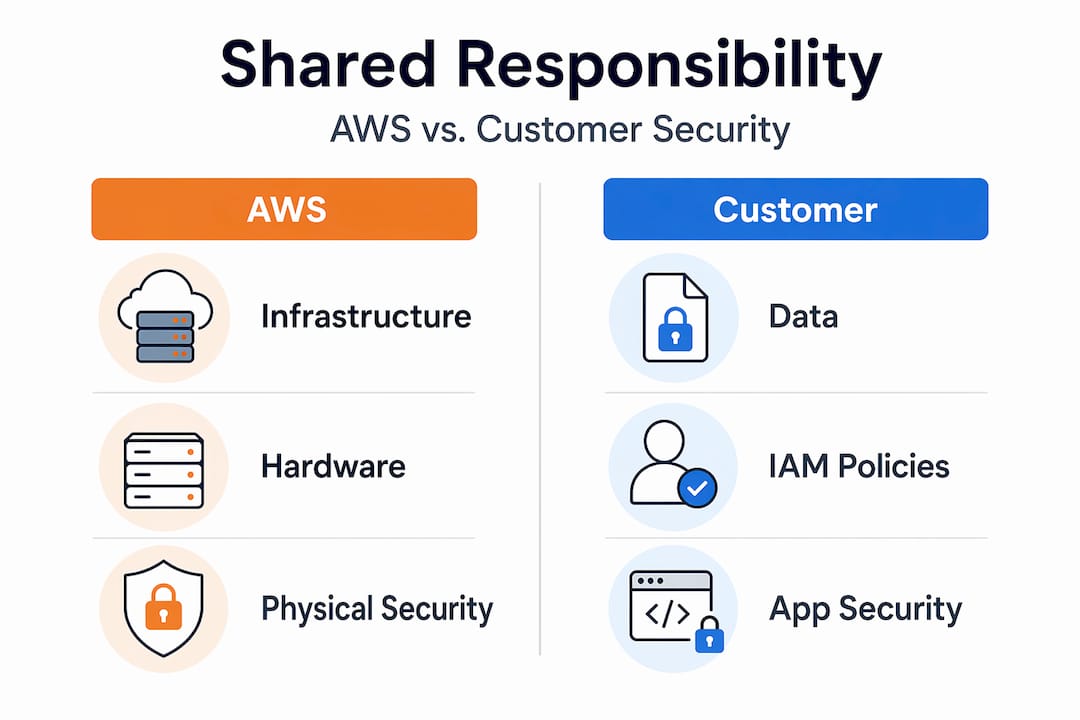
The model also allocates cloud security tasks based on control and capability. AWS cannot see your data, cannot know your intended access patterns, and cannot enforce your internal policies. You can. That is why those areas fall to you.
What AWS is responsible for
AWS’s responsibilities cover everything that makes the cloud physically and logically functional. When you evaluate the AWS shared responsibility model, this is the layer you can largely treat as given, though you should still verify it through AWS’s published compliance documentation.
AWS-managed security elements include:
- Physical data centers: Access controls, environmental protections, and hardware lifecycle management across all AWS regions and availability zones
- Network infrastructure: The global backbone, edge locations, and inter-region transit that your traffic runs across
- Hypervisor and virtualization: The compute isolation layer that prevents one tenant’s workload from accessing another’s memory or CPU cycles
- Managed service platforms: For services like RDS, ElastiCache, and OpenSearch, AWS manages the underlying OS, runtime, and platform patches
- Hardware decommissioning: Secure destruction of storage media to prevent data remnants from escaping decommissioned drives
AWS also handles patching at the infrastructure level. For a managed database like RDS, that means the database engine and the host OS receive patches without any action from your team. This is a meaningful reduction in operational burden compared to running your own database servers. The physical security and virtualization responsibilities remain with AWS regardless of which service you use. That does not change based on your service tier or contract.
What your team is responsible for

This is where most organizations underestimate their workload. Customer responsibilities cover the majority of the application and data stack, and the specifics vary by service type.
Core customer-owned security areas include:
- Data protection and classification: You decide what data goes into AWS, how it is classified, and what retention and deletion policies apply
- Encryption: Customers configure encryption, manage key policies through AWS KMS, and implement client-side encryption when required. AWS provides the tools; you decide when and how they are applied
- Operating system patching: For EC2 and any IaaS workload, OS patching and hardening fall entirely to your team
- IAM policies and access controls: Roles, policies, permission boundaries, and MFA enforcement are all customer-managed
- Security groups and network ACLs: Firewall rules at the instance and subnet level are your configuration to get right
- Application code: Logic, dependencies, and any vulnerabilities in your deployed code are yours to find and fix
Pro Tip: Run AWS IAM Access Analyzer on a regular schedule. It surfaces resource policies that grant access outside your account or organization, which is one of the fastest ways to catch unintended external exposure before an auditor does.
Identity and access management deserves special attention. IAM and configuration drift are the most common failure points in customer-side security. AWS cannot infer your intended access model. If a developer accidentally attaches an admin policy to a service account, AWS will not stop it. Your governance process must.
For practical guidance on managing access controls and security group configurations, the details matter more than most teams realize until after an incident.
How responsibility shifts across service models
The boundary between AWS and customer responsibilities is not fixed. It moves depending on which service abstraction you choose. This is one of the more nuanced aspects of understanding the AWS shared model, and it has direct implications for how much operational security work your team carries.
| Service model | AWS example | AWS manages | Customer manages |
|---|---|---|---|
| IaaS | EC2 | Physical host, hypervisor, network | Guest OS, patching, firewall rules, app code |
| PaaS | RDS | Host OS, DB engine patches, storage | DB users, schemas, access permissions, encryption settings |
| Serverless | Lambda | Infrastructure, runtime, execution env | Function code, IAM roles, environment variables |
For EC2, customers handle OS patching and security group configurations. That is the highest operational security burden of any AWS compute option. You own the guest OS from the moment the instance launches.
RDS shifts meaningful work to AWS. The database engine patching, the underlying OS, and the storage encryption at rest are all handled by AWS. Your team focuses on database user management, privilege separation, and ensuring that parameter groups enforce your security standards.
Lambda represents the furthest shift toward AWS. AWS manages infrastructure and runtime for serverless functions, including the execution environment and language runtime. What remains with the customer is the function code itself, the IAM execution role, and environment variable handling. Serverless does not mean responsibility-free. It means the responsibility surface area is smaller and more focused.
Pro Tip: When migrating workloads or selecting new services, map out the responsibility shift explicitly before deployment. Teams that choose RDS over self-managed databases without documenting what AWS now handles often duplicate operational controls and waste effort on things already covered.
Compliance and risk management implications
AWS compliance certifications are extensive, covering PCI DSS, HIPAA, SOC 2, ISO 27001, and more. But those certifications apply to the infrastructure AWS operates, not to your workload running on it. Customers must build IT environments aligned with their own compliance requirements and verify the controls they own.
This distinction catches compliance officers off guard more often than it should. Here is how it breaks down in practice:
- AWS’s certifications: Cover physical security, network controls, hypervisor isolation, and managed service platform configurations
- Your certification scope: Covers guest OS hardening, application-layer controls, data classification, access management, and audit logging configuration
- Evidence responsibility: In audits, customers must provide evidence of their own control effectiveness. AWS’s SOC reports are supporting documentation, not a substitute for your own control evidence
AWS compliance documentation tells auditors the platform is sound. It does not tell them your configuration is sound. That gap is your responsibility to close, every time.
Continuous monitoring is non-negotiable in this model. Configuration drift, the gradual deviation of your environment from a known-good baseline, creates compliance exposure that AWS cannot detect or remediate on your behalf. Customers must evaluate and verify controls they own, which requires active tooling and governance, not periodic manual review.
Putting it into practice: steps for your team
Translating the model into operational reality requires deliberate steps. Here is a sequence that works for most organizations:
- Audit your service inventory. List every AWS service in use and classify each one as IaaS, PaaS, or serverless. This immediately surfaces where your security responsibilities are highest.
- Map responsibilities per service. For each service, document what AWS handles and what your team owns. Do not rely on institutional knowledge. Write it down.
- Implement AWS Systems Manager. Use Systems Manager Patch Manager for guest OS patching on EC2 fleets. This removes the most common IaaS compliance gap.
- Configure AWS Config rules. Set up Config rules to detect configuration drift in real time. Rules for open security groups, unencrypted volumes, and public S3 buckets should be active from day one.
- Review IAM permissions quarterly. Apply the principle of least privilege and use AWS IAM Access Analyzer to catch over-permissive policies before audits do.
- Document for auditors. Maintain a controls matrix that maps your compliance requirements to the specific AWS services and configurations that satisfy each one.
Pro Tip: Do not treat the shared responsibility documentation as a one-time exercise. Every time your team adds a new AWS service, the responsibility boundary changes. Add a responsibility mapping step to your service onboarding checklist.
For a deeper look at AWS security best practices across data protection, IAM, and configuration management, the specifics of each control area deserve their own dedicated attention.
My take on what this model means in practice
I have worked through AWS security reviews with organizations across fintech, retail, and enterprise software. The pattern I see repeat itself is not ignorance of the shared responsibility model. It is selective acknowledgment. Teams read the documentation, understand the concept, and then proceed to operate as if the parts they find inconvenient are somehow negotiable.
What I have learned is that the model’s value is not in the documentation. It is in the discipline it forces. When you write down that your team owns OS patching for every EC2 instance, you are forced to ask: who does it, how often, and how do we prove it happened? That question reveals gaps that no amount of cloud-native tooling will close without deliberate ownership.
The shift I recommend to every cloud architect I work with is simple: treat the responsibility matrix as a living operational document, not a compliance artifact. Review it when you add services, when your team structure changes, and when a vendor relationship evolves. I have seen organizations lose audit credibility not because their controls failed, but because their documentation did not reflect what they were actually running.
The AWS shared responsibility model is also a vendor alignment tool. When you engage third-party SaaS providers running on AWS, ask them where their responsibility ends and where yours begins. That conversation should happen before a contract is signed, not during an incident response.
Security accountability does not dilute when you move to managed services. It sharpens. The fewer operational layers you own, the more precise your control over the ones that remain must be.
— Oleksandr
How Itmagic helps you own your side of the model

Understanding the AWS shared responsibility model is the first step. Executing it across a complex, multi-service AWS environment is where most teams need a partner with real operational depth. Itmagic is an AWS Advanced Tier Services Partner with over 700 projects delivered since 2010, specializing in infrastructure security, compliance implementation, and DevOps automation.
Our certified AWS engineers help you map responsibility boundaries across your service portfolio, configure IAM governance frameworks, implement continuous compliance monitoring, and prepare audit-ready documentation for frameworks including PCI DSS. Whether you are running EC2 fleets, containerized workloads on EKS, or serverless architectures, our team covers the operational security controls that your side of the model demands. Explore our AWS infrastructure support services to see how we work.
FAQ
What is the AWS shared responsibility model?
The AWS shared responsibility model divides cloud security between AWS and the customer. AWS secures the physical infrastructure, hypervisor, and managed service platforms. Customers are responsible for data, OS configurations, IAM policies, and application security.
What does AWS not cover in the shared responsibility model?
AWS does not manage guest OS patching, application code security, IAM policy configuration, encryption decisions, or firewall rule settings for customer-deployed workloads. These areas remain the customer’s obligation regardless of the services used.
How does the shared responsibility model change with Lambda vs. EC2?
With EC2, customers manage the guest OS, patching, and security groups. With Lambda, AWS manages the runtime and infrastructure. Customers using Lambda are responsible only for function code, IAM execution roles, and environment variable security.
Does AWS compliance certification cover my workload?
No. AWS compliance certifications cover the infrastructure AWS operates. Customers must implement and document their own controls for the workload layer and provide independent evidence of control effectiveness during audits.
What are the biggest risks in managing customer-side responsibilities?
IAM misconfiguration and configuration drift are the most common and consequential failure points. AWS cannot enforce your intended access model, making proactive IAM governance and automated Config rule monitoring critical to maintaining your security posture.
Recommended
- AWS Cloud Security: Best Practices, Tools & Complete Guide | IT-Magic
- AWS compliance checklist: Step-by-step guide for enterprise security
- AWS cloud security: 7 essential strategies for 2026
- Top AWS network security tips for robust cloud protection
Alexander founded IT-Magic, an AWS Advanced Tier Services Partner delivering DevOps, cloud architecture, and managed services since 2010. He holds:
- AWS Certified Solutions Architect – Professional
- AWS Certified DevOps Engineer – Professional
- AWS Certified Security – Specialty
- AWS Certified Advanced Networking – Specialty
Talk to a certified AWS team trusted by INTERTOP, Foxtrot, Pandora, and J.Hilburn.
Get a free consultation


