


TL;DR:
- Proper AWS logging architecture is essential for security, compliance, and cost management.
- Centralizing logs with structure, correlation IDs, and encryption improves incident response and audit readiness.
- Optimizing log levels, retention, and storage classes significantly reduces CloudWatch costs.
Misconfigured or missing AWS logs are not just a technical inconvenience. They can trigger failed audits, expose sensitive customer data, and generate cloud bills that make finance teams flinch. Missed logs hinder incident response and leave compliance gaps that regulators will find before you do. For CTOs and engineering leads at fintech and enterprise organizations, AWS logging is not a background concern. It is a core operational discipline. This guide walks through how to architect, secure, and optimize your AWS logging strategy so you can turn raw log data into a genuine competitive and compliance advantage.
Key Takeaways
| Point | Details |
|---|---|
| Centralize all logs | Bring together logs from all AWS services and applications for easier monitoring and security management. |
| Automate sensitive data protection | Use AWS CloudWatch Logs Data Protection to catch and mask personal or confidential information automatically. |
| Optimize storage and costs | Choose the right log storage class and filter detail levels to control costs without sacrificing visibility. |
| Prioritize compliance frameworks | Configure AWS logging to ensure auditability and meet GDPR, HIPAA, and PCI DSS requirements. |
| Avoid common pitfalls | Regularly review for missing log sources and cost bloat from unnecessary DEBUG logs in production. |
Centralized logging architecture in AWS
Running this on your own AWS setup? IT-Magic is an AWS Advanced Tier Partner — we audit, fix, or fully manage it for you.
Get a free consultationWith the stakes established, let’s clarify how AWS logging infrastructure is architected for robust coverage.
AWS logging primarily uses Amazon CloudWatch Logs for centralized collection, monitoring, and analysis of logs from AWS services, EC2, ECS, EKS, Lambda, and applications. Think of CloudWatch Logs as the central nervous system of your observability stack. Every signal from every service flows through it, and without it, you are essentially flying blind across your entire cloud environment.
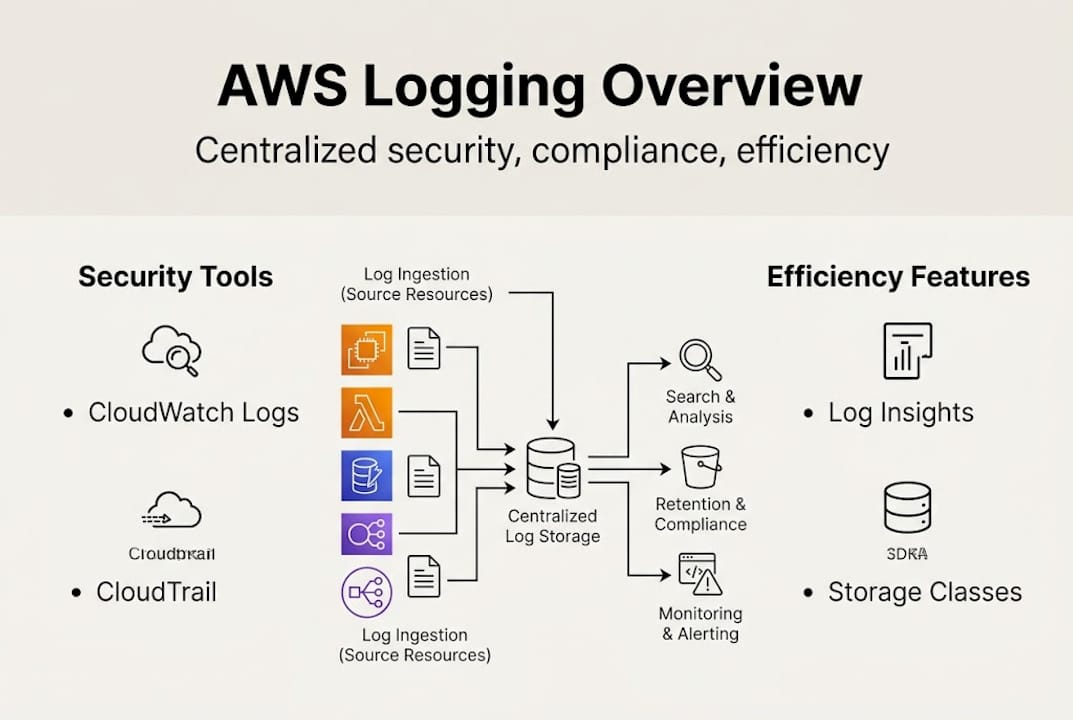
The CloudWatch Agent extends this coverage further. It runs on EC2 instances and on-premises servers, collecting system-level metrics and application logs that native AWS integrations do not capture automatically. For teams running hybrid infrastructure, this is critical. You get a single pane of glass instead of juggling separate tools for cloud and on-prem environments.
Native integrations cover a wide surface area. CloudTrail feeds API activity logs directly into CloudWatch. Lambda pushes function execution logs automatically. VPC Flow Logs capture network traffic metadata. EKS audit logs track Kubernetes control plane activity. For AWS for retail industry workloads handling high transaction volumes, this breadth of coverage is what separates proactive incident detection from reactive firefighting.
Here is a quick reference for supported AWS services and their log types:
| AWS Service | Log Type | Destination |
|---|---|---|
| EC2 | System, application logs | CloudWatch Logs via Agent |
| Lambda | Function execution logs | CloudWatch Logs (native) |
| CloudTrail | API activity, management events | CloudWatch Logs or S3 |
| VPC Flow Logs | Network traffic metadata | CloudWatch Logs or S3 |
| EKS | Audit, API server, scheduler logs | CloudWatch Logs |
| RDS | Error, slow query, audit logs | CloudWatch Logs |
| S3 | Access logs, data events | S3 or CloudTrail |
To build a truly resilient setup, follow these core architectural principles:
- Use a dedicated logging account within AWS Organizations to isolate log data from workload accounts
- Encrypt all log groups with AWS KMS customer-managed keys to prevent unauthorized access
- Apply IAM least privilege so only authorized services and roles can write or read logs
- Set log retention policies per log group to avoid indefinite storage costs
- Enable cross-region replication for disaster recovery and regulatory requirements
For a full breakdown of what this looks like in practice, the AWS compliance checklist covers the architectural controls that auditors actually look for. And if you are hardening your network layer alongside logging, AWS network security tips provides complementary guidance.
AWS logging for security and compliance
Knowing the architecture, next comes understanding how logging directly underpins both security and compliance.
CloudWatch Logs Data Protection automatically detects and masks sensitive data including PII, PHI, and credentials to help comply with GDPR, HIPAA, and PCI DSS. It uses machine learning and pattern matching to scan log events in real time. When a match is found, the sensitive value is masked before it ever lands in storage. This is not a manual process. It runs continuously without any developer intervention.
The "LogEventsWithFindings` metric is your signal that something was caught. A spike in this metric means your applications are inadvertently logging sensitive data, which is a compliance gap you want to close fast. Monitoring this metric in a CloudWatch alarm is one of the simplest high-value security controls you can implement today.
Compliance is also enabled through CloudTrail integration, immutable log storage, IAM controls, and OCSF normalization for security analytics. CloudTrail creates a tamper-evident record of every API call made in your account. Combined with S3 Object Lock for immutable storage, this gives you audit-ready evidence that satisfies even the strictest regulatory frameworks.
Here is how major compliance frameworks map to AWS logging features:
| Framework | Key Requirement | AWS Logging Feature |
|---|---|---|
| GDPR | Data minimization, breach detection | CloudWatch Data Protection, CloudTrail |
| HIPAA | Audit controls, access logging | CloudTrail, IAM, KMS encryption |
| PCI DSS | Log monitoring, retention | CloudWatch Logs, S3 immutable storage |
| SOC 2 | Change tracking, availability | CloudTrail, VPC Flow Logs |
Common compliance mistakes and how AWS logging addresses them:
- No retention policy set: Logs accumulate indefinitely, increasing cost and audit complexity. Set explicit retention per log group.
- Missing CloudTrail in all regions: API activity in unmonitored regions goes undetected. Enable multi-region CloudTrail.
- No alerting on sensitive data findings: Data Protection catches issues silently unless you alarm on
LogEventsWithFindings. - Unencrypted log groups: Default CloudWatch encryption is AWS-managed. Use customer KMS keys for stronger control.
Pro Tip: Use log group data protection policies with AWS built-in managed identifiers (there are over 100 pre-built patterns) to automate sensitive data detection without writing custom regex. This alone can cut compliance setup time significantly for teams preparing for a PCI DSS or HIPAA audit.
If you want a structured approach to meeting these requirements, the AWS compliance checklist is a practical starting point for enterprise teams.
Performance efficiency and smart log management
Security and compliance are imperative, but performance and operational efficiency can make or break scale for fast-moving teams.

Unified log management reduces duplication and ETL overhead, while Logs Insights enables querying and export to S3 or OpenSearch for long-term analysis. Before CloudWatch Logs Insights, debugging a production incident meant pulling raw log files, writing custom scripts, and waiting. Now you run a structured query directly in the console and get results in seconds. For an on-call engineer at 2am, that difference is enormous.
Storage class selection is one of the most underused cost levers available. CloudWatch Logs Standard class is optimized for active querying. Infrequent Access class costs roughly 50% less but adds a small query surcharge. For logs you need to retain for compliance but rarely query, Infrequent Access is the right choice.
The cost difference between log levels is striking. DEBUG logs at 100k requests per day cost approximately $150 per month versus $22 per month for ERROR-only logging, an 85% savings. Most production systems do not need DEBUG verbosity running continuously. Switching to ERROR or WARN in production, and reserving DEBUG for targeted troubleshooting windows, is one of the fastest ways to cut your CloudWatch bill.
Here is a step-by-step approach to optimizing logging costs:
- Audit current log groups using CloudWatch metric math to identify the top 10 groups by ingestion volume
- Review log levels in each application and set production environments to WARN or ERROR
- Set retention policies on every log group. Default is indefinite. Even 90 days is often sufficient for operational logs.
- Move archival logs to S3 using subscription filters and lifecycle policies to Glacier for long-term compliance storage
- Switch eligible groups to Infrequent Access storage class for logs accessed less than once per month
- Enable log sampling for high-volume, low-value log streams where full fidelity is not required
Pro Tip: Use CloudWatch metric math with the IncomingBytes metric across all log groups to build a ranked list of your biggest cost contributors. This takes about 10 minutes to set up and often reveals one or two log groups responsible for the majority of ingestion costs. Pair this with AWS cost optimization services to build a sustainable cost governance model. For broader architectural guidance, the AWS best practices resource library covers logging alongside compute and networking optimization.
Common pitfalls and advanced strategies
Now, let’s address what often goes wrong and how you can leap straight to advanced, cost-efficient AWS logging strategies.
High-volume ingestion and DEBUG logs in production explode costs, while missing VPC Flow Logs, EKS audit logs, and S3 access logs leave critical blind spots during incident investigations. These are not edge cases. They are the most common issues we see across new client environments, regardless of team size or cloud maturity.
Here are the most impactful solutions to implement:
- Switch to structured JSON logging across all services. JSON logs are machine-readable, filterable, and compatible with Logs Insights queries without custom parsing.
- Add correlation IDs to every log entry. A single request ID that flows through Lambda, API Gateway, and RDS makes cross-service debugging dramatically faster.
- Enable VPC Flow Logs on every VPC. Network-level visibility is essential for detecting lateral movement and unusual traffic patterns.
- Set explicit log retention on every log group. Unmanaged log groups with no retention policy are a silent cost and compliance risk.
- Enable S3 server access logging for buckets containing sensitive data. S3 access logs are disabled by default and frequently overlooked.
- Use AWS Organizations log aggregation to centralize logs from all member accounts into a single security account.
Centralize logs in a dedicated account with KMS encryption, least-privilege IAM, and structured logging using JSON with correlation IDs for efficiency.
“A missed audit log or unchecked DEBUG group can cause six-figure mistakes in both compliance fines and runaway cloud spend.”
Pro Tip: Never skip KMS encryption on log groups containing application data. AWS-managed encryption is the default, but it does not give you key rotation control or the ability to revoke access instantly. Customer-managed KMS keys are a non-negotiable for any team operating under PCI DSS or HIPAA. For teams evaluating managed support, reviewing top AWS partners can help identify providers with proven logging and security expertise. For industry-specific guidance, AWS industry solutions covers sector-specific compliance and logging requirements.
The uncomfortable truth about AWS logging: What most guides miss
With all strategies in place, here is a candid perspective on what really determines AWS logging success.
Most teams treat logging as a checkbox. They enable CloudWatch, confirm logs are flowing, and move on. The real risk is not that logs are missing entirely. It is that they are present but unstructured, uncorrelated, and unreviewed. A log file with no correlation ID is nearly useless during a live incident. A log group with no retention policy is a liability that grows every day.
After working with cloud and DevOps consulting clients across fintech, retail, and enterprise, the pattern is consistent. Teams that invest in structured logging, correlation IDs, and centralized aggregation resolve incidents in minutes rather than hours. Teams that do not spend that time during audits scrambling to reconstruct what happened from fragmented, verbose log dumps.
The other underappreciated truth is that log hygiene is a sprint-cycle discipline, not a quarterly security review item. Build log group reviews, retention audits, and log level checks into your regular engineering cadence. The teams that do this rarely face surprise cost spikes or audit failures. The ones that treat it as a one-time setup task almost always do.
Next steps: Optimize your AWS logging with IT-Magic
Ready to address your logging challenges strategically? Here is how IT-Magic can partner with you.
IT-Magic has delivered over 700 projects for 300+ clients since 2010, and AWS logging architecture is one of the most frequent areas where we create immediate, measurable impact. Whether you are preparing for a PCI DSS audit, dealing with runaway CloudWatch costs, or building a centralized logging strategy across a multi-account AWS organization, our certified engineers have done it before.

We integrate security, compliance, and cost controls into a single logging framework tailored to your environment. Our AWS infrastructure support covers the full logging stack, from agent configuration to KMS encryption and retention policies. For automation-first teams, our AWS DevOps services include logging pipelines as part of CI/CD and infrastructure-as-code workflows. And if cost is the primary driver, our AWS cost optimization engagements consistently identify 30 to 60% savings in logging spend within the first 30 days.
Frequently asked questions
What AWS services generate logs that should be monitored?
Monitor logs from EC2, ECS, EKS, Lambda, CloudTrail, VPC Flow Logs, and application-specific sources to ensure end-to-end security and performance visibility across your entire AWS environment.
How does AWS logging help with GDPR and PCI DSS compliance?
CloudWatch Logs Data Protection automatically detects and masks sensitive data including PII and credentials, supporting GDPR and PCI DSS requirements, while CloudTrail provides the immutable audit trail regulators require.
What are the biggest cost traps in AWS logging?
DEBUG logs at 100k requests per day cost roughly $150 per month versus $22 for ERROR-only logging. Unmanaged retention policies and missing storage class optimization are the other two most common sources of unnecessary spend.
What’s the best way to centralize AWS logs for an organization?
Centralize logs in a dedicated account using KMS encryption, least-privilege IAM, structured JSON logging, and correlation IDs to enable fast cross-service analysis and clean audit trails across all member accounts.
Alexander founded IT-Magic, an AWS Advanced Tier Services Partner delivering DevOps, cloud architecture, and managed services since 2010. He holds:
- AWS Certified Solutions Architect – Professional
- AWS Certified DevOps Engineer – Professional
- AWS Certified Security – Specialty
- AWS Certified Advanced Networking – Specialty
Talk to a certified AWS team trusted by INTERTOP, Foxtrot, Pandora, and J.Hilburn.
Get a free consultation


