

TL;DR:
- Workload migration involves transferring applications and data between IT environments, including cloud and on-premises setups. Success depends on strategic planning, proper classification, dependency mapping, and phased execution to optimize performance and cost. Ignoring dependencies and inadequate planning are common risks that can lead to delays and performance issues.
Workload migration is defined as the process of moving applications, data, and computational tasks from one IT infrastructure to another, whether from on-premises servers to AWS, Azure, or Google Cloud, or between cloud environments. IBM and VMware both define workload migration as the transfer of workloads between computing environments. For system architects and project managers, this process is rarely just a technical lift. It requires strategic planning, workload classification using frameworks like the Five R’s, and careful dependency mapping before a single virtual machine moves. Done right, it delivers real gains in scalability, cost control, and operational flexibility.
What is workload migration and how does it differ from cloud migration?
Workload migration and cloud migration are related but not identical. Cloud migration refers broadly to moving any IT asset, including infrastructure, data, and applications, to a cloud platform. Workload migration is more specific. It focuses on moving discrete computational units, such as a database cluster, a containerized service, or a batch processing job, from one environment to another.

The target environment does not have to be a public cloud. Teams migrate workloads between on-premises data centers, from on-premises to AWS or Google Cloud, between cloud regions, or into hybrid configurations that combine on-premises and cloud infrastructure. Each scenario carries different network, security, and performance requirements.
What makes workload migration distinct is the unit of analysis. You are not moving a whole data center. You are moving a specific application stack, with its dependencies, storage, and network connections, as a defined unit. That specificity is what makes planning both more tractable and more demanding.
What are the common workload migration strategies?
Running this on your own AWS setup? IT-Magic is an AWS Advanced Tier Partner — we audit, fix, or fully manage it for you.
Get a free consultationThe Five R’s framework from VMware classifies every workload into one of five categories: Retain, Rehost, Replatform, Refactor, and Retire. Each category maps to a different migration tactic with distinct trade-offs in speed, cost, and long-term value.
| Strategy | What it means | Best for |
|---|---|---|
| Rehost (Lift and Shift) | Move the workload as-is to the new environment | Legacy apps needing fast migration |
| Replatform | Minor adjustments to use managed cloud services | Apps that benefit from PaaS without full rewrite |
| Refactor | Redesign the app for cloud-native architecture | High-value apps needing long-term performance gains |
| Repurchase | Replace with a SaaS alternative | Commodity workloads like CRM or email |
| Retire | Decommission unused or redundant workloads | Apps with no active users or business value |
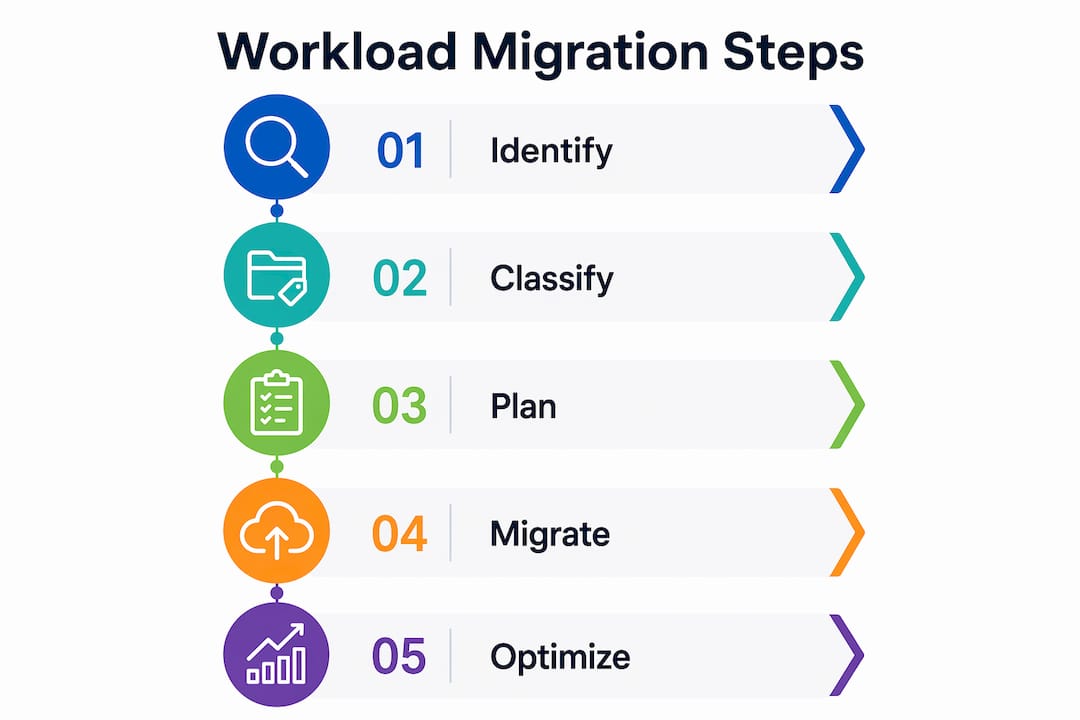
Rehost is the fastest path. A team can move a virtual machine from VMware Cloud Foundation to AWS EC2 with minimal changes. The trade-off is that you carry over all the inefficiencies of the original design. Refactoring delivers the most cloud-native benefit but demands the most time and engineering effort. Most migration programs use a mix of all five strategies across different workload categories.
Hybrid migration sits across all five strategies. Teams that use hybrid approaches keep latency-sensitive or compliance-bound workloads on-premises while moving others to the cloud. This is common in financial services and healthcare, where regulatory requirements restrict where certain data can reside.
Pro Tip: Classify every workload before writing a single migration plan. Teams that skip classification spend weeks migrating workloads that should have been retired, wasting budget and engineering time.
What technical considerations ensure a successful migration?
Dependency mapping is the single most important pre-migration task. Ignoring application dependencies causes cross-tier latency that degrades performance after cutover. If your application server moves to AWS but the database stays on-premises, every query crosses a wide-area network link. That latency compounds under load and can make a previously fast application feel broken.
The technical checklist for a migration project covers several areas:
- Dependency mapping: Document every service-to-service call, shared database, and network dependency before migration begins.
- Phased sequencing: Start with non-critical workloads to build team confidence and surface unexpected issues before touching production systems.
- Security in transit: Migrating sensitive data requires end-to-end encryption and compliance controls throughout the transfer, not just at the destination.
- Rollback plans: Define a clear rollback procedure for every workload before cutover. A rollback plan that exists only in someone’s head is not a rollback plan.
- Monitoring and automation: Deploy monitoring tools before migration, not after. You need baseline performance data to detect regressions at cutover.
Network architecture deserves special attention. Migrating to AWS without redesigning subnet layouts, security groups, and routing tables often recreates the same bottlenecks that existed on-premises. Architects should treat the network design as a first-class deliverable, not an afterthought.
Pro Tip: Run a pilot migration with one non-critical workload end-to-end, including rollback, before committing to the full migration schedule. The pilot will surface at least three issues you did not anticipate.
For teams managing high-traffic environments, the AWS migration case study for a high-load online store shows how phased planning and dependency analysis prevented downtime during peak traffic periods.
How does workload migration affect performance and cost?
Migrating to a public cloud like AWS, Azure, or Google Cloud improves scalability and flexibility by replacing fixed hardware capacity with on-demand resource allocation. A workload that required over-provisioned servers to handle peak load can scale horizontally in the cloud and scale back down when demand drops. That elasticity directly reduces infrastructure spend.
The cost picture is not simple, though. Migration itself carries upfront costs: engineering time, tooling, testing, and potential downtime. The return on that investment depends on how well the team manages cloud spend after migration. AWS Cost Optimization services focus specifically on controlling cloud infrastructure spend post-migration, covering rightsizing, reserved instance planning, and idle resource elimination.
Performance gains are real but conditional. Teams that migrate without addressing dependencies often see performance regressions in the first weeks after cutover. The gains come after the architecture is tuned for the cloud environment, not immediately at migration. Project managers should set realistic timelines that include a post-migration stabilization period of at least four to six weeks.
The clearest cost benefits appear in three areas: elimination of hardware refresh cycles, reduction of data center operational overhead, and the ability to match compute spend to actual demand. Teams that track these metrics before and after migration build a clear business case for future cloud investments.
What are the biggest risks in workload migration projects?
Treating migration as pure technical execution rather than strategic planning is the most common cause of project failure. VMware experts consistently flag this as the root cause of resource misallocation and missed timelines. When teams focus only on moving workloads and skip workload classification and prioritization, they create a backlog of problems that surface at the worst possible time.
The most frequent risks in migration projects, and how to address them:
- Undocumented dependencies. Run automated discovery tools like AWS Application Discovery Service before planning begins. Manual documentation alone misses runtime dependencies.
- Data security gaps. Apply encryption at rest and in transit from day one. Compliance requirements under PCI DSS, SOC 2, or HIPAA do not pause during migration.
- Vendor lock-in. Design for portability by using containerized workloads and infrastructure-as-code tools like Terraform. Avoid proprietary services that have no equivalent on another platform.
- Skill gaps. Identify which team members need AWS or Kubernetes training before the migration starts, not during it.
- Scope creep. Define the migration boundary for each workload in writing. Scope that expands mid-project is the leading cause of budget overruns.
“The biggest mistake teams make is confusing activity with progress. Moving workloads without a classification strategy creates chaos, not cloud infrastructure.”
— VMware Cloud Foundation Blog
For teams in retail or e-commerce, cloud migration strategies that account for seasonal traffic spikes require additional risk planning around cutover timing and rollback windows.
Key takeaways
Workload migration succeeds when teams treat it as a strategic program, not a technical task, anchored by workload classification, dependency mapping, and phased execution.
| Point | Details |
|---|---|
| Define migration units clearly | Treat each workload as a discrete unit with its own dependencies, not as part of a bulk move. |
| Apply the Five R’s framework | Classify every workload as Retain, Rehost, Replatform, Refactor, or Retire before planning begins. |
| Map dependencies first | Document all service-to-service calls and network paths before moving any workload to avoid latency issues. |
| Phase the migration | Start with non-critical workloads to surface issues before touching production systems. |
| Plan for post-migration costs | Use tools like AWS Cost Optimization to control cloud spend after cutover, not just during migration. |
The strategic gap most teams never close
After working on cloud infrastructure projects since 2010, the pattern I see most often is not technical failure. It is a planning failure that looks like a technical failure. Teams spend months on tooling decisions and almost no time on workload classification. Then they wonder why the migration took twice as long as projected.
The Five R’s framework is not new. VMware has been publishing guidance on it for years. But most teams treat it as a checkbox rather than a genuine decision-making tool. I have seen organizations rehost workloads that should have been retired, spending real engineering time migrating applications that had three active users. That is not a technical problem. It is a prioritization problem.
The other pattern worth naming is the post-migration cliff. Teams celebrate cutover day and then discover that cloud costs are higher than expected because no one set up rightsizing or reserved capacity planning. The migration is done, but the optimization work has not started. Building a 60-day post-migration review into the project plan from the beginning changes that outcome.
Emerging tools like AWS Compute Optimizer and containerization through Amazon EKS are making it easier to right-size workloads automatically after migration. But automation only works on top of a clean architecture. If the workload was poorly structured before migration, automation will optimize a bad design, not fix it.
The teams that get the best results treat migration as the beginning of a cloud operating model, not the end of a data center exit project.
— Oleksandr
How IT-Magic supports complex workload migrations on AWS
IT-Magic has delivered infrastructure migration projects for more than 300 clients since 2010, including fintech, retail, and enterprise environments with strict compliance requirements.

For teams moving workloads to AWS, IT-Magic provides AWS infrastructure support covering architecture design, dependency analysis, phased migration execution, and post-migration stabilization. For containerized workloads, the team also provides Kubernetes migration support using Amazon EKS and ECS. Every engagement includes cost governance planning so teams do not face surprise cloud bills after cutover. IT-Magic does not develop software. The focus is entirely on infrastructure, automation, and operations, which means the team’s attention stays on making the migration succeed, not on adjacent deliverables.
FAQ
What is the workload migration meaning in cloud computing?
Workload migration in cloud computing means moving a specific application, service, or data set from one computing environment to another, such as from an on-premises server to AWS or between cloud regions. The goal is typically to improve performance, reduce costs, or increase operational flexibility.
What is the Five R’s framework for migration?
The Five R’s are Retain, Rehost, Replatform, Refactor, and Retire. VMware and cloud industry experts use this framework to classify workloads and select the right migration strategy for each one.
How do you migrate workloads without downtime?
Phased migration, starting with non-critical workloads, combined with detailed dependency mapping and a tested rollback plan, minimizes downtime risk. Running parallel environments during cutover gives teams a safety net if issues appear.
What are the main benefits of workload migration to the cloud?
The primary benefits are on-demand scalability, elimination of hardware refresh costs, and the ability to match compute spend to actual demand. These gains are most significant when teams also implement post-migration cost optimization.
What is the biggest risk in a workload migration project?
Ignoring application dependencies is the most common technical risk, as it causes latency and performance degradation after cutover. Treating migration as a technical task rather than a strategic program is the most common organizational risk, leading to resource misallocation and missed timelines.
Recommended
- Multi-Cloud Strategy for IT Leaders: 2026 Guide
- Cloud Migration Strategies: Everything You Need to Know | IT-Magic
- AWS Optimization Checklist for Cloud Teams in 2026
- Cloud Monitoring Process: A 2026 Guide for IT Teams
Alexander founded IT-Magic, an AWS Advanced Tier Services Partner delivering DevOps, cloud architecture, and managed services since 2010. He holds:
- AWS Certified Solutions Architect – Professional
- AWS Certified DevOps Engineer – Professional
- AWS Certified Security – Specialty
- AWS Certified Advanced Networking – Specialty
Talk to a certified AWS team trusted by INTERTOP, Foxtrot, Pandora, and J.Hilburn.
Get a free consultation


