

TL;DR:
- AWS secrets management involves securely storing, rotating, and controlling access to credentials using specialized AWS services. Implementing automated rotation, centralized storage, and least privilege policies reduces the risk of credential leaks and cloud breaches.
AWS secrets management is the practice of securely storing, rotating, and controlling access to credentials and sensitive data within AWS using dedicated services like AWS Secrets Manager, AWS Systems Manager Parameter Store, and AWS KMS. Hardcoded credentials in source code remain one of the most common causes of cloud breaches. A disciplined approach to secure credential storage eliminates that risk by centralizing secrets, enforcing least privilege, and automating rotation without redeploying applications. This article covers the architecture, lifecycle workflows, cross-account patterns, and operational practices that security engineers and cloud architects need to manage secrets at scale.
What is AWS secrets management and which services handle it?
AWS categorizes secrets management across three core services, each with a distinct role. AWS Secrets Manager handles automated rotation and lifecycle management. AWS Systems Manager Parameter Store stores hierarchical configuration data that does not require rotation. AWS KMS manages the encryption keys that wrap every secret at rest.

AWS Secrets Manager supports up to 64 KB per secret with automatic versioning and lifecycle management built in. That capacity covers most structured credential payloads, including JSON blobs with multiple key-value pairs. Parameter Store suits non-rotating config values like feature flags or environment-specific endpoints. KMS sits underneath both services, encrypting data with either AWS-managed or customer-managed keys.
Pricing is pay-as-you-go. Secrets Manager charges $0.40 per secret per month and $0.05 per 10,000 API calls, with additional Lambda invocation costs for custom rotation functions. That cost structure rewards caching and batching API calls rather than fetching secrets on every request.
The table below maps the three services to their primary use cases:
| Service | Primary use | Rotation support | Encryption |
|---|---|---|---|
| AWS Secrets Manager | Credentials, API keys, tokens | Automatic via Lambda | AWS KMS (managed or customer) |
| Systems Manager Parameter Store | Config values, non-sensitive strings | Manual only | AWS KMS (optional) |
| AWS KMS | Encryption key management | Key rotation (annual) | N/A (is the encryption layer) |
Key capabilities of AWS Secrets Manager worth knowing before you architect a solution:
- Automatic rotation triggers a Lambda function on a configurable schedule without application downtime.
- Cross-Region replication propagates updates and rotations to replica secrets in other Regions automatically.
- Resource-based policies allow fine-grained access control at the secret level, not just at the IAM level.
- Versioning with staging labels tracks current, pending, and previous secret versions for safe rollback.
How does secrets lifecycle management work in AWS?
Running this on your own AWS setup? IT-Magic is an AWS Advanced Tier Partner — we audit, fix, or fully manage it for you.
Get a free consultationEvery secret in AWS Secrets Manager is encrypted at rest with an AWS KMS key. By default, Secrets Manager uses an AWS-managed key. For cross-account use cases or stricter compliance requirements, you must use a customer-managed key with an explicit key policy.
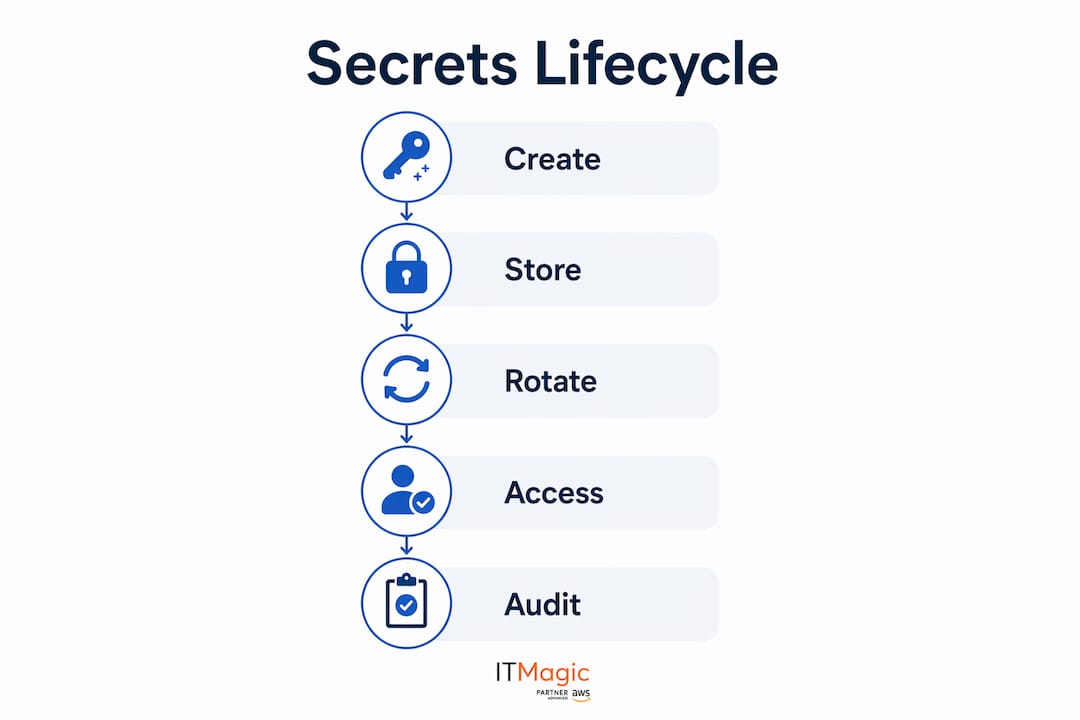
Automatic rotation is the feature that separates Secrets Manager from simple encrypted storage. Rotation uses a Lambda function that executes four ordered steps: createSecret, setSecret, testSecret, and finishSecret. Each step must complete successfully before the next begins. Mismanaging the transition between steps causes the AWSPENDING version to never promote to AWSCURRENT, which breaks application authentication.
Version staging labels are the mechanism that makes zero-downtime rotation possible. Secrets Manager maintains up to 100 versions per secret. AWSCURRENT is the version applications retrieve. AWSPENDING holds the new credential during rotation. AWSPREVIOUS retains the old credential as a fallback. Old versions with no staging labels are garbage-collected automatically.
Pro Tip: Always test your rotation Lambda against a non-production secret first. A bug in the finishSecret step that leaves AWSPENDING unresolved will lock your application out of the database until you manually intervene.
AWS Secrets Manager also supports cross-Region replication for disaster recovery. Replica secrets in secondary Regions stay synchronized with the primary, including rotation updates. This matters for multi-Region active-active architectures where a regional outage must not block credential retrieval.
Cost control during rotation deserves attention. Each rotation invokes a Lambda function, which adds to your monthly bill. For high-frequency rotation schedules across hundreds of secrets, Lambda invocation costs accumulate. Batch your rotation schedules and use the AWS cost reduction strategies that apply to Lambda, such as right-sizing memory and minimizing execution time in your rotation function.
How do you manage cross-account secret access securely?
Cross-account access to secrets requires two separate policy grants, not one. The secret itself needs a resource-based policy that explicitly allows the consuming account’s IAM role. The KMS key used to encrypt the secret also needs a key policy that grants decrypt permissions to that same role.
Default AWS-managed KMS keys do not support cross-account decrypt. This is the most common mistake teams make when setting up centralized secrets storage. You must create a customer-managed KMS key and configure both the key policy and the secret resource policy before cross-account retrieval works.
The permission model follows least privilege at every layer:
- The consuming role’s IAM policy must allow
secretsmanager:GetSecretValuefor the specific secret ARN. - The secret’s resource policy must allow the consuming account’s role to call
GetSecretValue. - The customer-managed KMS key policy must allow the consuming role to call
kms:Decrypt. - No single policy grant is sufficient on its own. All three must align.
Pro Tip: Use AWS Organizations SCPs to restrict which accounts can create secrets in the central account. This prevents unauthorized secrets from appearing in your centralized store and keeps your audit surface clean.
Cross-account access works well for centralized secrets stores where a security team owns secret creation and rotation, while application teams in separate accounts consume credentials at runtime. The tradeoff is dependency: if the central account’s Secrets Manager endpoint is unreachable, consuming accounts lose access. VPC endpoints and cross-Region replication both reduce that risk.
What are the best practices for operations, auditing, and networking?
Caching is the single most effective way to reduce both latency and API call costs. Fetching a secret on every Lambda invocation or container request generates unnecessary API traffic. AWS provides a Secrets Manager caching library for Java and Python, and Lambda extensions that cache secrets in memory across invocations. The cache respects TTL settings so applications pick up rotated credentials without a restart.
Auditing every secret operation is non-negotiable for PCI DSS, SOC 2, and HIPAA compliance. AWS CloudTrail, CloudWatch, and AWS Config together cover the full audit surface. CloudTrail logs every API call against Secrets Manager, including who accessed which secret and when. CloudWatch Alarms can trigger on unusual access patterns, such as a spike in GetSecretValue calls from an unexpected IAM role. AWS Config rules detect secrets that have not been rotated within your defined policy window.
Networking controls matter as much as IAM policies. VPC interface endpoints for Secrets Manager route all API calls over the AWS backbone, eliminating public internet exposure. Private DNS on the endpoint means existing SDK calls resolve to the private endpoint transparently, with no code changes required. This removes the need for NAT gateways in private subnets that need to retrieve secrets, which also reduces data transfer costs.
CLI usage is a frequently overlooked attack surface. Credentials echoed in shell commands appear in shell history files, CloudTrail logs, and CI/CD pipeline logs. The correct pattern is to retrieve secrets directly in application memory using the AWS SDK, or to inject them into the process environment at startup using a secrets injection sidecar. Never pipe a secret value into a variable that gets logged.
A complete operational checklist for secrets management includes:
- Enable CloudTrail logging for all Secrets Manager API calls in every Region.
- Set CloudWatch Alarms on
GetSecretValuecall volume and failed rotation events. - Use AWS Config managed rule
secretsmanager-rotation-enabled-checkto enforce rotation policy. - Apply resource tags to every secret for cost allocation and access control via tag-based IAM conditions.
- Review secret access patterns quarterly and remove permissions for roles that no longer need access.
Key Takeaways
Effective AWS secrets management requires combining automated rotation, least-privilege IAM policies, customer-managed KMS keys, and VPC endpoints to eliminate credential exposure at every layer.
| Point | Details |
|---|---|
| Use Secrets Manager for rotation | Secrets Manager automates credential rotation via Lambda without redeploying applications. |
| Customer-managed KMS keys are mandatory for cross-account use | AWS-managed keys do not support cross-account decrypt; always use customer-managed keys for multi-account setups. |
| Cache secrets to control costs | Use the AWS caching library or Lambda extensions to reduce API call volume and latency. |
| Audit with CloudTrail and CloudWatch | Log every secret access event and alert on anomalous patterns to meet PCI DSS, SOC 2, and HIPAA requirements. |
| VPC endpoints remove public exposure | Interface endpoints route Secrets Manager calls over the AWS backbone, eliminating NAT gateways and internet exposure. |
Centralized vs. decentralized: what I’ve learned from real deployments
Most teams default to centralized secrets management because it looks cleaner on a diagram. One account, one Secrets Manager instance, one audit trail. That logic is sound until the central account becomes a bottleneck or a target.
Centralized secrets storage delivers real advantages: unified audit logs, consistent rotation policies, and a single place to enforce tagging standards. The problem is that every application team now depends on a cross-account API call for every secret retrieval. Network partitions, IAM misconfigurations, or a misconfigured VPC endpoint in the central account can silently break dozens of services simultaneously.
Decentralized models, where each account owns its secrets, eliminate that single point of failure. But they fragment your audit surface. You now need federated CloudTrail aggregation and a Config aggregator to get a complete picture of secret access across accounts. That operational overhead is real.
The hybrid approach I recommend is this: centralize secret creation and rotation policy in a security account, but replicate secrets to consuming accounts using cross-Region and cross-account replication. Each account retrieves its own local copy. Rotation still originates centrally, but retrieval does not depend on a cross-account network path. This gives you the audit benefits of centralization without the availability risk.
The other mistake I see consistently is treating secrets management as a storage problem rather than a lifecycle problem. True value comes from lifecycle automation, specifically from rotating credentials automatically without touching application code. Teams that implement Secrets Manager but disable rotation because “it’s complicated” have paid for encrypted storage and skipped the feature that actually reduces breach risk.
— Oleksandr
How IT-Magic supports secure secrets management for Kubernetes workloads
Running secrets management correctly in containerized environments adds complexity. Kubernetes pods need credentials at runtime, and the wrong injection pattern exposes secrets in environment variables, pod specs, or image layers.

IT-Magic’s Kubernetes support services integrate AWS Secrets Manager directly into EKS workloads using the Secrets Store CSI Driver and AWS-native IAM Roles for Service Accounts (IRSA). Secrets mount as files or environment variables at pod startup, rotate without pod restarts, and never touch your container image. IT-Magic has delivered this pattern across 700+ projects for clients in fintech, retail, and enterprise environments, all with PCI DSS, SOC 2, and HIPAA compliance requirements built in. If your team is building or scaling a Kubernetes environment on AWS, IT-Magic’s certified engineers can design the full secrets lifecycle from day one.
FAQ
What is AWS Secrets Manager used for?
AWS Secrets Manager stores, rotates, and controls access to credentials like database passwords, API keys, and OAuth tokens. It automates rotation using Lambda functions so applications retrieve fresh credentials without code changes or redeployments.
How does automatic rotation work in AWS Secrets Manager?
Rotation executes a four-step Lambda function: createSecret, setSecret, testSecret, and finishSecret. Secrets Manager manages version staging labels (AWSCURRENT, AWSPENDING, AWSPREVIOUS) to ensure zero-downtime transitions between old and new credentials.
What is the difference between Secrets Manager and Parameter Store?
Secrets Manager is designed for credentials that require automated rotation and fine-grained access control. Parameter Store suits static configuration values and non-rotating strings, with optional KMS encryption at a lower cost per parameter.
Why do cross-account secrets require customer-managed KMS keys?
AWS-managed KMS keys do not support cross-account decrypt operations. Cross-account secret access requires a customer-managed key with explicit key policy grants for the consuming account’s IAM role, in addition to a resource policy on the secret itself.
How do you prevent secrets from appearing in logs or shell history?
Retrieve secrets using the AWS SDK directly into application memory, never via CLI commands that echo values to stdout. Use the AWS Secrets Manager caching library or Lambda extensions to keep secrets in-process and out of any log stream.
Recommended
- AWS cloud security: 7 essential strategies for 2026
- The CTO’s guide to securing AWS infrastructure for scale
- AWS Optimization Checklist for Cloud Teams in 2026
- AWS AI Infrastructure: A 2026 Guide for IT Teams
Alexander founded IT-Magic, an AWS Advanced Tier Services Partner delivering DevOps, cloud architecture, and managed services since 2010. He holds:
- AWS Certified Solutions Architect – Professional
- AWS Certified DevOps Engineer – Professional
- AWS Certified Security – Specialty
- AWS Certified Advanced Networking – Specialty
Talk to a certified AWS team trusted by INTERTOP, Foxtrot, Pandora, and J.Hilburn.
Get a free consultation


