

TL;DR:
- HIPAA compliance on AWS depends on proper configuration and strict use of eligible services, not just signing the BAA.
- Organizations must manage encryption, access, logging, and monitoring continuously to maintain compliance in their AWS environments.
HIPAA compliance on AWS is defined as the set of technical, administrative, and contractual controls that allow healthcare organizations to store and process protected health information (PHI) on Amazon Web Services within the bounds of the Health Insurance Portability and Accountability Act. AWS provides over 150 HIPAA-eligible services covered under a Business Associate Addendum, but signing that addendum is only the starting point. The real compliance burden falls on your team: how you configure services, control access, and monitor your environment determines whether your AWS workloads actually meet the HIPAA Security Rule. Healthcare IT managers who understand this distinction avoid the most costly mistakes.
What is the AWS Business Associate Addendum and how do you accept it?
The Business Associate Addendum, or BAA, is the formal HIPAA contract between your organization and AWS. Federal law requires a signed BAA before any business associate, including a cloud provider, stores or processes PHI on your behalf. Without it, any PHI on AWS is a regulatory violation regardless of how well you have configured your infrastructure.

The good news is that signing the BAA is self-service and free. You accept it directly through AWS Artifact, the compliance document portal inside the AWS Management Console. There is no negotiation, no legal back-and-forth, and no added cost. Every commercial AWS account can complete this in minutes.
The BAA covers a specific, published list of HIPAA-eligible services. As of 2026, that list includes more than 150 AWS services. The BAA defines what AWS is responsible for protecting, but it does not configure anything for you. It also does not extend to services outside the eligible list.
Key facts every healthcare IT manager must know about the BAA:
- The BAA applies only to HIPAA-eligible AWS services. Using a non-eligible service with PHI violates the BAA terms.
- Signing the BAA does not make your environment compliant. It creates the legal foundation for compliance work.
- The BAA must be signed before PHI touches any AWS resource, not after.
- Downstream vendors who access your PHI also need their own BAAs with you.
- AWS updates the eligible services list regularly. Verify service eligibility before adding new services to PHI workloads.
Pro Tip: Before your team provisions any new AWS service for a healthcare workload, check the official AWS HIPAA-eligible services page. Bookmark it and make verification a mandatory step in your change management process.
How does the AWS shared responsibility model affect HIPAA compliance?
Running this on your own AWS setup? IT-Magic is an AWS Advanced Tier Partner — we audit, fix, or fully manage it for you.
Get a free consultation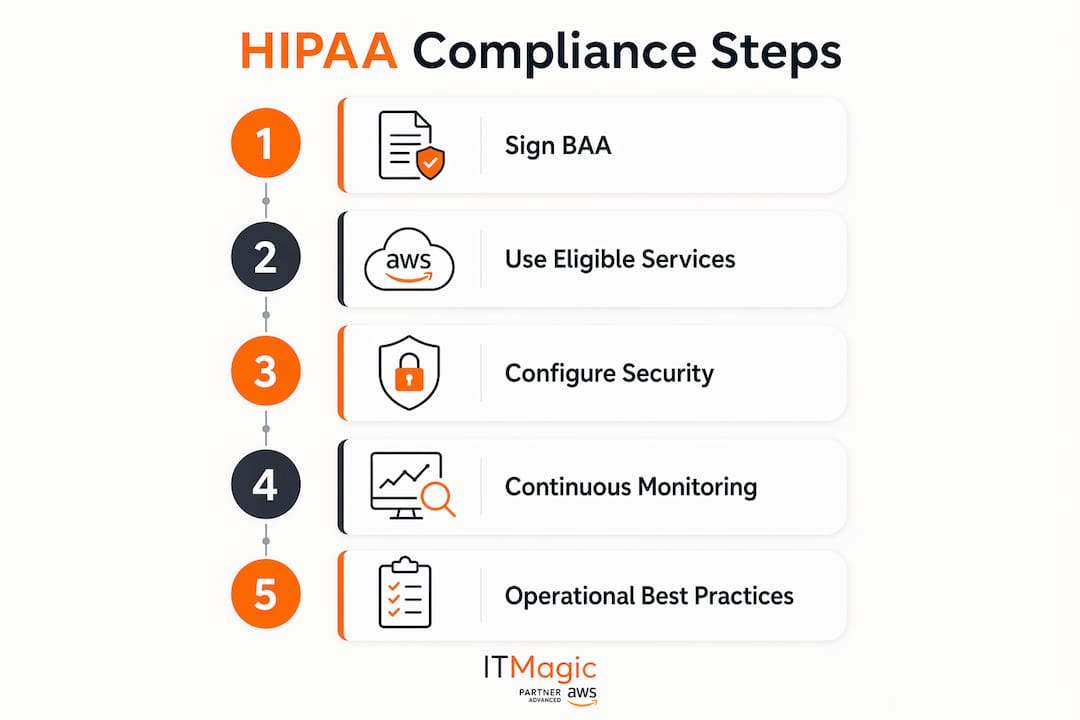
The AWS shared responsibility model divides security duties into two clear domains. AWS secures the physical infrastructure, networking, hypervisors, and data center facilities. Your organization secures everything built on top of that infrastructure: data encryption, identity and access management, audit logging, and application configuration.
This division has a direct impact on HIPAA compliance. AWS’s side of the model is largely fixed and audited by third parties. Your side is entirely variable and entirely your responsibility. Most HIPAA failures on AWS trace back to customer-side misconfigurations, not AWS infrastructure failures.
“Administrators often mistakenly believe signing the BAA ensures compliance, overlooking the need for strict technical guardrails and allowed-service restrictions. The BAA is a legal prerequisite, not a technical control.”
Customer responsibilities under the shared responsibility model include:
- Enabling encryption at rest and in transit for all PHI
- Configuring IAM policies with least-privilege access
- Enabling CloudTrail and VPC Flow Logs for audit trails
- Restricting PHI workloads to HIPAA-eligible services only
- Running vulnerability assessments and patching EC2 instances
- Monitoring configurations continuously for drift
AWS secures the cloud. You secure what you put in it. Understanding this model is the single most important factor for healthcare executives building a compliant AWS environment.
Pro Tip: Use AWS Service Control Policies (SCPs) at the organization level to block access to non-HIPAA-eligible services entirely. SCPs prevent any account in your AWS Organization from accidentally using a non-covered service with PHI, even if an engineer makes a configuration error.
How do you configure AWS services for HIPAA data security?
Proper configuration is where HIPAA compliance either holds or breaks. AWS provides the tools. Your team must apply them correctly and consistently across every service that touches PHI.
The following steps cover the core technical controls required for a compliant AWS environment:
- Enable encryption with KMS Customer-Managed Keys. Turn on server-side encryption for S3 buckets, RDS instances, and EBS volumes. AWS KMS customer-managed keys give you control over key rotation schedules and generate detailed audit logs. Default AWS-managed keys may not satisfy all audit requirements.
- Deploy PHI workloads in private VPC subnets. No PHI resource should have a public IP address. Use private subnets, NAT gateways for outbound traffic, and security groups that restrict inbound access to known sources only.
- Enable CloudTrail across all regions. CloudTrail logs must cover every region, not just your primary one. Store logs in a dedicated S3 bucket with restricted access and Object Lock enabled. HIPAA requires audit log retention for six years.
- Activate AWS Config with managed rules. AWS Config evaluates your resource configurations continuously and alerts you when a resource drifts out of compliance, such as an S3 bucket becoming publicly accessible or an RDS instance losing encryption.
- Enforce least-privilege IAM policies and MFA. Least-privilege IAM means no wildcard permissions, no shared accounts, and immediate access revocation when a team member changes roles. Multi-factor authentication is mandatory for all accounts with PHI access.
- Enable GuardDuty in every account. GuardDuty uses machine learning to analyze CloudTrail events, VPC Flow Logs, and DNS logs for threat indicators. AWS recommends activating it in every account that handles PHI.
- Implement encrypted backups with tested recovery. Encrypt all backups using KMS. Test restoration procedures quarterly. Document recovery time objectives in your incident response plan.
| Control | AWS service | HIPAA requirement addressed |
|---|---|---|
| Encryption at rest | KMS, S3 SSE, RDS encryption | Technical safeguards |
| Access control | IAM, SCPs, MFA | Access management |
| Audit logging | CloudTrail, VPC Flow Logs | Audit controls |
| Continuous monitoring | AWS Config, Security Hub | Integrity controls |
| Threat detection | GuardDuty | Incident response |
| Backup and recovery | AWS Backup, S3 versioning | Contingency planning |
Pro Tip: Architecting your AWS environment to segregate PHI and non-PHI workloads into separate accounts or VPCs reduces your compliance surface area significantly. Smaller scope means fewer controls to manage and fewer places for a misconfiguration to cause a breach.
Which AWS services are HIPAA-eligible and what are the common pitfalls?
AWS does not offer a single “HIPAA-certified” platform. Instead, it publishes a regularly updated list of services eligible for PHI processing under the BAA. AWS has no official HIPAA certification, but its eligible services list now exceeds 150 entries. That distinction matters: eligibility means AWS has implemented the controls needed to support your compliance, not that compliance is automatic.
Core HIPAA-eligible services include EC2, S3, RDS, Lambda, CloudTrail, KMS, DynamoDB, EKS, ECS, and Amazon SageMaker. These cover the majority of healthcare application architectures. Services like Amazon Rekognition or certain third-party marketplace offerings may not appear on the eligible list.
The most common pitfall is using a non-eligible service because it is convenient or because a developer did not check the list. A data pipeline that passes PHI through an ineligible service violates the BAA terms, even if every other component is fully configured. The violation is the act of using the service with PHI, not the outcome.
Best practices for managing service eligibility:
- Review the AWS HIPAA-eligible services page before every new service adoption.
- Use SCPs to block non-eligible services at the AWS Organizations level.
- Tag all PHI-handling resources and run quarterly audits to confirm every tagged resource belongs to an eligible service.
- When a service you rely on gains eligibility, update your BAA coverage documentation immediately.
What are the operational best practices for maintaining AWS healthcare compliance?
Technical configuration gets you to compliance. Operations keep you there. Healthcare organizations that pass their first HIPAA audit but fail the next typically have a configuration management problem, not a technology problem.
The following practices form the operational backbone of a sustainable compliance program on AWS:
- Conduct regular risk assessments. HIPAA requires documented risk assessments for all PHI-handling systems. Update them whenever you add a new AWS service, change architecture, or experience a security incident.
- Train your workforce. Technical controls fail when people make uninformed decisions. Workforce training on PHI handling, access policies, and incident reporting is a HIPAA administrative safeguard, not optional.
- Establish audit log review processes. Enabling CloudTrail is not enough. Assign ownership for reviewing logs on a defined schedule. Use Amazon Athena or Security Hub to query logs efficiently.
- Sign BAAs with all downstream vendors. Any vendor that accesses your PHI stored on AWS needs a BAA with your organization. This includes SaaS tools, analytics platforms, and healthcare AI applications that connect to your AWS environment.
- Use AWS Audit Manager for evidence collection. AWS Audit Manager includes a HIPAA Security Rule framework that automates evidence gathering for audits. It does not replace manual controls or risk assessments, but it dramatically reduces audit preparation time.
- Monitor with Security Hub. Security Hub aggregates findings from GuardDuty, AWS Config, and Inspector into a single dashboard. It gives compliance teams a real-time view of their security posture across all accounts.
The organizations that maintain compliance long-term treat it as an ongoing operational discipline. They assign ownership, set review cadences, and automate as much evidence collection as AWS allows. Compliance as a design feature rather than a periodic audit exercise is the standard that regulators increasingly expect.
Key Takeaways
HIPAA compliance on AWS requires a signed BAA, strict use of HIPAA-eligible services, and continuous customer-side configuration management across encryption, access control, logging, and monitoring.
| Point | Details |
|---|---|
| BAA is mandatory first step | Sign the BAA via AWS Artifact before any PHI touches an AWS resource. |
| Shared responsibility is real | AWS secures infrastructure; your team owns encryption, IAM, logging, and configuration. |
| Eligible services only | Using non-eligible services with PHI violates the BAA regardless of other controls. |
| Configuration drives compliance | Enable KMS CMKs, CloudTrail, AWS Config, GuardDuty, and least-privilege IAM across all PHI workloads. |
| Operations sustain compliance | Risk assessments, workforce training, and audit log reviews keep you compliant between audits. |
The BAA is a starting line, not a finish line
After working on AWS compliance environments since 2010, the pattern I see most often is this: a healthcare organization signs the BAA, checks it off the list, and then treats the work as done. Six months later, an audit or an incident reveals that S3 buckets were never encrypted with CMKs, CloudTrail was only enabled in one region, or a developer spun up a resource using a non-eligible service because nobody blocked it.
The BAA creates legal coverage. It does not create a secure environment. The organizations that get this right treat the BAA as the starting line, then immediately move to the configuration work: private VPCs, KMS encryption, SCPs at the organization level, GuardDuty in every account. They do not wait for an audit to find gaps.
The second lesson I keep relearning is that default configurations are almost never compliant. AWS defaults favor ease of use, not regulatory compliance. Default encryption keys, default IAM policies, and default logging settings will fail a HIPAA audit. Every default needs a deliberate review.
The third thing I tell every healthcare IT manager: automate your compliance evidence collection from day one. AWS Audit Manager and Security Hub exist precisely for this. Teams that build manual evidence collection processes burn out before the first audit. Automation makes compliance sustainable.
The AWS compliance checklist approach works when it is treated as a living document, not a one-time exercise. Assign owners to each control, set review dates, and integrate compliance checks into your CI/CD pipeline. That is the only way to keep pace with an environment that changes daily.
— Oleksandr
How IT-Magic supports HIPAA-ready AWS environments
Healthcare organizations that need to move fast on AWS compliance without building every control from scratch work with IT-Magic. As an AWS Advanced Tier Services Partner with 700+ completed projects, IT-Magic handles the infrastructure and security configuration work that turns a signed BAA into a genuinely compliant environment.

IT-Magic’s team of certified AWS architects conducts HIPAA readiness assessments, configures encryption, IAM, logging, and monitoring controls, and implements SCPs to enforce guardrails across your AWS Organization. For healthcare teams deploying containerized applications, IT-Magic’s Kubernetes support services cover EKS and ECS deployments built to HIPAA standards. For organizations managing cloud spend alongside compliance requirements, the AWS cost optimization services keep your compliant infrastructure budget-conscious. Contact IT-Magic to start your HIPAA readiness assessment.
FAQ
What is HIPAA compliance on AWS?
HIPAA compliance on AWS means configuring AWS services to meet the HIPAA Security Rule’s technical, physical, and administrative safeguards for PHI. It requires a signed Business Associate Addendum with AWS and strict use of HIPAA-eligible services only.
Does AWS have a HIPAA certification?
AWS does not hold an official HIPAA certification. Instead, it offers HIPAA eligibility for over 150 services under a BAA, which defines the security controls AWS maintains on its infrastructure.
How do I sign the AWS BAA?
You sign the AWS BAA through AWS Artifact inside the AWS Management Console. The process is self-service, free, and available to all commercial AWS accounts. Sign it before any PHI is stored or processed on AWS.
What happens if I use a non-eligible AWS service with PHI?
Using a non-eligible AWS service with PHI violates your BAA terms and constitutes a HIPAA compliance breach. AWS maintains a public list of eligible services, and your team must verify eligibility before using any service in a PHI workload.
How long must I retain CloudTrail logs for HIPAA?
HIPAA requires audit log retention for six years. Store CloudTrail logs in a dedicated S3 bucket with Object Lock enabled and restricted access to prevent tampering or premature deletion.
Recommended
- What is cloud compliance: A guide for IT decision-makers
- AWS compliance checklist: Step-by-step guide for enterprise security
- PCI DSS on AWS: A Clear Path to Audit Readiness | IT-Magic
- AWS Security Trends: What CIOs Need to Know for 2026
Alexander founded IT-Magic, an AWS Advanced Tier Services Partner delivering DevOps, cloud architecture, and managed services since 2010. He holds:
- AWS Certified Solutions Architect – Professional
- AWS Certified DevOps Engineer – Professional
- AWS Certified Security – Specialty
- AWS Certified Advanced Networking – Specialty
Talk to a certified AWS team trusted by INTERTOP, Foxtrot, Pandora, and J.Hilburn.
Get a free consultation


