

Start with category alignment, not product selection. The engineering leaders who get the most out of AWS aren’t the ones who picked the “best” tool — they’re the ones who matched the right category of tooling to each operational job before they ever opened a vendor comparison page.
The practical starting point: use AWS Control Tower to establish a multi-account landing zone, deploy AWS Systems Manager for operational runbooks and patch management, and turn on AWS Cost Explorer with Cost and Usage Reports before you evaluate anything else. Those three cover governance, ops automation, and cost visibility — the gaps that hurt teams the most, the fastest. IT-Magic, an AWS Advanced Tier Services Partner, has delivered this foundation across many projects since 2010, and the pattern holds regardless of org size.
Fast wins to start this week:
- Run an account inventory: list every active AWS account, owner, and spend bucket.
- Enable Control Tower in a sandbox organizational unit to test guardrails without touching production.
- Activate Cost Explorer and configure a Cost and Usage Report to an S3 bucket.
- Set up a single CloudWatch alarm channel (SNS to Slack or PagerDuty) for your most critical service.
- Schedule a 30-day pilot with one defined success metric — tagging coverage, cost variance, or mean time to detect.
Numbered priority order for tool adoption:
- Governance and multi-account structure (Control Tower, Organizations)
- Cost visibility and reporting (Cost Explorer, CUR)
- Monitoring and alerting (CloudWatch)
- Provisioning and IaC (CloudFormation, Service Catalog)
- Security and compliance (Config, Security Hub)
- Automation and runbooks (Systems Manager)
- Third-party or managed partner augmentation where native gaps remain
Table of Contents
- What are AWS management tools, and who actually needs them?
- Which tool categories map to the jobs your engineers actually own?
- Core AWS native services: what each one does and when it’s enough
- When should you use native AWS, third-party tools, or a managed partner?
- How do you evaluate and choose the right tools or vendor?
- A phased adoption roadmap that actually works
- Key Takeaways
- The tool stack isn’t the hard part
- IT-Magic brings the people behind the tools
- Useful sources for teams that want to go deeper
- FAQ
What are AWS management tools, and who actually needs them?
Running this on your own AWS setup? IT-Magic is an AWS Advanced Tier Partner — we audit, fix, or fully manage it for you.
Get a free consultationAWS cloud management tools are the processes, services, and platforms used to govern, provision, monitor, secure, automate, and optimize AWS environments. The phrase covers a wide range, so it helps to think in three delivery models:
- Native AWS managed services: — Services like Control Tower, Config, and CloudWatch that run inside your AWS account with no separate vendor. You pay for what you use; AWS owns the infrastructure.
Who needs which model?
Small teams (under 20 engineers, one or two AWS accounts) can usually get by with native services and a few Marketplace integrations. Platform teams at growth-stage companies managing five or more accounts need Control Tower and Organizations from day one, plus a cost visibility layer. Large enterprises running multi-account, multi-region environments almost always need a managed partner or a dedicated internal platform engineering function — the operational surface is too wide for native tooling alone to cover without significant staffing.
Which tool categories map to the jobs your engineers actually own?
Engineering leaders tend to evaluate tools by product name. The better frame is by job. Each category below owns a distinct operational problem, a natural team owner, and a measurable outcome.
| Category | Core problem it solves | Typical owner | Quick success metric |
|---|---|---|---|
| Governance & multi-account | Enforce policy, isolate blast radius, manage account lifecycle | Platform / Cloud Center of Excellence | Guardrail compliance rate |
| Provisioning & IaC | Repeatable, auditable infrastructure creation | Platform / DevOps | Time-to-provision (minutes) |
| Monitoring & observability | Detect anomalies, reduce mean time to detect | SRE / DevOps | Mean time to detect (MTTD) |
| Cost & financial management | Attribute spend, reduce waste, forecast accurately | FinOps / Engineering leads | Cost variance vs. budget |
| Security & compliance | Detect drift, enforce controls, support audits | Security / Compliance | Findings remediated within SLA |
| Automation & runbooks | Reduce manual ops, standardize incident response | SRE / Platform | Toil reduction (hours/sprint) |
| Project & task management | Track delivery, align engineering and business goals | Engineering managers | Cycle time, sprint velocity |
A few things worth noting about this table. Monitoring and security are often conflated, but they have different owners and different success metrics — conflating them leads to gaps in both. Cost management belongs in the SDLC, not just in a monthly finance review. Embedding cost guardrails as non-functional requirements in release gates is one of the highest-leverage moves an engineering leader can make, and most teams still treat it as an afterthought.
Core AWS native services: what each one does and when it’s enough
These nine services form the backbone of any well-managed AWS environment. Each solves a specific job. None of them solves everything.
AWS Control Tower
Control Tower automates a best-practices multi-account landing zone and ships a library of preconfigured controls. It builds on AWS Organizations and uses managed controls (formerly called guardrails) to enforce governance at scale. You pay only for the underlying services Control Tower provisions — there’s no additional Control Tower charge. Start here for any organization managing more than two accounts. The main gotcha: retrofitting Control Tower onto an existing messy account structure takes planning; greenfield deployments are far smoother.
AWS Organizations
The foundation beneath Control Tower. Organizations manages account structure, service control policies (SCPs), and consolidated billing. On its own, it gives you the skeleton; Control Tower gives you the muscle. Use Organizations directly when you need fine-grained SCP logic that Control Tower’s managed controls don’t cover.
AWS Systems Manager
Systems Manager is the operational control plane for EC2 fleets, on-premises servers, and ECS/EKS nodes. It handles patch management, run commands, session manager (no bastion hosts needed), parameter store, and automation documents. Operational overhead is moderate — you need SSM agents on managed nodes, and IAM roles configured correctly. The payoff is significant: standardized runbooks replace ad-hoc SSH sessions, and audit trails become automatic.
AWS CloudFormation
CloudFormation is AWS’s native infrastructure-as-code service. It provisions and manages resources through declarative templates (JSON or YAML) and tracks state through stacks. Integration with Service Catalog and Systems Manager is tight. The common gotcha is stack drift — resources modified outside CloudFormation cause state mismatches. Pair it with Config rules to detect drift automatically. For teams that prefer a higher-level abstraction, the AWS CDK compiles down to CloudFormation and is worth evaluating.
AWS Service Catalog
Service Catalog lets platform teams publish approved CloudFormation templates as self-service products. End users (developers, data scientists) provision compliant infrastructure without needing direct CloudFormation access. Time-to-provision drops from days to minutes when the catalog is well-maintained. The operational overhead is real: someone owns the catalog, keeps products current, and manages version deprecation.
AWS Config
Config records configuration changes across your AWS resources and evaluates them against rules. It’s the compliance and audit backbone — every SOC 2, HIPAA, or PCI DSS audit benefits from Config’s continuous recording. Pair Config with Control Tower for multi-account governance: Control Tower deploys Config rules across all accounts in your organization automatically. Config alone doesn’t remediate; pair it with Systems Manager Automation for auto-remediation.
Amazon CloudWatch
CloudWatch is the native monitoring and observability platform: metrics, logs, alarms, dashboards, and now Container Insights and Application Signals. For most teams, CloudWatch covers 80% of monitoring needs without a third-party agent. The gap shows up in cross-account correlation and advanced distributed tracing — that’s where tools like AWS X-Ray or third-party APM platforms earn their keep.
AWS Cost Explorer
Cost Explorer provides interactive cost and usage graphs, rightsizing recommendations, and savings plan analysis. It’s the first cost tool to enable, full stop. The CUR (Cost and Usage Report) feeds raw data to Athena or QuickSight for custom dashboards. Where Cost Explorer falls short: it’s account-centric, and multi-account FinOps dashboards with chargeback logic usually require a third-party aggregation layer or a custom data pipeline.
AWS Well-Architected Tool
The Well-Architected Tool runs structured reviews against AWS’s five pillars (operational excellence, security, reliability, performance efficiency, cost optimization) and the Sustainability pillar. It surfaces high-risk issues with remediation guidance. Use it at the start of a new workload and before major architectural changes. It’s not a continuous monitoring tool — it’s a periodic review mechanism, and it works best when a certified AWS partner facilitates the review.
Where native services complement each other and where they leave gaps:
Control Tower + Organizations + Config is the governance trifecta for multi-account environments. CloudFormation + Service Catalog handles provisioning with guardrails. CloudWatch covers monitoring for most workloads. The gaps: cross-account incident correlation, advanced FinOps with chargeback, and ML-assisted root-cause analysis. That’s where third-party tools or a managed partner add real value.
Amazon Q Developer fills an emerging gap: it’s a generative-AI assistant that helps engineering teams with coding, security scanning, resource optimization, and MLOps automation via SageMaker Projects. Think of it as a force multiplier for the engineers operating these native services.
When should you use native AWS, third-party tools, or a managed partner?
The decision isn’t binary. Most mature AWS environments use all three layers. The question is where each layer starts and stops.
Decision rules:
- Start native for foundational governance, cost visibility, and basic monitoring. Native services have no additional licensing cost, deep AWS integration, and no agent footprint to manage.
- Go third-party when you need faster time-to-value, cross-cloud visibility, specialized UX (FinOps dashboards, advanced APM), or vendor-managed analytics that native tools don’t provide out of the box.
- Engage a managed partner when you need people behind the tooling — SLA-backed incident response, compliance program delivery, or rapid scale without hiring. The AWS Cloud Adoption Framework governance perspective recommends shifting toward iterative, value-driven program management supported by automated portfolio dashboards — a managed partner can stand that up faster than most internal teams.
| Dimension | Native AWS | Third-party SaaS | Managed partner |
|---|---|---|---|
| Purpose / best for | Foundational governance, cost, monitoring | Specialized UX, cross-cloud, advanced analytics | People + tooling, SLA ops, compliance delivery |
| AWS integration | Native, deepest | API/agent-based, good | Native + custom, deepest |
| Operational overhead | Moderate (config, IAM) | Low to moderate (vendor manages infra) | Low (partner owns ops) |
| Deployment model | Native service | SaaS or agent | Managed service |
| Compliance posture | Inherits AWS certifications | Varies (SOC 2, HIPAA, PCI — verify per vendor) | Partner certifications + AWS |
| Pricing shape | Pay-per-use, no license | Subscription or usage-based | Retainer or project-based |
| Time-to-value | Days to weeks | Days (SaaS) to weeks (agent) | Weeks (with experienced partner) |
Red flags that native alone isn’t enough:
- You’re running more than five accounts and have no centralized cost attribution.
- Incident response relies on individual engineers knowing which account to check.
- Your last compliance audit required manual evidence collection across accounts.
- Engineers spend more than two hours per week on operational toil that could be automated.
- You have no defined runbook for a P1 incident.
How do you evaluate and choose the right tools or vendor?
Start with a prioritization checklist before you write an RFP.
Technical fit checklist:
- Does the tool integrate with your existing AWS account structure (cross-account IAM roles, Organizations)?
- What’s the agent footprint, and does it require changes to production workloads?
- Does it support your data residency requirements (region locking, data sovereignty)?
- What SLAs does the vendor offer, and who owns incident response?
- Can runbooks and automation be extended or customized?
- How does it feed into your existing observability stack (CloudWatch, PagerDuty, Slack)?
- What’s the extensibility story — APIs, webhooks, Terraform providers?
RFI/RFP questions worth asking every vendor:
- How do you handle cross-account role assumption, and what’s the minimum IAM permission set required?
- What compliance certifications do you hold (SOC 2 Type II, HIPAA BAA, PCI DSS)? Can you provide the most recent audit report?
- Who owns a P1 incident at 2 AM — your team or ours?
- What’s the typical implementation timeline for an organization of our size and account count?
- How do you handle configuration drift between your tool’s state and AWS’s actual state?
- What does offboarding look like if we decide to move on?
Timeline and pricing considerations:
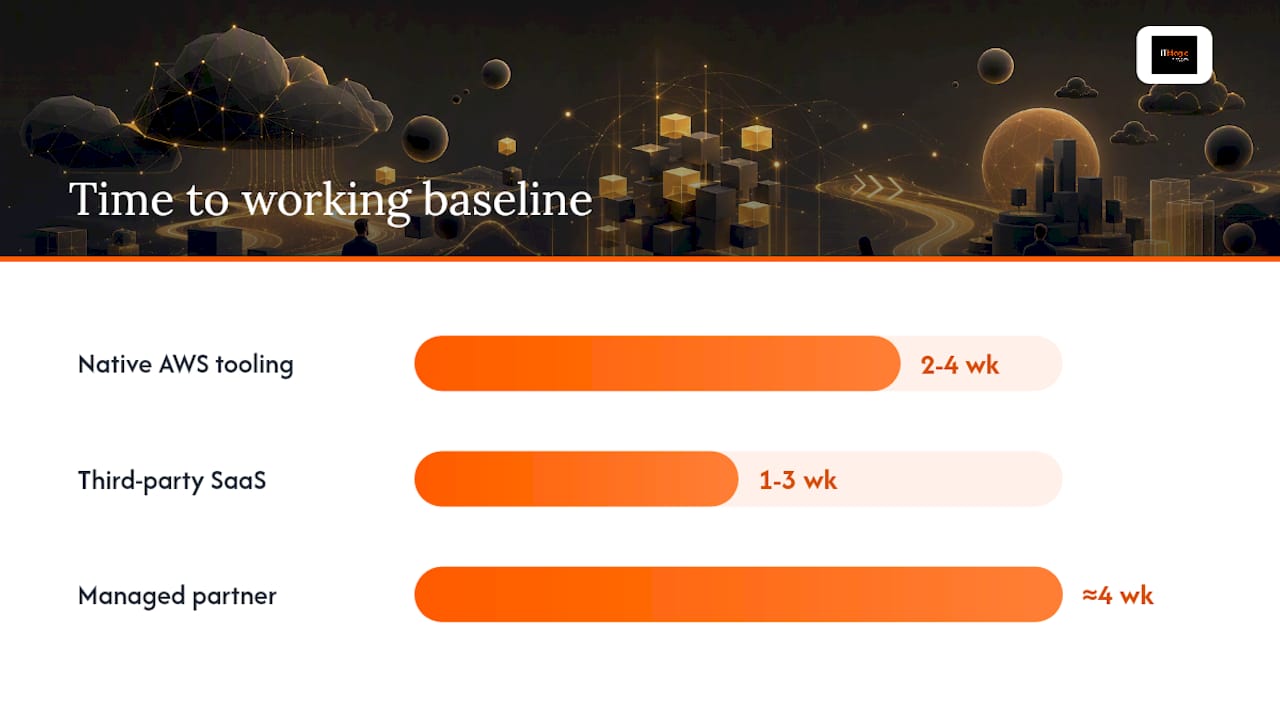
Pilot engagements for native AWS tooling (Control Tower, Config, CloudWatch) typically run a few weeks for a team with existing AWS experience. Third-party SaaS tools with good onboarding can be operational quickly, but full integration with existing workflows takes additional weeks. Managed partner engagements usually deliver a working governance baseline in about a month, with full operational handoff after additional weeks.
Cost curves differ significantly. Native services are pay-per-use with no license overhead. Third-party SaaS adds a subscription layer on top of AWS costs — budget for both. Managed partners have a higher upfront cost but often reduce total cost of ownership by eliminating the need to hire two or three senior cloud engineers.
Pro Tip: Measure time-to-value by a single, pre-agreed metric before the pilot starts. “We’ll know this worked if tagging coverage goes from 40% to 90% in 30 days” is a better success criterion than “we’ll see how it feels.”
A phased adoption roadmap that actually works
The teams that struggle with AWS tooling adoption usually try to do everything at once. A phased approach with defined owners and sprint-level milestones is the difference between a successful rollout and a shelf-ware graveyard.
Phase 1: Assess (weeks 1–2)
Owner: Platform lead + security lead
- Inventory all AWS accounts, regions, and active workloads.
- Pull a Cost and Usage Report and identify the top five spend drivers.
- Run a Well-Architected review on your highest-risk workload.
- Document current tagging coverage and compliance posture.
KPI: Baseline tagging coverage percentage, current monthly spend by account.
Phase 2: Pilot (weeks 3–6)
Owner: Platform team + DevOps
- Enable Control Tower in a sandbox OU with a defined set of managed controls.
- Deploy CloudWatch dashboards and a single alarm channel for your pilot workload.
- Configure Config rules for your top compliance requirements (e.g., S3 public access, unencrypted EBS).
- Publish two or three Service Catalog products for the most-requested infrastructure patterns.
KPI: Guardrail compliance rate in pilot OU, time-to-provision for catalog products, MTTD for pilot workload.
Phase 3: Scale (weeks 7–12)
Owner: Platform + SRE + Finance
- Extend Control Tower to all production OUs.
- Roll out Systems Manager patch baselines and automation documents across the fleet.
- Embed cost guardrails as non-functional requirements in your CI/CD release gates — a practice AWS recommends explicitly for engineering-led cost optimization.
- Integrate Cost Explorer data into your engineering team’s sprint review cadence.
KPI: Savings realized vs. baseline, guardrail compliance rate across all OUs, toil reduction in hours per sprint.
Phase 4: Operate (ongoing)
Owner: SRE + Platform + managed partner (if engaged)
- Run quarterly Well-Architected reviews on critical workloads.
- Use AWS DevOps Agent capabilities for root-cause analysis and mitigation suggestions to reduce manual firefighting.
- Automate rollback rules in CloudFormation pipelines for high-risk deployments.
- Review and update Control Tower baselines when new OUs are created.
KPI: MTTR, cost variance vs. forecast, audit findings per quarter.
Pro Tip: Use Control Tower baselines for every new OU from day one. Retrofitting governance onto an existing OU structure is significantly more painful than building it in from the start. The same principle applies to tagging: enforce it at account creation, not after 200 resources exist.
For teams building out DevOps automation workflows, the phase 3 and 4 steps above map directly to the automation patterns that reduce toil most reliably.
Key Takeaways
Native AWS services cover the governance, cost, and monitoring foundation — the real leverage comes from matching each tool category to the right operational job and owner before selecting products.
| Point | Details |
|---|---|
| Category alignment first | Match tooling to the operational job (governance, cost, monitoring) before evaluating individual products. |
| Start with three native services | Control Tower, Cost Explorer, and CloudWatch cover the highest-impact gaps for most teams within weeks. |
| Embed cost in the SDLC | Add cost guardrails as non-functional requirements in release gates, not as a monthly finance review. |
| Phased rollout beats big-bang | Assess, Pilot, Scale, Operate — each phase has defined owners, KPIs, and sprint-level milestones. |
| IT-Magic as managed partner | IT-Magic (AWS Advanced Tier Services Partner) delivers governance baselines, cost optimization, and 24/7 ops across many projects. |
The tool stack isn’t the hard part
Most engineering leaders I’ve worked with already know which AWS services exist. The harder problem is organizational: who owns the cost category, who enforces the guardrails, and who gets paged at 2 AM when something breaks across accounts.
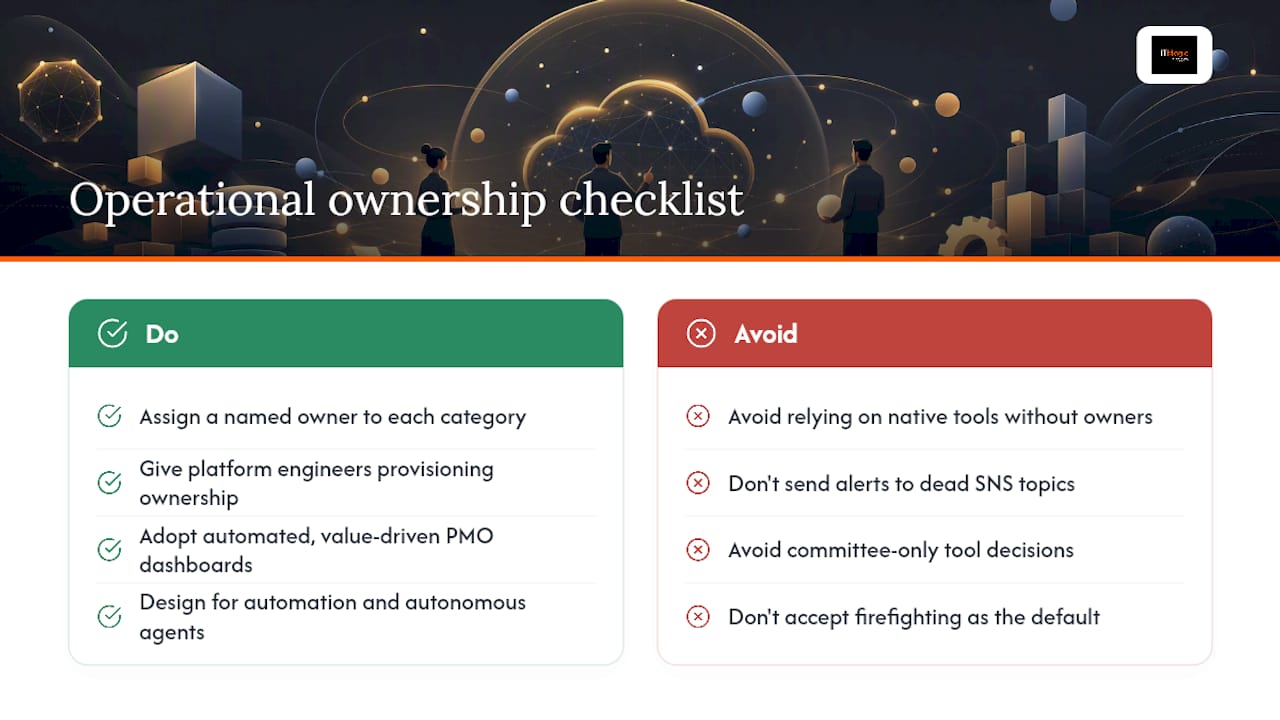
The conventional wisdom says “just use native AWS tools — they’re free and deeply integrated.” That’s true as far as it goes. But native tools require someone to configure them correctly, maintain them as the account structure evolves, and respond when they surface a finding. A Config rule that fires into a dead SNS topic is worse than no rule at all — it creates false confidence.
The shift worth making is from tool selection to operational ownership. Before you evaluate a single product, assign a named owner to each category in the table above. A platform engineer who owns the provisioning category will make better tool decisions than a committee evaluating features in a vacuum. The CAF governance perspective puts it well: PMOs need to evolve from rigid triple-constraint thinking to iterative, value-driven approaches with automated portfolio dashboards. That’s not just a governance philosophy — it’s a practical description of how the best engineering organizations actually run their AWS environments.
Operational excellence is also shifting toward automation and autonomous agents. The AWS DevOps Agent represents a real change in what “managing” an AWS environment means — less firefighting, more managing automated workflows and escalation policies. Engineering leaders who build their tool stack with that trajectory in mind will spend less time reacting and more time shipping.
IT-Magic brings the people behind the tools
Running AWS at scale without a dedicated platform team is a staffing problem disguised as a tooling problem. IT-Magic solves both. As an AWS Advanced Tier Services Partner, IT-Magic delivers governance baselines, cost optimization programs, Kubernetes infrastructure, and 24/7 managed operations — without the overhead of building an internal cloud platform team from scratch.

The engagement model fits where you are: a fixed-scope pilot to establish a Control Tower landing zone and cost reporting in 4–6 weeks, a managed services contract for ongoing operations and compliance (SOC 2, HIPAA, PCI DSS), or a full advisory and implementation engagement for migration and modernization. Clients have reduced AWS spend and cut provisioning lead times by moving from ad-hoc infrastructure to catalog-driven, guardrail-enforced deployments.
If your team is ready to move from reactive ops to a governed, cost-attributed AWS environment, talk to the IT-Magic DevOps team about a scoped pilot — most teams have a working governance baseline within six weeks.
Useful sources for teams that want to go deeper
- AWS Control Tower — primary implementation guide for multi-account landing zones and managed controls.
- AWS Control Tower FAQs — pricing model, operational model, and common setup questions.
- Empower your engineers to take an active role in cost optimization — AWS Cloud Financial Management blog; the definitive reference for embedding cost in the SDLC.
- AWS DevOps Agent — overview of autonomous root-cause analysis and mitigation capabilities.
- AWS Marketplace: Project Management Software — procurement hub for third-party PM and business application tools.
- IT-Magic AWS blog — practitioner guidance on AWS operations, DevOps automation, and cloud architecture.
- IT-Magic: AWS cloud operations tutorial — practical patterns for optimizing and scaling AWS environments.
FAQ
What are AWS management tools?
AWS management tools are the services, platforms, and partner offerings used to govern, provision, monitor, secure, automate, and optimize AWS environments. They span native AWS services (Control Tower, Config, CloudWatch), third-party SaaS integrated via APIs, and managed partners that combine people with tooling.
Does AWS have a project management tool?
AWS doesn’t offer a single proprietary project management product. Instead, AWS recommends integrating services like Amazon CodeCatalyst or procuring third-party PM solutions through AWS Marketplace, where compliant tools are available for direct procurement.
When should engineering leaders use a managed partner instead of native AWS tools?
A managed partner makes sense when you need SLA-backed incident response, rapid compliance delivery (SOC 2, HIPAA, PCI DSS), or operational scale without hiring a full internal platform team. IT-Magic, for example, delivers a governed AWS baseline in 4–6 weeks — faster than most teams can staff and onboard the equivalent expertise internally.
How does AWS Cost Explorer fit into engineering workflows?
Cost Explorer provides interactive spend analysis, rightsizing recommendations, and savings plan modeling. AWS recommends embedding cost visibility directly into the SDLC so engineers participate in optimization decisions, rather than treating cost as a finance-only concern reviewed monthly.
What is the AWS Well-Architected Tool used for?
The Well-Architected Tool runs structured reviews against AWS’s six pillars (operational excellence, security, reliability, performance efficiency, cost optimization, and sustainability) and surfaces high-risk issues with remediation guidance. It’s a periodic review mechanism, not a continuous monitor, and works best when facilitated by a certified AWS partner.
Recommended
- AWS certification types explained: choose the right path
- AWS cloud operations tutorial: optimize and scale smart
- AWS Control Tower Setup: A Practical Guide for Cloud Architects
- AWS Secrets Management: Best Practices for Engineers
Alexander founded IT-Magic, an AWS Advanced Tier Services Partner delivering DevOps, cloud architecture, and managed services since 2010. He holds:
- AWS Certified Solutions Architect – Professional
- AWS Certified DevOps Engineer – Professional
- AWS Certified Security – Specialty
- AWS Certified Advanced Networking – Specialty
Talk to a certified AWS team trusted by INTERTOP, Foxtrot, Pandora, and J.Hilburn.
Get a free consultation


