

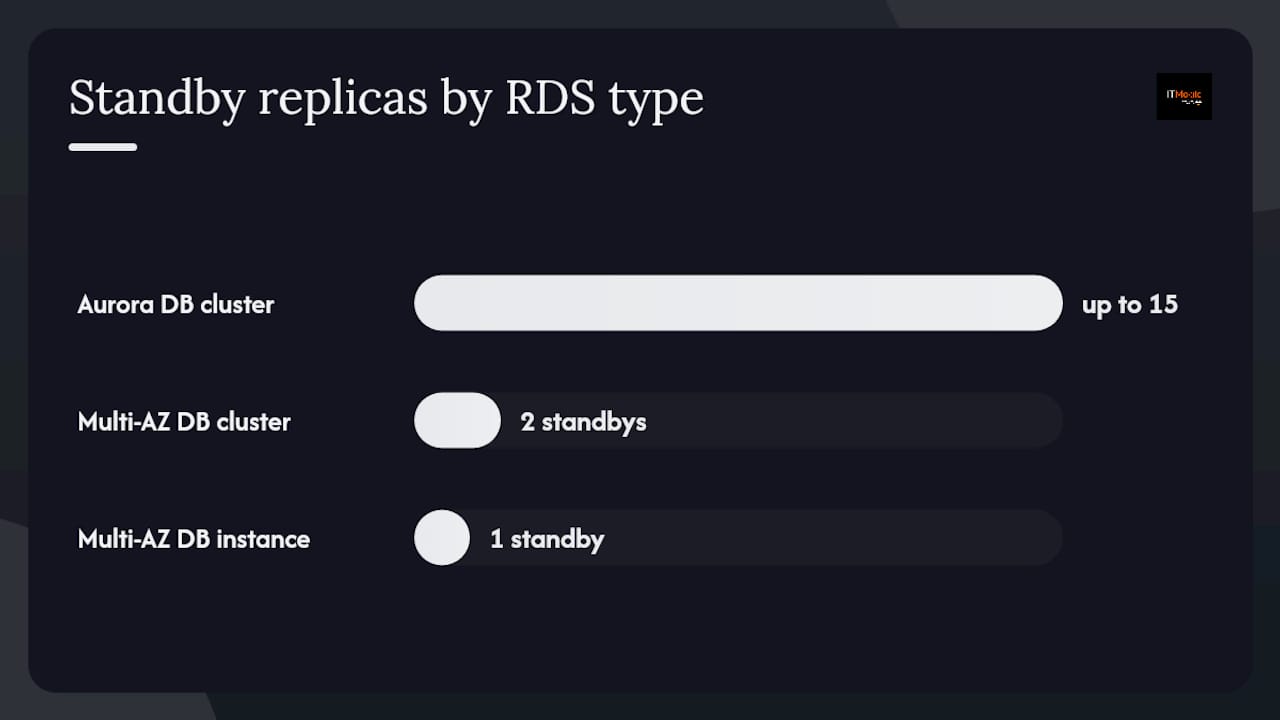
An RDS cluster is a managed, high-availability database deployment where one or more DB instances share a virtual storage volume across multiple Availability Zones, giving you automated failover, read scaling, and resilience that a single-instance deployment cannot match. The fast decision rule: pick Amazon Aurora when you need up to 15 read replicas, sub-second failover, and the lowest write latency; pick a Multi-AZ DB cluster when you need two readable standbys with faster failover than a classic Multi-AZ instance but want to stay on a standard RDS engine; pick a Multi-AZ DB instance when you need basic HA with no read-offload requirement and want the simplest operational model.
- Use case alignment: Aurora fits OLTP-heavy SaaS and fintech; Multi-AZ DB clusters fit read-heavy transactional apps on MySQL or PostgreSQL; Multi-AZ DB instances fit smaller workloads where standby read traffic is not a priority.
- RTO expectations: Multi-AZ DB clusters typically fail over in under 35 seconds; Multi-AZ DB instances can take up to roughly 60 seconds; Aurora’s leader election often completes faster still.
- IaC note: All three deployment types are expressible in Terraform (
aws_rds_cluster), CloudFormation (AWS::RDS::DBCluster), and CDK (DatabaseCluster) — choose your toolchain early, because switching after provisioning often requires resource replacement.
Key Takeaways
Choosing the right RDS cluster type requires matching your RTO, read/write ratio, and connection volume to the architecture — Aurora for scale and speed, Multi-AZ DB cluster for balanced HA on standard engines, and Multi-AZ DB instance for simple, cost-effective standby.
| Point | Details |
|---|---|
| Cluster type selection | Aurora for up to 15 readers and sub-35s failover; Multi-AZ DB cluster for two readable standbys on MySQL/PostgreSQL. |
| Failover RTO expectations | Multi-AZ DB clusters typically fail over in under 35 seconds; Multi-AZ DB instances can take up to roughly 60 seconds. |
| IaC and pitfalls | Specify all three AZs explicitly in Terraform; treat EngineMode and StorageType as immutable in CloudFormation. |
| Performance foundation | Size the working set to fit in memory and use Performance Insights to find expensive queries before scaling readers. |
| IT-Magic support | IT-Magic provides architecture design, IaC build-out, and 24/7 managed operations for RDS cluster deployments. |
Table of Contents
Running this on your own AWS setup? IT-Magic is an AWS Advanced Tier Partner — we audit, fix, or fully manage it for you.
Get a free consultation- What does “RDS cluster” actually mean in AWS?
- How Aurora, Multi-AZ DB cluster, and Multi-AZ DB instance architectures differ
- How replication, storage types, and endpoints work together
- What to expect from failover and how to recover
- Designing for read scaling without hurting write performance
- Parameter groups, engine versions, and instance class sizing
- Using RDS Proxy for connection management at scale
- Backups, restores, serverless v2, and global clusters
- IaC examples and common pitfalls
- How to choose the right RDS deployment for your workload
- IT-Magic operational runbook (EE-AAT) for RDS clusters
- A cloud architect’s honest take on RDS cluster decisions
- IT-Magic designs and operates RDS clusters for production AWS environments
- Sources
- FAQ
What does “RDS cluster” actually mean in AWS?
The phrase “RDS cluster” is informal shorthand. AWS uses it to describe two distinct architectures, and conflating them causes real configuration mistakes.
Amazon RDS supports multiple database engines — PostgreSQL, MySQL, MariaDB, SQL Server, Oracle, and Db2 — and offers both single-instance and clustered deployment modes. Within clustered deployments, you have:
- Amazon Aurora DB cluster: A cluster that separates compute from storage. The cluster volume is a distributed, fault-tolerant storage layer replicated across multiple AZs. Compute nodes (DB instances) attach to this shared volume. A cluster contains one primary writer and up to 15 Aurora Replicas.
- Multi-AZ DB cluster: An RDS-engine cluster (MySQL or PostgreSQL) with one writer and two readable standby instances spread across three AZs, using semisynchronous replication.
- Multi-AZ DB instance: Not a true cluster. A single primary instance with one synchronous standby replica for failover only — no read-offload, no shared storage volume.
Key terms you will encounter across the AWS console, CLI, IaC modules, and monitoring dashboards:
- Writer instance: The primary DB instance that accepts all write traffic.
- Reader instance / Aurora Replica: A read-only instance attached to the cluster. In Aurora, all readers share the same cluster volume. In a Multi-AZ DB cluster, readers are readable standbys.
- Cluster volume: Aurora’s virtual storage layer, automatically replicated across AZs. Does not exist in Multi-AZ DB clusters.
- Cluster endpoint: Routes connections to the current writer. Automatically updates after failover.
- Reader endpoint: Load-balances connections across available reader instances.
- Instance endpoint: Points to a specific DB instance. Use for targeted routing or debugging.
- engine_mode: The Terraform/CloudFormation attribute that controls whether a cluster runs as
provisioned,serverless(v1, legacy), or uses Serverless v2 capacity within a provisioned cluster. - Aurora Serverless v2: Serverless capacity units that scale per-ACU within a provisioned cluster. Not a separate engine_mode — you mix Serverless v2 instances with provisioned instances in the same cluster.
- DB cluster parameter group: Applied to all instances in the cluster. Controls engine-wide settings.
- DB parameter group: Applied at the instance level. Overrides cluster-level parameters for a specific instance.
An Aurora DB cluster can consist of a single instance and still benefit from the distributed cluster volume — a distinction worth noting when auditing existing topologies where someone provisioned “just one Aurora instance.”
How Aurora, Multi-AZ DB cluster, and Multi-AZ DB instance architectures differ
Understanding the storage and replication model for each type is what separates architects who size clusters correctly from those who discover the limits at 2 AM during an incident.
Aurora DB cluster
Aurora separates compute and storage entirely. The cluster volume spans multiple AZs automatically — you do not configure storage replication. Every DB instance in the cluster reads from and writes to this shared volume. Because readers share the same data as the writer, replica lag is minimal (typically milliseconds) and there is no replication stream to maintain between instances. Aurora supports multiple reader instances, each accessible via the reader endpoint or directly via instance endpoints.
Failover in Aurora works by promoting one of the existing readers to writer. The cluster endpoint automatically points to the new writer. If you have no readers, Aurora provisions a replacement instance, which takes longer.
Multi-AZ DB cluster
A Multi-AZ DB cluster places one writer and two readable standby instances across three separate AZs. Replication is semisynchronous: the writer commits a transaction after at least one standby acknowledges it. This gives you durability guarantees similar to synchronous replication while keeping write latency lower than full synchronous replication to two standbys simultaneously.
The two standbys are readable, so you can offload read traffic. Failover promotes one standby to writer; the promoted instance must apply any unapplied transactions before accepting writes, which is why the typical failover time is under 35 seconds rather than instantaneous.
Multi-AZ DB instance
A Multi-AZ DB instance maintains one synchronous standby replica in a second AZ. The standby is not readable; it exists purely for failover. Storage replication is synchronous at the block level. Failover flips the DNS CNAME to the standby, which can take up to roughly 60 seconds. No read-offload, no reader endpoint, no shared cluster volume.
Side-by-side comparison:
| Dimension | Aurora DB cluster | Multi-AZ DB cluster | Multi-AZ DB instance |
|---|---|---|---|
| Storage model | Shared cluster volume across AZs | Local storage per instance, semisync replication | Local storage, synchronous block replication |
| Max readers | Up to 15 Aurora Replicas | 2 readable standbys | 0 (standby not readable) |
| Reader endpoint | Yes | Yes | No |
| Typical failover time | Sub-second to ~30s (with readers) | Under ~35 seconds | Up to ~60 seconds |
| Write latency impact | Low (storage-level commit) | Moderate (semisync to 1 standby) | Low (async to standby) |
| Engine support | Aurora MySQL, Aurora PostgreSQL | MySQL, PostgreSQL | All RDS engines |
| Serverless v2 support | Yes | No | No |
| Management complexity | Higher | Medium | Low |
How replication, storage types, and endpoints work together
Replication behavior and write latency
Aurora’s storage-level replication means the engine does not maintain a traditional replication stream between compute nodes. Writes go to the cluster volume, which handles durability across AZs. This keeps write latency low and eliminates the replica lag that comes from log-shipping replication.
Multi-AZ DB clusters use semisynchronous replication at the engine level. The writer sends the transaction log to at least one standby and waits for acknowledgment before committing. If both standbys are unreachable, the cluster falls back to asynchronous behavior to preserve availability. This is a meaningful tradeoff: you get durability and readable standbys, but write latency is slightly higher than with Aurora’s storage model.
Storage types and IOPS sizing
For Multi-AZ DB clusters, you choose between gp3 (general-purpose SSD with configurable IOPS and throughput) and io1/io2 (provisioned IOPS for latency-sensitive workloads). Size IOPS to your peak write throughput, not your average — semisynchronous replication amplifies the cost of IOPS starvation because the writer stalls waiting for standby acknowledgment.
Aurora uses its own distributed storage system.
Encryption and cross-Region replication
Encryption at rest uses AWS KMS. Enable it at cluster creation — you cannot encrypt an existing unencrypted cluster in place. Encrypted snapshots stay encrypted, and restoring an encrypted snapshot to a different Region requires a KMS key in the target Region. Aurora Global Database replicates across Regions with typical replication lag under one second, making it the right pattern for cross-Region DR with aggressive RPO targets.
Endpoint routing
Use the cluster endpoint for all write connections. Use the reader endpoint for read traffic — it load-balances across available readers and automatically excludes instances that are lagging or unhealthy. Use instance endpoints only when you need to pin a connection to a specific instance, such as during a staged failover test or when running a maintenance query on a specific reader.
Pro Tip: Never hardcode instance endpoints in application connection strings. If that instance is replaced during a failover or maintenance event, your application loses connectivity. Always use the cluster or reader endpoint and let DNS routing handle the rest.
What to expect from failover and how to recover
Failover timelines and triggers
Failover is triggered by instance failure, AZ outage, storage failure, or a manual reboot with failover. The promoted instance must be current — in Multi-AZ DB clusters, the standby applies any unapplied transactions before accepting writes, which is the primary driver of the sub-35-second window.
Multi-AZ DB clusters typically achieve automated failover in under 35 seconds; Multi-AZ DB instances can take up to approximately 60 seconds. Aurora failover with an existing reader often completes faster, because the reader already shares the cluster volume and promotion is primarily a metadata operation.
For Aurora, replica lag directly affects which reader gets promoted. AWS promotes the reader with the least lag. If all readers are significantly behind (due to a write burst or long transactions), promotion takes longer. This is why maintaining at least one reader sized to handle the full write workload is a production best practice, not an optional optimization.
Recovery options
- Automated backups: Retained for 1–35 days. Enable point-in-time restore (PITR) to any second within the retention window. Restoring creates a new cluster — it does not overwrite the existing one.
- Manual snapshots: Retained indefinitely until you delete them. Use for pre-change checkpoints, cross-account sharing, and cross-Region copies.
- Restore to a different deployment type: You can restore a Multi-AZ DB instance snapshot to an Aurora cluster, or vice versa, by specifying the target engine and deployment type at restore time.
- Aurora Global Database: Spans up to five secondary Regions. Promotes a secondary Region to primary in a managed failover. Use for RPO near zero and RTO under a minute across Regions.
- Cross-Region snapshot copy: Simpler than Global Database, but recovery requires restoring the snapshot and rebuilding the cluster — RTO is measured in minutes to tens of minutes depending on database size.
Designing for read scaling without hurting write performance
Scaling read traffic
Aurora’s reader endpoint distributes connections across up to 15 replicas. For most read-heavy workloads, three to five readers cover the load while leaving headroom for failover promotion. Adding more readers beyond what your read traffic requires wastes money without improving latency.
For Multi-AZ DB clusters, you have exactly two readable standbys. If your read throughput exceeds what two standbys can serve, Aurora is the right architecture — not adding more Multi-AZ DB clusters.
Retail and e-commerce backends with high catalog-read volume are a natural fit for Aurora read scaling. Omnichannel commerce platforms that serve product data, pricing, and inventory across multiple channels can offload the bulk of their SELECT traffic to reader instances, keeping the writer free for order and payment transactions.
Write latency tradeoffs
Semisynchronous replication in Multi-AZ DB clusters adds latency proportional to the round-trip time between the writer and the nearest standby. In practice, within a single AWS Region, this is typically single-digit milliseconds. Long-running transactions amplify this: a transaction that holds locks for seconds blocks the standby acknowledgment and increases lag on the second standby.
Replica lag causes and mitigation
Replica lag spikes when write volume exceeds the standby’s apply rate, when transactions are long, or — for MySQL — when tables lack primary keys. Missing primary keys force row-based replication to do full table scans to locate rows, which is catastrophically slow on large tables.
Mitigation tactics:
- Enforce primary keys on every table before enabling replication.
- Throttle write bursts using application-level rate limiting or flow control.
- Size reader instances to match the writer’s instance class, not below it.
- Use Performance Insights to identify queries driving high write volume.
- For Aurora MySQL, monitor
AuroraReplicaLagin CloudWatch and alert when it exceeds your failover tolerance.
AWS best practices are direct on this point: design your cluster so the working set — frequently accessed data and indexes — fits in memory. Adding readers does not fix a query that performs a full table scan on a 500 GB table. Performance Insights and CloudWatch are the right tools to find those queries before they become incidents.
Pro Tip: Use the aurora_replica_read_consistency session variable (Aurora MySQL) or default_transaction_read_only (PostgreSQL) to route read-after-write queries to the writer when your application requires it, rather than routing all reads to the reader endpoint and accepting eventual consistency.
Parameter groups, engine versions, and instance class sizing
Cluster vs instance parameter groups
A DB cluster parameter group applies to every instance in the cluster. Changes to cluster-level parameters propagate to all instances, though some require a reboot to take effect. A DB parameter group applies to a specific instance and can override cluster-level settings for that instance — useful when you want different max_connections or work_mem values on a reader versus the writer.
Configuration propagation is not instantaneous for dynamic parameters. Static parameters require a reboot. Test parameter changes in a staging cluster before applying to production, and use a maintenance window to schedule reboots.
Engine and version support
Aurora MySQL and Aurora PostgreSQL are separate engine families from standard RDS MySQL and PostgreSQL. They share compatible wire protocols but differ in storage behavior, parameter names, and feature availability. Serverless v2 is available for Aurora MySQL 3.x (compatible with MySQL 8.0) and Aurora PostgreSQL 13 and later.
Multi-AZ DB clusters support MySQL 8.0.28 and later, and PostgreSQL 13.4 and later. Standard RDS engines (MariaDB, SQL Server, Oracle, Db2) do not support the Multi-AZ DB cluster deployment type.
Instance class availability for Multi-AZ DB clusters is more constrained than for Aurora. Not every instance family available for single-instance RDS is supported for Multi-AZ DB cluster deployments. Check the AWS documentation for your target Region before committing to an instance class in IaC.
Instance sizing checklist
- vCPU and memory: Size the writer to handle peak write throughput plus connection overhead. Size readers to handle peak read throughput independently — assume the writer could fail and a reader must absorb all traffic.
- Storage throughput: For
gp3, baseline throughput is 125 MiB/s; you can provision up to 1,000 MiB/s. Match to your peak write I/O rate. - Network throughput: High-throughput instances (r6g, r7g, r6i families) are preferred for clustered workloads. Check Enhanced Networking support for your instance class.
- Region availability: Not all instance families are available in all Regions. Run
aws rds describe-orderable-db-instance-optionsbefore finalizing your IaC configuration.
Using RDS Proxy for connection management at scale
When RDS Proxy makes sense
RDS Proxy sits between your application and the cluster, maintaining a pool of persistent connections to the database while presenting a smaller set of connections to the application. The cases where it pays for itself quickly:
- Lambda-backed applications: Lambda functions open and close connections on every invocation. Without a proxy, a burst of Lambda invocations can exhaust
max_connectionsin seconds. - High connection counts: Applications with hundreds or thousands of short-lived connections benefit from multiplexing — the proxy holds fewer connections to the DB than the application holds to the proxy.
- Failover resilience: During a cluster failover, the proxy queues connections rather than returning errors. Applications see a brief pause instead of a wave of connection failures.
- Minor version upgrades: The proxy absorbs the brief disconnect during an upgrade, reducing application-visible downtime.
IAM authentication and Secrets Manager integration
RDS Proxy supports IAM database authentication, which eliminates hardcoded database passwords in application code. The proxy retrieves credentials from AWS Secrets Manager and rotates them transparently. For clusters handling payment or healthcare data, this pattern satisfies a meaningful portion of the credential-management requirements under PCI DSS and HIPAA.
Connection multiplexing is the proxy’s core value: it maps many application connections to fewer database connections, reducing the memory and CPU overhead that high connection counts impose on the DB instance. For a cluster with a
db.r6g.largewriter (roughly 16 GB RAM), the difference between 500 and 5,000 application connections is measurable in freeable memory and query latency.
Connection pooling patterns
Configure the proxy’s connection borrow timeout to match your application’s query timeout. Monitor DatabaseConnectionsCurrentlyBorrowed and ClientConnectionsReceived in CloudWatch to tune the pool size over time.
Backups, restores, serverless v2, and global clusters
Automated backups vs manual snapshots
Automated backups run during the configured backup window and support PITR within the retention period (1–35 days). They are incremental after the first full backup. Manual snapshots are full snapshots taken on demand and retained until explicitly deleted.
Best practices:
- Set retention to at least 7 days for production clusters.
- Take a manual snapshot before every major schema change or engine upgrade.
- Test restores quarterly — not just the snapshot, but the full restore-to-new-cluster workflow, including DNS cutover and application reconnection.
Restoration workflows
Restoring a snapshot creates a new cluster — the original cluster is unaffected. You can restore to a different instance class, a different VPC, or a different deployment type. PITR restores to a new cluster at the specified timestamp; the source cluster continues running.
To restore a snapshot to a different Region, first copy the snapshot to the target Region (using KMS key replication for encrypted snapshots), then restore from the copy.
Serverless v2 operational notes
Aurora Serverless v2 scales in increments of 0.5 ACUs (Aurora Capacity Units) between a configured minimum and maximum. It does not cold-start the way Serverless v1 did — capacity scales within seconds. You can mix Serverless v2 instances with provisioned instances in the same cluster: a common pattern is a provisioned writer with Serverless v2 readers that scale to zero during off-peak hours.
Scaling configuration steps:
- Set
MinCapacityto a value that covers your baseline load without cold-start delays. - Set
MaxCapacityto your peak load estimate plus 20% headroom. - Monitor
ServerlessDatabaseCapacityin CloudWatch to validate scaling behavior under real traffic. - Avoid setting
MinCapacityto 0 for production clusters — scaling from zero introduces latency.
Global clusters
Aurora Global Database replicates to up to five secondary Regions with typical lag under one second. Use cases: cross-Region DR, read-local for globally distributed applications, and compliance requirements for data residency with local read access.
Limitations to plan for:
- Writes must go to the primary Region’s writer. Secondary Regions are read-only.
- Managed failover (promoting a secondary to primary) is a manual operation, not automatic.
- Global Database adds cost: replication data transfer charges apply per GB replicated.
IaC examples and common pitfalls
Terraform: aws_rds_cluster
The aws_rds_cluster resource manages both Aurora clusters and Multi-AZ DB clusters. Key attributes:
resource "aws_rds_cluster" "example" {
  cluster_identifier      = "prod-aurora-cluster"
  engine                  = "aurora-postgresql"
  engine_version          = "15.4"
  engine_mode             = "provisioned"
  database_name           = "appdb"
  master_username         = "dbadmin"
  manage_master_user_password = true  # Secrets Manager integration
  storage_encrypted       = true
  kms_key_id              = aws_kms_key.rds.arn
  availability_zones      = ["us-east-1a", "us-east-1b", "us-east-1c"]
  db_subnet_group_name    = aws_db_subnet_group.main.name
  vpc_security_group_ids  = [aws_security_group.rds.id]
  backup_retention_period = 14
  skip_final_snapshot     = false
}
Common Terraform pitfalls:
- Omitting
availability_zones: Terraform may assign AZs implicitly, and subsequent plans can show a diff that forces replacement. Specify all three AZs explicitly. - Not specifying
storage_typeandiopsfor Multi-AZ DB clusters: Defaulting togp2whengp3with custom IOPS is required causes a replacement on update. manage_master_user_password = falsewith a plaintext password in state: Usemanage_master_user_password = trueto store credentials in Secrets Manager and keep them out of Terraform state.- Public endpoint exposure:
publicly_accessible = trueon cluster instances should never appear in production IaC without an explicit security group rule limiting access.
CloudFormation: AWS::RDS::DBCluster
The AWS::RDS::DBCluster resource creates Aurora or Multi-AZ DB clusters. Properties that trigger resource replacement on update include EngineMode, StorageType (for Multi-AZ DB clusters), and SnapshotIdentifier. Changing these after initial creation forces CloudFormation to delete and recreate the cluster — a destructive operation in production.
Treat
EngineModeandStorageTypeas immutable after cluster creation in CloudFormation. If you need to change either, plan a blue-green migration rather than an in-place stack update.
Key properties:
DBClusterInstanceClass: Required for Multi-AZ DB clusters; not used for Aurora.EngineMode:provisionedfor standard clusters;serverlessfor legacy Serverless v1 (deprecated in favor of Serverless v2 within provisioned clusters).SnapshotIdentifier: Launches the cluster from a snapshot. Combine withDeletionPolicy: Retainto prevent accidental deletion.
CDK: DatabaseCluster
The CDK DatabaseCluster construct wraps the CloudFormation resource with higher-level abstractions. A cluster with a provisioned writer and a Serverless v2 reader:
from aws_cdk import aws_rds as rds, aws_ec2 as ec2

cluster = rds.DatabaseCluster(self, "AuroraCluster",
    engine=rds.DatabaseClusterEngine.aurora_postgres(
        version=rds.AuroraPostgresEngineVersion.VER_15_4
    ),
    writer=rds.ClusterInstance.provisioned("writer",
        instance_type=ec2.InstanceType.of(
            ec2.InstanceClass.R6G, ec2.InstanceSize.LARGE
        )
    ),
    readers=[
        rds.ClusterInstance.serverless_v2("reader1")
    ],
    vpc=vpc,
    storage_encrypted=True,
)
CDK requires the cluster to launch inside a VPC with subnets in at least two AZs. The construct automatically creates a DB subnet group from the provided VPC and subnet selection. To launch from a snapshot, pass snapshot_identifier to the construct — CDK handles the SnapshotIdentifier CloudFormation property.
How to choose the right RDS deployment for your workload
Work through this checklist before provisioning:
- What is your RTO requirement? Under 35 seconds points to Multi-AZ DB cluster or Aurora with readers. Under 60 seconds allows Multi-AZ DB instance. Under 30 seconds with cross-Region DR requires Aurora Global Database.
- What is your read/write ratio? Read-heavy (more than 60% reads) benefits from Aurora’s 15-reader capacity or Multi-AZ DB cluster’s two readable standbys. Write-dominated workloads gain less from clustering and more from instance sizing.
- What are your peak IOPS requirements? Calculate peak write IOPS and size storage accordingly. For Multi-AZ DB clusters, provision IOPS above your peak to avoid semisync stalls.
- How many concurrent connections do you expect? Above a few hundred persistent connections, add RDS Proxy. Above a thousand, it is not optional.
- Do you have geographic distribution requirements? Multi-Region reads or cross-Region DR points to Aurora Global Database.
- What are your compliance requirements? PCI DSS and HIPAA workloads need encryption at rest and in transit, IAM authentication, audit logging, and parameter group hardening. These are achievable on all cluster types but require explicit configuration.
- What is your budget constraint? Aurora costs more per instance-hour than equivalent RDS engines. Aurora I/O-Optimized pricing changes the math for I/O-heavy workloads. Multi-AZ DB instances are the lowest-cost HA option.
When to pick each type:
- Aurora: SaaS platforms, fintech transaction processing, e-commerce backends with high read volume, any workload needing Serverless v2 autoscaling or Global Database.
- Multi-AZ DB cluster: Standard MySQL or PostgreSQL workloads needing faster failover and some read offload without migrating to Aurora.
- Multi-AZ DB instance: Smaller workloads, legacy applications, or cases where the operational simplicity of a single-instance model with HA standby is the priority.
Implementation readiness questions:
- Is monitoring configured before go-live (CloudWatch alarms for replica lag, CPU, freeable memory)?
- Has a restore test been run against the backup?
- Is the IaC reviewed for the pitfalls listed above (AZ assignment, public endpoints, secrets handling)?
- Is the parameter group staged and tested in a non-production environment?
- Is there a runbook for failover, including DNS TTL considerations for your application?
IT-Magic operational runbook (EE-AAT) for RDS clusters
This runbook reflects the pre-change, test, and validation pattern IT-Magic applies across RDS cluster deployments for production clients.
Pre-change checklist
- Take a manual snapshot of the cluster and verify it completes successfully.
- Restore the snapshot to a test cluster and confirm application connectivity and query execution.
- Run a capacity smoke test: confirm current CPU, IOPS, and freeable memory are within normal ranges.
- Stage parameter group changes in a non-production cluster and validate with a representative query workload.
- Confirm the maintenance window does not overlap with peak traffic periods.
- Verify DNS TTL for the cluster endpoint is set to 5 seconds or below — higher TTLs extend application-visible failover time beyond the cluster’s actual RTO.
Staged failover and upgrade runbook
- Confirm all readers are healthy and replica lag is below 1 second.
- Initiate a manual failover via the console or CLI (
aws rds failover-db-cluster). - Record the time from failover initiation to writer endpoint resolution.
- Verify application reconnection and confirm no data loss by checking transaction logs.
- For engine upgrades: apply to readers first, validate query behavior, then apply to the writer during the maintenance window.
- Rollback criteria: if replica lag exceeds 30 seconds post-upgrade, or if error rates increase by more than 5% above baseline, revert to the pre-upgrade snapshot.
Monitoring thresholds
Post-test validation
- Baseline query latency using Performance Insights before and after the change. A 10% increase in average query latency warrants investigation before closing the change.
- Verify read-splitting is functioning: confirm read queries are hitting reader instances, not the writer, by checking
DatabaseConnectionsper instance endpoint. - Confirm RDS Proxy connection pool health:
ClientConnectionsReceivedshould return to pre-change levels within five minutes of failover completion.
Pro Tip: Set a CloudWatch alarm on ReplicaLag with a threshold of 2,000ms and route it to an SNS topic that pages on-call. Replica lag is the earliest warning signal for replication problems — catching it at 2 seconds is far better than discovering it at 60 seconds during a failover.
A cloud architect’s honest take on RDS cluster decisions
The technical documentation covers the mechanics well. What it underemphasizes is the operational cost of choosing the wrong cluster type for your team’s maturity level.
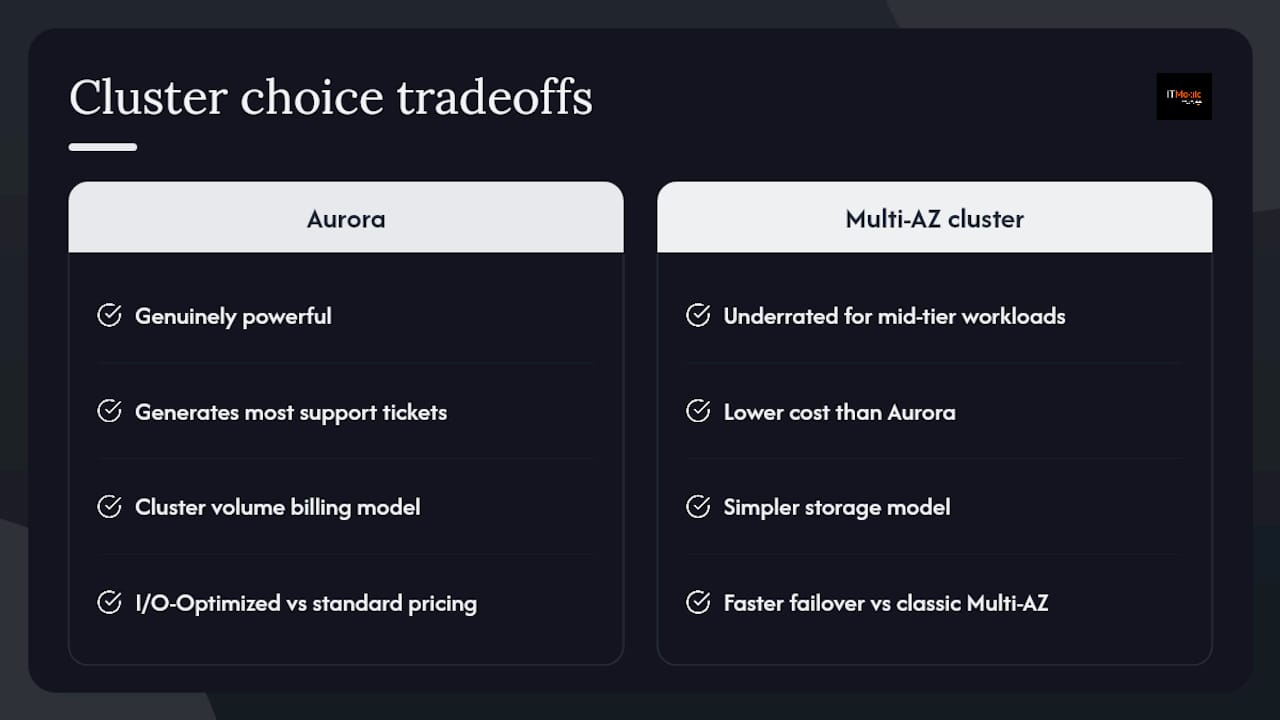
Aurora is genuinely powerful, but it is also the option that generates the most support tickets from teams who provisioned it without understanding Aurora-specific behaviors: the cluster volume billing model, the difference between Aurora I/O-Optimized and standard pricing, and the fact that Serverless v2 minimum capacity set too low causes latency spikes on the first query after a quiet period. Teams that treat Aurora as “just a faster RDS” tend to overspend and underperform.
Multi-AZ DB clusters are underrated for mid-tier workloads. If your read/write ratio is moderate and you need faster failover than a classic Multi-AZ instance, a Multi-AZ DB cluster on PostgreSQL or MySQL is often the right call — lower cost than Aurora, simpler storage model, and still meaningfully better RTO than the single-instance alternative.
The shared responsibility model matters here more than most teams acknowledge. AWS manages the infrastructure: storage replication, patching, hardware replacement. You manage query performance, schema design, and index strategy. A cluster with 15 readers does not fix a query that scans 200 million rows without an index. Performance Insights will show you exactly which queries are responsible — the data is there, and ignoring it is a choice.
When the complexity of cluster management, parameter tuning, failover testing, and IaC maintenance exceeds your team’s bandwidth, that is the right moment to bring in external AWS expertise rather than accumulate operational debt.
IT-Magic designs and operates RDS clusters for production AWS environments
IT-Magic is an AWS Advanced Tier Services Partner that has delivered 700+ projects for 300+ clients since 2010, with a focus on infrastructure, automation, and compliance — not software development. For RDS cluster work specifically, that means architecture design (Aurora vs Multi-AZ DB cluster selection, sizing, and endpoint strategy), migration from single-instance deployments to clustered architectures, parameter group hardening, IaC build-out in Terraform or CloudFormation, and 24/7 managed support.

For teams running healthcare workloads, IT-Magic’s HIPAA-compliant AWS infrastructure practice covers the encryption, IAM authentication, audit logging, and parameter hardening that RDS clusters require under HIPAA. For payment and retail platforms, the PCI DSS readiness toolkit maps directly to the RDS configuration controls auditors check. If your cluster architecture needs an independent review — or you want a managed services team to own the operational runbook — request an architecture review at Itmagic.
Sources
- Multi-AZ DB cluster deployments for Amazon RDS
- aws_rds_cluster | Resources | hashicorp/aws | Terraform
FAQ
What is an RDS cluster?
An RDS cluster is a managed AWS database deployment where multiple DB instances share infrastructure for high availability and read scaling. In AWS, this refers to Amazon Aurora DB clusters and Multi-AZ DB clusters — both provide automated failover and reader endpoints that single-instance deployments do not.
Does RDS have clusters?
Yes. AWS offers two cluster types: Aurora DB clusters (with a shared distributed storage volume and up to 15 reader instances) and Multi-AZ DB clusters (one writer plus two readable standbys across three AZs using semisynchronous replication).
What is the difference between an RDS cluster and an instance?
A DB instance is a single database server. An RDS cluster is a group of instances sharing storage or replication for HA and read scaling. The cluster provides a cluster endpoint that automatically routes to the current writer after failover — a single instance has no equivalent automatic rerouting.
What is the difference between a Redshift cluster and an RDS cluster?
RDS clusters are optimized for OLTP transactional workloads — row-oriented storage, low-latency reads and writes, and high connection concurrency. Redshift clusters are optimized for OLAP analytical workloads — columnar storage, large aggregation queries, and data warehouse patterns. They solve different problems and are not interchangeable.
When should you use RDS Proxy with a cluster?
Use RDS Proxy when your application opens many short-lived connections (Lambda functions, microservices with connection churn) or when you need to minimize application-visible downtime during failover. The proxy queues connections during the failover window rather than returning errors, and multiplexes many application connections into fewer database connections.
Recommended
- AWS Disaster Recovery Plan: Strategies for Cloud Architects
- ECS on AWS: Scale containers reliably in 2026
- What Is IaC in DevOps? A 2026 Guide for Engineers
- Cloud architecture: A practical guide for scalable AWS
Alexander founded IT-Magic, an AWS Advanced Tier Services Partner delivering DevOps, cloud architecture, and managed services since 2010. He holds:
- AWS Certified Solutions Architect – Professional
- AWS Certified DevOps Engineer – Professional
- AWS Certified Security – Specialty
- AWS Certified Advanced Networking – Specialty
Talk to a certified AWS team trusted by INTERTOP, Foxtrot, Pandora, and J.Hilburn.
Get a free consultation


