

TL;DR:
- Moving workloads to AWS does not guarantee scalability, security, or cost savings without deliberate architectural design.
- The core of cloud architecture emphasizes elasticity, automation, multi-tenancy, and API-driven operations, contrasting traditional IT models.
Most engineering leaders assume that moving workloads to AWS automatically unlocks scalability, security, and cost efficiency. It doesn’t. The real differentiator isn’t the cloud provider you choose. It’s how deliberately you design your architecture on top of it. Teams that treat cloud migration as a simple lift-and-shift operation often find themselves debugging mysterious latency spikes, absorbing unexpected AWS bills, and retrofitting security controls that should have been built in from day one.
Table of Contents
- Defining cloud architecture: Foundations and key differences
- The AWS Well-Architected Framework: Six pillars of excellence
- Critical cloud design principles for secure, resilient systems
- Common cloud architecture patterns: When and why to choose each
- Building for scale and cost optimization on AWS
- Why most cloud architectures fail—and how to get yours right from the start
- Next steps: Expert support for your AWS cloud architecture
- Frequently asked questions
Key Takeaways
Running this on your own AWS setup? IT-Magic is an AWS Advanced Tier Partner — we audit, fix, or fully manage it for you.
Get a free consultation| Point | Details |
|---|---|
| Cloud architecture defined | Effective cloud architecture is the strategic design of technology resources and processes for scalability, security, and business agility. |
| AWS Well-Architected pillars | Reliability, security, and cost efficiency are structured through the six-pillar AWS Well-Architected Framework. |
| Design for resilience | Using principles like defense in depth, automation, and multi-AZ ensures secure, durable AWS systems. |
| Pattern selection matters | Choosing the right architecture pattern impacts your team’s scalability, agility, and long-term costs. |
| Optimization is ongoing | Continuous cost and performance optimization is crucial for maximizing AWS value and maintaining a competitive edge. |
Defining cloud architecture: Foundations and key differences
With expectations set, it’s worth being precise about what cloud architecture actually means before going further.
Cloud architecture is not just “where your servers live.” As cloud design principles describe it, cloud architecture is “the discipline of structuring computational resources, network topology, storage hierarchies, security boundaries, and operational processes to meet reliability, performance, security, and cost requirements in cloud environments, distinct from traditional software architecture due to elasticity, multi-tenancy, and API-driven control.”
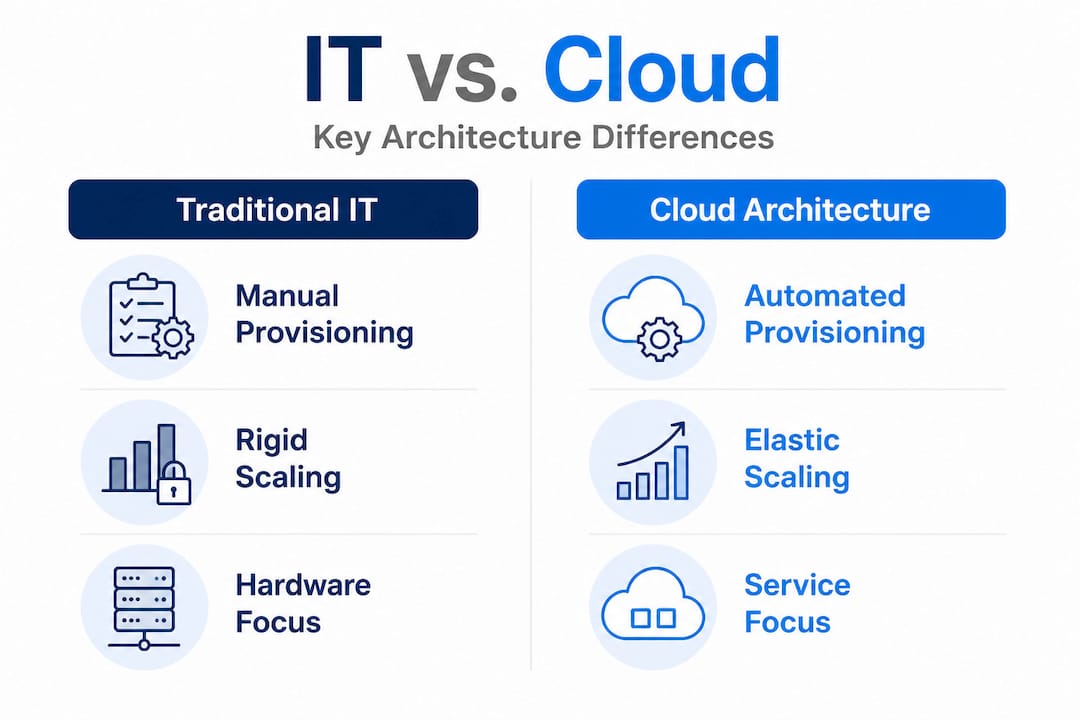
That distinction matters enormously. Traditional IT architecture assumes static hardware, manual provisioning, and predictable workloads. Cloud architecture assumes the opposite: resources scale up or down in seconds, infrastructure is defined as code, and multiple tenants share underlying hardware through logical isolation.
The key drivers that separate cloud architecture from legacy approaches include:
- Elasticity: Resources adjust automatically to demand, rather than being provisioned for peak load permanently
- Scalability: Horizontal scaling is a design expectation, not an afterthought
- Automation: Infrastructure-as-Code (IaC) tools like Terraform or AWS CloudFormation replace manual configuration
- Multi-tenancy: Workloads from many customers or environments coexist safely through strong isolation controls
- API-driven operations: Every resource, permission, and network rule is managed programmatically
| Dimension | Traditional IT | Cloud architecture |
|---|---|---|
| Provisioning | Manual, days to weeks | Automated, minutes |
| Scaling | Vertical, planned in advance | Horizontal, dynamic |
| Security model | Perimeter-based firewall | Zero trust, identity-first |
| Cost model | CapEx, fixed hardware | OpEx, pay-per-use |
| Failure handling | Manual recovery | Automated failover |
The classic lift-and-shift failure illustrates why this gap matters. A team migrates an on-premise application to EC2 instances with the same monolithic structure, the same static IP references, and no auto-scaling. On AWS, they pay cloud prices while getting legacy performance. The architecture doesn’t take advantage of AWS best practices for elasticity or resilience, and incidents become harder to debug because the team lacks observability tooling they never needed to build before.
If you’re curious how AWS compares to other cloud providers on architecture flexibility, that context is useful when evaluating vendor direction, particularly for AWS vs cloud competitors in specific verticals.
The AWS Well-Architected Framework: Six pillars of excellence
Once you’re clear on the core definition, the next step is understanding how leading organizations structure their approach to cloud design. AWS provides a foundational methodology specifically for this purpose.
The AWS Well-Architected Framework defines six pillars: Operational Excellence, Security, Reliability, Performance Efficiency, Cost Optimization, and Sustainability. Together, these six areas give CTOs a structured way to evaluate any architecture decision, not just at launch, but continuously.
Here’s what each pillar actually addresses in practice:
- Operational Excellence: Focuses on running and monitoring systems to deliver business value. This means automating runbooks, tracking key metrics, and continuously improving your incident response process.
- Security: Covers identity and access management (IAM), data protection, infrastructure protection, and detective controls. Security is not a feature you add later.
- Reliability: Designs for failure. It includes multi-AZ deployments, automated recovery, and circuit breakers so that individual component failures don’t cascade.
- Performance Efficiency: Ensures you’re using the right compute types, database engines, and caching layers. Running a memory-intensive workload on a compute-optimized instance is a common and costly mismatch.
- Cost Optimization: Focuses on eliminating waste, right-sizing resources, and using Reserved Instances or Savings Plans where usage patterns are predictable.
- Sustainability: Minimizes the environmental footprint of your workloads through efficient resource use and architectural choices that reduce unnecessary compute cycles.
| Pillar | Primary CTO concern addressed |
|---|---|
| Operational Excellence | Incident response, automation, observability |
| Security | Compliance, data breaches, IAM sprawl |
| Reliability | Downtime, data loss, failover capability |
| Performance Efficiency | Latency, user experience, resource fit |
| Cost Optimization | AWS bill surprises, wasted spend |
| Sustainability | ESG commitments, efficiency at scale |
Modern data platforms built on this framework have seen a 70% reduction in reporting time and a 65% decrease in total cost of ownership (TCO), demonstrating that proper architecture delivers measurable business returns, not just engineering elegance.
The AWS Well-Architected Framework review process itself is a practical tool for teams that want to identify high-risk areas in an existing architecture. Think of it as a technical audit with a clear remediation path, not a one-time checkbox exercise.
Pro Tip: Start every architecture review with the Security pillar, even in early-stage MVPs. Retrofitting security controls onto a running system is consistently more expensive and more disruptive than designing them in from the start. You can always optimize cost later. Recovering from a data breach isn’t that forgiving.
Critical cloud design principles for secure, resilient systems
With a framework established, successful architectures rely on a handful of proven design principles that translate theory into daily engineering decisions.
The AWS Security Pillar identifies five essential principles: strong identity foundation, defense in depth, automation of security controls, protection of data in transit and at rest, and active preparation for security events. Each of these deserves a concrete interpretation for your AWS environment.
Strong identity foundation means every human and machine interaction with AWS services goes through least-privilege IAM roles, not shared credentials or root account access. This sounds obvious, but it’s routinely violated in fast-moving startup environments.

Defense in depth means you don’t rely on a single security control. It stacks protections across AWS accounts (using AWS Organizations), VPCs (using security groups and NACLs), application layers (using WAF and API Gateway), and data layers (using encryption and access logging). If one layer fails, others remain intact.
Automation of security is where Infrastructure-as-Code becomes your best compliance partner. When security checks, backup schedules, and audit logging are defined in code, they can’t be accidentally skipped during a rushed deployment.
“Preparing for security events is not a precaution. It is a design requirement. Every architecture that handles sensitive data must include detection, response, and recovery workflows before it handles that data in production.” This is not a security opinion. It’s an operational reality.
Data protection in transit and at rest means enforcing TLS everywhere, using AWS Key Management Service (KMS) for encryption key management, and restricting which services can decrypt which data. These controls are non-negotiable for fintech teams subject to PCI DSS.
Preparing for security events involves building runbooks, enabling AWS CloudTrail and Amazon GuardDuty, and regularly testing your incident response process through tabletop exercises or chaos engineering.
The often-missed connection is that cloud security strategies and cost reduction are not separate disciplines. Well-designed security controls reduce the surface area of expensive incidents, and automated compliance reduces the labor cost of audits.
Pro Tip: Set up audit trails on day one, not when compliance comes knocking. CloudTrail logs, S3 access logs, and VPC flow logs are cheap to store. Retroactive compliance, where you try to reconstruct audit history after the fact, is not just costly. It’s sometimes impossible, which turns a compliance gap into a breach notification.
Common cloud architecture patterns: When and why to choose each
It’s one thing to understand design principles. It’s another to know which architecture patterns fit your specific stage and technical challenges.
Common AWS patterns include microservices (with circuit breaker and saga patterns), multi-tier web architectures, hybrid cloud setups, and serverless event-driven designs. Each has a distinct profile of strengths and trade-offs.
Here’s how to think about choosing between them:
- Multi-tier (3-tier web/app/db): The proven baseline for most applications. Web tier handles requests, application tier runs business logic, database tier stores state. Works well for teams of any size and is straightforward to secure and monitor.
- Microservices: Independent services that each own a bounded business domain. Best suited for teams with 15 or more engineers, clear service ownership, and mature CI/CD pipelines. Microservices add significant overhead, including distributed tracing, service discovery, and inter-service failure handling.
- Serverless: AWS Lambda plus API Gateway plus DynamoDB is a compelling combination for event-driven workloads with unpredictable traffic. It reduces operational overhead dramatically but introduces cold-start latency and vendor lock-in considerations.
- Hybrid cloud: Connects on-premise or edge infrastructure to AWS through Direct Connect or VPN. Critical for organizations with latency-sensitive workloads at the edge, regulatory requirements that mandate data residency, or existing data center investments they can’t immediately retire.
| Pattern | Best for | Watch out for |
|---|---|---|
| Multi-tier | Teams of any size, web applications | Scalability ceiling at high load |
| Microservices | Large teams, independent scaling | Operational complexity, debugging difficulty |
| Serverless | Event-driven, variable traffic | Cold starts, testing complexity |
| Hybrid | Edge workloads, data residency | Network latency, connectivity management |
For teams building scalable AWS patterns for e-commerce or high-traffic consumer applications, the choice between serverless and multi-tier often comes down to traffic predictability and team operational maturity, not which architecture sounds more sophisticated.
Pro Tip: Don’t adopt microservices because they feel modern. Most startups with fewer than 15 engineers will move faster and deploy more reliably with a well-structured modular monolith. You can extract services later once your domain boundaries are clear and your team has the bandwidth to manage distributed systems.
Building for scale and cost optimization on AWS
Even the best architecture pattern can underperform if not built to scale and actively managed for cost efficiency.
AWS prescriptive guidance consistently emphasizes multi-AZ and multi-VPC designs for resilience, IaC for repeatability, and hybrid patterns where latency or data requirements demand them. These aren’t aspirational recommendations. They’re the baseline for any production system handling real traffic.
Here’s a practical checklist for scaling without blowing your AWS budget:
- Deploy across at least two Availability Zones (AZs) for all stateful components and critical services
- Use Auto Scaling Groups for compute, not fixed instance counts
- Define all infrastructure in Terraform or CloudFormation, making every environment reproducible
- Separate environments (dev, staging, production) using distinct AWS accounts, not just separate VPCs
- Implement AWS Cost Explorer and set up billing alerts before you go live, not after the first surprise invoice
- Tag every resource with owner, environment, and project labels to make cost attribution accurate
- Review Reserved Instance and Savings Plan coverage quarterly for any workload running continuously
The numbers from real implementations are compelling. Data platform architectures built on Well-Architected principles have achieved a 70% reduction in reporting time alongside a 65% TCO decrease. These results come from eliminating over-provisioned infrastructure, replacing batch processes with event-driven pipelines, and using managed AWS services instead of self-hosted alternatives.
| Optimization lever | Potential impact | Complexity |
|---|---|---|
| Reserved Instances / Savings Plans | 30-70% compute savings | Low |
| Auto Scaling | Right-sized resource usage | Medium |
| Multi-AZ design | Resilience without redundant cost | Medium |
| IaC consistency | Prevents environment drift | Medium |
| Managed services (RDS, ElastiCache) | Reduced ops overhead | Low to medium |
For teams serious about cost optimization in AWS, the highest-ROI activity is usually a structured spend review combined with resource tagging enforcement, not chasing marginal discounts. Detailed AWS cost optimization strategies often reveal that 20 to 30 percent of spend is on unused or idle resources that no one noticed accumulating.
Pro Tip: Track resource utilization weekly, not monthly. Misallocated spend compounds quickly. A single oversized RDS instance running 24/7 at the wrong tier can cost thousands per month. Multiply that across five environments with no tagging enforcement and you have a cost problem that took six months to create and will take six months to untangle.
Why most cloud architectures fail—and how to get yours right from the start
After walking through the technical layers, the honest observation from working on hundreds of AWS projects is that technical missteps are rarely the root cause of failed cloud architectures. The real issue is usually sequencing. Teams make architectural decisions too early, skip foundational reviews, and then discover the cost of those decisions when their system is already in production and under load.
The conventional wisdom that microservices are the “mature” choice has caused enormous damage to early-stage startups. We’ve seen teams of eight engineers spend six months decomposing a working monolith into fifteen services, only to realize that their operational burden tripled and their deployment frequency dropped. Well-Architected Framework insights consistently show that the right architecture is the one matched to your current team size and scale requirements, not your aspirational future state.
Cost optimization is another area where early decisions have outsized long-term effects. Ignoring it during the build phase doesn’t save time. It creates technical debt in your billing model. Cloud cost strategy is part of architecture design, not a retrospective finance exercise. Teams that bake cost awareness into their architecture from day one consistently end up with lower total cost of ownership and fewer emergency scaling incidents.
Perhaps the most underrated practice is the periodic architecture review. Not an annual audit, but a quarterly conversation about whether the current design still fits the current reality. Fast-growing teams outgrow their initial architecture faster than they expect. Building in structured review cycles means you catch drift before it becomes a crisis.
Next steps: Expert support for your AWS cloud architecture
If you’re ready to put these principles into action, specialized guidance can give you a crucial head start.
At IT-Magic, we’ve delivered over 700 cloud infrastructure projects for more than 300 clients since 2010, focusing entirely on AWS architecture, DevOps, and security. We don’t build software. We design the infrastructure and operational systems that make your software perform reliably and securely at scale.

Whether your immediate priority is container orchestration with Kubernetes support on EKS, or identifying gaps in your current setup through a structured review, we help engineering leaders build AWS environments that hold up under real-world demand. Our AWS cost optimization services have helped fintech and enterprise clients cut unnecessary cloud spend while improving resilience and compliance posture. Reach out to our certified AWS experts to discuss where your architecture stands today.
Frequently asked questions
What is the difference between cloud architecture and traditional IT architecture?
Cloud architecture prioritizes scalability, elasticity, automation, and multi-tenancy, while traditional IT centers on static infrastructure and manual operations. As cloud design principles note, cloud architecture is distinct from traditional approaches due to elasticity, multi-tenancy, and API-driven control.
What are the six pillars of the AWS Well-Architected Framework?
The six pillars are Operational Excellence, Security, Reliability, Performance Efficiency, Cost Optimization, and Sustainability. Each pillar targets a specific dimension of architecture quality that matters to production systems.
How do I decide between a monolith, microservices, or serverless architecture on AWS?
Start with a monolith or modular monolith for small teams and adopt microservices or serverless when independent scaling and operational maturity justify the overhead. Microservices add operational complexity that small teams often underestimate until they’re managing it in production.
Why is multi-AZ deployment important for AWS architectures?
Multi-AZ deployment ensures resilience and high availability by enabling automatic failover when one Availability Zone experiences an issue. Multi-AZ failover is a foundational reliability pattern for any production workload.
How can cloud architecture help reduce operational costs?
Applying AWS best practices like automation, right-sizing, tagging, and continuous optimization can significantly cut resource waste and total cost of ownership. Real-world implementations have demonstrated a 65% TCO decrease in data platform architectures built on Well-Architected principles.
Recommended
- Cloud infrastructure examples: secure, scalable AWS solutions
- Cloud Infrastructure Explained: Scale, Secure, Optimize AWS
- The CTO’s guide to securing AWS infrastructure for scale
- AWS Cloud Security: Best Practices, Tools & Complete Guide | IT-Magic
- How To Perform an AWS Vulnerability Scan Effectively
- SaaS im B2B: Architektur, Skalierung und… | H-Studio
Alexander founded IT-Magic, an AWS Advanced Tier Services Partner delivering DevOps, cloud architecture, and managed services since 2010. He holds:
- AWS Certified Solutions Architect – Professional
- AWS Certified DevOps Engineer – Professional
- AWS Certified Security – Specialty
- AWS Certified Advanced Networking – Specialty
Talk to a certified AWS team trusted by INTERTOP, Foxtrot, Pandora, and J.Hilburn.
Get a free consultation


