

To get SOC 2 compliance, you must complete four phases: define scope and select Trust Services Criteria, run a readiness assessment and remediate gaps, operate controls through the observation window, then engage an AICPA-licensed CPA firm to conduct fieldwork and issue the attestation report. That sequence is non-negotiable. The one thing you can do this week: schedule a scoping call with a prospective auditor and draft a one-page system description that names your in-scope services, infrastructure, and data flows.
Phase 1: Scope and Trust Services Criteria selection
- Identify the services, systems, and data flows that touch customer data
- Draft a system description covering infrastructure, subservice organizations, and system boundaries
- Select Security (mandatory) plus any elective criteria: Availability, Confidentiality, Processing Integrity, Privacy
- Decide between Type I (design at a point in time) and Type II (operating effectiveness over 3–12 months)
- Engage your auditor early so their expectations shape scope before you build evidence
Phase 2: Readiness assessment and remediation
- Map existing controls to the 2017 Trust Services Criteria across all nine common-criteria groups (CC1–CC9)
- Identify gaps and assign owners, priorities, and target completion dates
- Close high-priority gaps before the observation window opens
- Validate evidence streams are producing timestamped, attributed records
Phase 3: Operate controls through the observation window
- Run access reviews, change management approvals, backup restore tests, and incident tabletops on a defined cadence
- Collect and retain evidence in the system of record for the full window (6 or 12 months)
- Monitor for control failures and document exceptions with a risk-acceptance log
Phase 4: Auditor fieldwork and report
- Provide the auditor with a population list for each control area they will sample
- Support fieldwork by answering requests within agreed SLAs
- Receive the Type I or Type II attestation report and share it under NDA with customers
Key Takeaways
Getting SOC 2 attestation requires four sequential phases: scope and TSC selection, readiness assessment and remediation, a 6- or 12-month observation window with operating controls, and fieldwork by an AICPA-licensed CPA firm.
| Point | Details |
|---|---|
| Type II is the standard buyers expect | Enterprise buyers require Type II; Type I only shows design, not operating effectiveness over time. |
| 80 controls mapped to 2017 TSC | Experienced firms use roughly 80 controls mapped to the 2017 Trust Services Criteria as a practical baseline. |
| 6 vs. 12 months depends on maturity | Mature teams can target a 6-month Type II path; teams building from scratch should plan for 12 months. |
| Population lists prevent audit slippage | Missing a population list for sampled controls is one of the most common reasons SOC 2 engagements slip. |
| IT-Magic for AWS-native compliance | IT-Magic configures AWS infrastructure to produce auditor-ready evidence automatically across the observation window. |
Table of Contents
Running this on your own AWS setup? IT-Magic is an AWS Advanced Tier Partner — we audit, fix, or fully manage it for you.
Get a free consultation- What is SOC 2 and which report type do you actually need?
- How to define scope and pick the right Trust Services Criteria
- How to run a readiness assessment and build a remediation roadmap
- What controls auditors test and what evidence they expect
- How to collect and automate evidence so auditors can actually use it
- What does SOC 2 compliance actually cost and how long does it take?
- How to choose an auditor and whether to use a compliance automation platform
- How to sustain SOC 2 controls after the audit
- Your 90-day SOC 2 readiness checklist
- The part of SOC 2 advice most teams get wrong
- IT-Magic brings AWS expertise to your SOC 2 program
- Sources
- FAQ
What is SOC 2 and which report type do you actually need?
SOC 2 is not a certification. It is an attestation framework administered by the AICPA, and only an independent, licensed CPA firm can issue the report. No vendor, no internal team, and no self-assessment tool produces a SOC 2 report. The auditor attests that your controls meet the 2017 Trust Services Criteria (TSC) — a set of principles and criteria developed by the AICPA to evaluate how service organizations manage security, availability, processing integrity, confidentiality, and privacy.
The auditor independence rule matters practically: the firm that helps you build controls cannot be the same firm that attests to them. Keep your readiness assessor and your attestation auditor separate.
Type I vs. Type II: which one do you need?
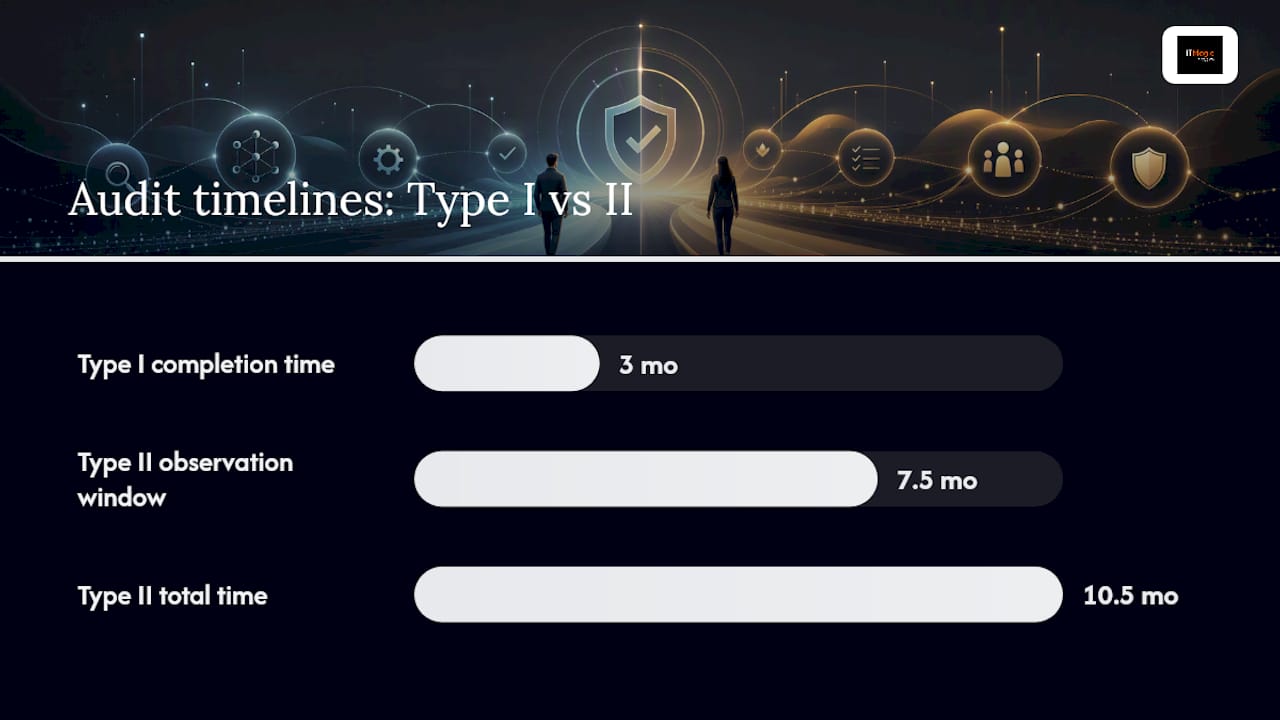
Type I examines control design at a single point in time; Type II tests operating effectiveness over a period, typically 3–12 months, and enterprise buyers almost always require Type II.
| Dimension | Type I | Type II |
|---|---|---|
| What it tests | Control design at a point in time | Operating effectiveness over an observation period |
| Observation period | None | Typically 3–12 months |
| Time to complete | 2–4 months from audit start | 6–15 months total (includes window) |
| Typical use case | Early-stage signal for prospects; pre-fundraising | Enterprise sales, regulated industries, renewals |
| Auditor evidence | Design documentation, walkthroughs | Sampled transactions, logs, tickets, test results |
Pro Tip: If your primary driver is closing enterprise deals or satisfying a procurement questionnaire, skip Type I entirely. Enterprise security teams know Type I only tells them your controls look good on paper. A Type II report covering even a 6-month window carries far more weight and avoids paying for two audits in the same year.
How to define scope and pick the right Trust Services Criteria
Scope is the single decision that most directly controls your timeline and cost. A scope that is too wide pulls in systems, teams, and evidence streams that add months of work. A scope that shifts mid-engagement is worse — it gives auditors a moving target and can invalidate evidence already collected.
Translating business objectives into a system description
Your system description is the document that tells the auditor exactly what is in scope. Auditors expect it to cover:
- The services your organization provides to customers
- The infrastructure components (compute, storage, network, cloud accounts) that support those services
- Data flows, including where customer data enters, is processed, and exits the system
- Subservice organizations (cloud providers, payment processors, identity providers) and whether you use the carve-out or inclusive method for each
- System boundaries: what is explicitly out of scope and why
- The principal service commitments and system requirements your customers rely on
A practical starting point: write one paragraph describing what your product does, who uses it, and what data it handles. That paragraph is the seed of your system description.
Choosing which Trust Services Criteria to include
Security (the Common Criteria, CC1–CC9) is mandatory for every SOC 2 engagement. The elective criteria add scope and cost, so add them only when a business reason exists:
- Availability: Add this if customers have SLA commitments or if uptime is a contractual obligation. Common in SaaS and infrastructure services.
- Confidentiality: Add this when you handle sensitive non-personal data (trade secrets, financial models, proprietary algorithms) under confidentiality agreements.
- Processing Integrity: Relevant for financial processing, payroll, or any service where completeness and accuracy of processing is a customer concern.
- Privacy: Add this when you collect, use, retain, or disclose personal information and have privacy commitments (GDPR, CCPA, or contractual).
Most startups begin with Security only, then add Availability on the second renewal when customers start asking for it.
Common scope pitfalls
- Including corporate IT systems (employee laptops, HR tools) when only the product environment is in scope
- Naming subservice organizations without deciding carve-out vs. inclusive, which forces a late-stage rework
- Letting the scope document drift between the readiness phase and audit start, which invalidates early evidence
- Scoping in a product that is still in active development, where controls change weekly
Pro Tip from the OneTrust SOC 2 checklist: Choose your auditor before you finalize scope. Auditors have preferences about how system descriptions are written and what subservice organization treatment they expect. Getting their input early prevents a rewrite after you have already collected three months of evidence.
How to run a readiness assessment and build a remediation roadmap
A readiness assessment is the structured gap analysis that tells you where you stand before the observation window opens. Starting with a readiness assessment that maps controls to the Trust Services Criteria, produces a gap list, and generates a remediation plan is the standard way to prevent costly surprises during fieldwork.
What a readiness assessment delivers
- A control inventory mapped to CC1–CC9 (and elective criteria if selected)
- A gap map showing which controls are missing, partially implemented, or undocumented
- A draft system description
- An evidence inventory listing what exists, what is missing, and what needs automation
- A prioritized remediation backlog with owners and target dates
Running the assessment: a structured approach
- Inventory your environment. List every system, service, and data store in scope. Include cloud accounts, identity providers, logging tools, and ticketing systems.
- Map controls to TSC. For each of the nine common-criteria groups, document what control exists, who owns it, and what evidence it produces. Experienced firms map roughly 80 controls to the 2017 TSC as a practical baseline.
- Assess evidence status. For each control, mark evidence as: exists and auditor-ready, exists but needs improvement, or missing entirely.
- Score and prioritize gaps. Rank gaps by risk (safety, auditability, cost to fix). A missing MFA policy on production access is higher priority than an undated policy acknowledgment form.
- Assign owners and deadlines. Every gap needs a named owner and a target completion date. Unowned gaps do not close.
- Validate before the window opens. Run a second pass to confirm high-priority gaps are closed and evidence streams are producing records.
Remediation roadmap milestones
A typical remediation roadmap for a startup with reasonable engineering hygiene runs 60–90 days. The milestones look like this: weeks 1–2 for environment inventory and control mapping, weeks 3–6 for closing critical gaps (MFA, access reviews, logging retention), weeks 7–10 for policy drafting and employee acknowledgments, weeks 11–12 for evidence stream validation and a pre-window dry run.

Pro Tip: Hire an external readiness assessor when your team has no prior SOC 2 experience or when you are under time pressure from a sales deal. An experienced assessor will find gaps your internal team normalizes. Run it internally only if you have someone who has been through at least one prior SOC 2 audit and can read the TSC criteria without a guide.
What controls auditors test and what evidence they expect
The nine common-criteria groups (CC1–CC9) cover the full Security TSC. Each group maps to concrete controls your team must implement and maintain. Auditors sample specific instances from a defined population; evidence must be findable, date-stamped, attributed to a person or system, and stored in the system of record.
| Control area | Example controls | Evidence auditors expect |
|---|---|---|
| CC1: Control environment | Security policies, roles and responsibilities, code of conduct | Signed policy acknowledgments, org chart, role descriptions |
| CC2: Communication | Security awareness training, incident notification procedures | Training completion records, notification templates |
| CC3: Risk assessment | Annual risk assessment, threat modeling | Risk register with dates, threat model documents |
| CC4: Monitoring activities | Internal audit, control monitoring | Audit logs, monitoring dashboards, exception reports |
| CC5: Control activities | Change management, access provisioning | Approved change tickets, provisioning workflow records |
| CC6: Logical access | MFA enforcement, least-privilege access, access reviews | IdP MFA reports, access review sign-offs, deprovisioning tickets |
| CC7: System operations | Vulnerability scanning, patch management, incident response | Scan reports with dates, patch records, IR runbooks and tabletop results |
| CC8: Change management | PR approvals, deployment controls, code review | PR merge logs with approver names, deployment pipeline records |
| CC9: Risk mitigation | Vendor management, business continuity | Vendor security assessments, BCP test results |
Elective criteria: what evidence they add
Availability adds SLA monitoring logs, uptime reports, and failover test results. Confidentiality adds data classification records and encryption configuration evidence. Processing Integrity adds reconciliation logs and completeness checks. Privacy adds data inventory records, consent logs, and deletion request handling documentation.
How auditors sample
Auditors do not review every record. They request a population list (every instance of a control firing during the observation period) and then pull a sample. A missing population list is one of the most common reasons engagements slip. If you cannot produce a list of every access review completed in the past six months, the auditor cannot sample from it — and that gap becomes a finding.

Common evidence buckets auditors sample include access review records, change management tickets and PR approvals, backup restore tests, and incident response tabletop outputs. Each sampled item needs both the population list and the specific instance.
Pro Tip: Before the observation window opens, run a dry-run evidence pull for your three highest-risk control areas. If you cannot produce a clean, timestamped, attributed list in under 30 minutes, you have an evidence problem that will surface during fieldwork. Fix the collection mechanism, not the evidence after the fact.
How to collect and automate evidence so auditors can actually use it
Auditors prefer automated extracts from source systems over screenshots. Screenshots are acceptable only for discrete, infrequent events — a one-time configuration change, a single vendor approval. For anything that happens on a cadence (access reviews, deployments, vulnerability scans), automated extracts from the system of record are the right default.
Automation patterns that produce auditor-ready evidence
- IdP and MFA reports: Export MFA enrollment status and access logs from your identity provider (Okta, Azure AD, AWS IAM Identity Center) on a scheduled basis. These feed CC6 directly.
- Centralized logging and SIEM exports: Route CloudTrail, VPC flow logs, and application logs to a SIEM (Datadog, Splunk, AWS Security Hub). Retain for the full observation window plus a buffer. These cover CC7 monitoring and CC8 change management.
- Ticketing and PR linkages: Every change ticket in Jira or Linear should link to the corresponding pull request. Auditors can then trace from the change record to the approver to the deployment. This covers CC8 completely.
- Backup restore test logs: Run restore tests on a defined cadence and log the result (date, system, outcome, approver) in a structured format. A spreadsheet with dated entries works; an automated test pipeline with logged output is better.
- Vulnerability scan reports: Schedule weekly or monthly scans (AWS Inspector, Tenable, Qualys) and export timestamped reports. Retain the full history for the observation period.
Integration checklist for a 6–12 month observation window
- Identity provider connected to all production systems with MFA enforced
- Centralized log aggregation with minimum 12-month retention configured
- Ticketing system linked to version control (every PR references a ticket)
- CI/CD pipeline with required approvals and deployment logs exported
- Backup restore tests scheduled and results logged in a durable store
- Vulnerability scanner configured with scheduled runs and report export
- Policy documents versioned in a document management system with acknowledgment tracking
Pro Tip: The single automation to implement in the first 30 days is IdP-to-production access reporting. It feeds CC6 (logical access), produces the population list auditors need for access review sampling, and surfaces orphaned accounts before they become a finding. Everything else can follow, but this one pays dividends across the entire observation window. See IT-Magic’s SOC 2 on AWS guide for specific AWS IAM Identity Center configuration patterns.
What does SOC 2 compliance actually cost and how long does it take?
Timeline and cost depend on three variables: your starting maturity, your scope width, and your auditor’s fee structure. Teams with mature engineering hygiene can meet a shorter Type II path appropriate for mature environments when remediation finishes before the observation window; teams starting from scratch should plan for twelve months.
Timeline options
| Path | Total duration | Observation window | Best for |
|---|---|---|---|
| 6-month Type II | 6–8 months total | 6 months | Teams with existing IAM, logging, and change management in place |
| 12-month Type II | 12–15 months total | 12 months | Teams building controls from scratch or with wide scope |
| Type I first, then Type II | 10–15 months total | 3–6 months for Type II after Type I | Teams needing a fast signal for prospects while building toward Type II |
The gating decision for the 6-month path: all high-priority gaps must be closed before day one of the observation window. If you start the window with open gaps, you are collecting evidence of a failing control, which becomes a finding.
Cost drivers
- Auditor fees: First-time Type II engagements at reputable CPA firms typically run in the range of $20,000–$50,000 depending on scope, firm size, and complexity. Repeat audits with the same firm often come in lower as the auditor already knows your environment.
- Internal engineering hours: Readiness work, evidence collection, and fieldwork support commonly consume 200–400 hours of engineering and compliance time for a first engagement.
- Compliance automation tooling: Platforms like Drata, Vanta, Secureframe, and Tugboat Logic range from roughly $10,000 to $30,000+ per year depending on employee count and integrations. They reduce internal hours but add a recurring line item.
- Readiness assessment (external): An external assessor typically charges a fee commensurate with scope and effort for a structured gap analysis and remediation roadmap.
- Ongoing compliance: Annual renewal audits, continuous monitoring tooling, and internal program management add recurring costs after the first year.
What inflates cost
- Wide scope (multiple products, many subservice organizations)
- Immature starting point requiring significant control builds
- Frequent scope changes during the observation window
- Poor evidence organization forcing auditors to spend extra time in fieldwork
You can expand scope on renewal once the program is running. A narrow, clean first report is worth more than a wide, finding-heavy one.*
How to choose an auditor and whether to use a compliance automation platform
Questions to ask prospective CPA firms
- How many SOC 2 Type II engagements have you completed for companies at our stage (headcount, revenue, infrastructure complexity)?
- What is your sampling methodology for cloud-native environments — do you accept automated log exports, or do you require specific formats?
- What does your fieldwork support look like — do you assign a dedicated senior auditor, or does the engagement get handed to a junior team?
- What is your typical timeline from observation window close to report delivery?
- What are your fees for a first engagement vs. renewal, and what scope changes trigger a fee adjustment?
- Will you conduct a pre-audit walkthrough before fieldwork begins?
A pre-audit walkthrough is worth requesting regardless of whether the auditor offers it. Walking through your evidence with the auditor before formal fieldwork surfaces mismatches between what you collected and what they need, with time to fix them.
Compliance automation platforms: how to evaluate them
A structured checklist approach — scoping, gap assessment, remediation, readiness, audit — is the practical way to organize SOC 2 work, and automation platforms are designed to support exactly that structure. When evaluating platforms, compare on these dimensions:
| Dimension | Entry-level platforms | Mid-market platforms | Enterprise platforms |
|---|---|---|---|
| Best for / org size | Seed to Series A, under 50 employees | Series A to Series C, 50–— employees | —, complex multi-product scope |
| Automation level | Manual evidence upload with guided workflows | Automated evidence collection via integrations | Full continuous monitoring with custom controls |
| Pricing model | Per-employee or flat annual fee, lower tier | Per-employee with integration add-ons | Custom contracts, usage-based |
| Scope coverage | Security TSC, common integrations | Security + elective TSC, broader integrations | Full TSC, custom frameworks, multi-standard |
| Integration surface | IdP, HR, basic cloud | IdP, SIEM, ticketing, CI/CD, cloud | All of the above plus custom API connectors |
Drata, Vanta, Secureframe, and Tugboat Logic all operate in this space, spanning the entry-level to mid-market tiers. Each connects to AWS, common IdPs, and ticketing systems, and each produces evidence packages auditors can consume directly. The practical difference between them at the startup stage is integration depth with your specific stack and how much manual work remains after automation.
Pro Tip: If your engineering team is under 20 people, a managed compliance service often costs less than a platform license plus the internal hours to configure and maintain it. Run the math on internal hours before committing to a self-serve platform. For AWS-native environments, native services like AWS Security Hub, CloudTrail, and Config already produce much of the evidence you need before you pay for a third-party tool.
How to sustain SOC 2 controls after the audit
The audit is not the finish line. Treating SOC 2 as ongoing operational discipline rather than a bolt-on project is the sustainable approach for cloud-native environments. Auditors verify that daily technical workflows match policy. A documentation-reality gap — where your policy says one thing and your logs show another — is one of the most common failure modes on renewal.
Owner assignments for ongoing control operations
- IAM and access reviews: Security lead or DevOps lead. Quarterly access reviews, monthly deprovisioning checks.
- Change management: Engineering manager. Ensures all production changes flow through the approved ticketing and PR process.
- Monitoring and alerting: DevOps or SRE team. Maintains log retention settings, reviews alert thresholds monthly.
- Vendor management: Compliance lead or legal. Annual vendor security assessments, tracks subservice organization changes.
- Policy management: Compliance lead. Annual policy reviews, tracks employee acknowledgments.
- Incident response: Security lead. Runs quarterly tabletops, maintains the IR runbook.
Recurring tasks that keep evidence flowing
- Quarterly access reviews with sign-off documentation
- Monthly vulnerability scans with remediation tracking
- Quarterly backup restore tests with logged outcomes
- Semi-annual incident response tabletops with documented results
- Annual policy reviews with updated employee acknowledgments
- Annual vendor security assessments for subservice organizations
- Pre-renewal readiness check: pull a sample evidence set 60 days before the new observation window opens
What renewal planning looks like
Start the renewal conversation with your auditor 90 days before the current observation window closes. Confirm whether scope is changing, whether any subservice organizations have changed, and whether the auditor needs updated system description language. Run an internal evidence sanity check — pull samples from each control area and verify they are clean, timestamped, and attributed. If you find gaps, you have time to fix them before fieldwork.
Pro Tip: Build an exception and risk-acceptance log from day one of your program. Every time a control fails or a risk is accepted rather than remediated, log the date, the control, the reason, the owner, and the planned resolution date. Auditors respect a well-maintained exception log far more than a program that claims zero exceptions — because zero exceptions in a real environment means the monitoring is not working.
Your 90-day SOC 2 readiness checklist
This checklist assumes a reasonably mature engineering environment (existing cloud infrastructure, some access controls in place) and targets starting a Type II observation window at day 90.
Days 1–30: inventory and critical controls
- Draft system description (Owner: CTO or compliance lead) — Name in-scope services, infrastructure, data flows, and subservice organizations. Acceptance: one-page document reviewed by the prospective auditor.
- Select Trust Services Criteria (Owner: CTO) — Confirm Security is in scope; decide on elective criteria based on customer commitments.
- Enforce MFA on all production access (Owner: DevOps lead) — Configure IdP MFA enforcement for all production accounts. Acceptance: IdP report showing 100% MFA enrollment for production users.
- Enable centralized logging (Owner: DevOps lead) — Route CloudTrail, VPC flow logs, and application logs to a central store with 12-month retention. Acceptance: log pipeline validated, retention policy documented.
- Inventory all user accounts with production access (Owner: Security lead) — Produce a list of every human and service account with production access. Acceptance: list reviewed and orphaned accounts removed.
Days 31–60: policies, change management, and evidence streams
- Draft and publish core security policies (Owner: Compliance lead) — Information security policy, access control policy, incident response policy, change management policy, vendor management policy. Acceptance: policies published in document management system, employee acknowledgments collected.
- Implement PR-required approvals for production deployments (Owner: Engineering manager) — No direct pushes to production; all changes require a reviewed and approved PR. Acceptance: branch protection rules configured, deployment pipeline enforces approval.
- Schedule vulnerability scans (Owner: DevOps lead) — Configure weekly scans with automated report export. Acceptance: first scan completed, report retained.
- Run first access review (Owner: Security lead) — Review all production access against job roles. Document sign-off. Acceptance: access review record with date, reviewer, and outcome.
- Conduct vendor inventory (Owner: Compliance lead) — List all subservice organizations, classify by risk, and initiate security assessments for high-risk vendors. Acceptance: vendor register with risk classification.
Days 61–90: validation and observation window readiness
- Run incident response tabletop (Owner: Security lead) — Simulate a security incident using your IR runbook. Document participants, scenario, and outcomes. Acceptance: tabletop record with date and action items.
- Complete backup restore test (Owner: DevOps lead) — Restore from backup for at least one critical system. Log date, system, outcome, and approver. Acceptance: restore test record retained.
- Validate evidence streams (Owner: Compliance lead) — Pull a sample from each control area (access review, change ticket, scan report, backup log). Verify each is timestamped, attributed, and retrievable. Acceptance: dry-run evidence package reviewed.
- Close high-priority gaps (Owner: All) — All critical and high gaps from the readiness assessment closed or formally risk-accepted. Acceptance: gap tracker shows no open critical items.
- Confirm auditor and start date (Owner: CTO or compliance lead) — Signed engagement letter with auditor, observation window start date agreed. Acceptance: engagement letter executed.
Sample remediation ticket template:
- Title: Enforce MFA on all AWS production accounts
- Owner: DevOps lead
- Priority: Critical
- Control: CC6.1 — Logical access restricted to authorized users
- Gap: MFA not enforced for 12 of 34 production IAM users
- Acceptance criteria: IdP report shows 100% MFA enrollment; AWS IAM policy blocks console access without MFA
- Target date: Day 14
At day 90, you should have: a signed system description, validated evidence streams across all nine common-criteria groups, all critical gaps closed, and a signed auditor engagement letter. That is the starting line for the observation window, not the finish line.
Pro Tip: The single automation to implement in the first 30 days is IdP-to-production access reporting, as noted earlier. Pair it with SSO enforcement across all production systems — it eliminates the orphaned-account problem at the source and produces the clean population list auditors need for CC6 sampling.
The part of SOC 2 advice most teams get wrong
Most SOC 2 guides treat the audit as the goal. It is not. The audit is a measurement. What you are actually building is an operational security program that happens to produce auditable evidence as a byproduct.
The conventional advice to “implement controls before the audit” is technically correct but practically misleading. It implies you can bolt controls onto an existing environment, collect evidence for six months, and hand it to an auditor. Some teams do exactly that and get a clean report. But when a customer asks a pointed question during a security review, or when an incident happens six months after the audit, the gap between documented controls and actual operations becomes visible fast.
The teams that get the most value from SOC 2 are the ones that treat the 2017 Trust Services Criteria as a design checklist for their engineering environment, not a compliance checklist for their legal team. CC6 (logical access) should drive how you configure IAM from day one. CC8 (change management) should be how your engineering team already works. When that is true, the observation window is not a period of heightened vigilance — it is just a normal quarter with a camera running.
The other thing most guides understate: auditor selection matters more than tooling selection. A good auditor who understands cloud-native environments will tell you what evidence they need in a format they can use. A poor fit will ask for evidence in formats your systems do not produce, costing weeks of reformatting. Interview at least three firms. Ask specifically how they handle AWS CloudTrail as change management evidence and whether they accept automated log exports for CC7 sampling. The answers will tell you everything about whether they have done this before.
IT-Magic brings AWS expertise to your SOC 2 program
Getting SOC 2 right on AWS means more than checking policy boxes. It means your CloudTrail, IAM Identity Center, Security Hub, and CI/CD pipeline are configured to produce the exact evidence auditors need, automatically, for the full observation window.

IT-Magic is an AWS Advanced Tier Services Partner that has delivered compliance-ready infrastructure across 700+ projects for 300+ clients since 2010. For startups and service organizations pursuing SOC 2, IT-Magic handles the infrastructure side: IAM and SSO configuration, centralized logging with correct retention, change management pipeline enforcement, and evidence automation patterns that feed directly into your compliance platform or auditor package. You get a team of certified AWS engineers who have done this before, without the overhead of hiring a full-time compliance engineer. If you are preparing for a SOC 2 Type II audit on AWS, talk to IT-Magic about scoping your infrastructure readiness today.
Sources
FAQ
How hard is it to get SOC 2 compliance?
SOC 2 is achievable for most startups, but it requires sustained operational discipline across 6–12 months, not a one-time documentation effort. Teams with existing IAM, logging, and change management practices in place find the path significantly shorter than teams building controls from scratch.
How much does SOC 2 compliance cost?
First-time Type II engagements typically involve auditor fees of $20,000–$50,000, plus internal engineering hours, an optional readiness assessor, and compliance automation tooling. Total first-year costs commonly vary depending on scope and starting maturity.
Can you self-certify for SOC 2?
No. SOC 2 is an attestation issued exclusively by an independent, licensed CPA firm accredited by the AICPA. No internal assessment, vendor questionnaire, or self-certification tool produces a SOC 2 report.
How do you obtain a SOC 2 report?
Engage an AICPA-licensed CPA firm, define your scope and Trust Services Criteria, complete a readiness assessment and remediation, operate controls through the observation window (3–12 months for Type II), then support auditor fieldwork. The firm issues the attestation report upon completion.
How long does SOC 2 compliance take?
Teams with mature engineering hygiene can complete a Type II engagement in 6–8 months total. Teams starting from scratch should plan for 12–15 months. The gating factor is finishing gap remediation before the observation window opens, not the audit itself.
Recommended
- SOC 2 Compliance on AWS: A Practical 2026 Guide
- PCI DSS on AWS: A Clear Path to Audit Readiness | IT-Magic
- AWS compliance checklist: Step-by-step guide for enterprise security
- What is cloud compliance: A guide for IT decision-makers
Alexander founded IT-Magic, an AWS Advanced Tier Services Partner delivering DevOps, cloud architecture, and managed services since 2010. He holds:
- AWS Certified Solutions Architect – Professional
- AWS Certified DevOps Engineer – Professional
- AWS Certified Security – Specialty
- AWS Certified Advanced Networking – Specialty
Talk to a certified AWS team trusted by INTERTOP, Foxtrot, Pandora, and J.Hilburn.
Get a free consultation


