

The controls that matter most, in order: pick a hosting model you can actually operate, protect the control plane and etcd, lock down RBAC and Pod Security Admission, sign and scan every image, set resource requests and limits on every workload, and wire up Prometheus and Grafana before you need them. Skip any one of these and you’re gambling with an outage, not just a bug.
- Hosting: managed (EKS) unless you have a dedicated platform engineer
- Control plane: automated etcd backups, tested restore, verified with
etcdctl snapshot status - Access: RBAC least privilege, checked with
kubectl auth can-i --list - Workloads: Pod Security Admission at
restricted, checked viakubectl get ns --show-labels - Supply chain: images signed and scanned in CI, not after deploy
- Visibility: Prometheus and Grafana running before your first production incident, not after
Pro Tip: If you can’t answer “how do we restore etcd” in one sentence right now, that’s the first gap to close, not the tenth.
Key Takeaways
Startups succeed with Kubernetes when they prioritize control-plane resilience, RBAC, image signing, and resource hygiene before adding any advanced feature.
| Point | Details |
|---|---|
| Start with managed hosting | Choose EKS or k3s at MVP stage; save self-managed kubeadm clusters for teams with dedicated ops capacity. |
| Test your etcd restore | A backup nobody has restored is not a working backup; verify it quarterly on a scratch cluster. |
| Enforce three security controls first | RBAC, Pod Security Admission at restricted, and default-deny NetworkPolicy come before anything else on the security list. |
| Set resource requests on every container | Missing limits let one bad pod destabilize an entire node and its neighbors. |
| Bring in IT-Magic for the hardening phase | IT-Magic phases Kubernetes rollouts from MVP cluster to secured production to managed hand-off, with tested runbooks at each step. |
Table of Contents
Running this on your own AWS setup? IT-Magic is an AWS Advanced Tier Partner — we audit, fix, or fully manage it for you.
Get a free consultation- Choosing Where to Run Kubernetes as a Startup
- How Resilient Does Your Control Plane Need To Be?
- What Security Controls Are Non-Negotiable Before Production?
- Securing the Container Image Supply Chain
- Building Workloads That Don’t Fall Over
- Which CNI Should a Startup Actually Use?
- Storage, Snapshots, and the Backup Runbook
- What Should a Small Team Actually Monitor?
- Deploying Safely: GitOps and Policy Gates
- How Often Should You Upgrade Kubernetes?
- What Timeline and Budget Should Startups Expect?
- How IT-Magic Phases This Checklist for Clients
- A Copy-Ready Checklist for Your Next Sprint
- What This Looked Like With Early-Stage Clients
- Get Your Kubernetes Setup Right the First Time
- Sources
- FAQ
Choosing Where to Run Kubernetes as a Startup
Most startups have three real choices: a managed control plane like Amazon EKS, self-managed clusters bootstrapped with kubeadm, or lightweight k3s for smaller footprints or edge use cases. The tradeoffs are consistent across all three:
- EKS: low operational overhead, AWS manages upgrades and control-plane HA, but you trade some control and pay a per-cluster fee.
- kubeadm: full control and no lock-in, but your team owns etcd backups, upgrades, and control-plane HA from day one.
- k3s: minimal footprint, fast to stand up, good for staging or small production workloads, less suited to complex multi-node scaling.
Decision rule: at MVP or seed stage, pick EKS or k3s. Don’t run kubeadm in production until you have someone whose job includes cluster operations.
How Resilient Does Your Control Plane Need To Be?
A single control-plane node is a single point of failure. It’s fine for a demo, risky the moment paying customers depend on uptime. Kubernetes documentation on production cluster setup recommends multiple control-plane nodes specifically because namespace isolation and RBAC only help if the API server is actually up to enforce them.
- Schedule automated etcd snapshots and verify them, not just take them:
etcdctl snapshot status snapshot.db - Move to HA control plane once you have real users, using a
--control-plane-endpointfor kubeadm setups - Spread nodes and load balancers across availability zones so a single AZ outage doesn’t take down the cluster
Pro Tip: A backup you’ve never restored isn’t a backup, it’s a hope. Run a restore drill quarterly, on a throwaway cluster, and time it.
What Security Controls Are Non-Negotiable Before Production?
Three controls are must-haves, not should-haves: RBAC scoped to least privilege, Pod Security Admission enforcing the restricted profile, and default-deny NetworkPolicy. Everything else on a startup’s security list is secondary until these three are live, according to the production practices Pulumi documents.
Must have:
- RBAC with no wildcard permissions: check with
kubectl auth can-i --list --as=system:serviceaccount:default:myapp - Pod Security Admission at
restricted, labeled per namespace - Default-deny NetworkPolicy as the baseline, with explicit allow rules layered on
Should have:
- Secrets pulled from AWS Secrets Manager or an External Secrets Operator, not stored as native Kubernetes Secrets in plaintext etcd
- Namespace-level ResourceQuota to stop one team’s runaway deployment from starving another
Optional at seed stage:
- OPA/Gatekeeper or Kyverno policy enforcement beyond what admission controllers already cover
A short set of reproducible rules, one container per pod by default, default-deny network policy, restricted Pod Security Admission, turns Kubernetes from a liability into infrastructure you can trust without watching it constantly.
Read more on applying these controls in practice in this Kubernetes security guide.
Securing the Container Image Supply Chain
Image scanning and signing catch problems before they ship, not after a customer reports them. Sign production images and verify signatures with Sigstore and cosign, and generate an SBOM for every build so you know exactly what’s inside.
- Scan images in CI with a step that fails the build on critical CVEs, not a dashboard nobody checks
- Enforce signature verification at the admission-controller level, not just in CI
- Restrict registry push access to CI service accounts only, and set image retention policies so old, unpatched tags don’t linger as an attack surface
Building Workloads That Don’t Fall Over
Every container needs a resource request and limit. Skip this and one memory leak on one pod can evict half your node. Pair that with LimitRange and ResourceQuota per namespace so no single team can consume the whole cluster.
- Set CPU and memory requests based on real usage, not guesses. Add limits, especially memory, since CPU throttling is safer than an OOM kill
- Configure liveness, readiness, and startup probes on every deployment; verify with
kubectl describe pod <name>and check the Events section for probe failures - Add a PodDisruptionBudget to anything with more than one replica, and use HPA plus Cluster Autoscaler (or Karpenter on AWS) for automatic scaling
Startups that skip resource discipline early are the ones paging themselves at 2 a.m. over a preventable noisy-neighbor problem, not a real outage.
Which CNI Should a Startup Actually Use?
Flannel is the simplest option and fine for small, low-security clusters. Calico adds NetworkPolicy enforcement most startups eventually need. Cilium goes further with eBPF-based networking and observability, at the cost of more complexity to learn.
- Plan your Pod CIDR before install to avoid colliding with your VPC’s existing address ranges
- After installing any CNI, confirm CoreDNS is healthy:
kubectl get pods -n kube-system -l k8s-app=kube-dns - Test pod-to-pod connectivity across nodes with a quick
kubectl execandcurlbetween two test pods
Storage, Snapshots, and the Backup Runbook
Pick your StorageClass by workload, not habit: fast ephemeral SSD-backed volumes for caches, durable replicated storage for anything holding customer data.
- Snapshot stateful volumes on a schedule matched to your recovery point objective, daily is a reasonable default for most startups
- Keep the etcd backup and restore runbook current, and actually test the restore path on a scratch cluster, not just the backup step
- Set retention policies on snapshots and logs early. Storage costs creep up fast when nobody prunes old backups
What Should a Small Team Actually Monitor?
You don’t need a full observability platform on day one. You need Prometheus for metrics, Grafana for dashboards, and OpenTelemetry (or a managed equivalent) for tracing, wired to alerts that page a human only when something user-facing breaks.
- Alert on symptoms, not causes: error rate above 1% on a core endpoint, p99 latency above your SLO, not “CPU is at 80%”
- Derive lightweight SLOs from your two or three most important user-facing endpoints, then alert against burn rate
- Control log costs by sampling verbose logs and setting index retention to 14 to 30 days for most startups, longer only where compliance demands it
Deploying Safely: GitOps and Policy Gates
The rule that prevents most self-inflicted outages: humans don’t run kubectl apply against production. A GitOps controller like Argo CD or Flux does, from a reviewed pull request.
- Gate CI on image signature verification, SBOM validation, and policy-as-code checks (OPA/Gatekeeper or Kyverno) before a merge can trigger a deploy
- Use canary or blue/green rollouts for anything customer-facing; a small team can run this with Argo Rollouts without hiring a dedicated platform team
- Treat any manual production change as an incident worth a retro, not a normal Tuesday
How Often Should You Upgrade Kubernetes?
Kubernetes supports version skew across the last three minor versions between control plane and kubelets, so don’t let nodes drift more than one or two minor versions behind. Test upgrades in staging first, cordon and drain nodes one at a time, upgrade the control plane before workers, then verify with kubectl get nodes to confirm every node reports Ready on the new version.
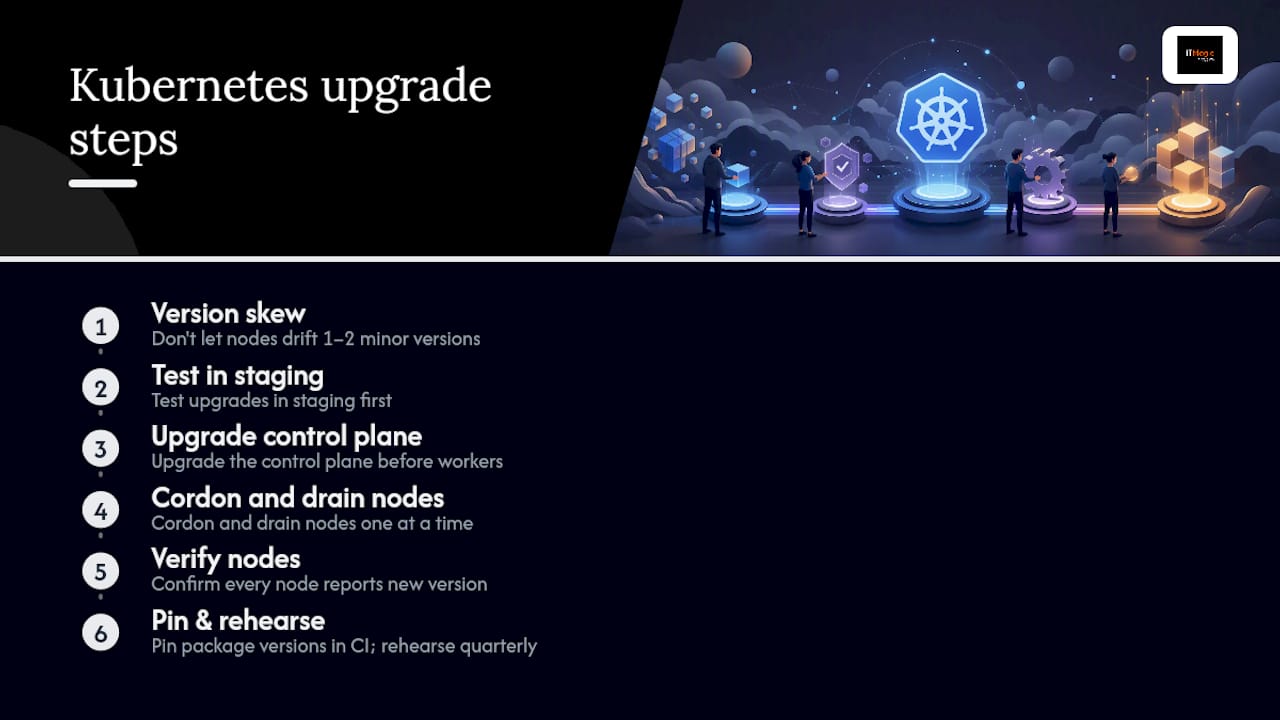
Pro Tip: Pin your package versions in CI and rehearse the upgrade path quarterly so a real upgrade never happens for the first time in production.
What Timeline and Budget Should Startups Expect?
A realistic rollout: days 0 to 7 get an MVP cluster running with basic ingress and cert-manager. Weeks 2 to 4 add RBAC, Pod Security Admission, and CI/CD. Months 1 to 3 layer in observability, autoscaling, and tested backups.
- Expect 10 to 20 engineer-days for the initial secure baseline, more if nobody on the team has run Kubernetes before
- Cost buckets: managed control plane fee, worker node compute, and load balancer/storage costs; a small EKS cluster with a handful of nodes commonly runs a few hundred dollars a month before traffic scales
- Use spot instances for non-production workloads and cloud credits where available. Startups building lean skip service mesh and multi-cluster setups until they have a concrete reason, which keeps both cost and complexity down
How IT-Magic Phases This Checklist for Clients
IT-Magic runs this rollout in three phases: an MVP cluster with GitOps wired in from day one, then a hardening phase that adds RBAC, Pod Security Admission, image signing, and observability, then an ongoing managed or hand-off phase with documented runbooks.
- Deliverables include a tested backup and restore runbook, automated policy checks in CI, and a documented incident-response process specific to the cluster
- Every engagement includes a verification pass: can the team actually restore etcd, does the alerting page the right person, does a canary rollout actually roll back on failure
Pro Tip: Ask any vendor building your cluster to prove the restore path works, on camera, before you sign off on the engagement.
As an AWS Advanced Tier Services Partner with over 700 projects delivered since 2010, IT-Magic has built this exact phased approach across fintech, e-commerce, and early-stage startup clients who needed production-ready Kubernetes without a full in-house platform team.
A Copy-Ready Checklist for Your Next Sprint
Paste this into a ticket or runbook and check items off as you close them:
- [ ] Hosting decided (EKS / kubeadm / k3s) and matched to team size
- [ ] etcd backups automated and restore tested:
etcdctl snapshot status - [ ] RBAC scoped, verified with
kubectl auth can-i --list - [ ] Pod Security Admission at
restrictedon all namespaces - [ ] Images signed with cosign, scanned in CI, SBOM generated
- [ ] Resource requests/limits set on every container
- [ ] Liveness/readiness/startup probes configured and verified
- [ ] CNI installed, CoreDNS healthy, pod-to-pod traffic tested
- [ ] PV snapshots scheduled with a defined retention policy
- [ ] Prometheus, Grafana, and alerting wired to a real SLO
- [ ] GitOps controller deployed, no manual
kubectl applyin prod - [ ] Upgrade rehearsal completed on staging within the last quarter
What This Looked Like With Early-Stage Clients
The clusters that stayed stable weren’t the ones with the most features enabled. They were the ones where the team could restore etcd without panicking and never once ran kubectl apply by hand in production. Prioritize those two habits before anything else on this list.

Get Your Kubernetes Setup Right the First Time
Building this checklist yourself works, but it takes weeks a small team often doesn’t have. IT-Magic is the AWS-certified partner startups bring in to skip the trial-and-error: we’ve hardened and operated Kubernetes clusters across fintech and e-commerce clients, so the RBAC policy, the etcd restore drill, and the GitOps pipeline are already proven patterns, not first attempts.

Our team handles managed Kubernetes setup on EKS, security hardening against PCI DSS and SOC2 requirements, migration from self-managed clusters, and observability builds with Prometheus and Grafana, plus 24/7 support once you’re live. Engagements scope from a focused two-week security hardening sprint to an ongoing managed-services contract with defined SLAs. If your cluster needs a production-readiness review before your next funding round or compliance audit, talk to IT-Magic about your Kubernetes setup and get a scoped plan back within days.
Sources
- Creating a cluster with kubeadm | Kubernetes
- Kubernetes best practices I wish I had known before | Pulumi Blog
- Kubernetes for Startups: Build Lean, Scale Without Lock-In | Atmosly (blog)
FAQ
What Is the Minimum Kubernetes Setup for a Startup?
A managed control plane like EKS, RBAC with least-privilege access, Pod Security Admission at restricted, resource limits on every container, and automated etcd backups with a tested restore path.
Should a Startup Use EKS or Self-Managed Kubernetes With Kubeadm?
Most startups should start with EKS or k3s; reserve kubeadm for teams with dedicated platform engineers who can own upgrades and etcd operations.
How Do You Verify RBAC Is Configured Correctly?
Run kubectl auth can-i --list for a given service account and confirm it only has the permissions it actually needs, nothing broader.
How Often Should Startups Back Up Etcd?
Automate etcd snapshots on a regular schedule and test a full restore on a scratch cluster at least once a quarter to confirm the backup actually works.
Can IT-Magic Help Implement This Kubernetes Checklist?
Yes. IT-Magic phases Kubernetes rollouts from an initial secure cluster through hardening and observability to an ongoing managed or hand-off engagement, with tested runbooks at each stage.
Recommended
- How to Set Up Kubernetes: Step-by-Step Guide for IT Leaders
- Kubernetes deployment step by step: IT leader’s guide
- Top Kubernetes use cases to optimize cloud infrastructure
- Kubernetes Security Issues: A Practical Guide for Engineers
Alexander founded IT-Magic, an AWS Advanced Tier Services Partner delivering DevOps, cloud architecture, and managed services since 2010. He holds:
- AWS Certified Solutions Architect – Professional
- AWS Certified DevOps Engineer – Professional
- AWS Certified Security – Specialty
- AWS Certified Advanced Networking – Specialty
Talk to a certified AWS team trusted by INTERTOP, Foxtrot, Pandora, and J.Hilburn.
Get a free consultation


