


TL;DR:
- AWS offers startups global reach, security, and a broad ecosystem from day one.
- Cost-effective with pay-as-you-go pricing and options for savings plans and spot instances.
- Proper setup and ongoing management are crucial to avoid misconfigurations and overspending.
Most founders assume AWS is reserved for companies with dedicated infrastructure teams and seven-figure cloud budgets. That assumption is wrong, and it costs startups real opportunities. Companies like DoorDash and Slack built their early infrastructure on AWS, scaling from scrappy prototypes to platforms serving millions without rebuilding from scratch. AWS was designed with exactly that kind of growth trajectory in mind: pay only for what you use, deploy globally on day one, and stay protected by security infrastructure that rivals Fortune 500 setups. If you are a founder or CTO weighing infrastructure options, this guide will show you how AWS fits startups at every stage.
Key Takeaways
| Point | Details |
|---|---|
| AWS offers the broadest toolkit | Startups gain access to over 240 services, global data centers, and robust security out of the box. |
| Flexible, startup-friendly pricing | Pay-as-you-go and the Free Tier let founders prototype and scale with minimal upfront spend. |
| Not one-size-fits-all | AWS excels at scaling startups, but for very early MVPs, serverless or simpler platforms might suit you better. |
| Expertise maximizes AWS value | Leaning on AWS specialists or advanced partners helps avoid complexity and cuts hidden costs. |
What makes AWS uniquely attractive for startups
Running this on your own AWS setup? IT-Magic is an AWS Advanced Tier Partner — we audit, fix, or fully manage it for you.
Get a free consultationWith the stakes established for startups choosing infrastructure, let’s clarify what sets AWS apart from the competition.
AWS is not just big. It is broad. With over 240 services, 36+ regions, and 140+ compliance certifications, no other provider matches its scope in a single platform. That matters for startups because it eliminates the need to stitch together multiple vendors for compute, storage, databases, security, and monitoring. Everything lives under one roof, one billing console, and one shared identity system.
Here is what that breadth translates to in practice:
- Global reach from day one. Thirty-six plus regions means you can serve users in Tokyo, São Paulo, and Frankfurt with low latency without managing physical servers anywhere.
- Security that scales with you. Enterprise-grade protections and compliance certifications including SOC 2, ISO 27001, and PCI DSS are available even on a startup budget. You are not buying a watered-down version.
- Free-tier experimentation. New accounts get twelve months of free access to core services, letting teams validate ideas without burning cash.
- Talent availability. AWS is the most widely adopted cloud platform, so hiring engineers who already know it is significantly easier than recruiting for niche alternatives.
- Ecosystem depth. AWS Marketplace offers thousands of third-party integrations, and the partner network spans AWS for retail operations all the way to fintech compliance solutions.
“The best infrastructure for a startup is the one you can grow into, not the one you will grow out of.” AWS was built with that philosophy embedded in every pricing tier and service boundary.
The flexibility across stages is a genuine differentiator. A two-person team can run a lean Lambda-based MVP for nearly nothing. That same team, eighteen months and a Series A later, can migrate workloads onto EKS, add multi-region failover, and implement FinOps controls without switching providers. That continuity is underrated. Re-platforming mid-growth is one of the most expensive and risky things a startup can do. Staying on AWS as you grow avoids that entirely.
Cost advantages and flexible pricing: Real numbers for startups
Now that you know what AWS brings, it is time to look at the numbers and decide if the value really justifies the spend.

The core promise of AWS pricing is simple: you pay for what you consume, and you stop paying the moment you stop consuming. There are no annual contracts required to get started, no hardware refresh cycles, and no data center leases. For a startup managing burn rate, that is a meaningful structural advantage.
Here is a simplified view of common startup cost scenarios on AWS:
| Workload | Estimated monthly cost | Key service used |
|---|---|---|
| Static website with CDN | $1 to $5 | S3 + CloudFront |
| API backend (low traffic) | $10 to $40 | Lambda + API Gateway |
| Containerized app (small) | $50 to $150 | ECS Fargate |
| Production-grade EKS cluster | $150 to $400+ | EKS (control plane alone: $72/month) |
| Multi-region with RDS | $300 to $800+ | EC2 + RDS Multi-AZ |
One often-overlooked insight: ECS is cheaper than EKS for small teams because EKS charges a flat $0.10 per hour ($72/month) just for the control plane, before you add any worker nodes. ECS has no equivalent charge. For a startup running a handful of containers, that difference compounds quickly.
Three reliable ways to cut costs further:
- Use Savings Plans. Committing to a consistent compute spend for one or three years yields discounts of up to 66% compared to on-demand pricing.
- Leverage Spot Instances. For fault-tolerant or batch workloads, Spot Instances can reduce EC2 costs by up to 90%.
- Right-size aggressively. Most startups overprovision out of fear. AWS Cost Explorer shows exactly which resources are underutilized.
Pro Tip: Set up AWS Budgets with email and SNS alerts before you write a single line of application code. A misconfigured Lambda or forgotten NAT Gateway can generate surprising charges. Catching that on day two is far less painful than catching it on your monthly invoice.
For teams serious about controlling spend, AWS cost optimization is a discipline, not a one-time task. Treat it as an ongoing operational practice from the first week.
AWS versus other cloud providers: Where does it win (and where not)?
Cost is important, but so is strategic fit. Here is how AWS compares to its biggest competitors for startups.
| Feature | AWS | GCP | Azure |
|---|---|---|---|
| Service breadth | 240+ services | ~200 services | ~200 services |
| Global regions | 36+ | 40+ | 60+ |
| Free tier | 12-month + always-free | 90-day credit | 12-month credit |
| AI/ML tooling | Strong (SageMaker) | Industry-leading | Strong (Azure OpenAI) |
| Enterprise MS integration | Limited | Limited | Native |
| Startup talent pool | Largest | Moderate | Moderate |
| Compliance certifications | 140+ | 100+ | 100+ |
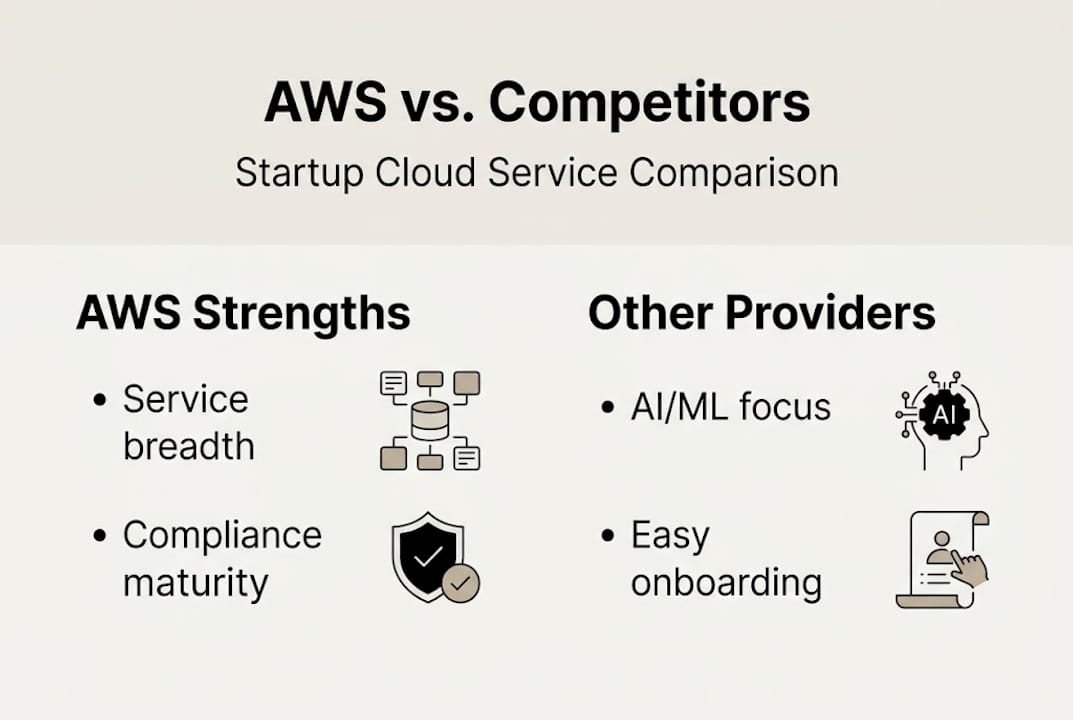
AWS is preferred for startups due to its ecosystem maturity, depth of managed services, and the sheer availability of engineers who know the platform. GCP leads for AI/ML-heavy workloads, and Azure is the natural fit when a company is already deep in the Microsoft stack (Active Directory, Office 365, .NET).
When AWS is clearly the right call:
- You need global distribution fast, with mature CDN and edge services
- Your team is hiring engineers from a competitive talent market
- You need compliance certifications like PCI DSS or HIPAA without building custom controls
- You are running a containerized architecture on ECS or EKS
When GCP or Azure might make more sense:
- Your core product is built around custom ML model training (GCP’s TPUs and Vertex AI are genuinely ahead)
- Your sales team is closing enterprise deals where buyers are on Microsoft infrastructure
Choosing a cloud provider based solely on which one is cheapest this month is a strategic mistake. Choose based on where your engineering team can be most productive and where your compliance requirements are most easily met.
For founders building AI-driven products, the competitors compared for retail AI breakdown offers a useful technical lens on real-world tradeoffs.
What most guides miss: Overcoming AWS gotchas for lean teams
Comparisons are helpful, but knowing common stumbling blocks is essential for new teams.
AWS’s strength is also its trap. Over 240 services means over 240 ways to misconfigure something. Teams that move fast without guardrails often end up with sprawling accounts, unpredictable bills, and security gaps they did not realize existed. The steep learning curve, vendor lock-in risk, and FinOps complexity are real challenges, not just blog post disclaimers.
Here is how experienced teams navigate this:
- Start with managed services, not raw EC2. Lambda, RDS, and Fargate remove the operational burden of patching and scaling. Build on those foundations before adding complexity.
- Use AWS Organizations from day one. Separate environments (dev, staging, prod) into distinct accounts. This limits blast radius if something goes wrong.
- Tag everything. Cost allocation tags let you see exactly which team, feature, or customer is driving spend. Without tags, your billing dashboard tells you very little.
- Automate cost alerts immediately. Do not rely on checking the console manually. Set budget thresholds and get alerted before you blow past them.
- Review your architecture every quarter. What was right at ten users is rarely right at ten thousand.
Pro Tip: Vendor lock-in fear is often overstated. Containers, Terraform, and open-source databases dramatically reduce the switching cost between providers. Build with portability in mind by using standard tooling, and lock-in becomes a manageable risk rather than an existential one.
Startups building in AWS for fintech environments face an additional layer of compliance complexity. In those cases, consulting for startups with AWS-specialized partners accelerates the setup significantly and avoids costly rework down the line.
The uncomfortable truth: AWS is the best (except when it isn’t)
After delivering 700+ projects since 2010, here is what we actually believe: AWS is not always the right answer, and recommending it without qualification would be doing you a disservice.
For very early-stage teams building an MVP with three engineers and no paying customers, the honest advice is to start serverless and stay in the free tier as long as possible. Delay architectural commitment until you have validated your core assumptions. A simple deployment on Lambda and DynamoDB beats an over-engineered EKS cluster that nobody has time to manage.
But here is where the calculus shifts. The moment you have growth signals, paying users, and a real security or compliance requirement, AWS is unmatched for rapid growth. No other platform gives you that combination of depth, global reach, and certified compliance infrastructure at the same maturity level.
The most overlooked cost in any cloud decision is not the monthly bill. It is your team’s ability to operate what you deploy. A junior team on a complex EKS multi-region setup will spend more time fighting infrastructure than shipping product. Sometimes a simpler platform gets you to market faster, and faster to market beats architecturally perfect every time at the early stage.
That said, companies that outgrow simple platforms mid-growth spend enormous energy re-platforming during their most critical scaling period. Choosing AWS early, even if you use only a fraction of its capabilities, means you never face that particular crisis. The top AWS partners consistently report that the startups with the smoothest growth trajectories are those that chose a scalable foundation early and grew into it deliberately.
How you can harness AWS expertise for your startup’s next leap
With a clear-eyed look at where AWS fits and where it does not, here is how your startup can tap into AWS strengths quickly and confidently.
Knowing AWS is the right platform and knowing how to configure it for your specific stage, compliance needs, and budget are two very different things. Misconfigurations cost money. Overprovisioning costs money. Gaps in security cost far more.

At IT-Magic, we specialize in helping startups get AWS right the first time. From AWS infrastructure support and architecture reviews to AWS cost optimization services that reduce monthly bills without sacrificing reliability, our certified AWS engineers become your dedicated cloud team. If you are ready to scale confidently, explore our consulting services for startups and let us map out the right architecture for your current stage and your next one.
Frequently asked questions
What is the AWS Free Tier and how can startups use it?
The AWS Free Tier offers twelve months of free access to core services like EC2, S3, and Lambda, making it ideal for prototyping or validating an early MVP without upfront infrastructure costs. Most startups can run a functional proof of concept entirely within free-tier limits before committing a dollar.
How does AWS compare with GCP and Azure for startup workloads?
AWS is preferred for its service depth, compliance maturity, and talent availability; GCP leads for intensive AI and ML workloads, while Azure fits best when your stack is already built around Microsoft services. For most startups without a strong pre-existing platform preference, AWS remains the safest default with the largest support ecosystem.
Is AWS a good fit for small, non-technical startup teams?
AWS has a steep learning curve for beginners, but its serverless stack (Lambda, API Gateway, DynamoDB) lets small teams ship quickly without deep infrastructure knowledge. Partnering with an AWS-specialized DevOps team bridges the skill gap and keeps your engineers focused on the product rather than the plumbing.
Alexander founded IT-Magic, an AWS Advanced Tier Services Partner delivering DevOps, cloud architecture, and managed services since 2010. He holds:
- AWS Certified Solutions Architect – Professional
- AWS Certified DevOps Engineer – Professional
- AWS Certified Security – Specialty
- AWS Certified Advanced Networking – Specialty
Talk to a certified AWS team trusted by INTERTOP, Foxtrot, Pandora, and J.Hilburn.
Get a free consultation


