

Skip the confusion: if you’re researching startup cloud credit programs, the one with real weight behind it is AWS Activate. Apply through Founders if you’re self-funded, or ask your investor or accelerator for an Activate Provider Org ID to unlock the larger Portfolio tier. Either way, the highest-leverage move isn’t hoarding compute credits. It’s spending a slice of them on AWS Business Support and a short, focused onboarding sprint with a managed partner.
Here’s the three-step version:
- Pick your path. Founders if you’re bootstrapped, Portfolio if you’re backed by a participating VC or accelerator.
- Get your Org ID ready. Portfolio applicants need one from their provider before submitting.
- Front-load support spend. Put a meaningful share of your credits toward Business Support and Activate Credits plus a 1 to 2 week hardening sprint, rather than letting credits burn on idle compute.
Eligible startups can receive up to $200,000 in AWS Activate credits, with additional invite-only packages for AI startups scaling fast.
Key Takeaways
AWS Activate credits deliver the most value when spent on Business Support and a managed onboarding sprint, not idle compute.
| Point | Details |
|---|---|
| Choose the right path | Apply via Founders if self-funded, or secure an Activate Provider Org ID for larger Portfolio credits. |
| Credits cap at $200,000 | Eligible startups can receive up to $200,000, with invite-only tiers for scaling AI startups. |
| Buy support, not just compute | Apply credits toward Business Support for architecture reviews, cost guidance, and 24/7 expert access. |
| Time your application carefully | Credits don’t apply retroactively, so apply just before you plan to ramp AWS usage. |
| Compare providers by workload fit | AWS Activate suits compliance-heavy and support-dependent teams; Google’s program fits data and ML-anchored stacks better. |
| Bring in managed expertise early | IT-Magic, an AWS Advanced Tier Services Partner with 700+ delivered projects, turns credits into a production-hardened environment through onboarding sprints and ongoing support. |
Where to Go Next for Official Details
Start with AWS Activate Credits for current tier amounts, then review Everything you need to know about AWS Activate Credits for eligibility rules. For support-plan mechanics, see AWS Support Plans and Activate Credits. For architecture context, browse IT-Magic’s AWS vs Azure vs Google Cloud comparison.
Table of Contents
Running this on your own AWS setup? IT-Magic is an AWS Advanced Tier Partner — we audit, fix, or fully manage it for you.
Get a free consultation- What Does AWS Activate Actually Provide?
- Who Qualifies and How Much Can You Get?
- How Do You Apply and What’s the Timeline?
- How Should You Actually Spend the Credits?
- When Should You Bring in a Managed AWS Partner?
- What Does Google Cloud’s Startup Program Cover?
- Who Qualifies for Google Cloud’s Startup Support?
- How Do You Apply and What Should You Expect?
- Best Practices for Spending Google Cloud Startup Credits
- Getting Hands-On DevOps Help Through the Program
- AWS Activate or Google Cloud Startup Program: Which Fits Your Team?
- How IT-Magic Turns AWS Credits Into a Production-Ready Setup
- Sources
- FAQ
What Does AWS Activate Actually Provide?
AWS Activate is not a cash grant. It’s a bundle: credits, support access, and technical resources aimed at getting startups into production faster without burning cash on infrastructure trial and error.
The core benefits break down into a few concrete pieces:
- Service credits applied automatically to your monthly AWS bill until they’re consumed or expire.
- Support plan coverage, meaning you can use credits toward Developer or Business Support tiers instead of paying out of pocket.
- Partner offers and discounts on third-party tools that startups already need, from monitoring to security scanning.
- Technical resources, including implementation templates, workshops, and partner-led onboarding that speed the move from prototype to something you’d trust in production.
The practical ROI shows up in runway math. A team burning $8,000 a month on AWS just bought itself real breathing room if $25,000 in credits covers three months of infrastructure plus a support upgrade. That’s not “free cloud.” That’s a few extra sprints of engineering time you didn’t have to raise a bridge round for.
One detail worth flagging early: credits are issued in USD and governed by AWS’s own Promotional Credit Terms and Conditions, which spell out what’s covered, what expires, and what happens if you switch AWS accounts. Read them once before you plan a budget around them, because Activate members also get access to more than just dollar credits, including templates and learning paths that don’t show up on the credit balance at all.
Who Qualifies and How Much Can You Get?
Eligibility splits into two main lanes, and picking the right one changes your credit ceiling substantially.
- Founders tier: open to self-funded or early-stage startups applying directly, with no provider relationship required. Credit amounts here are the entry-level package, useful for validating an architecture but not built to cover months of production traffic.
- Portfolio tier: requires an Activate Provider Org ID from a participating VC, accelerator, or startup program. Portfolio credits run larger, and the provider relationship itself can speed approval.
- Invite-only AI/scale tiers: reserved for startups AWS proactively invites, typically those already showing meaningful usage or growth trajectory in AI workloads.
Your eligibility checklist should cover: company age and funding stage (most Portfolio paths expect pre-Series B status), a live company website, founding date documentation, and confirmation you haven’t already maxed out a lower tier. If you previously received Founders-level credits and later qualify for Portfolio, AWS typically awards the difference rather than stacking both packages. Prior credit history follows your account, so don’t assume a second application resets the clock.
How Do You Apply and What’s the Timeline?
The application itself is short. Getting the supporting pieces lined up beforehand is where teams lose a week.
- Decide your route — Founders if you have no provider relationship, Portfolio if your investor or accelerator participates in Activate.
- Confirm your Org ID with your provider before you start the application; missing this is the single most common holdup for Portfolio applicants.
- Verify your AWS account status — you’ll need an active, non-suspended account in good standing.
- Assemble your evidence: company URL, founding date, and funding round documentation if applying through Portfolio.
- Submit and monitor your inbox — approvals typically arrive within a few business days for Founders, longer for Portfolio pending provider confirmation.
A few things to avoid:
- Applying without a confirmed Org ID when you’re pursuing Portfolio credits.
- Assuming prior credits don’t count. They do, and conflicting prior awards can complicate or reduce a new package.
- Waiting until you’re already burning heavy compute costs to apply. Credits don’t apply retroactively, so timing your application ahead of a usage ramp matters more than timing it around a funding announcement.
Coordinate with your investor or accelerator early. A provider that’s slow to confirm your Org ID is the most common source of delay in the entire process.
How Should You Actually Spend the Credits?
Most startups treat Activate credits like free compute and burn through them running dev environments nobody’s watching. That’s the wrong play. The startups that get real value buy expertise and safety nets, not just servers.
Start here: put a chunk of your credits toward Business Support instead of paying for it separately. Business Support unlocks proactive cost optimization guidance, architecture reviews, and 24/7 access to cloud experts. Combine that with AWS Trusted Advisor, which flags security gaps, underused resources, and cost anomalies automatically once support is active.
From there, the tactical list looks like this:
- Run an architecture review in your first month, before workloads calcify around decisions made under deadline pressure.
- Separate staging from production with short-lived environments for CI/CD testing, so credits fund experimentation without risking live traffic.
- Lean on managed services for databases and storage rather than self-hosting, since credits absorb the cost while your team avoids the operational overhead.
- Set budgets and alerts immediately. Trusted Advisor plus billing alarms catch runaway spend before it becomes a board-meeting conversation.
- Track credit expiration against your roadmap. Credits typically expire within a defined window, and misaligned timing means you pay full price right when usage ramps.
- Hold off on reserved instances until your usage pattern is stable enough to commit to.
Pro Tip: Book a 1 to 4 week managed onboarding sprint, paid with Activate credits, focused entirely on architecture hardening and cost guardrails. It’s the single highest-leverage purchase most early-stage teams never think to make, and it’s the difference between a production launch that holds up and one that pages your on-call engineer at 2 a.m.
When Should You Bring in a Managed AWS Partner?
Not every team needs outside help on day one. But there are clear signals that DIY infrastructure is about to become a liability.
Watch for these:
- You’re approaching a launch with uptime expectations you can’t currently guarantee in-house.
- Your team has general cloud experience but no deep AWS specialization, especially around networking or IAM.
- You’re pursuing PCI DSS, SOC2, or HIPAA compliance and don’t have a documented security architecture yet.
- You’re scaling fast enough that “we’ll fix it later” is no longer a viable engineering strategy.
When you decide to bring someone in, vet them against a short list: AWS certifications across DevOps, security, and networking; direct experience running Kubernetes in production, not just in a demo; a documented track record of cutting AWS bills without breaking reliability; and references from startups at a similar stage to yours.
This is exactly where Activate credits do their best work. Instead of spending them on idle EC2 instances, apply them toward a managed onboarding sprint or offset your first few months of a support plan. IT-Magic operates as an AWS Advanced Tier Services Partner, with a team certified across DevOps, security, and networking, and a track record spanning 700+ projects for 300+ clients since 2010. That kind of experience turns a credit balance into an actual production system faster than an internal team learning AWS architecture patterns from scratch.

What Does Google Cloud’s Startup Program Cover?
The other major cloud provider running a comparable playbook is Google Cloud, whose startup program bundles credit tiers with technical support and access to specialists across infrastructure, machine learning, and go-to-market resources. Startups typically move through escalating credit bands tied to funding stage, with more advanced tiers unlocking dedicated technical account support and architecture guidance.
Google structures its offering less around a single flat credit pool and more around a relationship that deepens as a startup grows. Early-stage companies get baseline credits and self-serve technical resources. As usage and funding stage increase, startups can access more hands-on support, including consultations with solutions architects and access to specialized programs for AI and data-heavy workloads.
The practical difference for a CTO evaluating providers isn’t really about total credit ceiling. It’s about which ecosystem your team already understands, which services your workload depends on, and where you’re more likely to find production-grade support without hiring a specialist yourself.
Who Qualifies for Google Cloud’s Startup Support?
Eligibility for Google’s program generally hinges on company age, funding history, and whether you’re already running meaningful workloads on Google Cloud or planning to. Startups typically need to fall under a funding ceiling and be within a set number of years since founding, similar in spirit to AWS’s pre-Series B framing.
Backing matters here too. Startups affiliated with a participating venture fund, accelerator, or incubator often access higher credit tiers than those applying independently, mirroring how AWS’s Portfolio path outperforms a standalone Founders application. Companies building primarily on open-source stacks or data-intensive workloads sometimes find Google’s program tuned closely to their needs, particularly around analytics and machine learning tooling.
The overlap with AWS eligibility is real: both programs want to see a legitimate, active company, a credible funding story, and a plan to actually use the infrastructure rather than bank credits indefinitely. Neither program is built for a side project sitting on GitHub with no roadmap.
How Do You Apply and What Should You Expect?
The application process runs through an online form where you’ll submit your company details, funding stage, and a description of your technical plans. Startups with an accelerator or investor connection typically get a faster, higher-tier path than those applying cold.
Expect to provide your company website, incorporation details, and a summary of your current or planned cloud usage. Processing time varies, but most applicants hear back within a couple of weeks. As with AWS, timing your application close to when you actually plan to ramp usage matters more than applying the day you incorporate, since credits don’t retroactively cover bills you’ve already paid.
One practical note for technical teams: build your architecture plan before you apply. Reviewers respond better to a startup that can describe what it’s building and why a particular set of services fits, rather than a generic request for “cloud credits” with no clear use case attached.
Best Practices for Spending Google Cloud Startup Credits
The same discipline that makes AWS Activate credits effective applies here almost without modification. Burn credits on idle experimentation and you’ll hit zero with nothing durable to show for it.
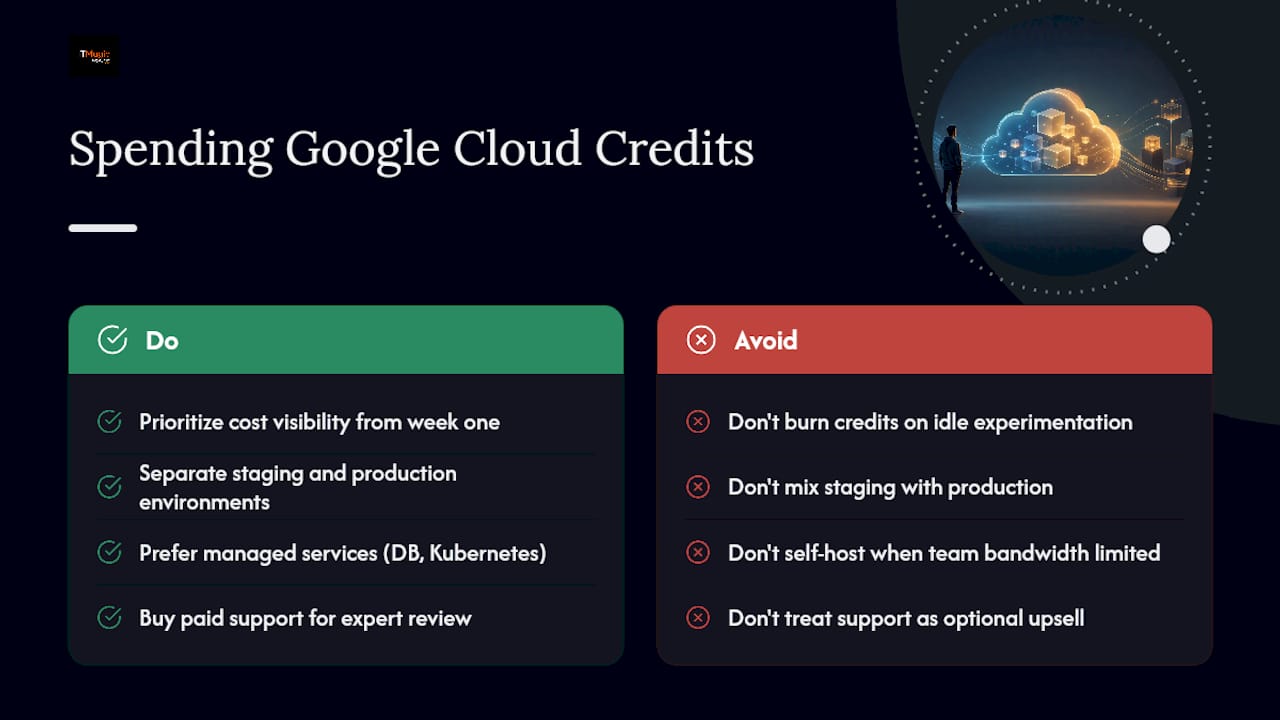
Prioritize cost visibility from week one. Google’s billing and budget tools let you set alerts before spend creeps past what you’re comfortable with, the same function Trusted Advisor serves in the AWS world. Pair that with a clear separation between staging and production environments, so credits fund iteration without putting live traffic at risk.
For architecture, lean toward managed services, managed databases, managed Kubernetes, over self-hosted alternatives whenever your team’s bandwidth is limited. The operational savings usually outweigh the marginal cost difference, especially when credits are covering the bill anyway. And where a paid support tier is available, treat it the same way you’d treat AWS Business Support: as a way to buy expert eyes on your architecture before problems compound, not as an optional upsell.
Getting Hands-On DevOps Help Through the Program
Google’s startup program includes access to technical specialists, but the depth of that support generally scales with your credit tier and funding stage. Early-stage startups mostly get self-serve documentation, community resources, and occasional office hours. Higher tiers can unlock direct consultations with solutions architects.
That gap between “documentation” and “someone who will actually review your production architecture” is where a lot of startups misjudge what they’re signing up for. If your team needs hands-on Kubernetes hardening, compliance-ready networking, or a genuine second set of eyes on a production launch, the program’s built-in support may not go as deep as a dedicated infrastructure partner would. That’s less a knock on the program and more a reflection of what any credit-driven support tier is designed to do at scale.
AWS Activate or Google Cloud Startup Program: Which Fits Your Team?
Neither program is objectively better across the board. The right pick depends on where your team already has expertise and what your workload actually needs.
AWS Activate tends to edge ahead for startups that need deep support-plan integration. Being able to apply credits directly toward Business Support and get 24/7 expert access is a meaningful operational advantage, especially paired with Trusted Advisor’s automated cost and security checks. AWS also has the deeper bench of certified managed partners for compliance-heavy work like PCI DSS or HIPAA, which matters if you’re building in fintech or healthtech.
Google’s program can make more sense for teams already anchored in data analytics or machine learning workloads where Google’s tooling has a natural fit, or for founders who’ve built their stack around open-source technologies Google supports well.
For most startups reading this because they need credits, onboarding help, and a path to production that doesn’t fall apart under real traffic, AWS Activate combined with a managed partner sprint remains the more mature, better-supported path, particularly once compliance or uptime requirements enter the picture.
A Partner’s View on Where Startups Go Wrong
The mistake we see constantly: a team burns its entire credit allocation on compute before booking a single hour of architecture review. Then production breaks under real traffic, and the fix costs more than the review would have. If you do one thing differently, buy Business Support and a short hardening sprint before you scale usage, not after.
How IT-Magic Turns AWS Credits Into a Production-Ready Setup
IT-Magic exists for exactly the gap between “we have AWS credits” and “we have infrastructure we trust in production.” Instead of spending months learning AWS architecture patterns the hard way, startups use their Activate credits to fund a focused engagement with a partner who’s already done this hundreds of times.
What that looks like in practice: credit-backed onboarding sprints that get you from prototype to a hardened environment in weeks, not quarters; architecture reviews that catch cost and security issues before they compound; Kubernetes and EKS production hardening for teams that need container orchestration done right the first time; ongoing cost optimization so your AWS bill doesn’t quietly outgrow your revenue; and 24/7 managed infrastructure support once you’re live.
IT-Magic is an AWS Advanced Tier Services Partner with a team certified across DevOps, security, and networking, backed by 700+ projects delivered for 300+ clients since 2010. One example: INTERTOP’s AWS infrastructure work with IT-Magic cut cloud costs while building infrastructure that scales without manual intervention.
If you’re sitting on Activate credits and unsure how to convert them into something durable, book a discovery call and find out what a focused onboarding sprint would look like for your stack.
Sources
- AWS Activate Credits – Up to $200K for Eligible Startups
- Tailor your cloud success with AWS Support Plans and Activate Credits | AWS Startups
FAQ
What Is AWS Activate?
AWS Activate is Amazon’s startup credit and support program, offering eligible startups up to $200,000 in promotional credits along with support plan access and technical resources.
How Do I Get an Activate Provider Org ID?
Ask your investor, accelerator, or incubator whether they participate in AWS Activate. If they do, they issue an Org ID you use when applying for the higher-tier Portfolio credits.
Can I Use AWS Activate Credits for Support Plans?
Yes. Credits can be applied toward Developer or Business Support tiers, which is one of the most effective ways to convert credits into practical, expert-backed guidance.
Do AWS Activate Credits Expire?
Credits typically expire within a set window after issuance and don’t cover past bills, so align your application timing with when you plan to actually ramp usage.
Should I Hire a Managed AWS Partner Before or After Getting Credits?
After. Use a portion of your Activate credits to fund a short onboarding sprint with a certified partner like IT-Magic, which turns raw credits into a hardened, production-ready environment instead of just extra compute time.
Recommended
- Startup Cloud Scaling Process: A Founder’s Guide
- AWS cloud operations tutorial: optimize and scale smart
- AWS Control Tower Setup: A Practical Guide for Cloud Architects
- Why choose AWS for startups: scale, save, and succeed fast
Alexander founded IT-Magic, an AWS Advanced Tier Services Partner delivering DevOps, cloud architecture, and managed services since 2010. He holds:
- AWS Certified Solutions Architect – Professional
- AWS Certified DevOps Engineer – Professional
- AWS Certified Security – Specialty
- AWS Certified Advanced Networking – Specialty
Talk to a certified AWS team trusted by INTERTOP, Foxtrot, Pandora, and J.Hilburn.
Get a free consultation


