

TL;DR:
- AWS Cost Anomaly Detection uses machine learning to monitor cloud spending and identifies unexpected cost spikes early. Amazon Q enhances root cause investigations by providing plain-language explanations of anomalies within minutes. Combining tiered alerts, multiple monitoring levels, and integrated tools enables effective cloud cost management across multi-account environments.
AWS Cost Anomaly Detection is the AWS service that uses machine learning to continuously monitor your cloud spending and flag unexpected cost spikes before they become budget crises. It operates inside the AWS Billing and Cost Management console and covers individual services, linked accounts, and entire AWS Organizations. As of june 2026, it also includes AI-powered root cause investigations via Amazon Q, which means your team gets plain-language explanations of why a spike happened, not just a notification that it did. For IT decision-makers and finance professionals managing complex AWS environments, this combination of automated detection and AI investigation changes how cloud cost optimization works in practice.
What is AWS cost anomaly detection and how does it work?
AWS Cost Anomaly Detection is defined as a machine learning-based monitoring service that identifies statistically unusual spending patterns across your AWS accounts and services. It does not use static thresholds. Instead, it learns your normal spending behavior over time and flags deviations that fall outside expected ranges.

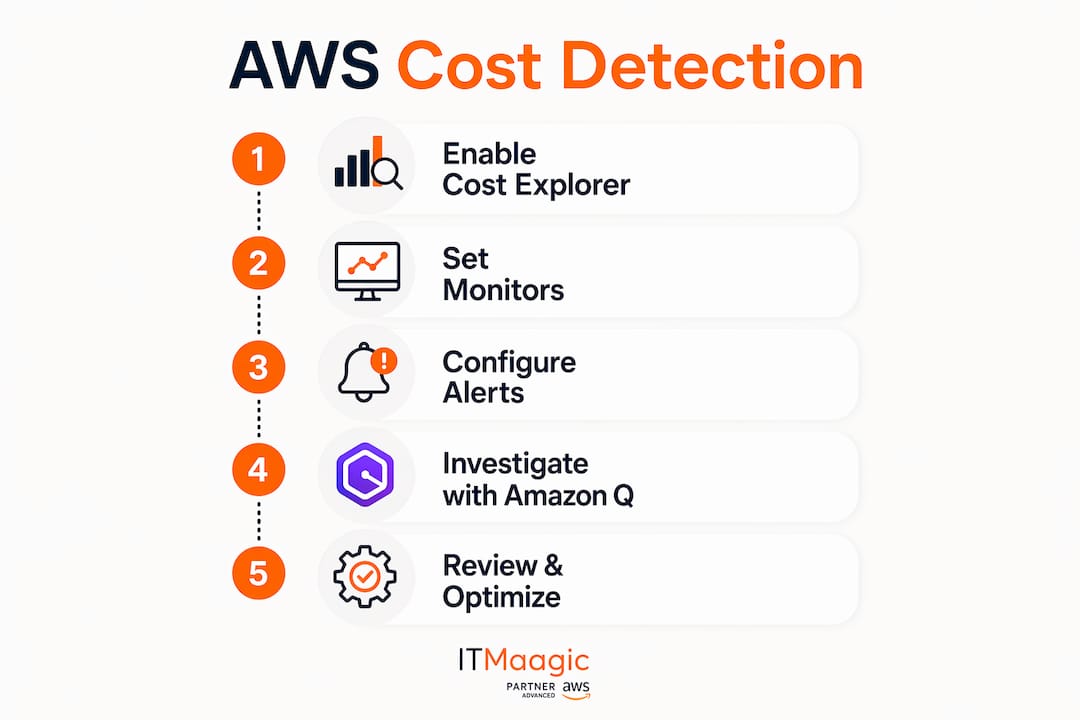
The service requires Cost Explorer activation to access historical billing data, which it uses to build baseline spending models. Without Cost Explorer enabled, the anomaly detection monitors cannot function. Setup happens entirely within the AWS Billing and Cost Management console, and you need the appropriate IAM permissions to create and manage monitors.
You can configure monitors at several levels:
- AWS services monitor: Tracks spending across all AWS services in a single account.
- Linked account monitor: Watches spending for specific accounts within an AWS Organization.
- Cost category monitor: Groups spending by business unit, team, or project tag.
- Cost allocation tag monitor: Tracks anomalies tied to specific resource tags.
Each monitor generates alerts when detected spending deviates from the learned baseline. Alerts route through Amazon SNS to email, Slack, or any downstream system your team uses.
Pro Tip: Set up separate monitors for your highest-spend services, such as EC2 and RDS, rather than relying solely on the default AWS services monitor. Granular monitors surface anomalies faster and with more context.
The service is distinct from CloudWatch billing alarms and AWS Budgets. CloudWatch billing alarms are reactive threshold alerts. AWS Budgets add forecasting. Cost Anomaly Detection adds pattern recognition, which catches problems that fixed thresholds miss entirely.
How does Amazon Q power root cause investigations?
Running this on your own AWS setup? IT-Magic is an AWS Advanced Tier Partner — we audit, fix, or fully manage it for you.
Get a free consultationThe most significant change to AWS expense tracking in 2026 is the AI-powered investigation feature introduced in june 2026. When an anomaly fires, you can launch an investigation directly from the console and Amazon Q Developer answers five core questions automatically.
- What changed? Amazon Q identifies which service, usage type, or resource drove the cost increase.
- When did it start? The investigation pinpoints the exact time the anomaly began, not just when the alert fired.
- Where is it happening? It narrows the scope to specific regions, availability zones, or accounts.
- Who triggered it? Amazon Q correlates cost data with CloudTrail events to identify the IAM principal, role, or service that initiated the change.
- Why did it happen? It surfaces the likely cause in plain language, such as a new deployment, a misconfigured auto-scaling policy, or an unexpected data transfer spike.
Amazon Q Developer outputs its findings as plain-language explanations, making cost anomaly root cause analysis accessible to finance stakeholders who do not read CloudTrail logs. This democratizes FinOps workflows across technical and non-technical teams.
For cross-account root cause attribution, you need organization-wide CloudTrail trails enabled. Without them, Amazon Q can identify what and when, but the who and why become harder to pin down across linked accounts.
One cost nuance worth knowing: the investigation feature itself is free, but CloudWatch Logs Insights queries that run underneath it incur standard data-scanned charges. For organizations with high CloudTrail log volumes, this adds up. Size your log retention policies accordingly before enabling investigations at scale.
Pro Tip: Run a test investigation on a known past anomaly before relying on the feature in production. This confirms your CloudTrail trails are correctly scoped and that Amazon Q has enough data to produce useful output.
A practical workflow looks like this: an anomaly alert fires at 9:00 AM, your FinOps engineer opens the investigation panel, Amazon Q returns a structured report within minutes identifying a developer who left a GPU-backed EC2 instance running over the weekend, and the team terminates the instance before the daily cost compounds further. That cycle, from alert to resolution, used to take hours of manual log analysis.
How should you configure alerts and thresholds?
Alert configuration is where most teams either get real value from monitoring AWS expenses or create noise that everyone ignores. The goal is tiered alerting that separates minor anomalies from genuine incidents.
For organizations spending $1,000–$3,000 per month, tiered alert thresholds at approximately 20%, 50%, and 100% of expected spend provide the right granularity. A 20% deviation warrants a Slack notification to the engineering team. A 100% deviation warrants a page to the on-call engineer and a finance escalation.
| Alert tier | Threshold | Recommended action |
|---|---|---|
| Low severity | 20% above baseline | Notify engineering channel |
| Medium severity | 50% above baseline | Notify FinOps lead and team manager |
| High severity | 100% above baseline | Page on-call, notify finance director |
Combine anomaly detection with two other tools for full coverage:
- AWS Budgets: Set monthly and quarterly budgets with forecast alerts. Budgets warn you when projected spend will exceed targets, even before an anomaly technically fires.
- CloudWatch billing alarms: Use these as hard-stop backstops for absolute dollar thresholds. They are blunt instruments, but they catch runaway spend when everything else fails.
The limitation of CloudWatch billing alarms is real and worth understanding. Billing metrics update every 6–8 hours and only exist in the us-east-1 region. Setting an alarm evaluation period shorter than six hours produces noise, not signal. Cost Anomaly Detection detects problems within a few hours of occurrence, making it faster for catching unexpected spikes.
Routing matters as much as thresholds. Low-severity alerts should go to a team channel where they are visible but not urgent. High-severity alerts should trigger PagerDuty or OpsGenie escalations. Mixing all alerts into one channel is the fastest way to train your team to ignore them. For teams dealing with alert fatigue from monitoring systems, applying the same triage logic to cost alerts as to infrastructure alerts produces better outcomes.
Pro Tip: Review your anomaly detection alert history monthly. If low-severity alerts fire more than twice a week without leading to action, your baseline threshold is too tight. Widen it or add a filter for known recurring patterns like month-end batch jobs.
How does anomaly detection fit into a broader cost strategy?
AWS cost anomaly detection is one layer in a three-layer cost management stack. Each layer serves a different purpose, and none of them replaces the others.
Effective cloud cost management requires combining CloudWatch for hard-stop alarms, AWS Budgets for planned forecasting, and Cost Anomaly Detection for machine learning-driven identification of unusual patterns. Treating any one of these as sufficient on its own creates blind spots.
| Tool | Primary function | Best for |
|---|---|---|
| CloudWatch billing alarms | Reactive threshold alerts on actual spend | Hard dollar limits, absolute backstops |
| AWS Budgets | Forecast-based alerts and budget tracking | Planned spend, team-level budget governance |
| Cost Anomaly Detection | ML-based pattern deviation detection | Catching unexpected spikes, multi-account visibility |
Automated cost report delivery transforms cost governance from reactive firefighting into proactive financial management. Scheduled reports sent to finance and engineering leadership weekly create shared accountability. Teams that only check dashboards when something breaks miss the gradual cost creep that anomaly detection does not flag because it falls within normal variance.
For multi-account environments, configure Cost Anomaly Detection monitors from the payer account in AWS Organizations. Configuring monitors only at the individual account level creates coverage gaps where cross-account spending patterns go undetected. The payer account view aggregates all linked accounts and gives your FinOps team a single place to manage anomaly response.
Integration with third-party dashboards, such as Grafana or business intelligence tools, extends visibility to stakeholders who do not use the AWS console. Exporting Cost Explorer data via the Cost and Usage Report and feeding it into a central dashboard gives finance teams the context they need without requiring AWS console access. This alignment between IT and finance is where cloud cost optimization strategies at the CIO level produce the most measurable results.
Key Takeaways
AWS Cost Anomaly Detection, combined with Amazon Q investigations and tiered alerting, gives IT and finance teams the fastest and most complete picture of unexpected cloud spending available in the AWS ecosystem.
| Point | Details |
|---|---|
| Enable Cost Explorer first | Cost Anomaly Detection cannot function without Cost Explorer activated in your account. |
| Use Amazon Q for root cause | AI-powered investigations identify the who, what, and why of anomalies in plain language within minutes. |
| Apply tiered alert thresholds | Set alerts at 20%, 50%, and 100% deviation levels to separate noise from genuine incidents. |
| Configure from the payer account | Multi-account monitoring requires central setup in the AWS Organizations management account to avoid coverage gaps. |
| Layer your cost tools | Combine CloudWatch alarms, AWS Budgets, and Cost Anomaly Detection for complete proactive and reactive coverage. |
What I’ve learned from running anomaly detection across multi-account AWS environments
The teams that get the most out of AWS Cost Anomaly Detection are not the ones who set it up once and forget it. They are the ones who treat alert tuning as an ongoing operational task, the same way they treat on-call runbooks or security group reviews.
The most common mistake I see is configuring a single AWS services monitor at the account level and calling it done. That setup catches large, obvious spikes. It misses the slow burn: a forgotten NAT Gateway passing traffic for weeks, a Lambda function with a memory misconfiguration running ten times more than expected. Granular monitors per service and per team tag surface those patterns.
The Amazon Q investigation feature genuinely changes the FinOps workflow. Before it existed, a cost spike investigation meant pulling CloudTrail logs manually, cross-referencing timestamps with deployment records, and spending two to three hours narrowing down the cause. Now that same investigation takes minutes. The output is readable by a finance director, not just a cloud engineer. That accessibility matters because cost accountability works best when it is shared across technical and financial stakeholders, not siloed in the DevOps team.
One thing I would caution against: treating the AI investigation output as final without verification. Amazon Q is excellent at correlating data, but it works with the logs and events it has access to. If your CloudTrail coverage has gaps, the investigation will have gaps too. Audit your trail configuration before you rely on the feature in a production incident.
The broader shift I am watching is generative AI moving from a novelty in FinOps to a standard part of the workflow. Cost anomaly detection with AI investigation is an early example of that shift done well. It reduces the skill gap required to diagnose cloud cost problems and makes budget governance accessible to organizations that do not have a dedicated FinOps team.
— Oleksandr
AWS infrastructure auditing and cost anomaly visibility with IT-Magic
Detecting a cost anomaly is only half the problem. Understanding why your AWS environment is structured in a way that allowed the anomaly to occur is the other half.

IT-Magic’s AWS Infrastructure Audit gives IT and finance teams a structured review of their AWS environment, covering cost governance gaps, misconfigured resources, and monitoring blind spots. The audit maps your current Cost Anomaly Detection setup, identifies accounts or services with no monitor coverage, and recommends threshold configurations based on your actual spend patterns. IT-Magic has delivered 700+ projects for 300+ clients as an AWS Advanced Tier Services Partner, and cost visibility is a core part of every infrastructure engagement. If your team wants a clear picture of where your cloud budget is going and why, the audit is the right starting point.
FAQ
What is AWS Cost Anomaly Detection?
AWS Cost Anomaly Detection is a machine learning-based service inside the AWS Billing and Cost Management console that monitors your cloud spending and alerts you when costs deviate from expected patterns.
Does AWS Cost Anomaly Detection require Cost Explorer?
Yes. Cost Explorer must be enabled before you can create anomaly detection monitors, as it provides the historical billing data the service uses to build spending baselines.
How does Amazon Q help with cost anomaly investigations?
Amazon Q Developer correlates cost spikes with CloudTrail events and outputs plain-language explanations identifying the service, account, IAM principal, and likely cause of the anomaly.
How is Cost Anomaly Detection different from CloudWatch billing alarms?
CloudWatch billing alarms use static thresholds and update every 6–8 hours, while Cost Anomaly Detection uses machine learning to detect unusual patterns and can surface anomalies within a few hours of occurrence.
How should multi-account teams configure anomaly detection?
Multi-account teams should configure monitors from the payer account in AWS Organizations to get consolidated visibility across all linked accounts and avoid coverage gaps in cost monitoring.
Recommended
- AWS AI Infrastructure: A 2026 Guide for IT Teams
- AWS cost reduction strategies: proven steps for cloud savings
- AWS Security Trends: What CIOs Need to Know for 2026
- AWS Inter-AZ Data Transfer Costs: 2026 Architect’s Guide
Alexander founded IT-Magic, an AWS Advanced Tier Services Partner delivering DevOps, cloud architecture, and managed services since 2010. He holds:
- AWS Certified Solutions Architect – Professional
- AWS Certified DevOps Engineer – Professional
- AWS Certified Security – Specialty
- AWS Certified Advanced Networking – Specialty
Talk to a certified AWS team trusted by INTERTOP, Foxtrot, Pandora, and J.Hilburn.
Get a free consultation


