

TL;DR:
- Automating cloud operations reduces manual errors and improves incident response times.
- Implement guardrails like approval gates, staged rollouts, and monitoring to ensure safe automation.
- Continuous review and ownership are essential to maintain effective and reliable automation workflows.
Manual cloud operations are a ticking clock. As your AWS environment grows, every runbook executed by hand, every deployment requiring human approval without guardrails, and every incident requiring someone to SSH into a server at 2 AM represents compounding risk. Engineering leaders at scaling companies know the feeling: the team spends more time reacting than building, and one wrong command can cascade into a production outage. This guide walks you through a systematic approach to automating cloud operations on AWS, covering the tools, the steps, and the safety mechanisms that separate confident automation from chaotic button-clicking.
Key Takeaways
| Point | Details |
|---|---|
| Automate with guardrails | Always embed approval gates, throttles, and safety checks in your cloud automation to prevent large-scale errors. |
| Use processes as code | Define operational runbooks and workflows as code for repeatable, auditable, and scalable automation. |
| Monitor and iterate | Continually monitor automation and apply learnings from incidents to strengthen reliability and resilience. |
| Choose the right tools | Leverage AWS-native solutions like Systems Manager, CloudFormation, and EventBridge for integrated automation. |
| Aim for continuous improvement | Adopt repeatable reviews and checklists such as ORR to institutionalize lessons learned and drive operational excellence. |
Why you should automate cloud operations
Running this on your own AWS setup? IT-Magic is an AWS Advanced Tier Partner — we audit, fix, or fully manage it for you.
Get a free consultationAt small scale, manual operations feel manageable. One engineer knows where everything lives, deploys happen slowly, and the blast radius of any mistake is contained. Then growth hits. Suddenly you have multiple AWS accounts, dozens of services, and a team that spends significant cycles on repetitive tasks instead of delivering business value.
Manual operations become a genuine bottleneck when complexity exceeds human cognitive capacity. You cannot manually track state across hundreds of EC2 instances, enforce security policies across multiple regions, or respond to infrastructure events fast enough to prevent cascading failures. The bottleneck is not effort, it is the architecture of the process itself.
Automation changes that equation. When you treat your operational procedures the same way you treat application code, you get version control, repeatability, peer review, and testability. The Operational Excellence design principles from AWS are clear on this: you should “treat workload configuration as code”, automating operations via event-driven execution with guardrails and using managed services to reduce operational burden. These are not abstract ideals. They are the foundation of teams that ship reliably.
The tangible cloud automation benefits include:
- Reduced human error in repetitive tasks like patching, backups, and deployments
- Faster incident response through automated remediation triggered by CloudWatch alarms
- Consistent policy enforcement across all environments via Infrastructure as Code
- Freed engineering capacity for higher-value work instead of operational firefighting
- Auditable change history that supports compliance requirements like PCI DSS
“Organizations that institutionalize automation into their operations build a compounding advantage: every automated process is one fewer source of manual error, and every guardrail is one fewer catastrophic failure waiting to happen.”
Managed AWS services play a critical role here too. Services like Amazon RDS, EKS, and Lambda offload the undifferentiated heavy lifting of infrastructure management. When AWS handles patching your database engine or scaling your compute fleet, your team can focus automation effort on the workflows that actually differ across your environments.
What you need to get started: Requirements and essential tools
Understanding the benefits is straightforward. Actually building safe, effective automation requires specific skills, tools, and organizational clarity before you write a single line of automation code.
The AWS DevOps guides cover this well, but here is the honest prerequisite checklist:
Skills your team needs:
- Infrastructure as Code proficiency (CloudFormation, Terraform, or AWS CDK)
- Scripting capability (Python, Bash, or PowerShell for Lambda functions and runbooks)
- Operational process design: you cannot automate a process you have not clearly defined
Core AWS tools for automation:
| Tool | Primary purpose | Safety mechanism |
|---|---|---|
| CloudFormation | Provision and update infrastructure as code | Change sets for preview before apply |
| Systems Manager | Execute operational runbooks and patch management | Approval gates, rate controls |
| Lambda | Event-driven serverless automation functions | Concurrency limits, dead-letter queues |
| CloudWatch | Monitoring, alarming, and triggering automation | Alarm thresholds before action |
| EventBridge | Route events to automation targets | Rule filtering prevents unintended triggers |
| CodePipeline | CI/CD pipeline orchestration | Manual approval stages |
The AWS Well-Architected Operational Excellence Pillar identifies “safely automate where possible” as a core design principle, which means “you need guardrails around automation” including approval gates, throttling, rate controls, and error thresholds. This is where many teams underinvest. Automation without these constraints does not reduce risk, it accelerates failures.
Staged rollouts deserve particular attention. Rather than applying an automated change to all resources simultaneously, use Systems Manager to target a percentage of instances first, observe metrics for a defined window, then proceed to the next stage. This pattern alone prevents a majority of automation-induced outages.
Your operating model matters too. Centralized teams may benefit from a shared automation library with standard runbooks distributed across business units. Decentralized teams need guardrail enforcement baked into the automation itself, since you cannot rely on a central team to catch mistakes before they propagate.
Pro Tip: Before automating any workflow, document the manual steps in enough detail that a new engineer could execute them. If you cannot write that documentation, you do not understand the process well enough to automate it safely.
Step-by-step: Automating AWS operations in practice
You have the tools and the prerequisites. Here is how to actually build automated workflows your team can trust in production.
1. Define and version your processes as code
Start with a Git repository dedicated to operational runbooks and automation documents. Every operational procedure, from instance patching to database failover, should exist as a versioned document. This creates a history of changes, enables code review, and makes rollback straightforward. Use pull requests for changes to production automation the same way you would for application code.
2. Build runbooks using AWS Systems Manager Automation
AWS Systems Manager Automation allows you to define runbooks as code using JSON or YAML documents. These documents support multi-step workflows with branching logic and conditional execution. For example, a patching runbook might check whether an instance is part of an active deployment before proceeding, branch to a notification step if it is, and only apply the patch if the instance is idle.

The Systems Manager Automation runbook guide provides predefined runbooks for common tasks like stopping instances, creating AMIs, and rotating SSH keys. You can extend these or author custom documents using the AWS CLI, which accepts local JSON/YAML files and supports preview execution before live runs. Always run new runbooks in a staging environment first.
3. Wire events to automation using EventBridge
EventBridge acts as the nervous system of your automation architecture. Route CloudWatch alarms, AWS Config rule violations, and service-level events directly to Lambda functions or Systems Manager automation documents. This creates genuinely event-driven responses instead of manual intervention. A disk utilization alarm, for instance, can automatically trigger a runbook that identifies large log files, compresses them, and notifies the on-call engineer with a summary of what was done.
4. Add approval gates for high-risk actions
Not every automation step should execute without human review. Systems Manager Automation supports approval steps that pause execution and notify stakeholders via SNS. Route approvals to Slack or email, set a timeout period, and define fallback behavior if no approval arrives. This pattern is essential for AWS automation efficiency in regulated environments where you need evidence of human oversight.
5. Monitor execution and audit all changes
Every Systems Manager Automation execution creates a detailed log. Feed these logs to CloudWatch Logs and create a centralized audit trail using CloudTrail. Set up dashboards that show automation execution frequency, success rates, and failure reasons. This data is your feedback loop.
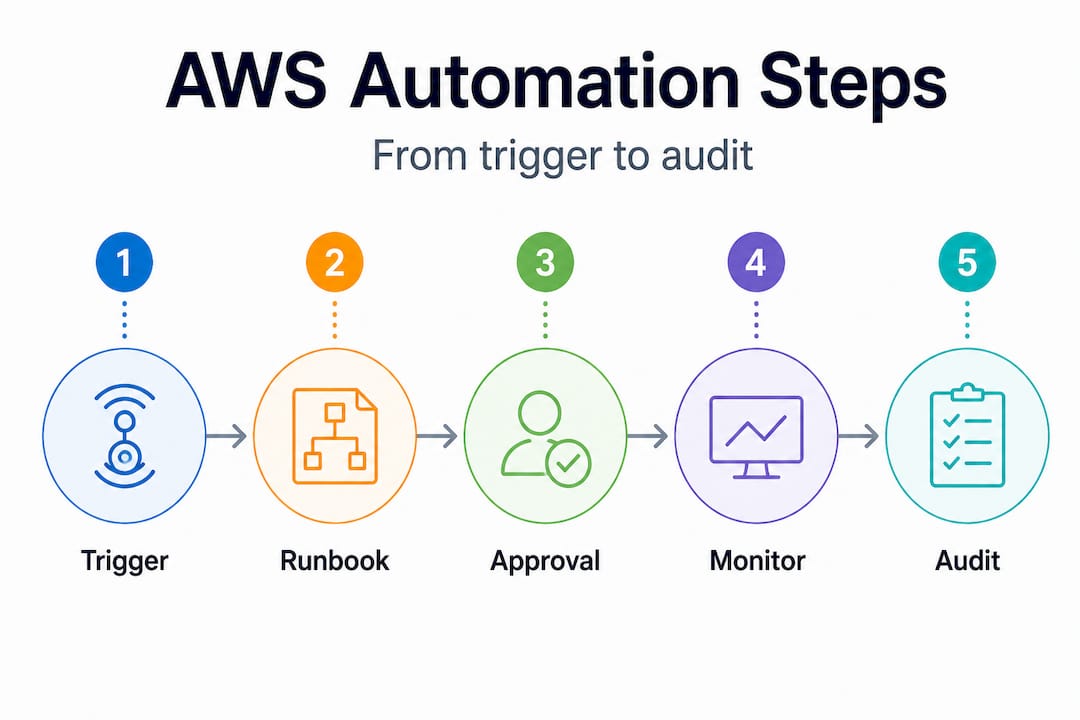
| Automation stage | Primary tool | Safety guardrail |
|---|---|---|
| Trigger | EventBridge / CloudWatch Alarm | Threshold filter, deduplication |
| Approval | Systems Manager Approval step | Timeout fallback, SNS notification |
| Execution | Systems Manager / Lambda | Rate controls, concurrency limits |
| Verification | CloudWatch Metrics | Alarm on post-execution anomalies |
| Audit | CloudTrail / CloudWatch Logs | Immutable log retention policy |
Pro Tip: Set up a dead-letter queue (DLQ) for every Lambda function involved in automation. When a function fails silently without a DLQ, you may not discover the failure until its absence causes a downstream problem. Visible failures are far easier to fix than invisible ones.
According to AWS research, teams that implement event-driven automation with proper guardrails recover from operational incidents significantly faster than those relying on manual runbooks, because the response time is measured in seconds rather than minutes or hours.
Following the AWS best practices around tagging and resource grouping also accelerates automation. If your resources are consistently tagged by environment, team, and workload, your automation documents can target precisely the right resources without hardcoding resource IDs that become stale the moment an instance is replaced.
Continuous improvement: Monitoring, feedback, and iterative review
Shipping automation to production is not the finish line. It is where the real learning begins. Automation that works perfectly on day one can drift out of alignment as your environment grows, your team changes, and your workloads evolve.
Continuous improvement in this context means four concrete practices:
-
Measure what your automation actually does. Track metrics like mean time to recovery (MTTR), number of incidents caught by automated remediation versus human response, and frequency of approval gate activations. These numbers tell you whether your automation is delivering value or creating noise.
-
Run Operational Readiness Reviews regularly. The AWS Operational Readiness Review framework exists specifically for this. An ORR “distills lessons learned from incidents into a repeatable checklist-driven review process” across your workload lifecycle. Run an ORR before major deployments and after significant incidents to validate that your automation is keeping pace with your environment.
-
Mine incidents for automation opportunities. Every incident your team handles manually is a candidate for automated detection and remediation. Create a lightweight incident postmortem template that explicitly asks: “Could automation have detected this faster? Could automation have remediated this without human intervention?” Over time, this builds a prioritized backlog of automation improvements.
-
Review and retire stale automation. Automation that targets resources or processes that no longer exist is noise at best and dangerous at worst. Schedule quarterly reviews of all active runbooks and EventBridge rules to confirm they still target valid, current workflows.
“The most resilient AWS environments we work with are not the ones with the most automation. They are the ones with the most deliberate automation, where every workflow has a clear owner, a clear trigger, and a clear rollback path.”
Good cloud automation insights come from treating your automation layer like a product: it needs owners, a roadmap, and regular investment. Automation debt, where outdated runbooks and unmaintained Lambda functions accumulate, is just as costly as technical debt in application code.
What most teams get wrong about cloud automation
Here is the part most guides skip: automation itself is not the goal, and more automation is not always better.
The biggest failure pattern we see, across hundreds of AWS environments, is teams that automate extensively but skip guardrails. They wire Lambda directly to production remediation actions without approval gates, set broad EventBridge rules that trigger on too wide a class of events, and discover their automation amplified a problem rather than contained it. Runaway automation during a cascading failure is genuinely worse than having an engineer in the loop.
The second failure pattern is treating automation as a one-time project. Teams invest heavily in building out automation workflows during a focused sprint, declare victory, and then never review or update them. Six months later, the automation is targeting deprecated resources, triggering on stale thresholds, and generating alerts that engineers have learned to ignore. Dead automation is almost worse than no automation, because it creates false confidence.
The third pattern is the ownership vacuum. When automation lives in a shared space with no clear owner, nobody updates it, nobody responds when it fails, and nobody knows whether it is still working. Whether your team is centralized or decentralized, every automated workflow needs a named owner and a review cadence. Check the AWS best practices around operational ownership for guidance on structuring this.
The mindset shift that changes everything: think of automation as “safe and scalable operations with fast feedback,” not as “hands-off operations.” The goal is to move human judgment upstream, into the design of guardrails, approval policies, and monitoring thresholds, rather than eliminating human judgment from the loop entirely. When your automation is well-designed, humans make decisions at the right level of abstraction rather than at the level of clicking buttons.
Investing in automation is investing in business resilience, not just engineering efficiency. Every automated remediation that catches a problem at 3 AM without waking anyone up is a direct contribution to uptime, customer trust, and team health.
Need expert help with AWS cloud automation?
Building reliable AWS automation from the ground up takes more than the right tools. It requires battle-tested patterns, the right guardrails from day one, and the organizational muscle to maintain automation as your environment grows.

At IT-Magic, we have spent over a decade helping CTOs and engineering leaders build automation that actually holds up in production. Our AWS infrastructure support services cover everything from designing event-driven automation architectures to implementing runbooks, CI/CD pipelines, and monitoring frameworks. If cost efficiency is your priority, our AWS cost optimization engagements layer automation directly into your cost governance workflows. As a trusted AWS managed service provider with Advanced Tier Partner status and 700+ delivered projects, we bring the depth to accelerate your automation without the risk of figuring it out alone.
Frequently asked questions
What are the safest cloud operations to automate first?
Start with routine, well-documented workflows like patching, backups, and monitoring alerts, and add guardrails before expanding. Per the AWS Well-Architected guidance, treating operations as code with event-driven execution and guardrails is the safest starting point.
How do AWS Systems Manager Automation runbooks help with cloud operations?
They let you define, version, and programmatically execute operational tasks as code, with branching logic and approval steps that make automation both safer and auditable. Systems Manager Automation documents support multi-step workflows that you can test before running in production.
How do you reduce the risk of automation errors in the cloud?
Implement approval gates, rate controls, error thresholds, and staged rollouts to contain the blast radius of any failure. The AWS Operational Excellence guidance explicitly calls for these guardrails as part of safe automation design.
What is an Operational Readiness Review (ORR)?
An ORR is a structured, checklist-based review process that distills lessons from operational incidents into repeatable improvements across your workload lifecycle. The AWS ORR framework helps teams validate readiness before major changes and after significant incidents.
How do centralized vs decentralized teams affect automation?
Both models can succeed with automation, provided guardrails and accountability are built into the automated workflows rather than enforced manually. Teams that rely on policy documents and human enforcement instead of automated governance tend to see more drift and more incidents over time.
Alexander founded IT-Magic, an AWS Advanced Tier Services Partner delivering DevOps, cloud architecture, and managed services since 2010. He holds:
- AWS Certified Solutions Architect – Professional
- AWS Certified DevOps Engineer – Professional
- AWS Certified Security – Specialty
- AWS Certified Advanced Networking – Specialty
Talk to a certified AWS team trusted by INTERTOP, Foxtrot, Pandora, and J.Hilburn.
Get a free consultation


