

TL;DR:
- Building scalable, secure, and cost-efficient cloud infrastructure is the main challenge after migration.
- Cloud infrastructure layers include compute, storage, network, security, and management, supported by AWS services.
- Treating cost optimization and automation as strategic, measuring cost-per-transaction as an SLO drives business growth.
Most engineering leaders assume moving workloads to the cloud is the hard part. It isn’t. The real challenge is what comes after: building infrastructure that scales under pressure, stays secure without slowing teams down, and doesn’t silently drain your budget. Cloud infrastructure is the engineered foundation beneath every product decision you make. It determines how fast you ship, how much downtime costs you, and whether your security posture holds when it matters. This article breaks down what cloud infrastructure actually means in 2026, how AWS tools support each layer, and what CTOs need to prioritize to turn infrastructure into a genuine competitive advantage.
Key Takeaways
| Point | Details |
|---|---|
| Cloud infrastructure is foundational | It’s more than hosting—it’s an engineered platform for innovation, agility, and resilience. |
| Scaling is built-in | Using features like Auto Scaling and serverless lets you handle growth and spikes without waste. |
| Cost optimization is architectural | AWS tools and practices drive efficiency, turning variable cloud expenses into competitive advantage. |
| Security and governance matter | Automated controls, encryption, and compliance should be integrated from day one for robust protection. |
| Right choices enable business outcomes | Strategic cloud architecture empowers teams to innovate faster, reduce risk, and scale with confidence. |
Defining cloud infrastructure: components and architecture
Running this on your own AWS setup? IT-Magic is an AWS Advanced Tier Partner — we audit, fix, or fully manage it for you.
Get a free consultationCloud infrastructure is not a server in someone else’s data center. It is a layered system of on-demand services, automated controls, and architectural decisions that together determine how your applications run, scale, and recover. The AWS Overview Whitepaper defines it clearly: cloud infrastructure covers compute, storage, network, and management layers that enable scalable operations. Each layer has a distinct role.
Compute is where your workloads run. AWS EC2 gives you configurable virtual machines for predictable, persistent workloads. Lambda handles event-driven, short-burst functions without server management. Together, they cover the full spectrum from always-on services to unpredictable spikes.
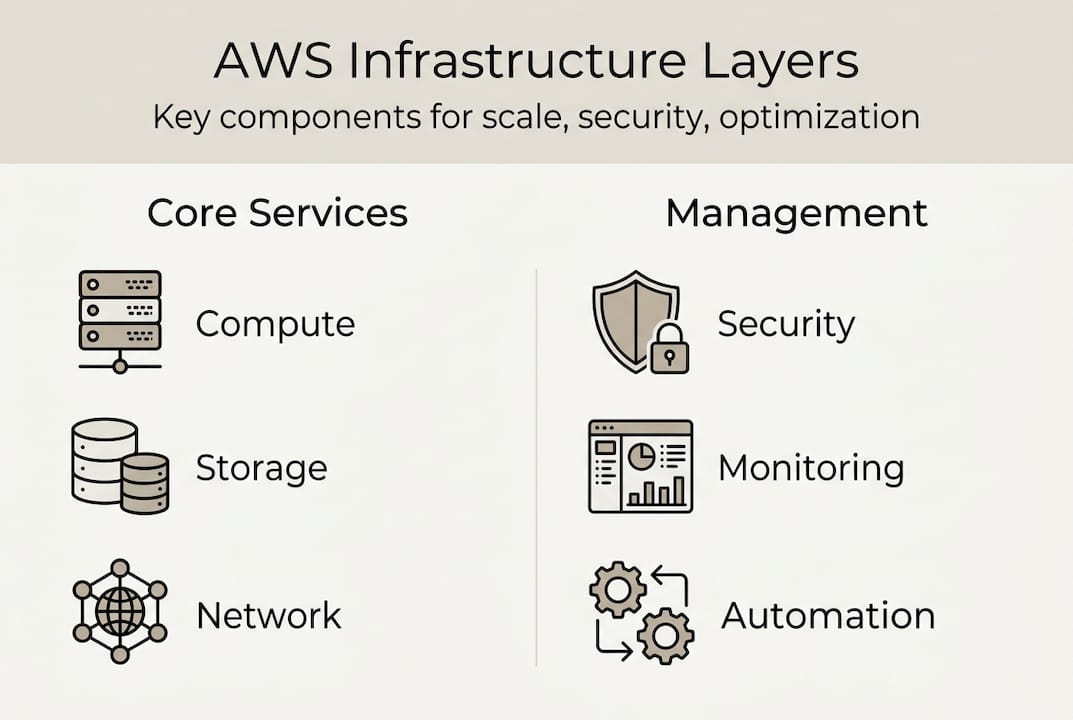
Storage covers both object and block storage. S3 is the workhorse for unstructured data, backups, and static assets. EBS provides persistent block storage attached to EC2 instances, critical for databases and stateful applications.
Networking ties it all together. VPC (Virtual Private Cloud) lets you define isolated network environments with granular routing rules. AWS Direct Connect provides dedicated, private connectivity between your on-premises systems and AWS, which matters enormously for latency-sensitive or compliance-heavy workloads like those in AWS for retail environments.
Security and management are not afterthoughts. IAM controls who accesses what. CloudWatch monitors performance. Systems Manager automates patching and configuration. These layers are where operational discipline lives.
Here is a quick breakdown of how each component maps to AWS services:
| Layer | AWS service examples | Primary function |
|---|---|---|
| Compute | EC2, Lambda, ECS, EKS | Run workloads at any scale |
| Storage | S3, EBS, Glacier | Store, retrieve, and archive data |
| Networking | VPC, Direct Connect, Route 53 | Connect and route traffic securely |
| Security | IAM, KMS, WAF, Shield | Control access and protect data |
| Management | CloudWatch, Config, Systems Manager | Monitor, automate, and govern |
Architectural choices at each layer directly affect resilience. A multi-AZ (Availability Zone) deployment, for example, protects against single data center failures. Choosing the right compute model affects both performance and cost. AWS managed services reduce operational overhead by abstracting much of this complexity, letting your team focus on product rather than infrastructure maintenance.
How cloud infrastructure enables scale and agility
Scale is not just adding more servers. Done right, it is an automated, architectural response to demand. The two core approaches are vertical scaling (adding more power to an existing instance) and horizontal scaling (adding more instances). Vertical scaling has a ceiling and creates single points of failure. Horizontal scaling, paired with load balancing, is how modern cloud systems handle real growth.
AWS provides purpose-built tools for both. EC2 Auto Scaling Groups (ASGs) automatically adjust the number of running instances based on metrics like CPU utilization or request count. This is ideal for steady, predictable workloads. Lambda, AWS’s serverless compute, removes the instance management entirely. You define a function, set a trigger, and AWS handles everything else, scaling from zero to thousands of concurrent executions in seconds.
The AWS Cloud Architecture Design Principles recommend Auto Scaling Groups, horizontal scaling, serverless, and multi-AZ deployments as the baseline for high availability. Multi-AZ is especially critical: it distributes your workload across physically separate data centers within a region, so a hardware failure in one zone doesn’t take down your service.
Here is how the two primary scaling approaches compare:
| Approach | Best for | AWS tool | Key tradeoff |
|---|---|---|---|
| Vertical scaling | Legacy apps, quick fixes | EC2 instance resize | Limited ceiling, downtime risk |
| Horizontal scaling | Web apps, microservices | EC2 Auto Scaling Groups | Requires stateless design |
| Serverless | Event-driven, unpredictable | Lambda | Cold starts, execution limits |
| Multi-AZ | All production workloads | RDS Multi-AZ, ALB | Higher cost, worth every cent |
For startups with unpredictable traffic patterns, Lambda is often the smartest starting point. For enterprises with consistent, high-volume workloads, ASGs with Reserved Instances deliver better economics. You can explore how cloud scaling for retail plays out in practice across different demand profiles.
Here is a practical sequence for building scalable infrastructure:
- Define your workload type: steady vs. bursty vs. event-driven.
- Choose the right compute model for each service independently.
- Implement Auto Scaling with conservative thresholds, then tune.
- Deploy across at least two Availability Zones from day one.
- Test failure scenarios with chaos engineering before you need to rely on resilience.
Pro Tip: If your traffic patterns are unpredictable, start with Lambda and move to ASGs only when usage stabilizes and you can model the cost curve accurately.
Cloud infrastructure and cost optimization: get more for less
Cost is not a finance problem. It is an architecture problem. Every resource provisioning decision, every instance type selection, every data transfer route has a cost implication. The teams that treat cost as a billing issue rather than an engineering discipline consistently overspend by 30 to 40 percent.

AWS provides a full toolkit for cost control. AWS Compute Optimizer analyzes your actual usage and recommends right-sized instance types, often cutting compute costs significantly without touching performance. Savings Plans and Reserved Instances lock in discounted rates for predictable workloads, delivering up to 72% savings versus On-Demand pricing. Spot Instances let you bid for unused EC2 capacity at steep discounts, ideal for batch jobs, CI/CD pipelines, and fault-tolerant workloads. You can see real numbers in our breakdown of EC2 Spot Instance savings.
Storage costs are another common leak. S3 lifecycle policies automatically move data to cheaper storage classes (like S3 Glacier) as it ages, delivering 40 to 70% storage savings without manual intervention.
| Strategy | Tool | Potential savings |
|---|---|---|
| Right-sizing compute | Compute Optimizer | 20-40% |
| Committed use discounts | Savings Plans / Reserved Instances | Up to 72% |
| Spot compute | EC2 Spot Instances | Up to 90% |
| Storage tiering | S3 lifecycle policies | 40-70% |
Tagging is the operational backbone of cost accountability. Without consistent resource tagging by team, environment, and product, you cannot allocate spend accurately or identify waste. Enforce tagging policies at the account level using AWS Config rules.
The most forward-thinking CTOs track cost-per-transaction as a service level objective (SLO), the same way they track latency or error rate. This framing makes cost a first-class engineering metric. For a deeper look at the strategies that matter most, our cost optimization guide for CIOs covers the full framework, and our AWS cost optimization tools breakdown goes further into tooling specifics.
Pro Tip: Run a monthly cost audit aligned to your usage data, not your billing report. Billing tells you what you spent. Usage data tells you why, and that is where the fixes live.
Security and governance in cloud infrastructure
Cost and agility are important, but none of it matters if your infrastructure isn’t secure and resilient. Security in the cloud operates on a shared responsibility model: AWS secures the underlying infrastructure, and you are responsible for everything you build on top of it. That boundary is where most breaches happen.
The core AWS security toolkit includes:
- IAM (Identity and Access Management): Define roles and policies with least-privilege access. No user or service should have more permissions than it needs.
- KMS (Key Management Service): Manage encryption keys for data at rest and in transit. Rotate keys automatically.
- CloudTrail: Log every API call across your AWS environment. This is your audit trail for compliance and incident response.
- AWS Config: Continuously evaluate resource configurations against compliance rules. Detect drift the moment it happens.
- GuardDuty: Automated threat detection using machine learning, flagging suspicious activity without manual monitoring.
For enterprises operating under PCI DSS, SOC 2, or HIPAA requirements, these tools are not optional. They are the baseline. Compliance is not a one-time audit; it is a continuous state maintained through automation.
This is where Infrastructure as Code (IaC) becomes non-negotiable. Tools like Terraform and AWS CDK define your infrastructure in version-controlled code. When a configuration drifts from its defined state, you catch it immediately. As the AWS Well-Architected framework confirms, IaC prevents drift and is essential for secure, manageable infrastructure.
“Security is not a feature you add later. It is a property of your architecture from the first line of Terraform.”
For industries like retail and fintech, where data sensitivity and regulatory exposure are high, secure AWS for retail architectures must bake in encryption, access controls, and audit logging from the start, not as a retrofit.
Our take: Cloud infrastructure is your business enabler, not just IT spend
After delivering 700+ cloud projects since 2010, we have seen a consistent pattern: the teams that treat cloud infrastructure as a cost center struggle. The teams that treat it as a product capability ship faster, recover faster, and grow more profitably.
The most common mistake we see is separating architecture decisions from business outcomes. A CTO will approve a scaling strategy without tying it to a revenue SLO, or approve a security tool without connecting it to compliance revenue risk. These decisions look technical but are fundamentally strategic.
Here is what most leaders miss: cost optimization and automation are not separate workstreams. They are the same workstream. When you automate resource provisioning, tagging, and scaling, you automatically gain cost visibility. When you have cost visibility, you make better architecture decisions. The loop is self-reinforcing, but only if you start it deliberately.
Our hard-won lesson is this: treat cost-per-transaction as seriously as you treat uptime. Both are SLOs. Both reflect engineering quality. And both directly affect whether your business scales profitably or just scales.
Next steps: Accelerate your AWS cloud infrastructure
If this breakdown clarified where your infrastructure gaps are, the next step is getting expert eyes on your actual environment.

At IT-Magic, we work with CTOs and engineering leaders to design, optimize, and secure AWS infrastructure that performs under real business pressure. Whether you need AWS infrastructure support to stabilize your current environment, a targeted AWS cost optimization engagement to cut waste, or a structured AWS Well-Architected review to benchmark your architecture against AWS best practices, our certified team brings the operational depth to move fast without cutting corners. Reach out and let’s map out what your infrastructure needs to support your next growth stage.
Frequently asked questions
What are the key components of cloud infrastructure?
Cloud infrastructure consists of compute, storage, networking, security, and management layers, each delivered as scalable, on-demand services through providers like AWS.
How does cloud infrastructure reduce costs for startups and enterprises?
Architectural tools like right-sizing, Spot Instances, and Savings Plans and S3 lifecycle can save 40 to 72% on compute and storage compared to unoptimized On-Demand usage.
What AWS tools support scaling and high availability?
Auto Scaling Groups and serverless Lambda functions, combined with multi-AZ deployments, give you automated, resilient scaling without manual intervention.
Why is security critical in cloud infrastructure?
Cloud security failures typically happen in the customer-managed layer, and IaC prevents drift while tools like IAM, KMS, and CloudTrail enforce access control, encryption, and auditability continuously.
What makes cost a cloud architecture issue, not just finance?
Every provisioning decision affects spend, so measure cost-per-transaction as SLO alongside latency and uptime to treat cost as a first-class engineering metric.
Alexander founded IT-Magic, an AWS Advanced Tier Services Partner delivering DevOps, cloud architecture, and managed services since 2010. He holds:
- AWS Certified Solutions Architect – Professional
- AWS Certified DevOps Engineer – Professional
- AWS Certified Security – Specialty
- AWS Certified Advanced Networking – Specialty
Talk to a certified AWS team trusted by INTERTOP, Foxtrot, Pandora, and J.Hilburn.
Get a free consultation


