

TL;DR:
- Automating infrastructure workflows uses AI, IaC tools, and orchestration platforms to enable reliable, compliant management of IT systems. Building trust through review-only modes and broad tool integration minimizes risks and ensures audit readiness, supporting long-term automation success.
Automating infrastructure workflow is the process of using technology to automatically provision, configure, and manage IT infrastructure through governed workflows and AI-powered agents. Done right, it reduces repetitive DevOps work by up to 70%, freeing your team from manual ticket queues and reactive firefighting. The industry term for this practice is infrastructure automation, and it spans everything from Infrastructure as Code (IaC) tools like Terraform to no-code orchestration platforms that connect across your entire tool stack. Governance frameworks like SOC 2 Type II define the compliance guardrails your automation must operate within. IT-Magic has built and managed these systems for over 300 clients since 2010, and the patterns that work are consistent.
What tools and prerequisites do you need to automate infrastructure workflow?
The right tooling determines whether your automation project ships in 48 hours or stalls for months. Three categories of infrastructure automation tools cover the full spectrum of what IT teams need.

AI workflow agents handle classification, reasoning, and decision-making. They read infrastructure state, interpret intent from plain language, and generate configuration code. They work best when paired with a validation layer, not when running unsupervised.
No-code orchestration platforms give operations leads the ability to build and modify workflows without writing code. No-code platforms can move teams from manual ticketing to automated IT control in as little as 48 hours, with up to a 90% reduction in administrative tasks. That speed matters when your backlog is measured in weeks.
Infrastructure as Code tools like Terraform, AWS CloudFormation, and Pulumi define infrastructure state declaratively. They are the execution layer that AI agents and orchestration platforms drive. Without IaC as the foundation, automation has no reliable target to act on.
| Feature category | Role in workflow automation |
|---|---|
| AI reasoning engine | Interprets intent, classifies tasks, generates IaC code |
| Deterministic execution | Runs pre-validated steps in a fixed, auditable sequence |
| No-code canvas | Lets operations teams build workflows without engineering support |
| RBAC and audit trail | Enforces permissions and logs every action for compliance review |
| Pre/post-validation | Checks infrastructure state before and after each change |
| Rollback on failure | Reverts changes automatically when a step fails |
Integration requirements matter as much as the tools themselves. Your automation platform needs connectors for ITSM tools like ServiceNow and Jira, cloud platforms like AWS, and communication apps like Slack and Microsoft Teams. Connecting AI agents to 2,700+ app ecosystems eliminates manual data transfers and maintains SOC 2 Type II audit-ready compliance without added overhead. That breadth of integration is what separates a real automation program from a collection of disconnected scripts.
Pro Tip: Before selecting a platform, map every manual handoff in your current workflow. Each handoff is a future integration point. If a platform cannot connect to both ends of that handoff natively, you will rebuild the manual step in a different tool.
How do you design and execute automated infrastructure workflows step by step?
Running this on your own AWS setup? IT-Magic is an AWS Advanced Tier Partner — we audit, fix, or fully manage it for you.
Get a free consultationWorkflow design starts with a clear goal written in plain language. “Provision a new VPC with private subnets and a NAT gateway when a developer submits a Jira ticket” is a valid starting point. Vague goals like “automate infrastructure” produce vague automation that breaks in production.
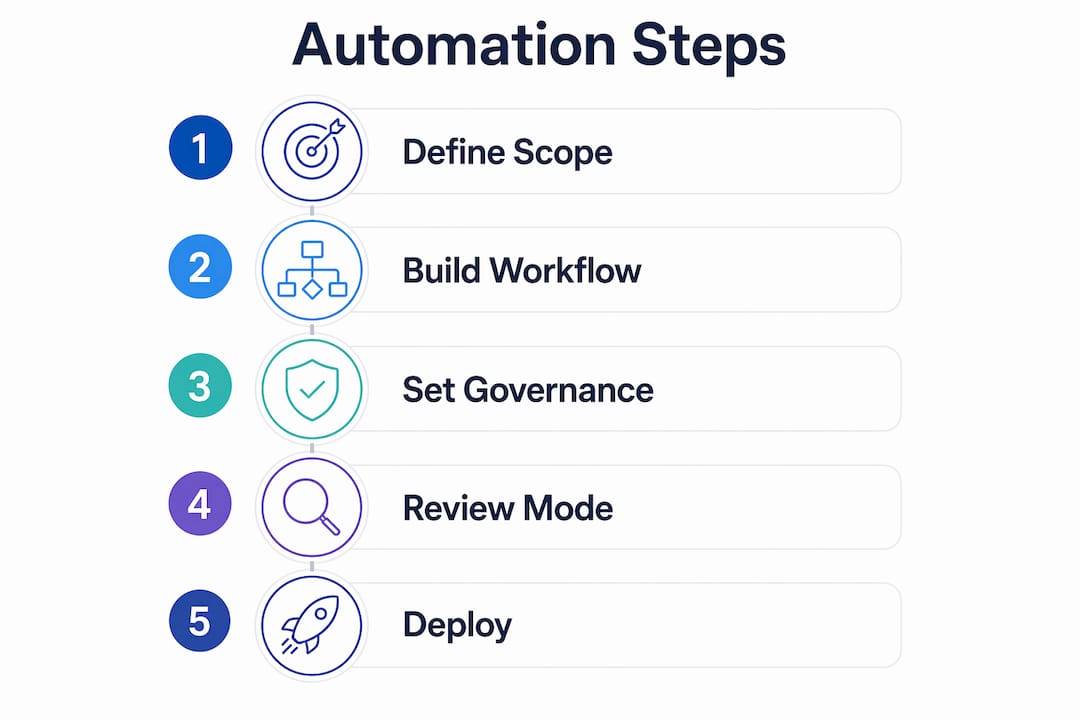
Step 1: Define scope and success criteria. Identify one workflow, its inputs, its expected outputs, and the compliance checks it must pass. Limit the blast radius by choosing a workflow that touches a small, isolated part of your infrastructure first.
Step 2: Build the workflow on a visual canvas or in code. Map each step, assign the tool that executes it, and define the pre-validation check that must pass before execution begins. Include a rollback path for every step that modifies state.
Step 3: Configure governance controls. Set RBAC permissions so only authorized roles can trigger or approve the workflow. Add an audit log entry at each step. Workflow orchestration platforms that unify AI reasoning with deterministic execution enforce these controls regardless of how the workflow is triggered.
Step 4: Run in review-only mode first. This is the most skipped step and the most important one. Treating automation as review-only first builds trust over weeks before you enable auto-apply. The “dark factory” pattern formalizes this: run the automation, measure its outputs against scenario-based evaluators across multiple pull requests, and only promote to auto-apply when the metrics are consistently clean.
Step 5: Enable auto-apply gradually. Start with low-risk, high-frequency workflows like tagging enforcement or security group audits. Expand to higher-risk workflows like VPC changes only after the lower-risk workflows have run cleanly for a defined period.
Step 6: Monitor and iterate. Set alerts for workflow failures, drift detection, and policy violations. Review audit logs weekly during the first month. Adjust pre-validation rules based on what the logs reveal.
- Use small, isolated stacks for your first automated workflows to limit the impact of failures.
- Write explicit holdout scenarios that describe what the workflow should NOT do.
- Require human approval gates for any workflow that modifies production networking or IAM policies.
- Log the reason for every rollback and review those logs in your next sprint retrospective.
Pro Tip: Autonomous Terraform agents can complete end-to-end tasks in under 10 minutes when the underlying module architecture is validated and modular. Invest time in your module library before you invest time in the agent.
What challenges come up when automating infrastructure workflows?
The most common failure mode is premature trust. Teams see an AI agent generate correct Terraform code three times in a row and disable the approval gate. The fourth run hits an edge case, applies a misconfigured security group to production, and the incident review reveals there was no rollback configured. Phased adoption with manual approval is more reliable than speed-first automation.
Governance and traceability are not optional features. They are the difference between automation that passes a SOC 2 Type II audit and automation that creates a finding. Every workflow change must be logged, attributed, and reversible.
Common errors and how to avoid them:
- Automation sprawl: Teams build separate automations for each tool with no central orchestration. Fix this with a single workflow engine that calls all other tools through APIs.
- State drift: Infrastructure drifts from its declared state when manual changes bypass the automation layer. Fix this with continuous drift detection and alerts that trigger a reconciliation workflow.
- Policy violations at runtime: Automation applies a change that violates a guardrail policy. Fix this with pre-validation checks that run the policy engine before execution, not after.
- Rollback failures: A rollback step fails because the previous state was not captured correctly. Fix this by storing state snapshots before every destructive operation.
- Disconnected silos: Security, networking, and compute automations run independently with no shared audit trail. Fix this with centralized orchestration that logs all activity to a single system of record.
Combining AI reasoning with deterministic execution addresses accuracy and reliability together. AI handles the classification and intent parsing. Deterministic execution handles the actual infrastructure change with pre-checks, rollback logic, and audit logging baked in. Neither layer alone is sufficient.
Human leadership retains final accountability for major architectural decisions even when AI agents handle routine tasks. This is not a limitation of the technology. It is the correct design for any system that must remain auditable and compliant.
How do you scale automated infrastructure workflows for long-term success?
Scaling automation is not just adding more workflows. It is building the organizational and technical infrastructure that keeps automation reliable as complexity grows.
| Scaling consideration | Optimization tactic |
|---|---|
| App ecosystem integration | Connect to 2,700+ tools via native connectors to eliminate manual handoffs |
| Compliance maintenance | Use SOC 2 Type II audit trails built into the orchestration layer |
| 24/7 operational coverage | Schedule recurring automations and enable mobile alerts for on-call teams |
| Governance at scale | Centralize RBAC and policy enforcement in one orchestration engine |
| Performance visibility | Use workflow analytics dashboards to identify bottlenecks and failure patterns |
Monitoring and feedback loops are the engine of long-term improvement. Every workflow run produces data: execution time, failure rate, rollback frequency, and policy violation count. Review that data on a regular cadence and use it to prioritize which workflows need refinement. Teams that treat automation as a set-and-forget system accumulate technical debt faster than teams that never automated at all.
Mobile accessibility matters more than most teams expect. On-call engineers need to approve, pause, or trigger workflows from a phone at 2 a.m. Platforms that lack mobile interfaces force engineers to VPN into a laptop before they can respond to an alert. That delay costs you the incident SLA.
Broad app ecosystem integration is the multiplier that makes scaling practical. When your orchestration layer connects natively to your ITSM, your cloud provider, your monitoring stack, and your communication tools, new workflows take hours to build instead of weeks. The integration work is already done.
Pro Tip: Build a workflow catalog. Document every automated workflow with its trigger, scope, approval requirements, and rollback procedure. When a new team member joins or an auditor asks for evidence, the catalog is your first line of defense.
Key Takeaways
Automating infrastructure workflows requires a governed combination of AI agents, IaC tools, and deterministic orchestration to deliver reliable, audit-ready results at scale.
| Point | Details |
|---|---|
| Start with review-only mode | Run automation without auto-apply first to build trust before enabling hands-off execution. |
| Combine AI and deterministic execution | AI handles reasoning; deterministic engines handle execution with pre-checks, rollback, and audit trails. |
| Integrate broadly from day one | Connecting to your full tool stack eliminates manual handoffs and supports SOC 2 compliance. |
| Centralize governance | One orchestration engine with RBAC and audit logging prevents automation sprawl and compliance gaps. |
| Scale through monitoring | Use workflow analytics to identify failures and refine automations continuously over time. |
What I have learned after years of infrastructure automation projects
The teams that succeed with infrastructure automation share one habit: they distrust their own automation until it has earned trust. That sounds counterintuitive. You built the workflow. You tested it. But production infrastructure has a way of presenting conditions that no test environment replicates.
The dark factory pattern is the most honest framework I have seen for handling this reality. You run the automation. You measure it. You do not let it act until the measurements are consistently good. That discipline is hard to maintain when your leadership is asking why the automation is not saving time yet. The answer is that it will save time reliably, rather than saving time occasionally and creating incidents the rest of the time.
The governance question is where I see the most organizational resistance. Engineers want to move fast. Compliance teams want audit trails. The right architecture gives you both. A workflow orchestration engine that logs every action, enforces RBAC, and stores rollback state does not slow you down. It gives you the evidence you need to move faster with confidence, because you can prove to your auditors and your leadership that every change was authorized, logged, and reversible.
The last thing I will say is about communication. Automation changes who does what. Operations engineers stop doing manual provisioning and start doing workflow design and monitoring. That shift requires deliberate change management. The teams that skip that conversation end up with automation that nobody trusts and engineers who work around it. The teams that have the conversation end up with engineers who own the automation and improve it continuously.
— Oleksandr
IT-Magic’s infrastructure automation services for IT teams
IT-Magic has delivered over 700 infrastructure projects for clients in fintech, enterprise, and high-growth startups since 2010. The work is focused entirely on infrastructure, automation, compliance, and operations.

For teams building or scaling automated infrastructure workflows on AWS, IT-Magic provides AWS infrastructure support covering governed workflow design, IaC implementation, and compliance alignment for SOC 2, PCI DSS, and HIPAA. Teams running containerized workloads can access Kubernetes support services for EKS and ECS environments. For end-to-end pipeline automation, AWS DevOps services cover CI/CD, drift detection, and workflow orchestration at scale. Every engagement is staffed by certified AWS experts who specialize in the infrastructure layer, not software development.
FAQ
What is infrastructure workflow automation?
Infrastructure workflow automation is the practice of using AI agents, IaC tools, and orchestration platforms to automatically provision, configure, and manage IT infrastructure. It replaces manual processes with governed, repeatable workflows that log every action and support rollback on failure.
How long does it take to implement automated infrastructure workflows?
No-code platforms can move teams from manual processes to automated IT control in as little as 48 hours for initial workflows. Full production-grade automation with governance controls typically takes several weeks of phased rollout.
What is the dark factory pattern in infrastructure automation?
The dark factory pattern requires running automation in review-only mode and measuring its outputs across multiple pull requests before enabling auto-apply. It builds verified trust in the automation before removing human approval gates.
How do you maintain compliance when automating infrastructure workflows?
Compliance requires audit trails, RBAC enforcement, and pre/post-validation built into the orchestration layer. Connecting your automation to a platform that maintains SOC 2 Type II audit-ready logs by default removes the manual compliance overhead.
What is the biggest risk in infrastructure workflow automation?
Premature trust in AI-generated code is the leading cause of automation failures. Phased adoption with manual approval gates, scenario-based evaluators, and rollback procedures reduces that risk before auto-apply is enabled.
Recommended
- How to automate cloud operations for scalable AWS
- The Role of Automation in Security: 2026 Guide
- AWS Automation: Boost Efficiency and Cut Cloud Costs
- What Is IaC in DevOps? A 2026 Guide for Engineers
Alexander founded IT-Magic, an AWS Advanced Tier Services Partner delivering DevOps, cloud architecture, and managed services since 2010. He holds:
- AWS Certified Solutions Architect – Professional
- AWS Certified DevOps Engineer – Professional
- AWS Certified Security – Specialty
- AWS Certified Advanced Networking – Specialty
Talk to a certified AWS team trusted by INTERTOP, Foxtrot, Pandora, and J.Hilburn.
Get a free consultation


