

TL;DR:
- A VPC in AWS is a logically isolated virtual network that enables full control over IP ranges, subnets, routing, and security for deploying cloud resources. It enforces region-specific, software-defined isolation using unique identifiers, supporting connectivity options like peering, Transit Gateway, VPN, or Direct Connect to extend networks securely. Proper VPC design—including CIDR selection, subnet sizing, and layered security—prevents common issues like IP exhaustion and security misconfigurations, forming the backbone of scalable, secure cloud architectures.
An AWS Virtual Private Cloud (VPC) is a logically isolated virtual network inside the AWS Cloud where you launch and manage resources like EC2 instances and RDS databases with full control over IP address ranges, subnets, routing, and security. Understanding what is VPC in AWS is the starting point for every serious cloud architecture decision. A VPC gives you the network foundation that determines how your workloads communicate, who can reach them, and how traffic flows between your application tiers, your users, and your on-premises systems.
What is a VPC in AWS and how does it work?
A VPC is defined by an IPv4 CIDR block that sets the total IP address space for your network. A CIDR block like "10.0.0.0/16` provides 65,536 IP addresses, which you then divide into subnets. Each subnet occupies a portion of that range and lives inside a single Availability Zone (AZ). Spreading subnets across multiple AZs is the standard approach for building fault-tolerant applications.

A VPC exists within a single AWS Region and does not span multiple regions by default. Resources in different regions require explicit connectivity through VPC Peering, AWS Transit Gateway, or AWS Direct Connect. This regional boundary is a hard constraint you need to account for in multi-region architectures.
The core components of a VPC work together as a system:
- CIDR block: Defines the total IP address space for the VPC and all subnets within it.
- Subnets: Segments of the CIDR range assigned to specific AZs. Public subnets route traffic to an Internet Gateway; private subnets route outbound traffic through a NAT Gateway.
- Route tables: Control where network traffic is directed. Each subnet is associated with a route table that determines its reachability.
- Internet Gateway (IGW): Attaches to the VPC and enables public internet connectivity for resources in public subnets.
- NAT Gateway: Allows instances in private subnets to initiate outbound internet connections without exposing them to inbound traffic from the internet.
- Security groups: Stateful, instance-level firewalls that control inbound and outbound traffic per resource.
- Network ACLs (NACLs): Stateless, subnet-level filters that evaluate traffic against allow and deny rules in order.
Pro Tip: Security groups and NACLs are not interchangeable. Security groups track connection state, so a return packet is automatically allowed. NACLs do not track state, so you must explicitly allow both inbound and outbound traffic for each flow. Mixing up these behaviors is one of the most common sources of connectivity issues in new VPC deployments.
The layered security model combining security groups at the instance level and NACLs at the subnet level gives you two independent control planes. This means a misconfiguration in one layer does not automatically expose your resources, which is the right approach for production environments.
How does AWS VPC enforce logical isolation and secure connectivity?
Running this on your own AWS setup? IT-Magic is an AWS Advanced Tier Partner — we audit, fix, or fully manage it for you.
Get a free consultationVPC isolation is enforced through software-defined networking, not physical separation. VPCs with overlapping CIDR blocks remain logically isolated because AWS tags all traffic with a unique VPC identifier at the hypervisor level. Two VPCs can both use 10.0.0.0/16 and their traffic will never cross, because the underlying network fabric treats each VPC as a completely separate namespace.
This software-defined isolation is what makes multi-tenant cloud infrastructure practical. Your workloads share physical hardware with other AWS customers, but the network layer guarantees they cannot communicate unless you explicitly configure connectivity.
When you do need to connect VPCs or extend your network, AWS provides four primary options:
- VPC Peering: Direct, private connection between two VPCs in the same or different AWS accounts. Traffic stays on the AWS backbone and does not traverse the public internet. Peering is non-transitive, meaning VPC A peered with VPC B and VPC B peered with VPC C does not give VPC A access to VPC C.
- AWS Transit Gateway: A regional hub that connects multiple VPCs and on-premises networks through a single managed resource. Transit Gateway solves the non-transitive limitation of VPC Peering at scale.
- AWS Site-to-Site VPN: Encrypted tunnel over the public internet connecting your on-premises network to a VPC. Suitable for moderate bandwidth requirements and hybrid architectures.
- AWS Direct Connect: Dedicated private network connection from your data center to AWS. Provides consistent latency and higher throughput than VPN, and is the standard choice for regulated industries and large data transfer workloads.
Traffic between VPCs connected via Peering or Transit Gateway is encrypted in transit by default on the AWS network. For workloads subject to PCI DSS, SOC 2, or HIPAA compliance requirements, this encryption in transit is a baseline requirement, not an optional enhancement.
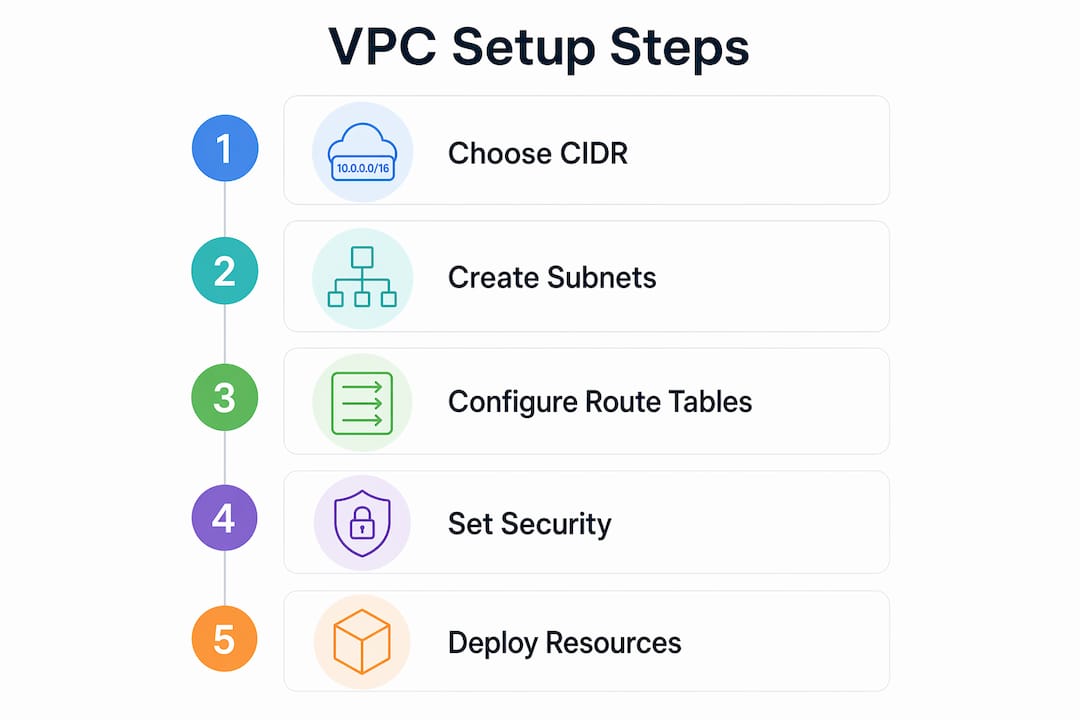
How to configure a VPC in AWS: key steps and decisions
Configuring a VPC correctly requires decisions that are difficult to reverse later. The primary CIDR block selection is the most consequential of these. Changing it after deployment requires significant refactoring of routing tables, peering connections, and security group rules. Plan for growth from day one, not from the day you run out of IPs.
Choosing your CIDR block
Use RFC 1918 private address ranges: 10.0.0.0/8, 172.16.0.0/12, or 192.168.0.0/16. For most production environments, a /16 VPC CIDR gives you enough room to create subnets across multiple AZs and workload tiers without running into exhaustion. If you plan to peer VPCs across accounts or connect to on-premises networks, map out all existing CIDR ranges first. Overlapping CIDRs between peered networks will block the peering connection entirely.
Designing your subnet structure
The table below summarizes the key differences between public and private subnets in a VPC:
| Attribute | Public subnet | Private subnet |
|---|---|---|
| Route table target | Internet Gateway (IGW) | NAT Gateway or local only |
| Inbound internet access | Yes, if security group allows | No direct inbound access |
| Typical resources | Load balancers, bastion hosts | Application servers, databases |
| IP assignment | Public IP assigned to instances | Private IP only |
The distinction between public and private subnets comes entirely from route table configuration, not from the subnet name or any other label. A subnet named “private” that has a route to an IGW is functionally a public subnet. This is a detail that catches engineers off guard during security audits.
Pro Tip: Always create subnets in at least two AZs, even for workloads you think will never need high availability. Retrofitting multi-AZ subnet coverage after an outage is far more disruptive than building it in from the start.
Sizing subnets correctly
AWS reserves five IP addresses per subnet: the network address, the VPC router address, the DNS server address, a future-use address, and the broadcast address. A /24 subnet gives you 256 addresses minus 5 reserved, leaving 251 usable IPs. For Kubernetes clusters running on Amazon EKS, where each pod consumes an IP from the subnet, a /24 exhausts quickly. Size your subnets with your peak pod or instance count in mind, not your current count.
How to apply AWS VPC features for secure cloud architecture
VPC design should coordinate IP ranges, routing, and security to manage connectivity and reachability across workload tiers. The most effective architectures use VPC structure to enforce separation between environments and application layers.
Practical patterns used in production environments include:
- Environment isolation: Run production, staging, and development workloads in separate VPCs. This prevents a misconfigured staging deployment from affecting production traffic and simplifies compliance audits by creating hard network boundaries.
- Tiered subnet architecture: Place internet-facing load balancers in public subnets, application servers in private subnets, and databases in isolated private subnets with no route to the internet at all. This three-tier model is the standard for web applications handling sensitive data.
- Multi-AZ high availability: Deploy matching subnets in at least two AZs for every workload tier. AWS services like RDS Multi-AZ, Amazon EKS, and Application Load Balancer require multi-AZ subnet coverage to function correctly.
- Layered security controls: Apply security groups at the instance level to control per-resource access, and use NACLs as a secondary defense at the subnet boundary. For fintech and healthcare workloads, this layered security approach is a compliance requirement, not just a best practice.
- Centralized egress: Route all outbound internet traffic from private subnets through a single NAT Gateway per AZ. This simplifies firewall logging, reduces the attack surface, and makes cost attribution straightforward.
For web application architectures, the standard VPC layout includes a public subnet tier for Application Load Balancers, a private application tier for EC2 or ECS tasks, and a database tier with no internet route. Security groups chain the tiers together: the load balancer security group allows port 443 from the internet, the application security group allows traffic only from the load balancer security group, and the database security group allows traffic only from the application security group. This chain of trust is enforced at the network layer, not just in application code.
For teams managing AWS network security across multiple VPCs, AWS Network Firewall and VPC Flow Logs add visibility and control beyond what security groups and NACLs provide alone.
Key takeaways
An AWS VPC is the foundational network layer for every cloud workload, and its design directly determines the security, availability, and scalability of your infrastructure.
| Point | Details |
|---|---|
| VPC is a regional construct | Each VPC exists in one AWS Region; cross-region connectivity requires explicit configuration via Peering or Transit Gateway. |
| CIDR selection is irreversible | Choose your primary CIDR block with future growth and peering requirements in mind, as changes require major refactoring. |
| Route tables define subnet type | Public vs. private subnet behavior is determined by route table entries pointing to IGW or NAT Gateway, not by naming. |
| Subnet sizing affects scaling | AWS reserves 5 IPs per subnet; size subnets to accommodate peak instance or pod counts, not current usage. |
| Layered security is non-negotiable | Security groups handle stateful instance-level filtering; NACLs handle stateless subnet-level filtering. Both layers serve distinct roles. |
VPC design lessons I keep relearning
Every time I review a VPC architecture that was built under deadline pressure, the same problems appear. The CIDR block is too small, the subnets are all /24 by default, and the security groups have accumulated rules that nobody can explain. These are not beginner mistakes. They happen to experienced engineers who treated the VPC as a checkbox rather than a design artifact.
The insight that changed how I approach VPC design is this: a VPC is not just an isolation boundary. It is a connectivity and reachability control plane that shapes every network decision you will make for the life of that workload. Getting the CIDR wrong means you will eventually face a choice between IP exhaustion and a painful migration. Getting the subnet sizing wrong means your EKS cluster stops scheduling pods at the worst possible moment.
The security model confusion between security groups and NACLs is the issue I see most often in troubleshooting sessions. Engineers add NACL rules expecting stateful behavior, then spend hours debugging why return traffic is being dropped. The fix is straightforward once you understand the difference, but the confusion is almost guaranteed if you have not worked through it deliberately.
My practical advice: draw your VPC on paper before you touch the AWS console. Map every subnet, every route table, every security group chain. The ten minutes you spend drawing it will save you ten hours of refactoring later. And if you are building for PCI DSS, SOC 2, or HIPAA, treat the network segmentation requirements as design inputs from day one, not as audit findings to remediate after launch.
— Oleksandr
Build better AWS infrastructure with IT-Magic

IT-Magic has designed and managed VPC architectures for 300+ clients across fintech, retail, and enterprise since 2010, including environments subject to PCI DSS, SOC 2, and HIPAA compliance. Whether you are starting a new VPC from scratch, dealing with IP exhaustion in an existing environment, or untangling a complex multi-account network topology, the IT-Magic team brings certified AWS networking expertise to every engagement. From CIDR planning and subnet design to Transit Gateway configuration and security group audits, IT-Magic handles the infrastructure so your team can focus on the product. Explore AWS infrastructure support to see how IT-Magic can strengthen your cloud network architecture.
FAQ
What is a VPC in AWS in simple terms?
An AWS VPC is a logically isolated virtual network inside the AWS Cloud where you deploy resources like EC2 and RDS with full control over IP addressing, routing, and security. It behaves like a traditional data center network, but runs entirely in software on AWS infrastructure.
What is the difference between a VPC and a subnet in AWS?
A VPC defines the overall IP address space for your network using a CIDR block, while a subnet is a smaller segment of that space assigned to a specific Availability Zone. Every resource you launch in AWS runs inside a subnet, which in turn belongs to a VPC.
How many VPCs can you have in an AWS account?
AWS allows up to 5 VPCs per Region per account by default, though this limit can be increased through a service quota request. Most organizations use multiple VPCs to separate production, staging, and development environments.
Can two VPCs have the same CIDR block?
Two VPCs can share the same CIDR block and remain fully isolated because AWS uses unique VPC identifiers to tag and separate traffic at the network layer. However, VPCs with overlapping CIDRs cannot be connected via VPC Peering, so plan your address space carefully if cross-VPC connectivity is a future requirement.
What is the default VPC in AWS?
AWS creates a default VPC in each Region for every new account, pre-configured with a /16 CIDR, public subnets in each AZ, and an attached Internet Gateway. The default VPC is useful for testing, but production workloads should use custom VPCs designed to match specific security and routing requirements.
Recommended
- AWS Cloud Security: Best Practices, Tools & Complete Guide | IT-Magic
- Cloud architecture: A practical guide for scalable AWS
- The CTO’s guide to securing AWS infrastructure for scale
- What Is AWS Shared Responsibility: a Security Guide
Alexander founded IT-Magic, an AWS Advanced Tier Services Partner delivering DevOps, cloud architecture, and managed services since 2010. He holds:
- AWS Certified Solutions Architect – Professional
- AWS Certified DevOps Engineer – Professional
- AWS Certified Security – Specialty
- AWS Certified Advanced Networking – Specialty
Talk to a certified AWS team trusted by INTERTOP, Foxtrot, Pandora, and J.Hilburn.
Get a free consultation


