

TL;DR:
- AWS EKS is a fully managed Kubernetes service that reduces infrastructure complexity but requires teams to handle application availability policies like Pod Disruption Budgets. While it simplifies control plane management and offers enterprise scalability, responsibility for workload resilience remains with your team, especially when enabling Auto Mode, which automates node management. Proper PDB configuration and operational discipline are essential to prevent outages during cluster automation and consolidation processes.
Amazon Elastic Kubernetes Service is a fully managed Kubernetes service that removes an enormous layer of infrastructure complexity, but many CTOs and DevOps leaders walk into production deployments believing AWS handles everything. That assumption is where avoidable outages are born. AWS EKS genuinely simplifies cluster operations, delivers enterprise-grade scalability, and integrates tightly with the broader AWS ecosystem. Yet certain critical responsibilities, particularly application availability guardrails like Pod Disruption Budgets, remain squarely on your team. This guide unpacks exactly what EKS delivers, where automation ends, and how to deploy confidently without falling into the traps that catch even experienced teams off guard.
Table of Contents
- What is AWS EKS and why choose it?
- How AWS EKS automation works: Control and delegation
- Avoiding downtime: The role of Pod Disruption Budgets (PDBs)
- Best practices for migrating to AWS EKS
- What most guides miss: Automation is not abdication
- How IT-Magic can help you succeed with AWS EKS
- Frequently asked questions
Key Takeaways
Running this on your own AWS setup? IT-Magic is an AWS Advanced Tier Partner — we audit, fix, or fully manage it for you.
Get a free consultation| Point | Details |
|---|---|
| EKS automates complexity | AWS EKS dramatically reduces operational tasks for running Kubernetes clusters. |
| Automation needs oversight | Even with Auto Mode, your team must set Kubernetes controls like Pod Disruption Budgets. |
| Migration is incremental | You can transition to EKS at your own pace, using hybrid modes if needed. |
| Best practices prevent downtime | Operational policies such as PDBs are essential for resilient, automated EKS environments. |
What is AWS EKS and why choose it?
AWS EKS is a fully managed Kubernetes service that runs Kubernetes clusters on AWS infrastructure, taking over the heavy lifting of control plane management, upgrades, and high availability. Rather than provisioning your own master nodes, configuring etcd clusters, and patching Kubernetes binaries manually, you point EKS at your workloads and AWS keeps the control plane running.
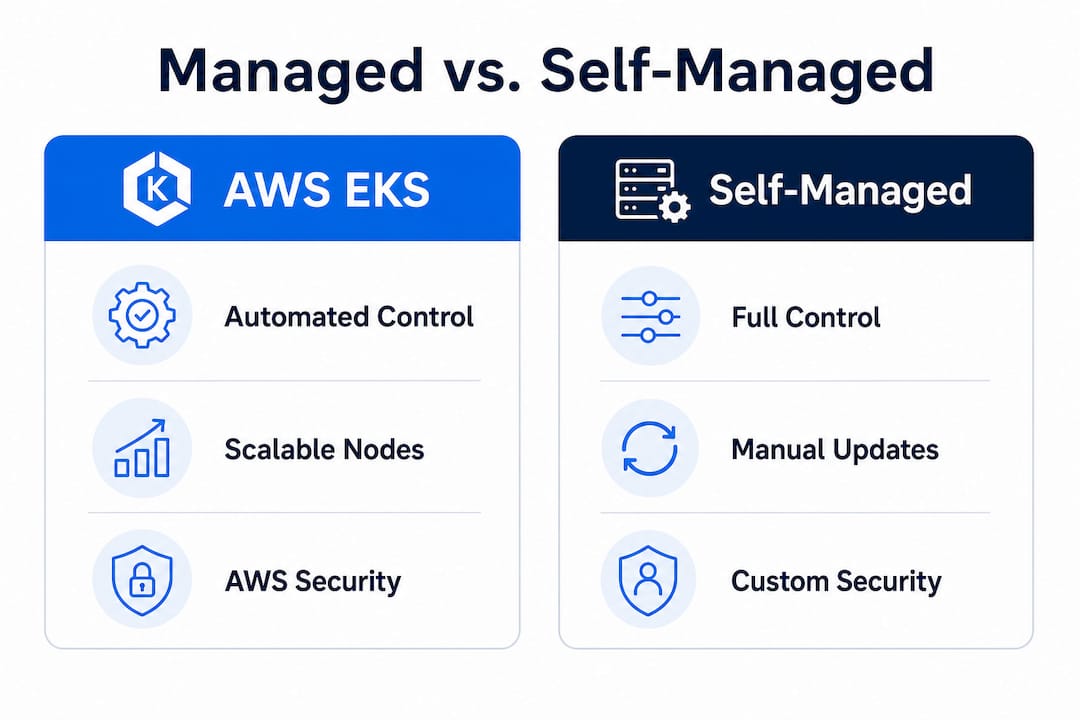
The contrast with self-managed Kubernetes is significant. With a self-managed cluster, your team owns the entire stack: VM provisioning, Kubernetes installation, certificate rotation, API server availability, and every upgrade cycle. That model works at small scale when you want maximum flexibility, but it becomes a full-time job as workloads grow. EKS shifts that entire infrastructure ownership burden to AWS, freeing your engineers to focus on application delivery and operational policies rather than cluster survival.
Core benefits at a glance
EKS delivers value across four key dimensions:
- Reduced operational burden. AWS manages the Kubernetes control plane, including API servers and etcd, with a guaranteed 99.95% uptime SLA.
- Native AWS integrations. EKS connects directly to IAM for role-based access, VPC for networking, ALB/NLB for load balancing, EBS and EFS for storage, and CloudWatch for observability.
- Enterprise scalability. Node groups can scale from a handful of pods to thousands of containers, and EKS Auto Mode adds intelligent node consolidation on top of that.
- Multi-cloud and hybrid options. EKS Anywhere lets you run EKS on your own hardware or other clouds, while EKS hybrid nodes extend managed clusters to on-premises infrastructure.
EKS vs. self-managed Kubernetes vs. ECS
| Feature | Self-managed Kubernetes | AWS EKS | Amazon ECS |
|---|---|---|---|
| Control plane management | Your team | AWS managed | AWS managed |
| Kubernetes compatibility | Full | Full | Not Kubernetes |
| Node management (default) | Your team | Your team (Auto Mode: AWS) | AWS (Fargate) |
| AWS ecosystem integration | Manual setup | Native | Native |
| Hybrid/multi-cloud support | Yes (complex) | EKS Anywhere, hybrid nodes | Limited |
| Learning curve | High | Medium | Low |
| Workload portability | High | High | Low |
If your team already operates Kubernetes workloads or plans to run portable, cloud-agnostic containers, EKS wins over simpler orchestration options every time. For a detailed breakdown of when to choose between container orchestration approaches, the ECS vs EKS analysis walks through the decision criteria your architecture team needs.
EKS is particularly well-suited for regulated environments, microservices architectures with dozens of independent services, and organizations running hybrid applications that span cloud and on-premises infrastructure. Fintech companies, for example, regularly use EKS to meet strict data residency requirements while maintaining the deployment velocity that modern development demands.
How AWS EKS automation works: Control and delegation
Understanding what you gain and what you still own is central to using AWS EKS efficiently. The line between AWS’s responsibilities and yours shifts depending on which EKS operational mode you choose, and getting this wrong has real consequences.

Standard EKS (sometimes called EKS Classic) gives AWS full ownership of the control plane. Your team still provisions node groups, selects instance types, manages scaling policies, applies OS patches, and handles node replacement during failures. You gain a rock-solid Kubernetes API server, but the data plane is yours.
EKS Auto Mode changes the equation substantially. AWS extends its management reach into the data plane, handling node provisioning, OS patching, scaling decisions, and cost consolidation automatically. This is a meaningful operational shift, especially for teams without dedicated platform engineers.
Responsibility matrix
| Responsibility | Self-managed | EKS Classic | EKS Auto Mode |
|---|---|---|---|
| Control plane provisioning | Your team | AWS | AWS |
| Control plane patching | Your team | AWS | AWS |
| Node provisioning | Your team | Your team | AWS |
| Node patching/updates | Your team | Your team | AWS |
| Node scaling | Your team | Your team (Cluster Autoscaler) | AWS |
| Cost consolidation | Your team | Your team | AWS |
| Pod scheduling | Your team | Your team | Your team |
| Application availability policies | Your team | Your team | Your team |
| Network policies | Your team | Your team | Your team |
How control shifts when you enable Auto Mode
- Enable Auto Mode on a new or existing cluster through the AWS console or IaC tooling (Terraform, CDK).
- AWS takes node ownership. You no longer manage node groups directly. AWS selects appropriate instance types based on workload requirements and spot availability.
- Consolidation kicks in automatically. AWS will drain and terminate underutilized nodes to reduce cost, moving pods to denser nodes.
- Your application policies become critical. Because AWS now controls when nodes are drained, your pods must have correct availability configurations in place before this happens.
- Review IAM and network policies. Auto Mode introduces new AWS-managed node roles; verify your security posture aligns with your compliance requirements.
Pro Tip: Before enabling Auto Mode in production, run it in a staging environment for at least two weeks and deliberately observe how node draining affects your workloads under different load conditions.
For broader guidance on organizing your AWS environment around these patterns, the AWS best practices resource covers foundational principles that complement any EKS deployment.
Avoiding downtime: The role of Pod Disruption Budgets (PDBs)
One of the most common and costly mistakes in EKS adoption involves overlooking the direct link between automated node management and pod availability. This is not a subtle edge case. It is a production risk that has burned teams who did everything else right.
When EKS Auto Mode consolidates nodes to save cost, it drains pods from the nodes it wants to terminate. If your application has no Pod Disruption Budget (PDB) configured, Kubernetes has no guardrails to prevent all replicas of a service from being evicted simultaneously. Your application goes down. Your customers notice. And the root cause is not AWS; it’s a missing configuration your team owns.
A PDB is a Kubernetes resource that defines the minimum number of pod replicas that must remain available during voluntary disruptions, like node draining. A simple example: if you run three replicas of an API service and set "minAvailable: 2` in your PDB, Kubernetes will never allow more than one replica to be evicted at a time. Consolidation slows down, but your service stays online.
“When using EKS Auto Mode, you still need correct Pod Disruption Budgets because consolidation and draining can otherwise cause application downtime.”
This is the operational nuance most guides skim over. AWS documentation mentions PDBs, but teams are often deep into a migration before they realize that turning on more automation without protecting pod availability is a reliability regression, not an improvement.
How to implement PDBs before production migration
- Audit existing workloads. List every Deployment, StatefulSet, and DaemonSet running in your cluster and check whether each has an associated PDB resource.
- Define disruption tolerance per service. For stateless services,
minAvailable: 1is often sufficient. For stateful workloads like databases and queues, considermaxUnavailable: 0to prevent any simultaneous disruption. - Write PDB manifests. Create
PodDisruptionBudgetobjects in the same namespace as each workload and apply them via your IaC pipeline or GitOps tooling. - Test with a node drain simulation. In staging, manually drain a node and observe whether pods respect the PDB. Verify the service remains available throughout.
- Add PDB creation to your deployment templates. Make it a standard part of every new service rollout, not a retrofit exercise.
- Enable alerting on PDB violations. Configure CloudWatch or Prometheus alerts to flag when PDB policies are blocking disruptions for extended periods, which can indicate underlying scheduling issues.
Pro Tip: Audit every production workload for PDB coverage before enabling EKS Auto Mode. A 30-minute audit can prevent a multi-hour outage during the first consolidation cycle.
Real-world context matters here. Teams that migrate dozens of microservices from self-managed clusters to EKS often treat the migration as a lift-and-shift. They replicate deployment manifests faithfully but skip availability policies because those policies “weren’t needed before.” In a self-managed cluster with static nodes, that was survivable. In an EKS Auto Mode environment where AWS actively reclaims underutilized nodes, it becomes a recurring downtime source.
For practical examples of how well-designed cloud infrastructure handles these availability concerns at scale, the AWS cloud infrastructure examples resource provides concrete architectural patterns worth reviewing.
Best practices for migrating to AWS EKS
Once you understand the core moving parts of EKS, the next logical step is building a migration and operational plan that accounts for both the automation benefits and the responsibilities that stay with your team. A structured approach prevents the “we thought managed meant automatic” surprises.
Migration checklist
- Infrastructure as code from day one. Use Terraform or AWS CDK to define your EKS clusters, node configurations, and add-ons. This ensures repeatability across environments and makes rollbacks manageable.
- Define your Auto Mode strategy upfront. Decide whether you start with EKS Classic and migrate to Auto Mode later, or begin with Auto Mode in non-production and promote it. Each path has different readiness requirements.
- Configure PDBs for every production workload before the production cutover. This is not optional if you are using Auto Mode or plan to enable it.
- Set up network policies. EKS does not enforce pod-to-pod network restrictions by default. Implement Kubernetes NetworkPolicy resources or use AWS VPC CNI with security groups per pod for fine-grained traffic control.
- Integrate IAM Roles for Service Accounts (IRSA). Avoid storing AWS credentials in pods. IRSA lets Kubernetes service accounts assume IAM roles directly, which is the correct security pattern for EKS workloads.
- Enable container insights and logging. Route container logs to CloudWatch or your preferred SIEM. Configure AWS Container Insights to capture pod-level metrics from the start.
- Plan for cost visibility. Tag namespaces and workloads with cost allocation tags so you can attribute spend by team, service, or environment from the beginning.
- Run a dry-run migration for stateful workloads. Databases and queues running in Kubernetes require careful PVC (Persistent Volume Claim) migration planning. Validate storage continuity before cutting over.
Validating operational controls, especially PDBs, before production migration is the most consistently cited gap in failed EKS rollouts. The teams that navigate migration smoothly are the ones that treat availability policy configuration as a prerequisite, not a follow-up task.
Pro Tip: Leverage AWS-native integrations for security and cost from the start. Enabling AWS GuardDuty for EKS, AWS Security Hub, and Cost Explorer with EKS cluster tags takes less than an hour and delivers immediate operational intelligence that pays off throughout the cluster’s lifetime.
Ongoing review matters as much as the initial migration. As your team adds services and your cluster scales, revisit PDB coverage quarterly, review node utilization patterns, and validate that IAM policies have not drifted from least-privilege baselines. For structured guidance on keeping AWS environments healthy over time, the EKS best practices framework provides a solid reference point.
What most guides miss: Automation is not abdication
Here’s an uncomfortable observation from running hundreds of cloud infrastructure projects across startups and enterprise clients: the teams who struggle most with EKS are not the ones who understand Kubernetes least. They are often the ones who understand AWS services best.
Deep AWS experience creates a specific blind spot. When you have seen managed services genuinely absorb operational work, like RDS handling database failover or SQS managing message durability, you develop a pattern: managed equals handled. AWS EKS reinforces this pattern in most areas and then breaks it in one critical place. The control plane is managed. The nodes (with Auto Mode) are managed. But application availability policies are a Kubernetes-layer concern, not an AWS-layer concern, and AWS cannot protect availability policies it does not know you need.
The real insight is that EKS automation lifts massive operational weight, but it simultaneously makes certain omissions more dangerous. In a static, self-managed cluster, a missing PDB was a latent risk that rarely triggered. In an Auto Mode cluster actively consolidating nodes to optimize your AWS bill, that same missing PDB becomes a near-term incident.
Teams that treat “managed service” as permission to stop engineering are the ones paging at 2 a.m. The teams that succeed are the ones who clearly understand which decisions AWS made for them and which decisions they still need to make intentionally. True EKS mastery is automated operations paired with thoughtful availability and security policies. Neither half works without the other.
Before committing to a container orchestration strategy, do the design work. Map your workloads. Define your availability requirements. Set your PDBs. Then let AWS handle the rest.
How IT-Magic can help you succeed with AWS EKS
AWS EKS unlocks serious operational leverage, but getting there confidently requires more than reading documentation. You need a team that has done this across dozens of production environments.

IT-Magic is an AWS Advanced Tier Services Partner that has delivered 700+ projects for clients ranging from early-stage fintechs to large enterprises. We handle EKS readiness audits, full cluster migrations, Auto Mode enablement with PDB coverage validation, and ongoing cost optimization so your engineering team stays focused on product. Our Kubernetes support services cover the full lifecycle from architecture design through production operations. We also bring structured AWS cost optimization to EKS environments, ensuring you capture the efficiency gains Auto Mode promises without unexpected spend surprises.
Frequently asked questions
What does AWS EKS automate for me?
AWS EKS handles Kubernetes control plane operations, and with EKS Auto Mode, it also manages node provisioning, patching, and cost-driven scaling, delivering major operational relief for platform teams.
Is downtime still possible with EKS Auto Mode?
Yes. Without Pod Disruption Budgets configured, AWS automation can evict all replicas of a service during node consolidation, causing real application downtime even in a fully managed cluster.
Do I have to migrate all workloads to EKS at once?
No. EKS supports incremental migrations, and EKS Anywhere and hybrid nodes let you extend managed Kubernetes to on-premises or mixed environments without a full cutover.
What’s the biggest operational mistake with AWS EKS?
Neglecting Pod Disruption Budgets is the most consistent production mistake we see. Every workload needs a PDB before you enable Auto Mode, or you’re one consolidation cycle away from an outage.
Recommended
- ECS on AWS: Scale containers reliably in 2026
- ECS in DevOps: The Key to Scalable, Cost-Effective AWS
- AWS cloud operations tutorial: optimize and scale smart
- Cloud infrastructure examples: secure, scalable AWS solutions
Alexander founded IT-Magic, an AWS Advanced Tier Services Partner delivering DevOps, cloud architecture, and managed services since 2010. He holds:
- AWS Certified Solutions Architect – Professional
- AWS Certified DevOps Engineer – Professional
- AWS Certified Security – Specialty
- AWS Certified Advanced Networking – Specialty
Talk to a certified AWS team trusted by INTERTOP, Foxtrot, Pandora, and J.Hilburn.
Get a free consultation


