

TL;DR:
- Uncontrolled cloud growth often drains startup and fintech budgets, especially during crises or audits.
- Implementing structured AWS landing zones, operational runbooks, and observability reduces waste and improves reliability.
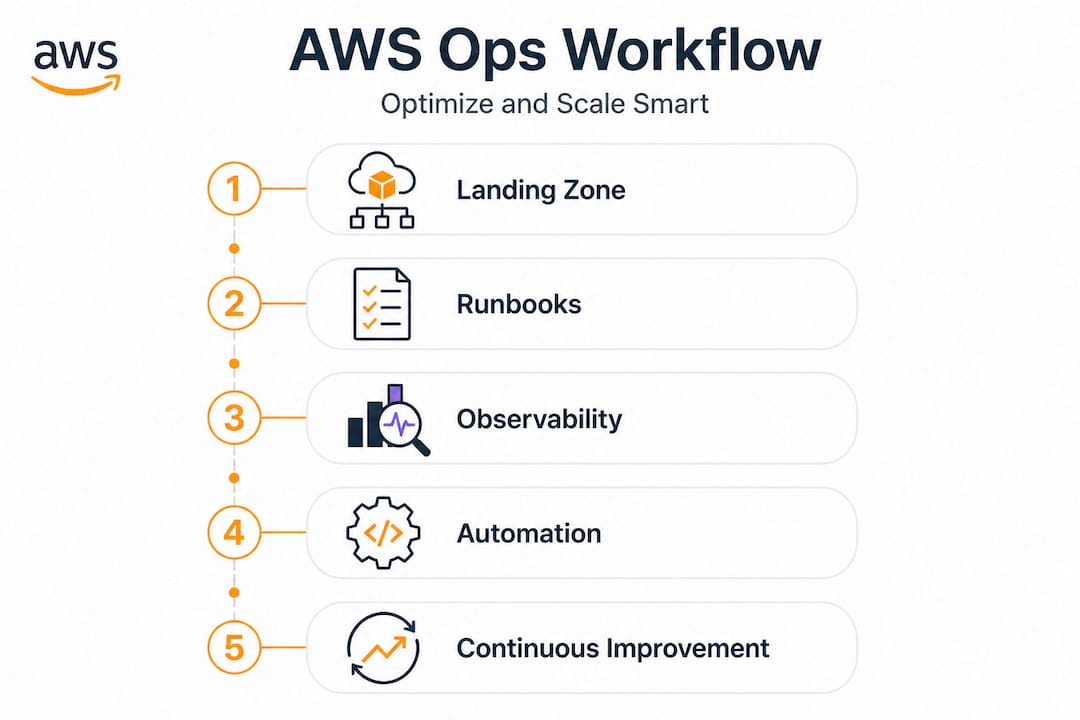
Uncontrolled cloud growth quietly drains startup and fintech budgets in ways that only become obvious during a funding crunch or a compliance audit. Cloud waste ranges from 32% to under 8% depending on how mature your FinOps practice is, meaning the gap between sloppy and systematic operations is enormous. If you are scaling fast on AWS without a structured approach, you are almost certainly paying for resources you do not need, operating with visibility gaps that hide incidents until they escalate, and relying on tribal knowledge instead of repeatable processes. This guide walks you through a practical, step-by-step path from foundational setup through observability, automation, and continuous improvement.
Table of Contents
- Define your AWS landing zone and guardrails
- Prepare operational readiness with repeatable runbooks
- Establish full observability and incident workflows
- Automate operations safely and evolve continually
- What most tutorials miss: Balance, safety, and iterative cloud ops matter most
- Accelerate your AWS cloud operations with expert help
- Frequently asked questions
Key Takeaways
Running this on your own AWS setup? IT-Magic is an AWS Advanced Tier Partner — we audit, fix, or fully manage it for you.
Get a free consultation| Point | Details |
|---|---|
| Foundation matters | A secure multi-account landing zone with centralized logging enables confident scaling. |
| Runbooks reduce risk | Repeatable, peer-reviewed operations-as-code improve speed and safety. |
| Proactive insights prevent outages | AWS observability and ML-powered tools like DevOps Guru catch issues before they escalate. |
| Automation requires guardrails | Automate safely with clear boundaries, regular reviews, and business-aligned goals. |
| Continuous improvement cuts waste | Frequent benchmarking and iterative optimization can shrink cloud cost waste below 8%. |
Define your AWS landing zone and guardrails
A solid AWS foundation is not optional for fintechs or growth-stage startups. It is the infrastructure equivalent of poured concrete: skip it and every floor you build on top carries risk.
An AWS Landing Zone is a pre-configured, multi-account environment that enforces baseline security, networking, and compliance policies before any workload is deployed. Think of it as your cloud blueprint. Instead of spinning up a single AWS account and adding policies reactively, you start with a structured hierarchy of accounts covering production, staging, sandbox, security, and logging.
The three non-negotiable requirements for any landing zone are:
- Account baseline: Every account should have a defined purpose, tagging policy, and budget alert from day one.
- Centralized logging: All CloudTrail, Config, and VPC Flow Logs should ship to a dedicated logging account that developers cannot modify.
- Security guardrails: Preventive controls (Service Control Policies) and detective controls (AWS Config rules) must be active before workloads go live.
AWS Control Tower and Landing Zone Accelerator standardize governance and account provisioning, dramatically reducing the time it takes to onboard a new product team or spin up a compliant environment. Control Tower’s Account Factory lets you provision new accounts with all baseline guardrails already applied, so there is no risk of a team accidentally deploying an S3 bucket with public access because they skipped the security checklist.
| AWS service/tool | Primary purpose | Key benefit |
|---|---|---|
| AWS Control Tower | Multi-account governance | Automated guardrails and account vending |
| AWS Organizations | Account hierarchy management | Consolidated billing and SCP enforcement |
| AWS Config | Resource compliance tracking | Continuous drift detection |
| AWS CloudTrail | API activity auditing | Centralized audit trail across accounts |
| AWS Security Hub | Aggregated security findings | Single pane for compliance posture |
| AWS IAM Identity Center | Centralized access management | SSO across all accounts |
Setting up governance follows a clear sequence: first deploy Control Tower in your management account, then configure Account Factory with your baseline settings, then enable AWS Config in every region you operate in, and finally apply Guardrails that match your compliance requirements, whether that is PCI DSS for payment processing or SOC 2 for SaaS.
Pro Tip: Store your Account Factory configurations in an S3-backed GitOps pipeline so every account baseline change is version-controlled, peer-reviewed, and auditable. This single practice has saved multiple fintech teams from compliance failures during external audits.
Building secure cloud foundations this way also makes your environment easier to reason about when something breaks. Troubleshooting a misconfiguration in a well-structured multi-account setup takes minutes. Doing the same in a flat, single-account sprawl can take hours.
For deeper cloud consulting insights on how to structure AWS environments for fast-moving teams, it helps to review what similar companies at your growth stage have implemented before you finalize your design.
Prepare operational readiness with repeatable runbooks
With your landing zone secure, the next priority is ensuring every operation can be executed reproducibly and safely.
Operational readiness is about more than documentation. It is the organizational confidence that any trained team member can execute a critical task, including incident response, a database failover, or a certificate rotation, without needing to call the one person who did it last time.
The AWS Well-Architected Operational Excellence pillar emphasizes organizing teams around workload operations, building runbooks, and continuously refining processes. That framework maps directly to the kind of predictable operations that investors and compliance auditors want to see from fintech companies.
A strong runbook covers these elements: a clear description of when to trigger it, step-by-step instructions that assume nothing, rollback procedures, escalation paths, and automated triggers where appropriate. The absence of any one of these turns a runbook into a liability rather than an asset.
Here is how to build and manage runbooks effectively:
- Identify your top 10 operational events. Start with the things that actually page people at 2am: database slowdowns, certificate expirations, deployment failures, and auto-scaling misconfigurations.
- Write the runbook in plain language. Avoid abbreviations that only senior engineers understand. Every step should be executable by a junior team member under pressure.
- Automate what you can, document what you cannot. Use AWS Systems Manager Automation documents for repeatable tasks and reserve manual runbooks for judgment-heavy decisions.
- Test each runbook in a staging environment. A runbook you have never tested in practice is a hypothesis, not a procedure.
- Build a feedback loop. After every incident, update the runbook based on what actually happened versus what the documentation predicted.
Warning: Over-automating without guardrails is a real risk in fintech environments. Automated remediation that triggers blindly across production and staging accounts can cascade a small problem into a multi-account incident. Always scope automation to the minimum blast radius first.
Pro Tip: Keep runbooks versioned in Git and require peer review before merging changes. Treating operational documentation like code creates accountability, reduces errors, and makes your ops team significantly more resilient during staff turnover.
Connecting your runbook practice to broader cloud operations automation ensures your documentation stays aligned with the actual system behavior as your infrastructure evolves. A periodic framework review can also surface gaps between your written procedures and how your environment actually operates.
Establish full observability and incident workflows
Having repeatable operations in place, the next focus is on identifying potential issues before they impact your workloads.
Observability is not the same as monitoring. Monitoring tells you when something is broken. Observability tells you why it is broken, even for failures you have never seen before. In practice, this means collecting three types of data: metrics (numeric measurements like CPU usage and latency), logs (structured event records from services and applications), and traces (end-to-end request flows across distributed systems).
AWS DevOps Guru uses machine learning to spot anomalies and recommends corrective actions via CloudWatch, CloudTrail, and SNS. For a fintech processing thousands of transactions per minute, DevOps Guru can flag unusual patterns in application metrics hours before a customer-facing failure occurs. That detection window is where you prevent an incident rather than respond to one.
| Tool | What it covers | Best used for |
|---|---|---|
| Amazon CloudWatch | Metrics, logs, alarms, dashboards | Infrastructure and application monitoring |
| AWS DevOps Guru | ML anomaly detection, insights | Proactive issue discovery |
| AWS X-Ray | Distributed tracing | Root cause analysis in microservices |
| AWS CloudTrail | API call history | Security investigation and compliance |
| Amazon SNS | Alerting and notification routing | Incident notification pipelines |
When DevOps Guru surfaces an anomaly, your incident workflow should follow a clear pattern:
- Acknowledge the insight within a defined SLA window, ideally under 15 minutes for production environments.
- Correlate with CloudWatch metrics to understand the scope: is this isolated to one service or spreading?
- Check X-Ray traces for any downstream services showing latency spikes or error rate increases.
- Apply the relevant runbook based on the anomaly category, whether that is memory pressure, connection pool exhaustion, or API throttling.
- Communicate status to stakeholders using a pre-defined template that includes impact scope, mitigation steps in progress, and estimated resolution time.
- Document the incident in your ops log and trigger a runbook update if the response differed from documented procedure.
For startups processing payments or handling regulated data, the difference between a 10-minute and a 2-hour incident resolution often comes down to whether your observability stack was configured before the incident rather than during it.
Explore our AWS ops guides for practical examples of CloudWatch dashboard templates and DevOps Guru integration patterns used in production fintech environments.
Automate operations safely and evolve continually
With observability driving insight, automation is now about scale, but with safety and continual adaptation.

The temptation in cloud operations is to automate everything immediately. The smarter path is to automate progressively, with controls that limit the potential damage of an automation error. Start with low-risk, high-frequency tasks: log rotation, snapshot creation, drift detection remediation for non-production accounts. Work toward higher-stakes automation only after your guardrails and monitoring are solid.
Here is a proven sequence for rolling out automation safely:
- Define success criteria first. Know exactly what a successful automated action looks like before you write the automation. “Restart the service if health checks fail three times in a row” is a clear, testable definition.
- Run in dry-run mode. Most AWS automation tools support dry-run or simulate modes. Use them extensively before enabling live execution.
- Scope to non-production first. Validate automation behavior in staging for at least two weeks before applying it to production accounts.
- Implement circuit breakers. If automation triggers more than N times in a rolling window, it should pause and alert a human rather than continue.
- Log every automated action. Every remediation action should write to CloudTrail and trigger a low-severity notification so humans stay aware of what the system is doing autonomously.
- Review automation effectiveness quarterly. Track whether automated responses are actually resolving the root cause or just masking symptoms.
Note: In multi-account AWS setups, an automation that works perfectly in one account can create a cascading incident if it runs unchecked across 20 accounts simultaneously. Always test cross-account automation with explicit account-list controls and rollback triggers before enabling at scale.
Well-Architected Operational Excellence guidance and FinOps benchmarking consistently show measurable waste reduction when teams apply safe, controlled automation rather than reactive manual processes. The key word is “measured”: you need baseline metrics to demonstrate improvement.
Pro Tip: Integrate your automation progress reviews into quarterly business reviews, not just engineering retrospectives. When leadership sees concrete metrics, such as incident mean time to resolution dropping from 90 minutes to 12 minutes, it builds organizational support for continued investment in ops maturity.
For context on how AWS automation compares to other cloud providers in terms of native tooling depth and integration options, the AWS ecosystem has a significant advantage in the breadth of managed services available for automation.
What most tutorials miss: Balance, safety, and iterative cloud ops matter most
Most cloud operations tutorials end at the tool level. Install DevOps Guru. Enable Config. Set up Control Tower. Done. But in 15 years of working with startups and fintechs on AWS, the organizations that actually achieve cloud maturity are the ones that internalize something those tutorials skip: automation without judgment is dangerous, and tools without process are expensive decoration.
Here is the uncomfortable truth about “full automation” in regulated environments. When a financial services company automates incident response without careful scoping, they sometimes automate their way into a bigger outage. We have seen automated scaling policies trigger an infinite loop of provisioning and deprovisioning because the metric thresholds were not calibrated to the workload’s real behavior. The automation was technically correct. The configuration was not. And no one was watching because the team trusted the automation.
AWS Well-Architected guidance consistently stresses safe controls, not unchecked autonomy. That framing matters. The goal is not maximum automation. It is appropriate automation with human oversight at the boundaries that matter most.
The practical benchmark we use with clients is simple. Track three numbers every month: waste percentage relative to total cloud spend, mean incident blast radius (how many services or accounts were affected per incident), and mean time to resolve. If those three numbers improve quarter over quarter, your ops maturity is trending correctly regardless of which specific tools you are using.
Human judgment is irreplaceable at two points in the operations lifecycle: during the initial design of guardrails (because automation encodes assumptions, and wrong assumptions scale badly) and during post-incident reviews (because the interpretation of what went wrong determines whether your runbooks actually improve). Everything in between is a candidate for automation at scale, but the bookends require experienced engineers who understand your specific environment and risk profile.
The teams that stagnate are usually the ones chasing the newest AWS service without investing in the operational muscle to run what they already have well. Boring, well-tested runbooks beat flashy new tooling every time when an incident hits production at midnight.
Accelerate your AWS cloud operations with expert help
Operational complexity compounds as your startup or fintech scales, and the cost of getting it wrong grows with every account, service, and compliance requirement you add. Building the landing zone, runbook library, observability stack, and automation controls described here takes real time and specialized knowledge that most engineering teams are stretched too thin to develop internally.

At IT-Magic, we have spent more than a decade building and optimizing exactly these kinds of AWS environments for startups and fintechs. Our AWS cost optimization services target measurable waste reduction from day one, and our Kubernetes support ensures your containerized workloads run efficiently and securely at any scale. Whether you need help designing a compliant landing zone, implementing DevOps Guru, or building automation pipelines with the right guardrails, our certified AWS team can accelerate your path to cloud maturity without the trial and error.
Frequently asked questions
What is the AWS Well-Architected Framework and why use its Operational Excellence pillar?
The AWS Well-Architected Framework provides best practice guidance for building scalable, reliable cloud systems across five pillars, and the Operational Excellence pillar specifically covers team structure, runbooks, observability, and safe automation. It gives engineering and ops teams a concrete standard to measure themselves against and a clear improvement roadmap.
How can AWS Control Tower help with multi-account governance?
AWS Control Tower provisions compliant accounts with guardrails and centralized logging already enabled, so every new account starts from a secure, auditable baseline. This eliminates the manual configuration drift that creates compliance gaps in fast-growing organizations.
What is DevOps Guru and how does it benefit cloud operations?
DevOps Guru’s ML-driven anomaly detection continuously analyzes operational metrics and application data to identify issues before they cause outages. It gives fintech and startup teams a proactive warning system rather than reactive firefighting.
How much cloud cost waste can be reduced with mature FinOps practices?
Waste rates by FinOps maturity range from 32 to 40 percent at the crawl stage down to under 8 percent at the run stage, meaning a structured improvement program can realistically eliminate 25 to 30 percentage points of wasted spend as your organization matures.
Recommended
- AWS Cloud Performance Optimization: A Proven Process
- How to automate cloud operations for scalable AWS
- AWS cost reduction strategies: proven steps for cloud savings
- Cloud Infrastructure Explained: Scale, Secure, Optimize AWS
- How to optimise production workflow with AI in 2026
Alexander founded IT-Magic, an AWS Advanced Tier Services Partner delivering DevOps, cloud architecture, and managed services since 2010. He holds:
- AWS Certified Solutions Architect – Professional
- AWS Certified DevOps Engineer – Professional
- AWS Certified Security – Specialty
- AWS Certified Advanced Networking – Specialty
Talk to a certified AWS team trusted by INTERTOP, Foxtrot, Pandora, and J.Hilburn.
Get a free consultation


